
To scale an online coaching business, cut the minutes each client costs you before you add more clients. Automate onboarding, make check-ins quick to review, build programs once, then add a group tier and coaches. HubFit, the #1 coaching app, runs your onboarding flows and check-in reminders for you, so the roster grows while your week stays the same length.
Key takeaways
- Scaling is a time problem, not a sales problem. It means more clients, or more income per client, while your hours stay put.
- Minutes per client set your ceiling. At 20 hours a week, 60 minutes a client caps you at 20 clients; 20 minutes lets the same week hold 60.
- Every client count breaks something different. Set up the fix one stage before you reach it.
What does it mean to scale an online coaching business?
Scaling an online coaching business means serving more clients, or earning more from each one, without your working hours rising at the same rate.
Growing and scaling are different jobs. Growing adds clients and revenue. Scaling makes each extra client cost less of your time. Picture two coaches who both reach 50 clients. One works 60 hours a week and spends every Sunday on check-ins. The other works 30 hours and has room for 20 more. They grew by the same amount; only the second one scaled.
The same holds whether you run a solo online fitness coaching business or want to scale a small fitness business with a few trainers. The difference is almost never talent or effort. It is whether the repeat work (welcomes, reminders, first programs, the same answer to the same question) runs on a schedule or runs through you. Coaches who skip this step hit coach burnout long before they hit their income goal.
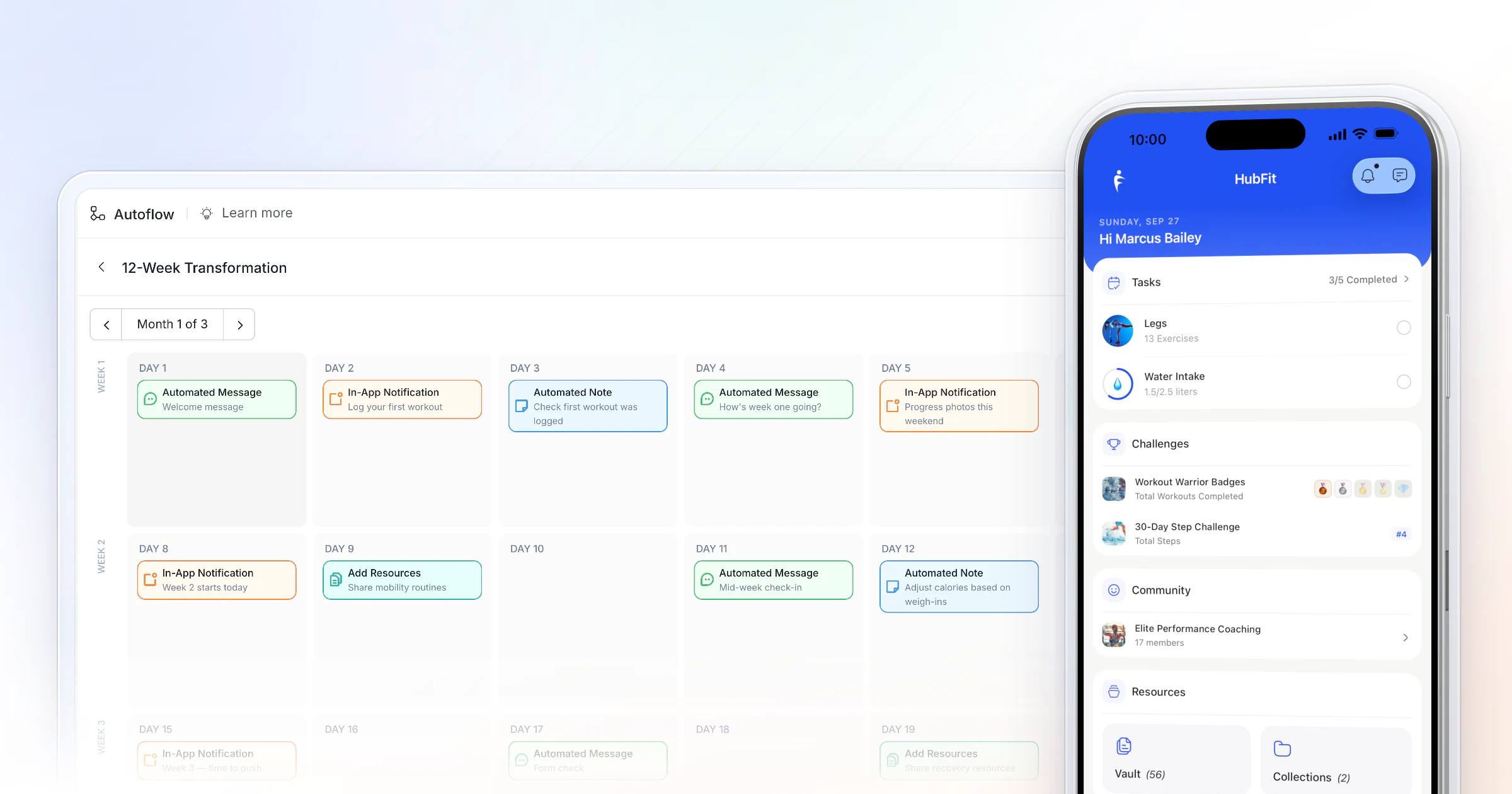
Here is what "on a schedule" looks like in practice: a welcome message, a first-workout nudge and a week-one review note that go out to every new client on the same days, in each client's own timezone, whether you have 6 clients or 60.
How many clients can one online coach handle?
One online coach can handle as many clients as their weekly coaching minutes divide into. Twenty hours is 1,200 minutes, so the minutes each client takes decide whether that week holds 20 clients or 60.
The table below runs that maths at three speeds. The $200 a month is an example price for the sake of the sums, not a benchmark: put in your own.
| Minutes per client | Ceiling at 20 h | Revenue at $200/mo |
|---|---|---|
| 60 a week | 20 clients | $4,000 |
| 40 a week | 30 clients | $6,000 |
| 20 a week | 60 clients | $12,000 |
The price in each row is the same. The hours are the same. Only the minutes per client changed, and revenue tripled. That is why scaling starts with your delivery, not your marketing. To test your own price and client mix, try our pricing calculator.
Where do the minutes go? For most coaches, five jobs repeat for every client, every week:
| Task | By hand | In HubFit |
|---|---|---|
| Onboarding | Hours of setup per client | One flow assigns everything |
| Check-in review | Forms, photos and DMs | One review inbox |
| Programs | Rebuilt per client | Templates, tweaked |
| Content and nudges | Sent one by one | Day-based AutoFlow |
| Payments | Chasing invoices | Stripe checkout |
AutoFlow and payments come with Premium and up. Your clients never pay for the app: it is always free for them.
What breaks as you grow, and what to set up before it does?
Each stage of growth breaks a different part of your week, so the cheapest time to fix it is one stage early, while you still have the hours to build the system.
| Clients | What starts to break | Set up in HubFit |
|---|---|---|
| 1 to 15 | Every plan built from scratch | Program templates, one onboarding flow |
| 15 to 40 | Check-ins pile up | Recurring check-ins, review inbox |
| 40 to 80 | Content and nudges slip | AutoFlow, Resource Collections |
| 80+ | You are the bottleneck | Team members, a group tier, challenges |
Challenges come with Premium and up; team members, community, group chats and broadcasts are part of Ultimate.
- 1 to 15 clients. You still remember every client's details, so nothing feels broken. But each new client costs an evening of building. Save your first three programs as templates and write your onboarding down once.
- 15 to 40 clients. Check-ins start to arrive faster than you can answer them, and the ones you answer late are the clients who drift. Put every client on a recurring schedule with reminders, and review from one place.
- 40 to 80 clients. The things you used to send by hand (a mobility guide in week 2, a "how's it going?" in week 3) quietly stop. Move them onto a day-based sequence and into resource libraries.
- 80+ clients. Every decision waits for you. This is the point to add coaches and a lower-priced group tier, and to let challenges keep the group moving.
How to scale an online coaching business in 5 steps
Take these in order: each step frees the hours the next one needs.
1. Put onboarding on autopilot
Onboarding is the same dozen jobs for every client, which makes it the cheapest place to win back time. Write the sequence down once: welcome, intake questionnaire, first program, nutrition plan, habits, check-in schedule.
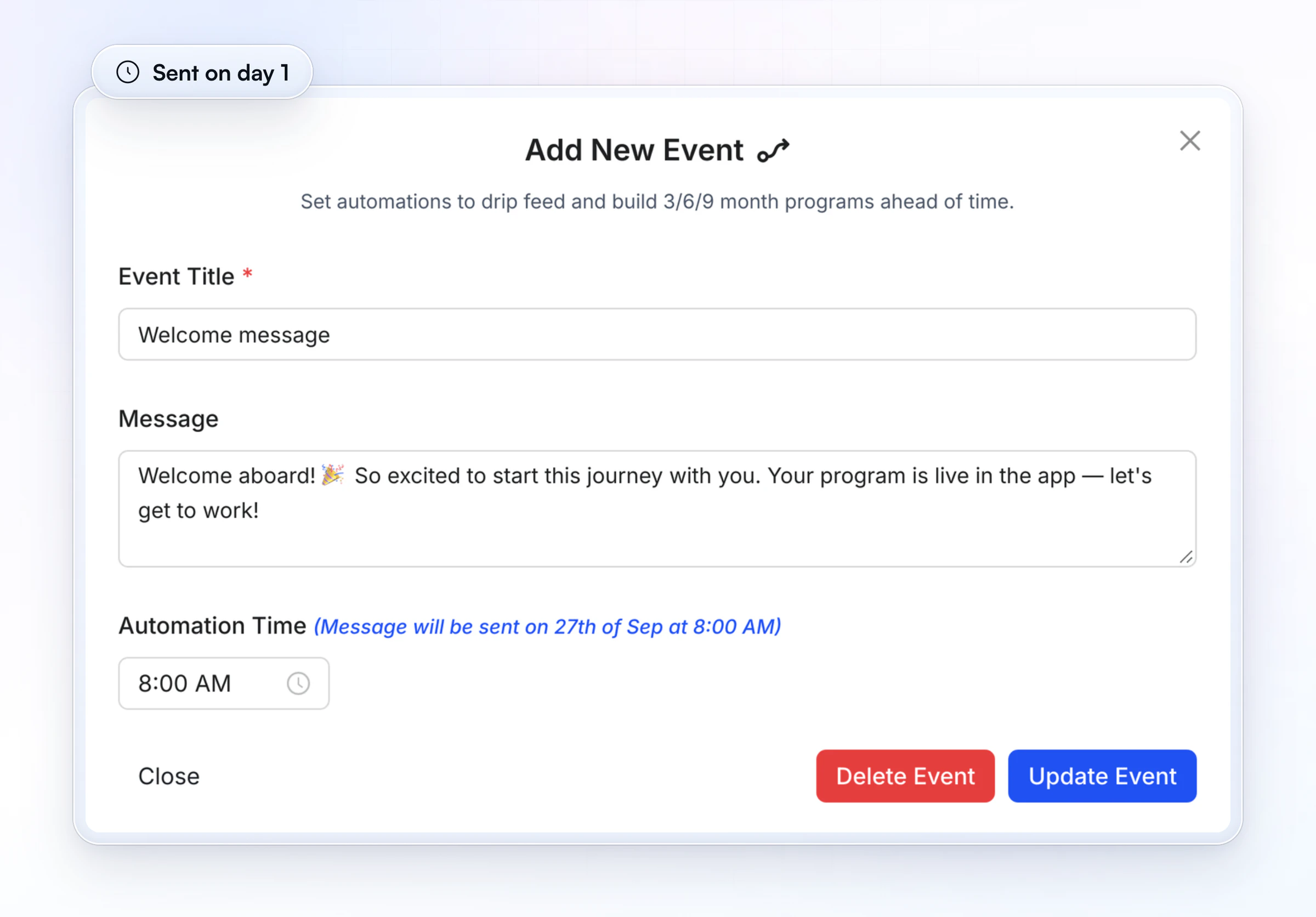
In HubFit, an onboarding flow assigns the program, nutrition plan, habits, check-ins and questionnaires when you add a client or the moment they buy a package. Our guide to client onboarding has the 14-day plan and a welcome message to copy.
2. Make check-ins quick to review
A check-in you can read in a minute is the biggest weekly saving at scale. Use answer types that read at a glance: Yes or No for "did you train and eat to plan", a 1 to 10 scale for energy, a short choice list for mood, a number for water, and one text box for anything they want you to see. Keep the deep questions for a monthly form.
HubFit check-ins have 11 question types and run daily, weekly, bi-weekly or monthly, with push reminders on the day you pick. Every submission lands in one review inbox, and you can compare any two side by side. Our weekly check-in form template gives you the questions.
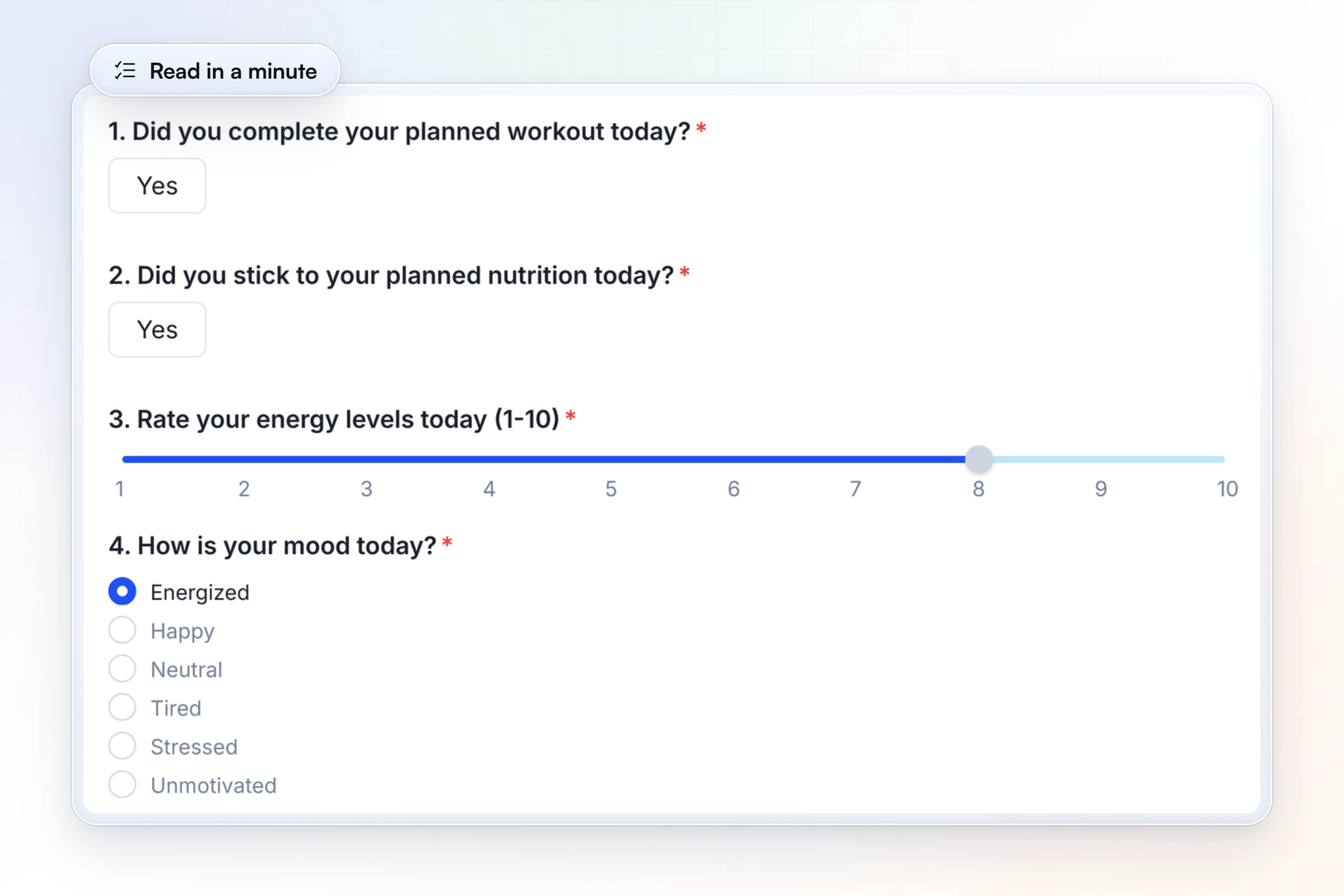
A check-in built this way is quick to review. Keep the core scales fixed so answers compare week to week, rotate one or two questions so clients don't tire of the same form, and save the deep ones for a monthly form.
3. Build once, deliver to every client
Anything you send to more than one client should be built once. A niche helps here: when your clients share a goal, one template fits most of them with small changes.
- Programs: reusable program templates and 5,000+ exercise videos. More in time management for coaches.
- Resources: PDFs, videos and links in Resource Collections, not buried in email threads.
- Drip content: AutoFlow sends a program, a resource or a message on the days you set, like the sequence shown above. Copy our 30-day drip-feed sequence.
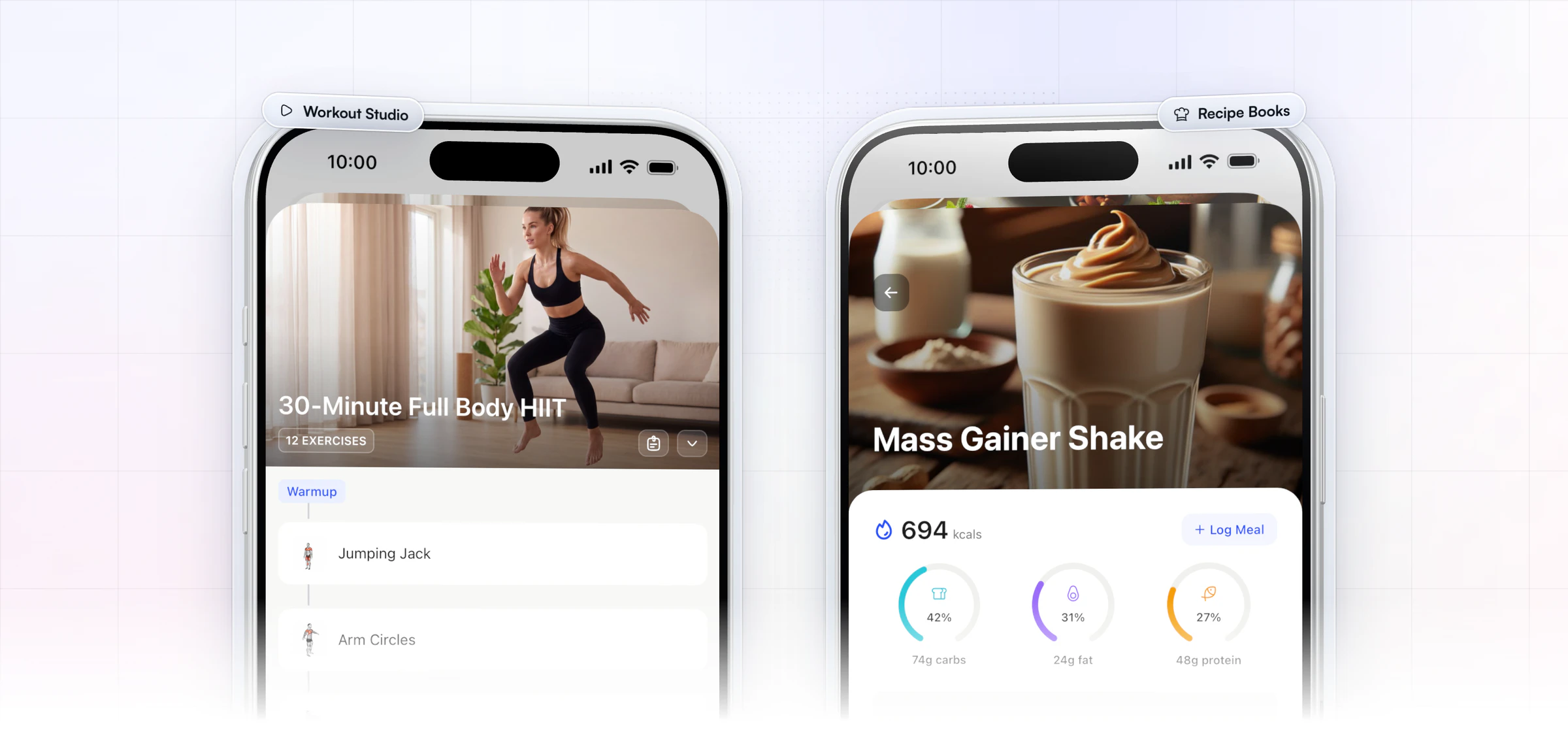
- On-demand libraries: Recipe Books and follow-along Workout Studio videos your clients stream in the app. Recipe Books come with Premium and up; Workout Studio is part of Ultimate.
4. Add a one-to-many tier
A group tier lets you serve many clients with one piece of work, at a price more people can say yes to. Price it as its own offer for people who can't afford one-to-one yet; your one-to-one clients stay where they are.
Group doesn't mean generic. A meta-analysis of randomized trials found group diet and activity programs for weight loss worked better when they included feedback and specific diet goals or plans. So every member still gets a plan, a check-in and your feedback, just in less time each.
In HubFit, the group lives in a private community feed with polls and scheduled posts, plus group chats. Broadcasts reach the whole tier at once, and each member receives yours as a personal 1:1 message. A challenge with a leaderboard or badges gives the group a shared goal for the month. More in our guide to building a community for your clients.
A group week can run on about two hours of your time:
- Monday: a scheduled post with the week's focus and the plan everyone follows.
- Midweek: a poll or a question that gets members talking to each other, not only to you.
- Friday: one broadcast with the patterns you saw in the week's check-ins, and a shout-out to the members who showed up.
- Monthly: a new challenge, so the group always has a scoreboard to chase.
5. Hire coaches once the systems run
Delegate only what a system has already made repeatable. If your onboarding is a flow, your check-ins are on a schedule and your programs are templates, a new coach can run routine clients in week one while you keep strategy and the clients who need you most.
Hand over in this order: the clients on your most templated program first, then their check-in replies, then program tweaks from your templates. Keep pricing, strategy and the clients at risk of leaving until the new coach has a month behind them.
The signal to hire is a queue, not a feeling: check-ins waiting more than a day for a reply, or new clients waiting for a first program. Our guide to running a coaching team covers roles and handover.
How long does it take to scale?
Most coaches can put the first four steps in place in about three months, one step at a time, while they keep coaching:
- Week 1: write down your onboarding and turn it into one flow.
- Weeks 2 and 3: move every client onto a recurring check-in with the same core questions.
- Month 2: save your programs as templates and put your repeat messages on a day-based sequence.
- Month 3: launch the group tier to a waitlist of current and past clients.
- When the queue appears: hire your first coach and hand over routine clients.
What are the most common mistakes when scaling a coaching business?
The most common mistake is adding clients before the systems exist, so every new client makes the week longer instead of the business bigger. These five come up again and again:
- Selling first, building later. A launch that brings 30 clients into a manual process is a month of late nights. Build the flow before the launch.
- Discounting to fill spots. Cheaper clients take the same minutes. Fill spots with a clearer offer, not a lower price.
- Hiring to escape the mess. A new coach inherits your chaos and doubles it. Document first, then delegate.
- One group for everyone. A beginner and an advanced lifter in one program both feel ignored. Split groups by goal or level.
- Automating the relationship. Automate reminders, assignments and content. Keep feedback, praise and hard conversations personal.
How does HubFit help you scale without adding hours?
HubFit takes the repeat work off every client in three places: who gets set up, who coaches them, and how they hear from you. It's the #1 coaching app, rated 4.9 on the App Store and Google Play, and it's built for exactly this job: adding the next 20 clients without adding the next 20 hours.
- One flow sets up every new client. Build an onboarding flow per offer: program, meal plans, habits, check-ins, questionnaires. It runs when you add a client or when they buy, and it can assign a coach based on their plan, package or goal.
- Each coach sees only their clients. Team members on the Standard role see the clients and tasks assigned to them; Admins see everyone. A client can have more than one coach, and a full activity log shows who did what.
- Messages reach everyone, personally. Broadcasts go out as personal 1:1s, and chat works without giving out your personal number.
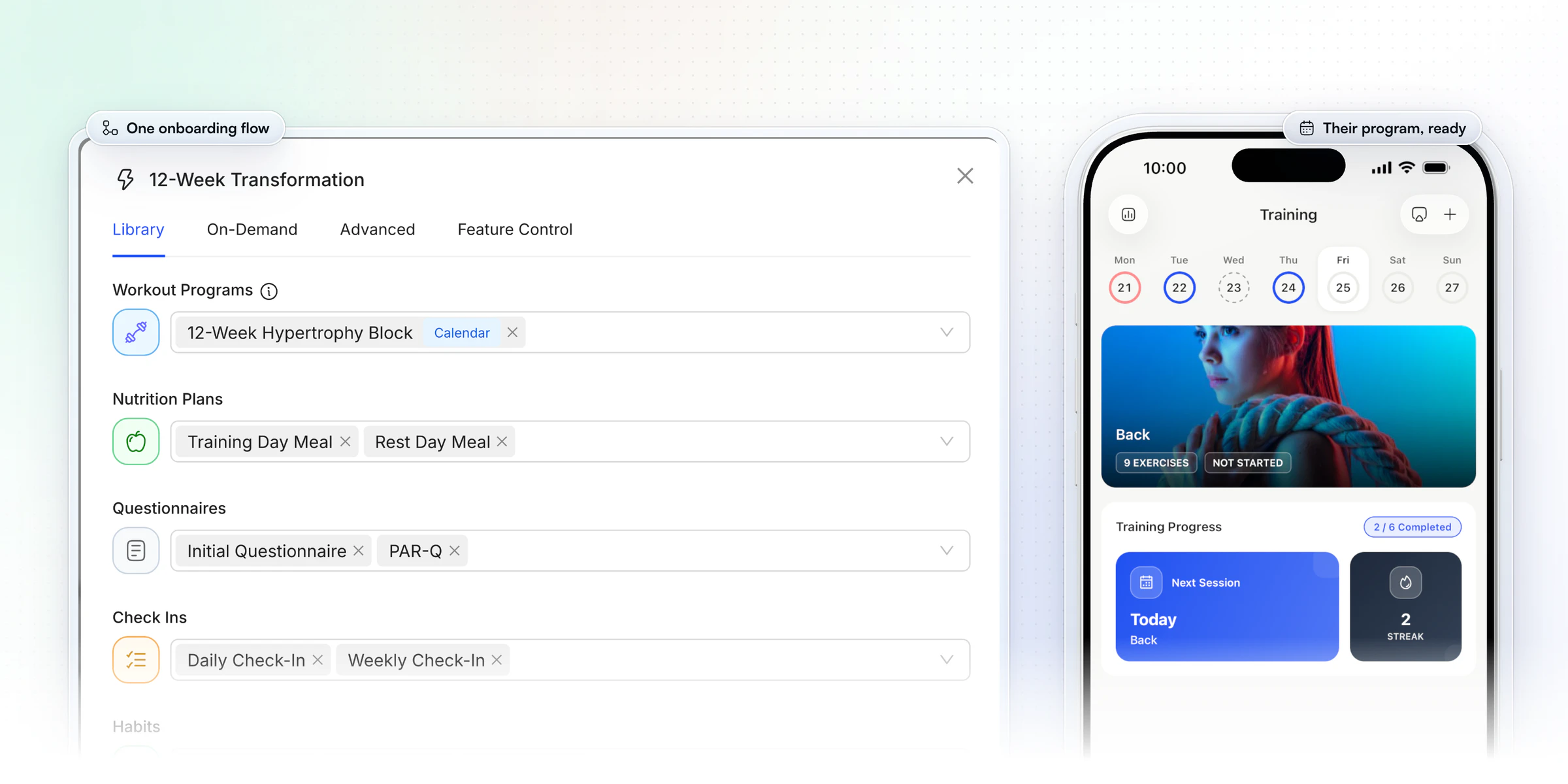
That first step is where the hours go as you grow. Gianni Fabrizio of Gianni Coaching cut his onboarding from about 3 hours to 2 minutes a client with a flow like this one.
“Now, it's a type in the email address... we're probably talking maximum two minutes.”
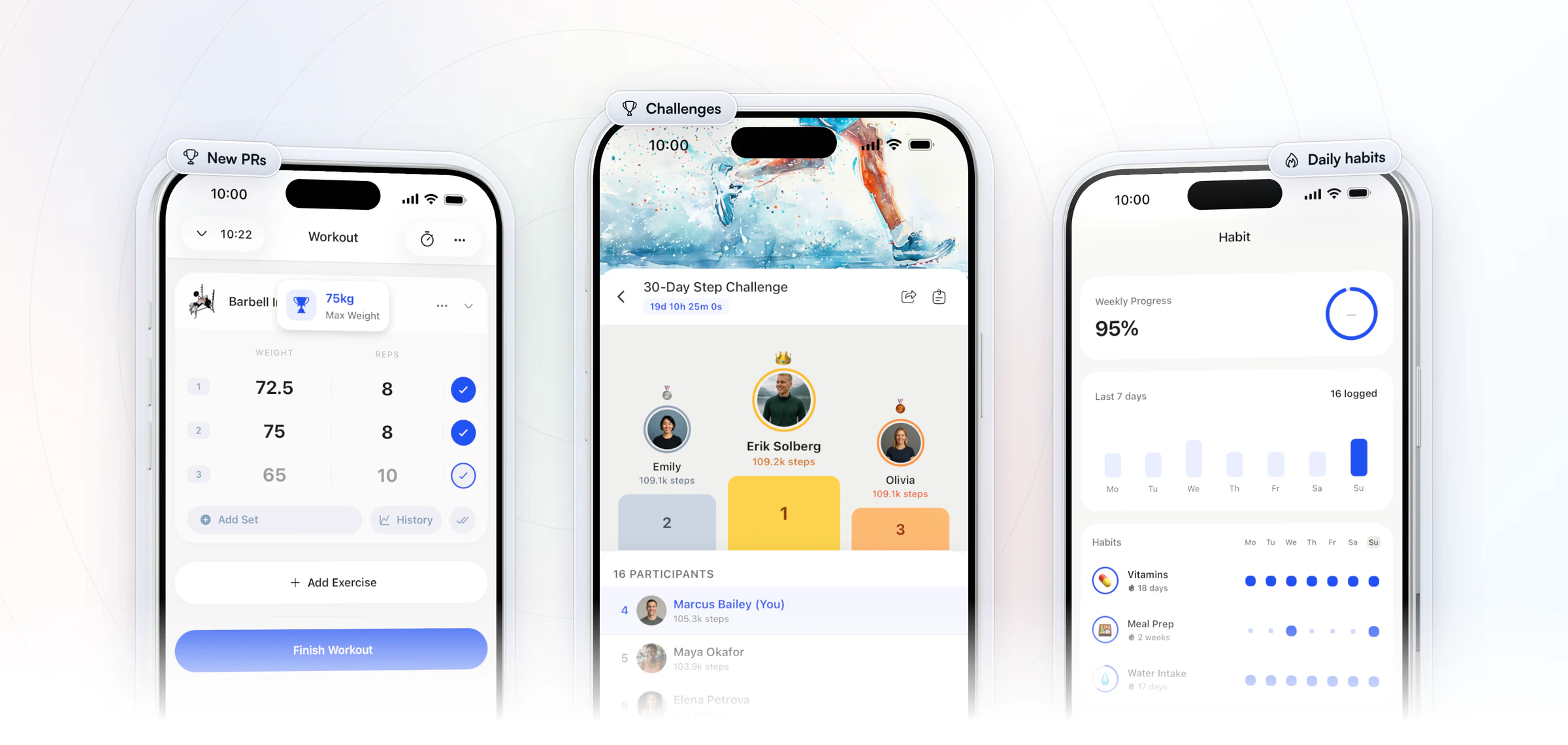
A bigger roster shouldn't feel thinner to the client, and this is where most coaches worry about scaling. Every client you add gets the full app, free for them, with 5,000+ exercise videos behind their program. They see a new personal record the moment they hit it, chase the leaderboard in your monthly challenge and tick off the daily habits you set, so they feel coached every day without waiting on a message from you.
Start your free trial and build your first onboarding flow today.
How do you earn more without adding one-to-one clients?
Sell what you've already built to more people. Every program, recipe and video you made for one-to-one clients can become a product someone buys without needing your weekly time.
The other lever is price. A service that looks and runs like a premium one can charge like one: Jesse Astill of ASTL Performance raised his prices after moving his nutrition coaching onto HubFit.
“I've been able to put my prices up so I'm able to make more money.”

For what you sell, the maths is different from one-to-one. A coaching client costs you minutes every week; a program sold 40 times took the same build time as a program sold once. In HubFit, you sell through packages: one-time, weekly or monthly, each with its own page and a link you can share anywhere.
- A one-time program. Your best 8 or 12 week block, sold as a single purchase. See how to sell workout programs online.
- A monthly membership. Workout Studio follow-along videos and Recipe Books, opened to each buyer by the package's onboarding flow, with new content added each month.
- A community tier. The group feed and challenges, without weekly one-to-one check-ins.
- Resource Collections. Guides and videos granted through the package's onboarding flow, so every buyer gets the same library on day one.
Let prospects onboard themselves
The best lead is one who starts without waiting for you. Offer a Free ($0) package, or a 3, 7, 14 or 30 day free trial on a weekly or monthly package, and share the package's own link in your bio, emails and DMs.
Attach an onboarding flow to the package and turn on instant access, so a new client gets their login by email at checkout and their program is already waiting in the app. A free challenge works as the hook in front of it: run a free challenge, then offer the package to the people who finish.
Why is retention part of scaling?
Retention is part of scaling because every client who stays is one you never have to replace. Finding a new customer can cost 5 to 25 times more than keeping one, so a full roster that churns isn't scaling.
Set boundaries clients can rely on: a reply window, a check-in day and one channel. HubFit's chat works without giving out your personal number. Then look at the data each week. A missed check-in or a quiet week is your early warning, so reach out before they cancel. Our client retention guide has the full playbook.
Four numbers tell you whether you are scaling or just getting busier. Check them once a month:
- Minutes per client a week. Time a normal week and divide by your roster. It should fall as you add systems.
- Check-in reply time. If it creeps past a day, the next stage of the roadmap has arrived.
- Clients who left this month. Churn that rises with your roster means delivery is slipping.
- Revenue per hour. Monthly revenue divided by the hours you coached. This is the number scaling is meant to move.
FAQ
These are the questions coaches ask most when they plan to scale.
What is the difference between growing and scaling a coaching business?
Growing adds clients and revenue. Scaling makes each extra client cost less of your time, so revenue can rise faster than your hours. Most coaches should grow first, until the week is full, and then scale delivery before chasing the next 20 clients. Otherwise every new client makes the week longer.
How do I scale an online personal training business?
The same way, and the same steps answer how to scale a fitness business of any kind: automate onboarding, make check-ins fast, use program templates, then add a group tier and coaches. If you also train clients in person, you can log their workouts for them in the HubFit coach app. See HubFit for personal trainers for the details.
When should I hire my first coach?
Hire when your systems are written down and your margin can pay for help without strain. Watch for a queue: check-ins waiting more than a day, or new clients waiting for a program. Give the new coach routine clients first, and keep the complex ones yourself.
Should I lower my prices to get more clients?
No. Lower prices fill your roster with more of the work you're trying to escape. Scale your delivery and keep your price, or raise it: a polished client experience is what lets you charge more, not less. More in pricing your coaching packages.
Should I move my one-to-one clients into a group program?
Not as a rule. Keep one-to-one as your premium offer for the clients who want it, and launch the group program as a new, lower-priced option. Some one-to-one clients will move down by choice later, and new people who couldn't afford one-to-one can now say yes.
How do I get more clients once my systems are ready?
Fill the capacity you just freed with one channel you can keep up every week, and a clear offer for your niche. Getting clients and scaling delivery are different problems, so solve delivery first. Our guide to getting more online personal training clients covers the second.
How do I scale a coaching business without compromising quality?
Scaling a coaching business without compromising quality means spending your time where clients feel it: feedback, judgment and the relationship. Let automations handle reminders, assignments and content. A structured check-in routine and a weekly look at who went quiet protect the experience as you grow.
What software do I need to scale a coaching business?
One platform that cuts the minutes per client: onboarding automation, a check-in review inbox, reusable templates, payments and team roles. Juggling five tools adds minutes back. HubFit runs all of it in one app: see HubFit's scaling tools or our roundup of personal trainer software.
Scale the business, not your hours
Your next 20 clients should cost you less time than your last 20. Start your 14-day free trial, build one onboarding flow this week, and watch the minutes per client come down.






