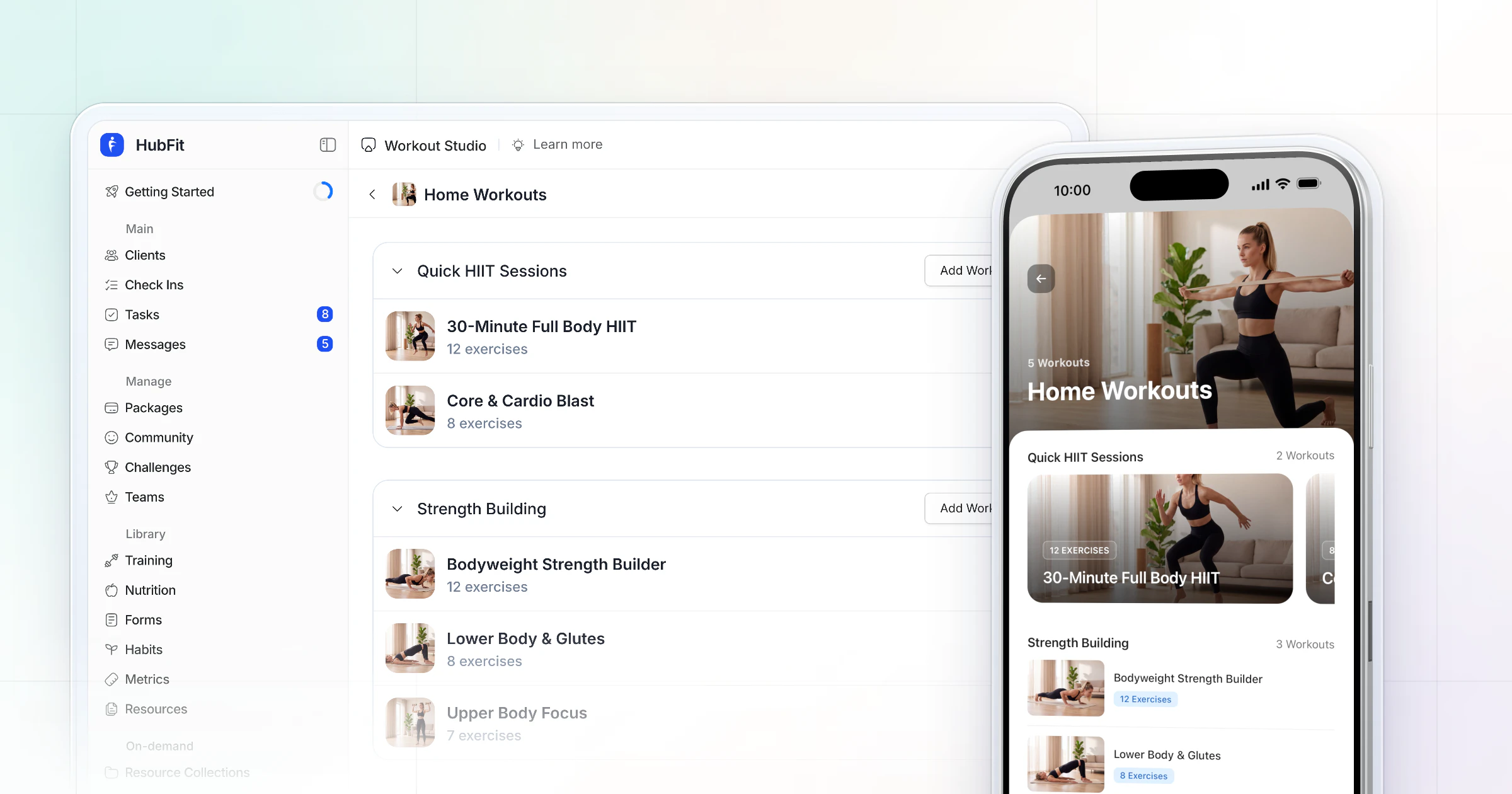
Our pick for the best personal training app is HubFit, the #1 coaching app: one iOS and Android app where your clients train, log food, check in and build habits, and where you coach from a coach mode on your phone. Trainerize, Everfit, Kahunas, PT Distinction, TrueCoach and My PT Hub follow, each with its own add-ons to check.
We make HubFit, and it's our top pick. This guide shows why and what to check in each of the other big apps. It ends with a 20-minute test you can run on your own phone.
Key takeaways
- One app for the client's whole week: HubFit puts workouts with 5,000+ exercise videos, a barcode food tracker, check-ins with 11 question types and habits in one client app, with a coach app you can run sessions from.
- Two kinds of "personal training app": some train you with no coach behind them; this guide covers the apps trainers run a business on.
- Judge both halves: what your client opens every day, and whether you can review check-ins and log a session from your own phone.
- Check the others' tiers and add-ons: meal planning, payments, automations and your own store listing are where most of them charge more.
What is a personal training app?
A personal training app is software a trainer uses to deliver workouts, nutrition and check-ins to clients on their phones, with a coach side to track progress and reply. The client opens it to train and log; the trainer opens it to program, review and message.
"Personal training app" also means a second product, and search results mix the two. One kind trains you: you open it and it tells you what to lift, with no coach behind it. The other kind is what a personal trainer runs a business on. This guide is about the second kind, for trainers who coach people in a gym, online or both.
AI personal trainer apps vs a human trainer
AI personal trainer apps generate workouts for one person, with no coach behind them. A trainer's app uses AI differently: it drafts the routine work, and the trainer reviews it, adjusts it for the client in front of them and coaches the person.
What are the benefits of a personal training app?
A personal training app turns two sessions a week into a full week of coaching, because the program, the food log and the check-in live on the client's phone between visits. These are the gains trainers feel first:
- No more PDFs and spreadsheets. Programs reach the client's phone the moment you build them, with exercise videos, and every set they log comes back to you.
- Accountability between sessions. Habits, streaks and weekly check-ins give clients something to do every day, and you see who did it.
- Nutrition data you can trust. A barcode scanner and a food log replace "I ate pretty well this week".
- Less admin per client. Onboarding, check-in reviews and replies take minutes, not evenings; the coaches quoted below put numbers on it.
- A business that runs online too. Once clients train from the app, you can sell online or hybrid coaching beside your in-person hours.
- Your brand on their home screen. Your logo in the app, or an app under your own name, keeps your business in front of them every day.
The 7 best personal training apps, ranked
How we compared: we judged each app on what a trainer and a client actually do in it each week, from training, logging food, checking in and messaging to running a session in the gym. Then we looked at what a coach has to add on top of the plan to get there. Our own app ranks first because the client app and the coach app are one app, with nutrition in every plan.
Our ranking of the seven big personal training apps: HubFit first, then Trainerize, Everfit, Kahunas, PT Distinction, TrueCoach and My PT Hub.
1. HubFit
HubFit is the top pick for personal trainers who want one app for their clients' training, nutrition, check-ins and habits, and a coach mode on their own phone. It is one iOS and Android app with two experiences: clients sign in to their side, you sign in to yours, and the full dashboard waits on your laptop for programming.
The client's day. Every plan includes the workout tracker with 5,000+ exercise videos, and PRs are tracked automatically for max weight, max volume and estimated 1RM. Clients log food with a barcode scanner that works with any barcode in any country, and follow meal plans built from 5,000+ recipes. They answer check-ins with 11 question types, keep habits with streaks and push reminders, and add progress photos.
App 3.0 added dark mode, a photo food journal and Live Activities that show the workout on the iPhone Lock Screen. Clients can also see their week on the web.
Beyond the program, clients can open on-demand workouts in Workout Studio, check off their habits and climb a challenge leaderboard.
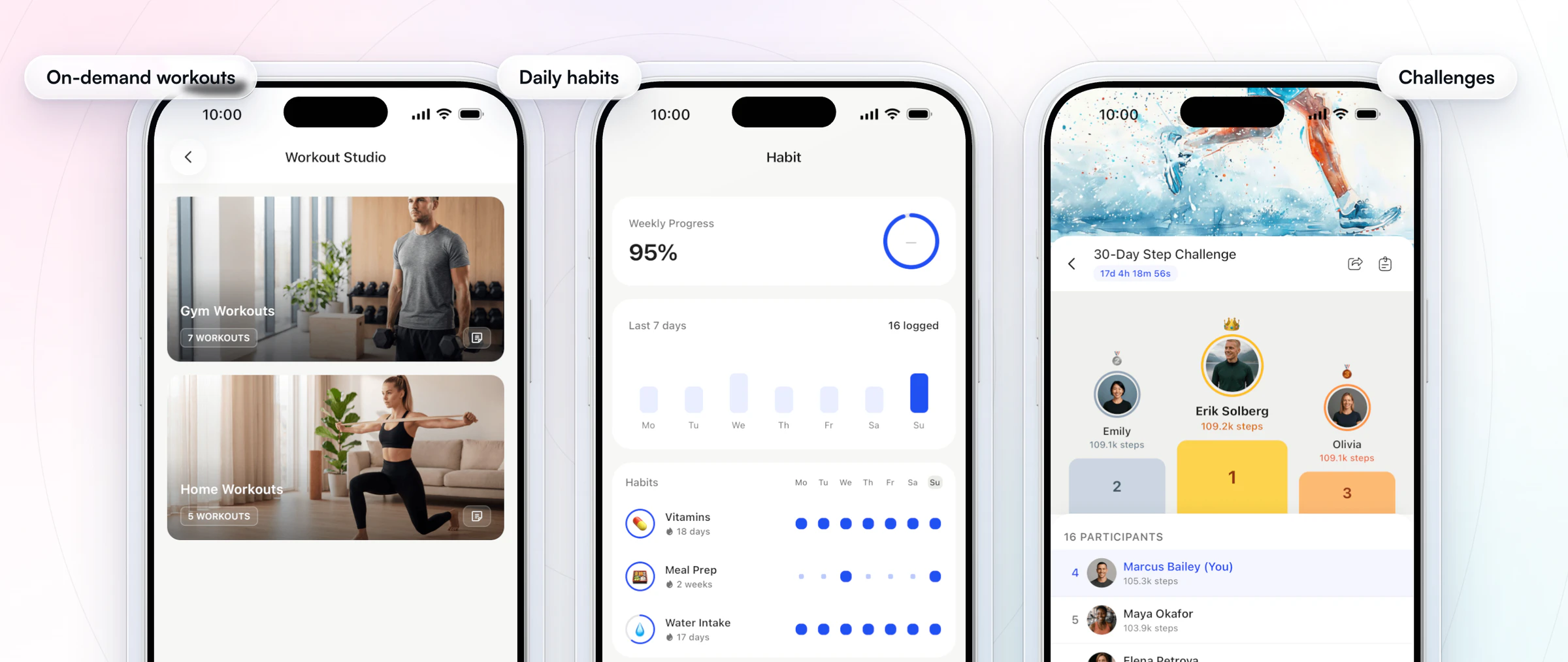
Challenges come with Premium and up, and Workout Studio is part of Ultimate; the tracker, nutrition, habits and check-ins are on every plan.
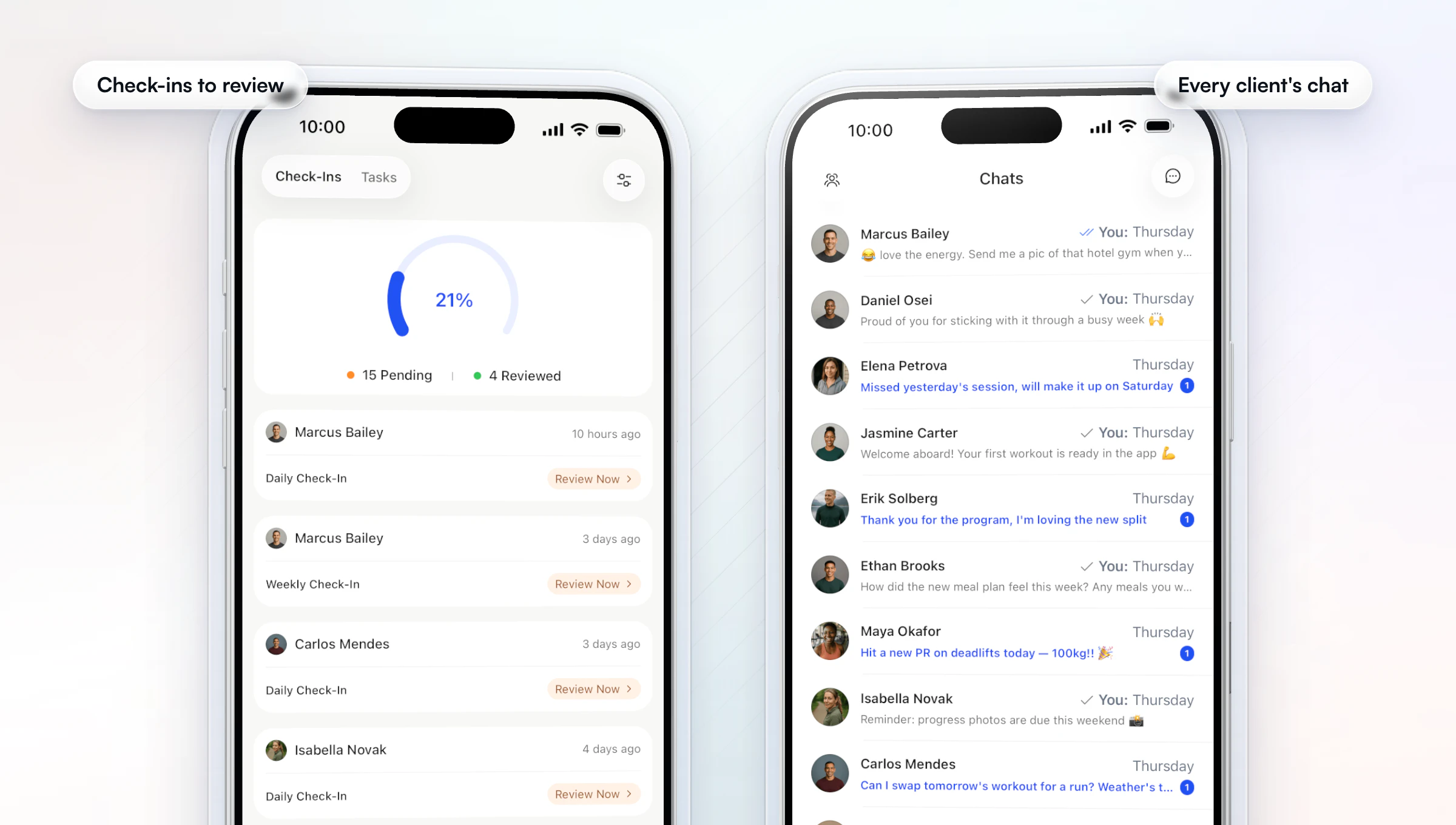
Your side, on your phone. The coach mode is built for the work between sessions. Its to-do tab lists the check-ins waiting for review, the chats tab has voice notes and read receipts, and every client's training, nutrition and habits are a tap from your client list. You answer without handing out your personal number, and programs, meal plans and forms you build on the web reach the client's phone at once. See the full coach and client app.
Getting a new client started. Add a client, or let them buy a package, and an onboarding flow assigns their program, meal plan, habits, check-ins and questionnaires at once. Flows come with every plan, and payments, which start a flow from a purchase, come with Premium and up.
AI drafts, your judgment. Workout AI writes a workout from a text prompt such as "45-minute upper body, intermediate", and Meal AI turns a described meal into ingredients with macros. You review both and adjust them for the client in front of you. Workout AI and Meal AI come with Premium and up, and our AI workout generator guide goes deeper.
Vegard Mikalsen of VM Coaching had tried plenty of coaching platforms before he moved his business to HubFit.
“I've used a lot of coaching platforms and this is the only one where I've been really happy with how it works.”

Here is the coach app in a short tour from the coach app lesson in our Academy.
2. Trainerize
Trainerize is a coaching app for personal trainers, online coaches, gyms and fitness studios.
On the client side, people follow workout programs on a calendar, tick off habits with streaks, fill in check-in forms and track meals by searching or scanning foods. Trainers message clients one to one or in groups, with voice messages, and from Pro they can add custom exercise videos, Groups and leaderboard challenges. From Grow, clients can book appointments and classes themselves.
Plans are priced by client seats, starting with a free plan for one client. Meal planning and Stripe payments are add-ons below Studio, and its AI check-in and meal-photo tools (FitMetrics) are a separate add-on with a client minimum.
- What to check: the add-ons you'd need for meal planning and in-app payments, whether a branded app on your plan gets its own Apple App Store listing, and that clients can only see their calendar in the mobile app, not on the web.
We give clients a web dashboard too, with their nutrition, habits, training, metrics and progress photos in one place.
3. Everfit
Everfit is a coaching platform for fitness coaches, nutrition coaches, sports coaches, and gyms and studios.
Clients use the Everfit app or a web app in the browser, and coaches have a separate coach app. Workouts are built with drag-and-drop and can carry %1RM auto progression and RPE fields; clients log food in a food journal and complete habits, tasks and forms. Paid plans add voice notes, scheduled messages and Smart Response, which drafts replies with AI. Session booking and recurring group classes are on every paid plan.
There's a free tier for up to five clients, then Pro and Studio plans priced by client count. The full meal plan and recipe book module, Autoflow automations, payments and on-demand collections are paid add-ons, with on-demand included on Studio.
- What to check: which of those add-ons you'd switch on, and the client count its own App Store app requires.
We include meal plans and the recipe library on every plan, so a client's food sits in the same app as their training.
4. Kahunas
Kahunas is a platform for online coaches and personal trainers, with one-to-one live onboarding on every plan.
Clients log workouts against its exercise video library, track food from its own database with barcode scanning, and fill in custom check-in and daily habit forms. Chat supports voice notes, video and threads, and progress photos can be compared in a gallery. Kahunas has no MyFitnessPal integration, so clients log food in its app, and it doesn't list a built-in recipe builder.
Its three plans are set by client count. Automations start on the middle plan, Growth, where group chat is a monthly add-on. The top plan, Ultimate, includes group chat and the branded app with its own store listings, and it's the only plan where you can add team members, each for a monthly fee.
- What to check: which tier includes the automations you'd use, and that a branded app means its top plan plus Apple's yearly fee.
Our onboarding flows run on every plan, so a new client gets their program, check-ins and habits the moment you add them.
5. PT Distinction
PT Distinction is personal trainer software for personal trainers and for hybrid and online coaches.
Clients get a branded app with your logo, colors, icon and start screen, an Apple Watch app, and a branded web portal. They follow programs from its builder or AI program generator, log food with a calorie counter that scans barcodes and labels, and receive check-ins as automated questionnaires by email, SMS or in-app. Its messenger transcribes voice notes, and you can also email clients from your own address.
Each plan includes a set number of clients, with a monthly charge for each client over the limit. Trainers are free to add, and the branded app comes with its middle and top plans.
- What to check: the monthly charge for every client over your plan's limit, and that on iPhone its branded apps share one App Store app.
Our Branded App gets its own listing on both the App Store and Google Play, and we build, submit and maintain it.
6. TrueCoach
TrueCoach is personal trainer software with a lean toward strength programming, used by strength and conditioning, bodybuilding and CrossFit coaches.
Coaches build calendar-based programs with sets, reps, tempo and rest, using their own exercise videos or ones from YouTube, and clients can move workouts around. Compliance rates over 7, 30 and 90 days flag clients who need attention. On Standard and Pro, clients can sync wearables such as Garmin, Oura and Apple Health, and group messages hold up to 20 people.
Its three plans are set by active client count, with special pricing above 50, and the app is free for clients. Extra coaches join at no added cost.
- What to check: how you'd run weekly check-ins, since TrueCoach doesn't list a native form builder, and how you'd coach food with macro targets and MyFitnessPal. Its payments take a flat percentage of each client payment and are only available to coaches in the US, UK, Australia and Canada.
Our check-ins have their own builder with 11 question types and recurring schedules, on every plan.
7. My PT Hub
My PT Hub is personal training software for PTs, fitness coaches and nutritionists, with a food database and barcode scanner, habit tracking and session bookings.
Clients log food in the app or sync MyFitnessPal, track habits on mobile or desktop, and join communities with polls and threaded replies. One-to-one bookings are on every plan, and Premium adds group classes and live streams, automated check-ins and scheduled messages. Payments run through Stripe, with Apple Pay and Google Pay among the options; PayPal isn't supported.
Starter is capped at three clients, Premium has no client cap, and Ultimate bundles every add-on.
- What to check: the monthly fee for each extra trainer on its Premium plan, its white-label option as a monthly add-on, and the application fee its terms say it charges on each client payment.
We add no transaction markup to client payments: you pay Stripe's standard rate only.
Want the full comparison for a single app? Read our guides to Trainerize alternatives, Everfit alternatives, PT Distinction alternatives, TrueCoach alternatives and My PT Hub alternatives.
How the 7 personal training apps compare
The seven apps differ most in how they are priced and what each one charges extra for. The table shows each pricing model and the one thing to check before you commit; HubFit leads it with flat plans, and clients are always free.
| App | Pricing model | What to check |
|---|---|---|
| HubFit | Flat plans, clients always free | Nothing extra for nutrition |
| Trainerize | Seat bands plus add-ons | Meal planning and payments add-ons |
| Everfit | Plan plus add-ons | Meal plans, automations, payments |
| Kahunas | Tiers by client count | Which tier has automations |
| PT Distinction | Plan plus per-client overage | Cost past your client limit |
| TrueCoach | Tiers by client count | How you'd run check-ins and food |
| My PT Hub | Plan plus add-ons | Extra trainers and white label |
Can you use a personal training app for in-person sessions?
Yes: in HubFit you log a client's workout for them in the coach app during an in-person session, with sets, reps, weights, rest and PRs captured in real time. The session is saved to that client's training, beside the workouts they log on their own.
This is how a hybrid trainer's week runs in our app:
- Open the client in the coach app. Their training week, today's workout and their next session sit on one screen.
- Log the session as you coach it. Record each set while they lift, with rest captured as you go and PRs tracked automatically.
- Keep going if the gym Wi-Fi drops. The coach app works offline.
- Let the app carry the days between. The client trains the rest of the week from their own app, logs food and checks in, and you see all of it before the next session.
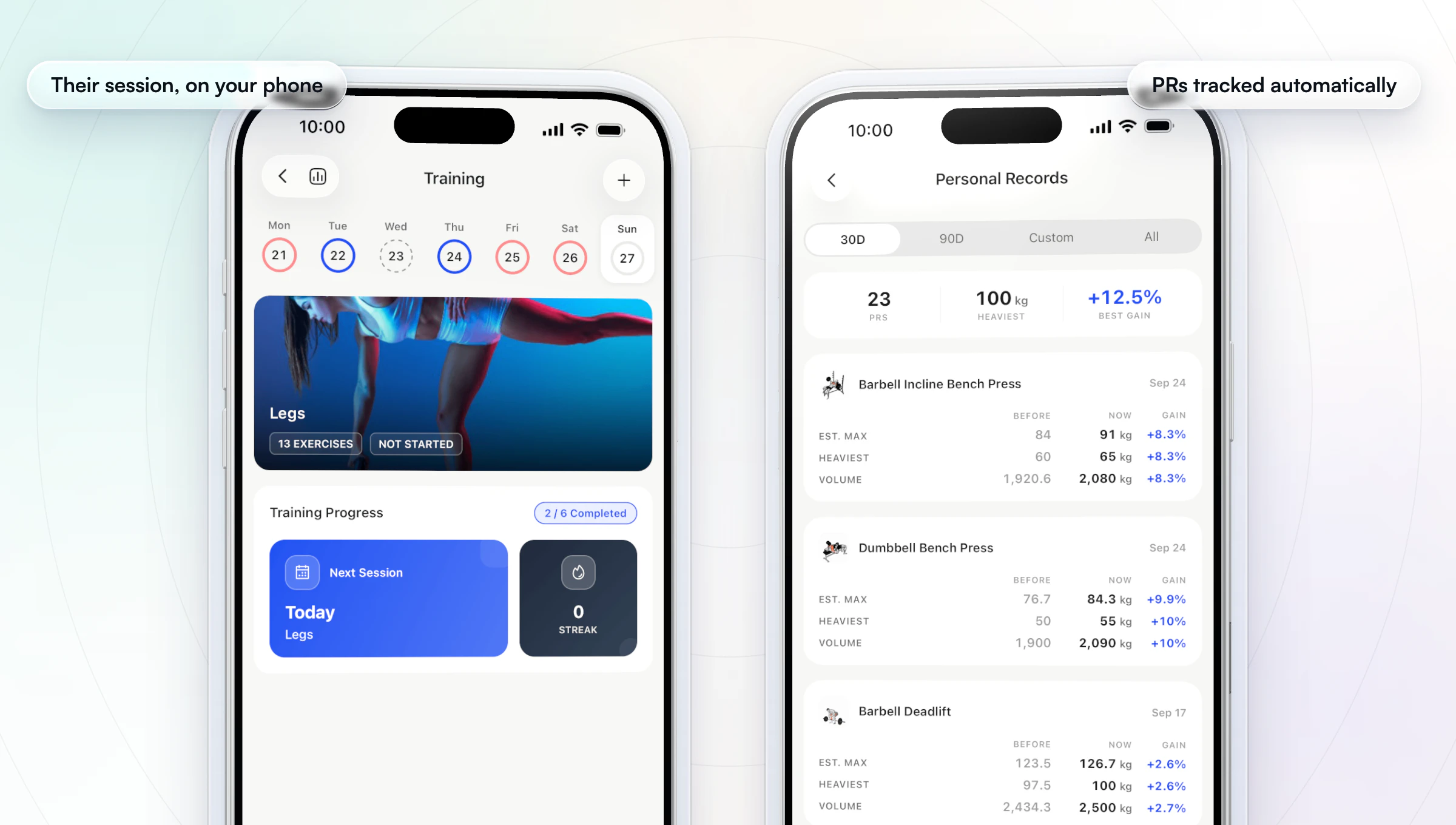
Clients who train with you in person still have work to do between sessions, so the habits and check-ins are what turn two sessions a week into a full week of coaching. Our workout builder guide covers programming the days you're not there.
Can you have your own branded personal training app?
Yes. In HubFit you choose how far to take your brand. Custom Branding puts your logo and color on the client app, emails, checkout and share cards. The Branded App add-on gives you an app under your own name, icon and colors, listed on the App Store and Google Play.
We build, submit and maintain the branded app from your own developer accounts, and it's typically live in 7 to 10 business days once those accounts are ready. Apple's Developer Program asks a business for a D-U-N-S number, and Google Play has its own developer account; we guide you through both. New features reach your app automatically, and your clients sign in with their existing details, so their programs, history and messages are all there.
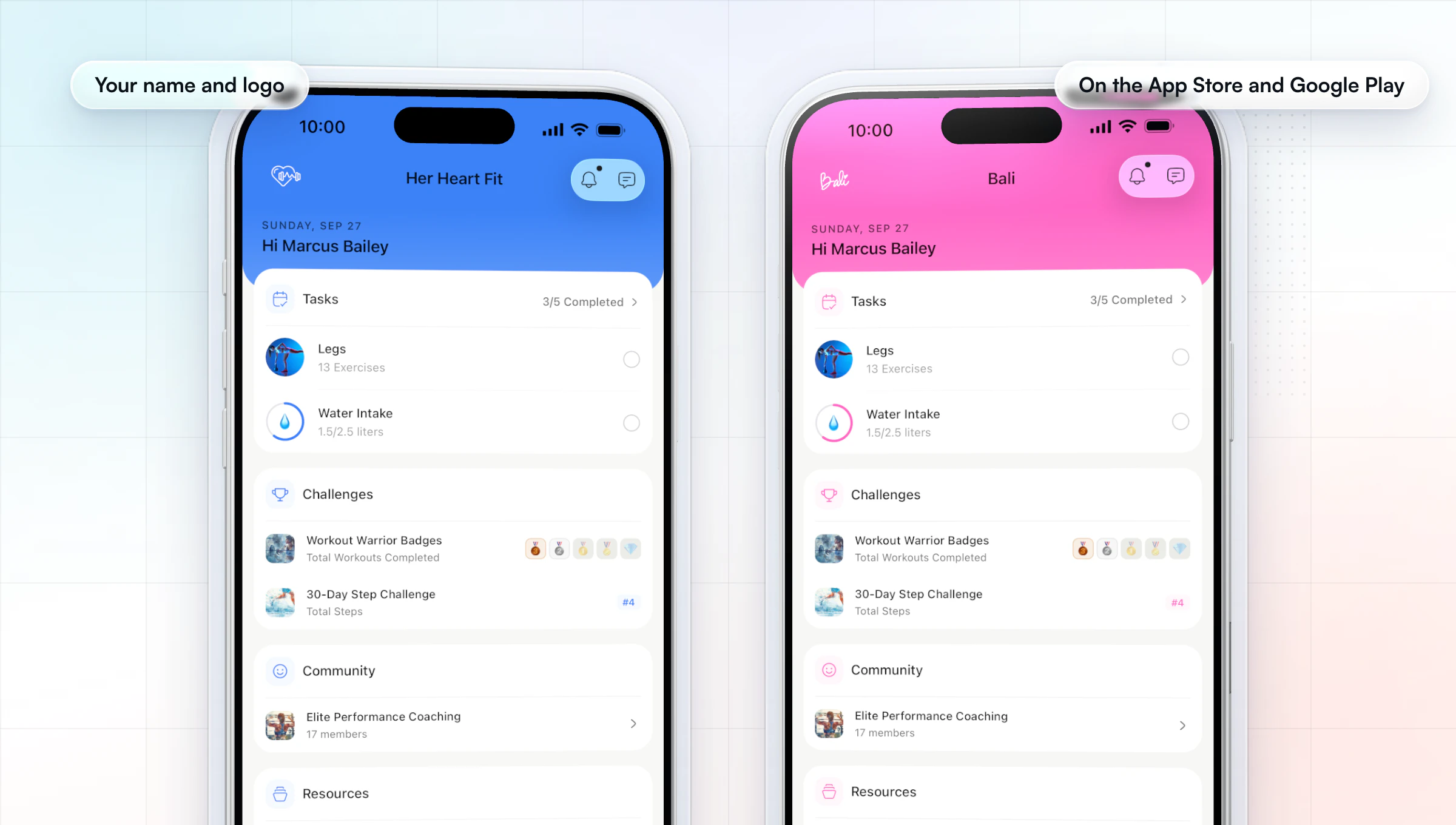
Custom Branding comes with Premium and up. Apply for your branded app, or read our guide to a branded app for personal trainers.
What should a personal training app do?
A personal training app should give your clients one place to train, eat and report in, and give you one place to see it all and reply. These are the criteria we ranked the apps on, split into the two halves of the app.
| Half | What to check | Why it matters |
|---|---|---|
| Client app | Workout tracker with exercise videos | The workout is what they open most |
| Client app | Food logging with a barcode scanner | Nutrition coaching needs real data |
| Client app | Check-ins with photos and scales | Your weekly review runs on them |
| Client app | Habits with streaks and reminders | Small daily wins keep them going |
| Coach app | Messages and voice notes | Clients expect a same-day reply |
| Coach app | Check-in review on the phone | Reviews pile up if they wait for a desk |
| Coach app | Logging an in-person session | Gym trainers coach phone in hand |
| Both | Your brand on the client's phone | It's your business they see daily |
Booking, payments and AI builders matter too, but only to some trainers, so we cover them in each app's entry above.
How to test a personal training app in 20 minutes
The fastest way to judge a personal training app is to be your own client for 20 minutes during the trial, on your own phone. Do the same steps in every app on your shortlist.
| Step | What to do | A good result |
|---|---|---|
| 1 | Invite yourself as a client and install | A workout on screen in 5 minutes |
| 2 | Log a workout with two sets and a swap | One hand, no typing but numbers |
| 3 | Scan a packaged snack's barcode | Found, and the macros match the label |
| 4 | Submit a check-in with a photo | The photo uploads on mobile data |
| 5 | Review that check-in on the coach side | Done without opening a laptop |
| 6 | Log a session for a client as the coach | Sets and PRs saved as you go |
| 7 | Turn on airplane mode, open the workout | You can still see the session |
Write down where you got stuck. A step that takes you three tries will take a new client five, and they'll message you about it.
Which personal training app fits you?
HubFit is our pick for every kind of personal trainer, because one app covers the gym floor, online coaching, nutrition and a team, so you don't outgrow it as the way you coach changes. Here is what you would use most, by how you coach.
| If you are | What you use most in HubFit |
|---|---|
| A gym-floor trainer | Log sessions live in the coach app |
| A hybrid trainer | Sessions and programs in one history |
| An online coach | Check-ins, food and habits in one app |
| A nutrition-led trainer | Tracker, meal plans, 5,000+ recipes |
| A trainer with a team | Shared clients, roles, activity log |
| A trainer who wants their own app | The Branded App add-on |
Team members are part of Ultimate.
What does a personal training app cost?
A personal training app costs a monthly subscription that the trainer pays. It's priced in one of four ways: flat plans with a client cap, seat bands that step up with your client count, a plan plus paid add-ons, or a plan plus a charge for each client over the limit. The total depends on your client count and the features you switch on, so price every app at the client count you expect in a year.
HubFit uses flat plans: no per-client fees on Standard and Premium (up to 50 and 100 clients), clients always free, and meal planning, the food tracker, check-ins and habits included in every plan. See our plans, and the personal trainer software guide for the wider tool stack.
How to switch personal training apps without losing clients
You switch personal training apps without losing clients by building first, moving clients in bulk, and running both apps for a week. Here is the order that works:
- Rebuild your templates. Recreate your main programs, meal plans and check-in forms in the new app before anyone moves.
- Import clients in bulk. Add your client list in one go, assign each client's program, meal plan, habits and check-in, and start every new client on an onboarding flow.
- Tell clients what changes. Send one message with the download link and what to expect in their first week.
- Run both apps for a week. Keep the old app open until every client has logged a workout in the new one.
- Close the old account last. Cancel the old plan and its add-ons once the week is done.
FAQ
Short answers to what trainers ask most about personal training apps.
What is the best personal training app for trainers?
Our pick for the best personal training app for trainers is HubFit, the #1 coaching app. Clients train, log food with a barcode scanner, check in and track habits in one app, and you coach from a coach mode on your phone, including logging in-person sessions live. Trainerize, Everfit, Kahunas, PT Distinction, TrueCoach and My PT Hub follow in our ranking.
What is the best value personal training app?
The best value personal training app is the one that includes what you'd otherwise pay extra for. In HubFit, meal planning, the food tracker, check-ins and habits are on every plan, and payments carry no transaction fee from us, only Stripe's standard rate. Clients never pay for the app. Compare every app at the client count you'll reach this year.
Can AI replace a personal trainer?
No. AI can draft a workout or estimate a meal's macros, but it can't watch a client's form, adjust to how they feel that day or keep them accountable. In HubFit, Workout AI and Meal AI do the drafting so you spend your time coaching. Read our guide to check-in software for the accountability side.
Can I coach clients from my phone?
Yes. In HubFit's coach mode you review check-ins, reply with messages and voice notes, see each client's training, nutrition and habits, and log in-person sessions for clients as you coach them. You build programs and meal plans on the web, and they reach the client's phone at once.
Do my clients pay for the app?
No: with HubFit, clients are always free, and you pay for your plan. What you charge your clients is up to you, and you can sell packages in the app through Stripe, with no fee from us on top of Stripe's standard rate.
How do I move my clients to a new app?
Rebuild your main templates first, then import your clients in bulk and assign their program, meal plan and check-in; new clients start on an onboarding flow. Run both apps for a week, then close the old one. Our Trainerize alternatives guide covers moving from Trainerize step by step.
Can I get my own branded personal training app?
Yes. Our Custom Branding puts your logo and color in the client app. The Branded App add-on gives you an app under your own name on the App Store and Google Play, built, submitted and maintained for you. It's typically live in 7 to 10 business days once your developer accounts are ready.
Run your next in-person session from the coach app this week, and let the client app carry the days between.