
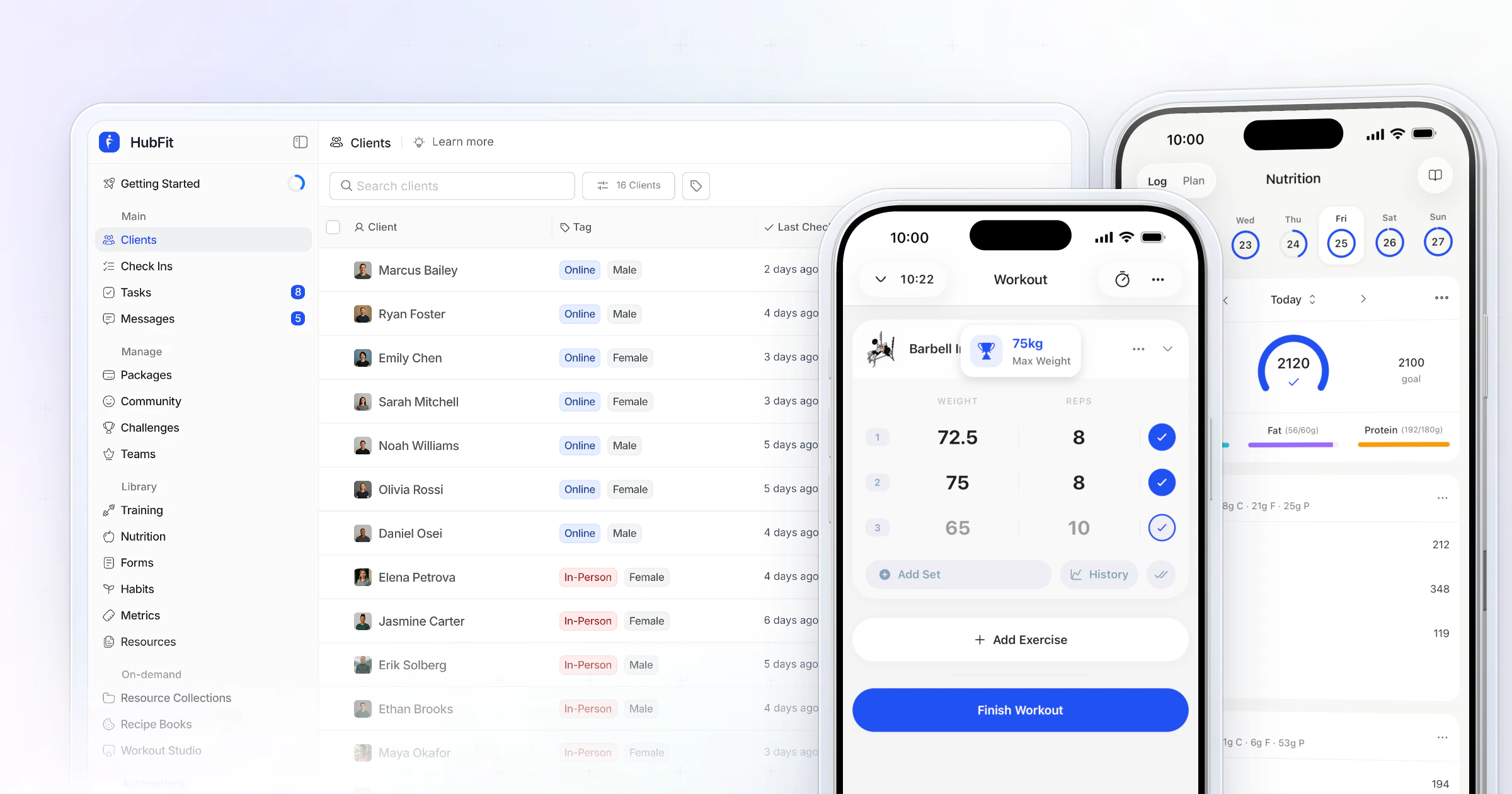
Our pick for the best personal trainer software is HubFit, the #1 coaching app. Workouts, nutrition, check-ins, habits and messaging run in one app your clients open every day, on flat monthly plans where clients are always free. We make HubFit, and below we rank it against six platforms trainers often shortlist.
Key takeaways
- HubFit is the top pick: training, nutrition, check-ins, habits and chat in one client app, coached from the same app, for online, in-person and hybrid trainers.
- Coaching software runs programs, food, check-ins and chat; gym management software runs classes, bookings and memberships. Many trainers need only the first.
- One platform replaces the free stack many trainers start with: spreadsheets, Google Forms, WhatsApp threads and a separate food app.
- Price software at next year's client count, with every add-on you'd need, before you compare.
What is personal trainer software?
Personal trainer software is the app you use to program workouts, track clients, coach nutrition, review check-ins, message clients and get paid. Clients follow everything on their phone, and you manage it from the web or the coach app. The best platforms cover all of it, so you stop stitching tools together.
It is not the same thing as gym management software, which runs class bookings, memberships and the front door. More on that difference below.
The best personal training software, ranked
How we compared: we ranked each platform on what a trainer feels every week. That means how fast you program and review check-ins, whether nutrition lives in the same app, what you pay as your client list grows, and how much your clients enjoy using it.
1. HubFit
HubFit is the top pick for personal trainers and online coaches who want one app for training, nutrition, check-ins and habits. It's the #1 coaching app, rated 4.9 on the App Store and Google Play, and it's free for your clients.
- Training: a drag-and-drop builder, fixed or calendar programs, 5,000+ exercise videos and automatic PR tracking.
- Nutrition: macro targets, meal plans, a food tracker with a barcode scanner and 5,000+ recipes.
- Check-ins: recurring forms with 11 question types, a review inbox, side-by-side comparison and Loom video feedback.
- Habits: 40+ ready-made habits with streaks and reminders in the client's time zone.
- AI drafts: Workout AI, Meal AI and the Smart Meal Planner.
- Business: onboarding flows that assign programs, plans and check-ins on their own, plus Stripe payments with no transaction markup from us.
It ranks first because the whole week happens in one place.
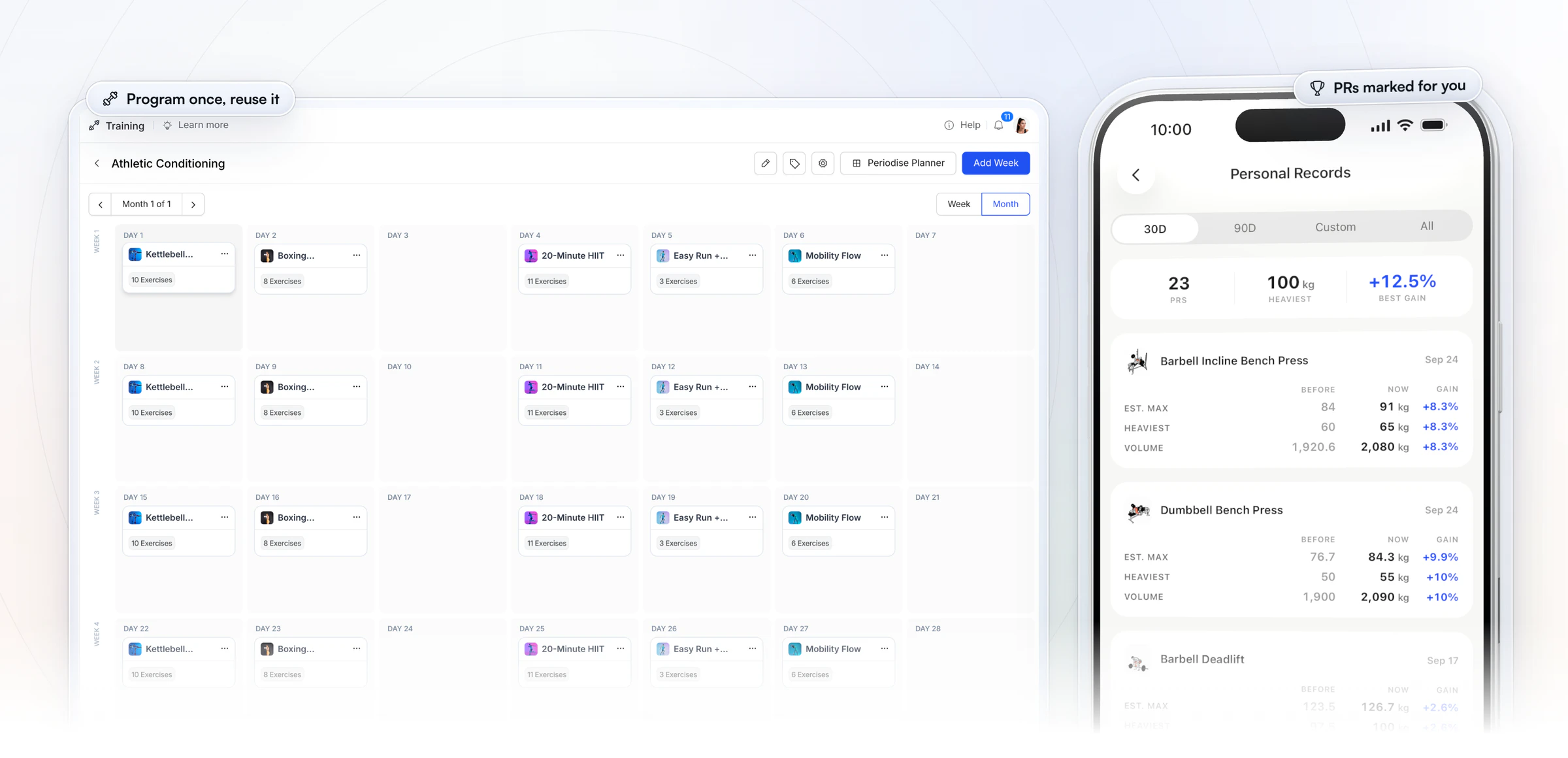
Programs and results. You build a workout or a full program once on the web, pulling from 5,000+ exercise videos, and reuse it for every client who needs it. Then the results come back to you: every set a client logs is checked against their history, and new personal records for max weight, max volume and estimated 1RM are marked on their own, whether the client trained alone or you logged the session for them in the coach app on the gym floor.
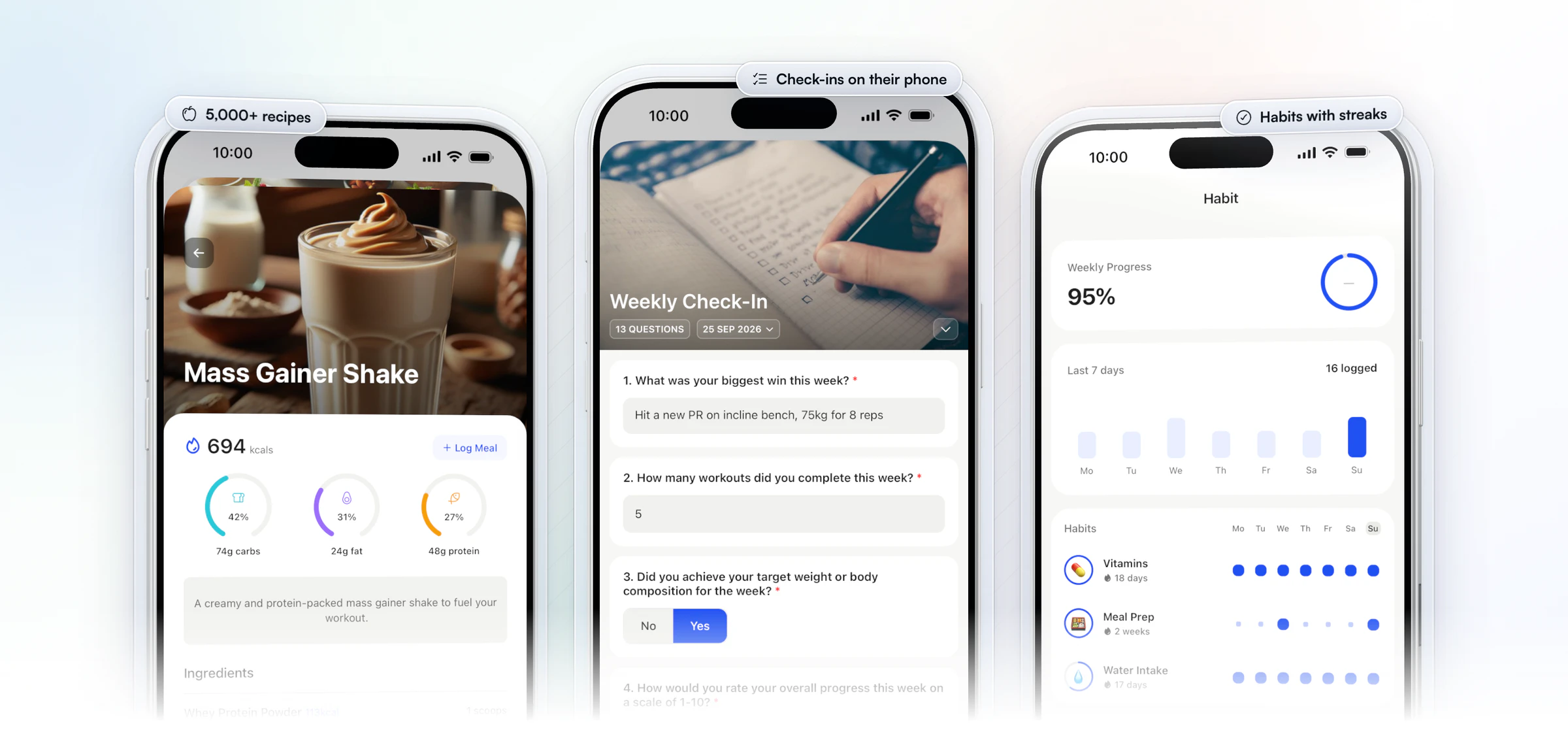
The client's whole day in one app. Your clients cook from 5,000+ recipes, log meals by search or barcode and see their macros fill up, answer their weekly check-in on their phone, and tick off habits with streaks that bring them back the next day.
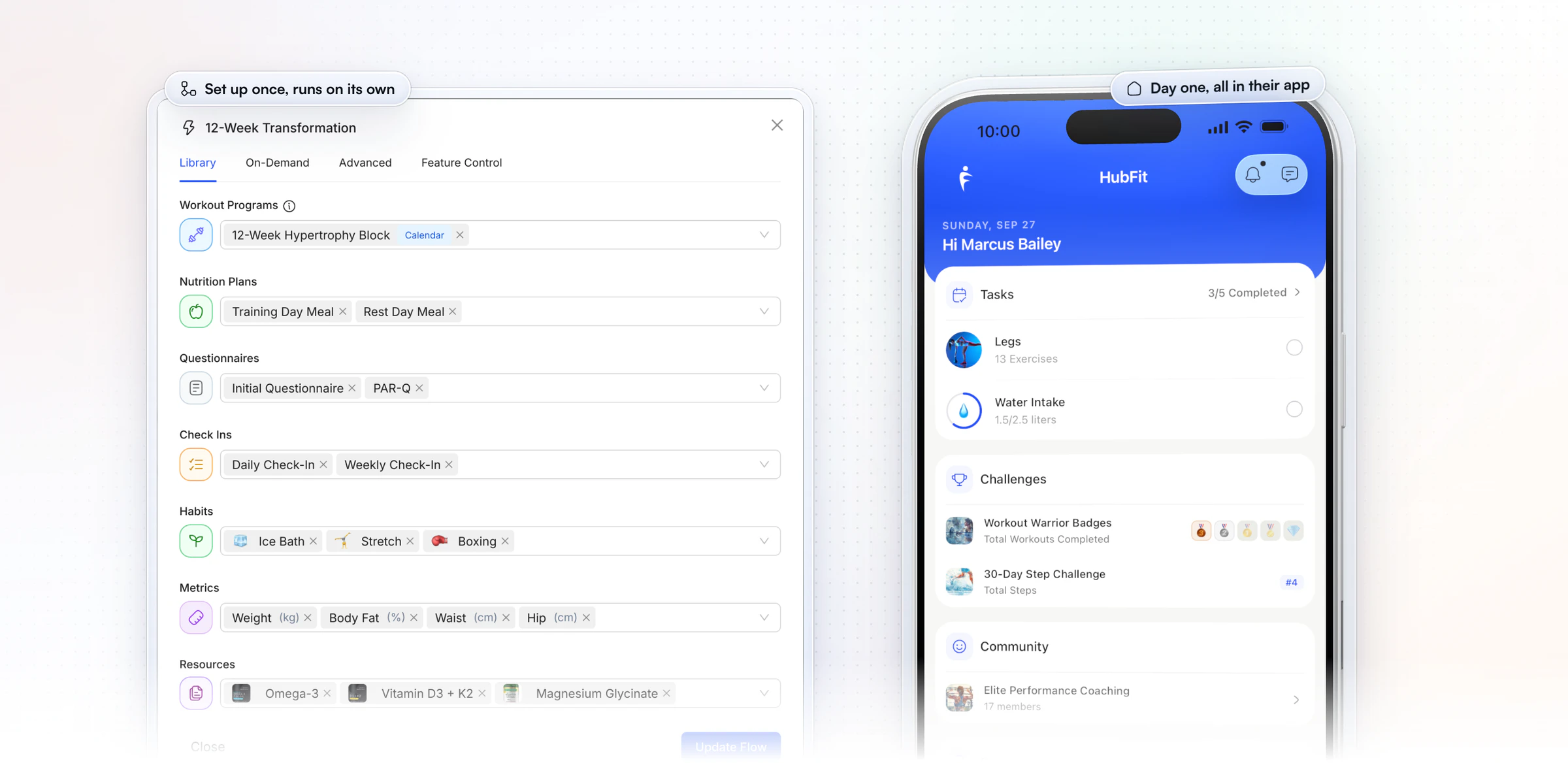
Onboarding on autopilot. When someone buys a package or you add them, an onboarding flow assigns their program, meal plans, questionnaires, check-ins, habits, metrics and resources on its own, so every new client opens the app to a full plan waiting on day one.
“I can quickly fire off an onboarding email... boom, done. That client is incredibly happy, and I feel good about it.”

2. Trainerize
Trainerize is built for independent trainers, nutrition and lifestyle coaches, studios, gyms and health clubs, and its parent company, ABC Fitness, serves multi-location businesses.
Beyond workouts, in-app food tracking, check-in forms and habits, it covers the business side of a training week. From Grow, clients can book appointments and classes themselves, with calendar sync. A Business add-on brings prospect booking links, referrals and trial products, and team roles run from account owner and admin to manager, shared trainer and regular trainer.
Plans are priced by client seats, and each level bundles a set number of trainer seats. Meal planning, Stripe payments, the Business tools and video coaching are each a monthly add-on, and Studio includes all four.
- What to check: the trainer seats bundled at the seat level you'd need, and the monthly add-ons you'd run on top.
Our Ultimate plan includes team members with no per-seat fee.
3. Everfit
Everfit is made for fitness coaches, gyms and studios, nutrition coaches and sports coaches.
For trainers who see clients in person, it books sessions and recurring group classes of 4 to 15 people, with waitlists, client self-booking and session credits, on every paid plan. The Payments & Packages add-on sells subscriptions, one-time packages, trials and coupons through landing pages, and US clients can pay with HSA or FSA funds through Truemed. Team accounts on Pro and up add coaches with Admin and Trainer roles.
A free tier covers up to five clients, and Pro and Studio are priced by client count. Meal plan generation, Autoflow automations, payments and on-demand collections are add-ons, and payments carry a monthly fee plus processing on each transaction.
- What to check: the monthly total with every add-on you'd use, and that its terms say no refunds will be granted.
Our plans include the nutrition tracker and meal plans from Standard, so food coaching is never an add-on.
4. Kahunas
Kahunas is aimed at online coaches and personal trainers who want one-to-one onboarding when they join.
Next to workouts, nutrition from its own food database and custom check-ins, it has business tools on its Growth plan and up: lead capture forms, a mini CRM with statuses, broadcasts and automatic email series. Clients can pay through Stripe or PayPal, a calendar holds events and appointments, and Health Score AI reads sleep, stress and readiness from wearable data.
Its three plans are set by client count. Team members are only on Ultimate, at a monthly fee for each one, and the branded app with its own store listings is on Ultimate too, with Apple's yearly fee on top. Growth can add group chat as a monthly add-on.
- What to check: what your plan costs once you hire, since adding a coach means Ultimate plus a fee per member.
Our onboarding flows assign programs, nutrition plans, habits and check-ins on their own, on every plan.
5. TrueCoach
TrueCoach is a training-first app for personal trainers, with strength and conditioning, CrossFit and university or rec center programs among its audiences.
Clients get calendar-based programs, macro targets they log in MyFitnessPal, and check-ins built inside the workout builder. For the business, it offers team accounts with admin and standard coach rights, public coach profiles that collect lead applications on Standard and Pro, and Stripe payments with subscriptions, one-time charges, pausing and invoices.
Plans step up by active client count to 50, with special pricing above that and no add-ons to buy. Coaches join a team at no added cost, and billing follows the team's total client count.
- What to check: where you coach from, since its payments are only available to coaches in the US, UK, Australia and Canada and take a flat percentage of each client payment, and how you'll run weekly check-ins.
We take client payments in 9 currencies with no transaction markup from us, and our check-ins have their own form builder.
6. My PT Hub
My PT Hub pitches itself to PTs, fitness coaches and nutritionists on unlimited clients from its Premium plan.
It covers the running of a training business: one-to-one bookings on every plan, group classes and live streams on Premium, Stripe packages and subscriptions, and business and financial analytics. A MySite microsite and Google Ads, Facebook Pixel and Google Analytics integrations support marketing, and a team can share workouts, nutrition plans and custom exercises.
Starter is capped at three clients, Premium removes the cap, and Ultimate bundles every add-on with five additional trainers. On Premium, each extra trainer, Check-Ins AI and Zapier is a monthly fee.
- What to check: the cost as your team grows, and that its terms say it charges an application fee on each client payment it processes.
When a client buys one of your packages, our onboarding flows can assign their program, nutrition plan and check-ins straight away.
7. PT Distinction
PT Distinction is software for personal trainers and for hybrid and online coaches.
Packages sell through Stripe inside the app or through PayPal, and a new buyer can be enrolled automatically with a welcome workflow. Prospects can get a free-trial automation, and you can email clients from your own address or send SMS. Its AI assistant drafts blogs, social posts and marketing copy, and movement screens and exercise technique reviews cover the coaching side. Clients log in to a custom-branded web portal.
Every plan includes a set number of clients, and each client over the limit adds a monthly charge. Trainers are added free, and branded apps come with its middle and top plans.
- What to check: the cost at next year's client count.
HubFit's plans are a flat monthly price for a range of clients, and clients never pay for the app.
Already on one of these? Our guides to Trainerize alternatives, Everfit alternatives, TrueCoach alternatives, My PT Hub alternatives and PT Distinction alternatives cover what to plan for.
How the 7 personal trainer software platforms compare
HubFit leads the table: nutrition, check-ins and training in one app, on flat plans by client count where clients are always free.
| Platform | Nutrition | Payments | What to check |
|---|---|---|---|
| HubFit | Tracker, barcodes, recipes | By plan, no markup | No nutrition add-on |
| Trainerize | In-app tracking | Add-on below Studio | Add-ons at your client count |
| Everfit | Food journal | Add-on | Total with every add-on |
| Kahunas | Database, barcodes | Stripe, PayPal | Plan at your client count |
| TrueCoach | Macros + MyFitnessPal | Terms list a fee per payment | How you run check-ins |
| My PT Hub | Database, barcodes | Terms list a fee per payment | Cost as your team grows |
| PT Distinction | Meal plans, in-app tracker | Stripe, PayPal | Charge per client over limit |
Which personal trainer software fits you?
HubFit fits every kind of trainer below: the same app runs online, in-person and hybrid coaching, so you never outgrow it. Find your row.
| You are | What you need most | In our app |
|---|---|---|
| A solo online coach | Clients who train without you | Programs, check-ins, chat |
| An in-person trainer | Logging while you coach | Log sessions in the coach app |
| A hybrid trainer | Both kinds in one list | Online, In-Person, Hybrid tags |
| A team of coaches | Each coach, their clients | Roles and assigned clients |
| A studio with bookings | Coaching beside the scheduler | Keep your booking system |
| A coach with a brand | Your own app in the stores | Branded App add-on |
The coach app tags each client as online, in-person or hybrid when you add them, so one list holds every kind of client you train.
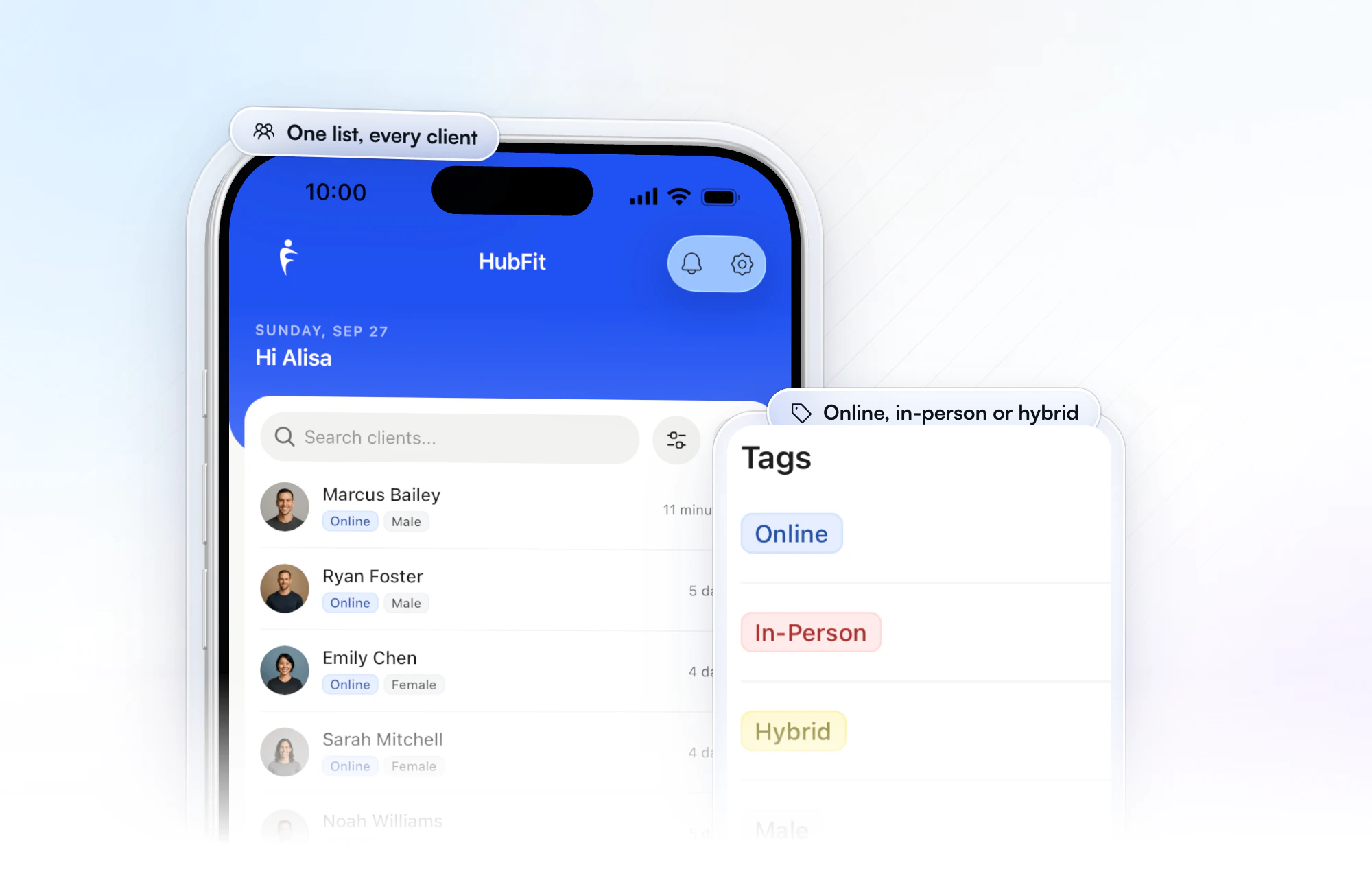
For in-person sessions, you log the workout on your client's behalf in the coach app while you train them, and reps, sets, weights, rest and PRs are captured in real time. Their online weeks and your sessions sit in the same history. For a deeper look at the builder itself, see our guide to workout builder software.
Personal trainer software vs gym management software
Personal trainer software runs the client's training, food and check-ins. Gym management software runs the business around the floor: class bookings, memberships and the front door. Many studios use both.
| Type | What it runs | Examples |
|---|---|---|
| Coaching software | Programs, food, check-ins, chat | HubFit |
| Gym management | Classes, bookings, memberships | Class booking and membership software |
| Access and POS | The door and front-desk sales | Often part of gym suites |
HubFit is coaching software. It isn't a class booking, point-of-sale or door-access system, so a studio keeps the scheduler it already uses and runs coaching alongside it. A solo trainer who sells packages online usually needs no gym software at all.
Does personal trainer software use AI?
Yes. The best personal trainer software uses AI to draft the routine work, and you check and finish it. Our app has three AI tools:
- Workout AI: describe the session (exercise count, sets, reps, muscle focus, difficulty, rest) and it builds the workout. It also turns pasted text such as "Bench Press 5x8" into a workout.
- Meal AI: describe a meal and get its ingredients with macros, ready to add to a client's meal plan.
- Smart Meal Planner: pick a calorie target, one of six presets (balanced, high-protein, keto and more) and dietary filters, and it generates a full meal plan in seconds. Swap or regenerate any meal in one tap.
All three come with Premium and up.
AI saves the typing, not the judgment. Read every draft before a client sees it: the right exercise for their knee, the meal they'll actually eat and the call to push or pull back are still yours. Our guide to AI for personal trainers shows where it helps most.
How do personal trainers take payments in their software?
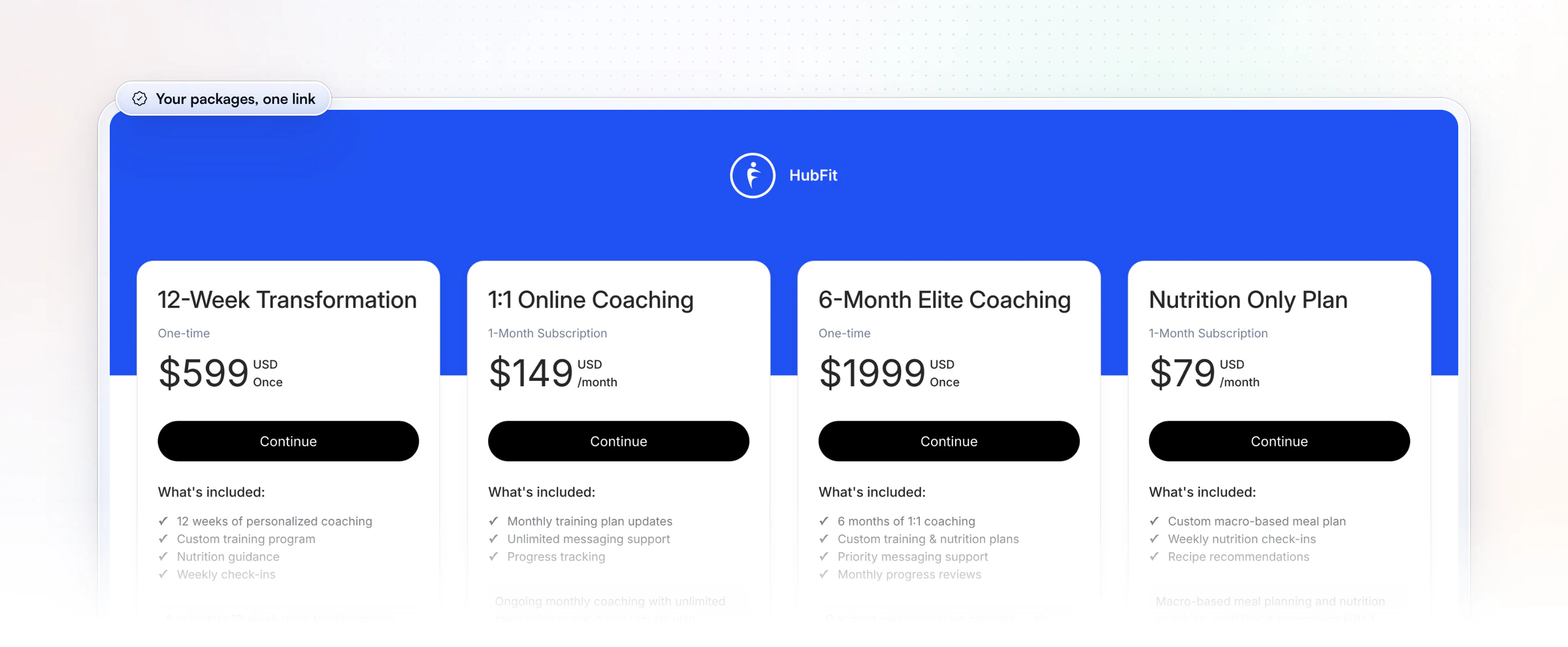
Personal trainers take payments by selling coaching packages through a Stripe checkout inside their software, so the client pays and starts in one go. In our app it takes three steps:
- Create a package: one-time, weekly or monthly, with an optional free trial, initial fee or coupon.
- Share its page: every package gets its own link, your plans page lists them all, and clients pay with a card, Apple Pay or Google Pay in 9 currencies.
- Let it onboard them: with instant access on, the client gets their login by email the moment they pay, and an onboarding flow assigns their program, plan and check-ins.
We add no transaction markup on top of Stripe's standard rate. Payments and packages come with Premium and up.
Compare the options in our guide to payment solutions for personal trainers.
What should personal trainer software include?
Good personal trainer software covers the whole client week, from the first payment to the weekly review. To choose, trial your top two with one real client's week and score each against this list.
| Feature | Why it matters | In HubFit |
|---|---|---|
| Workout builder | Program once, reuse for every client | Drag-and-drop, 5,000+ videos |
| Workout tracking | See sets, reps and PRs as they happen | Automatic PR tracking |
| Nutrition | No second app for clients | Tracker, meal plans, recipes |
| Check-ins | Review progress fast each week | 11 question types, inbox |
| Habits | Accountability between sessions | 40+ habits, streaks |
| Messaging | No personal number needed | Chat with voice notes |
| Onboarding | Clients start the minute they pay | Onboarding flows |
| Payments | Packages, renewals, no chasing | Stripe, no markup |
How HubFit runs a trainer's whole client week
It replaces the stack of apps a trainer juggles with one client app and one place to coach from. Here is what that changes in a normal week:
- Your client opens one app. Today's workout, their food log with barcode scanning and meal photos, and their habits all live in the same app, so nothing gets lost between tools.
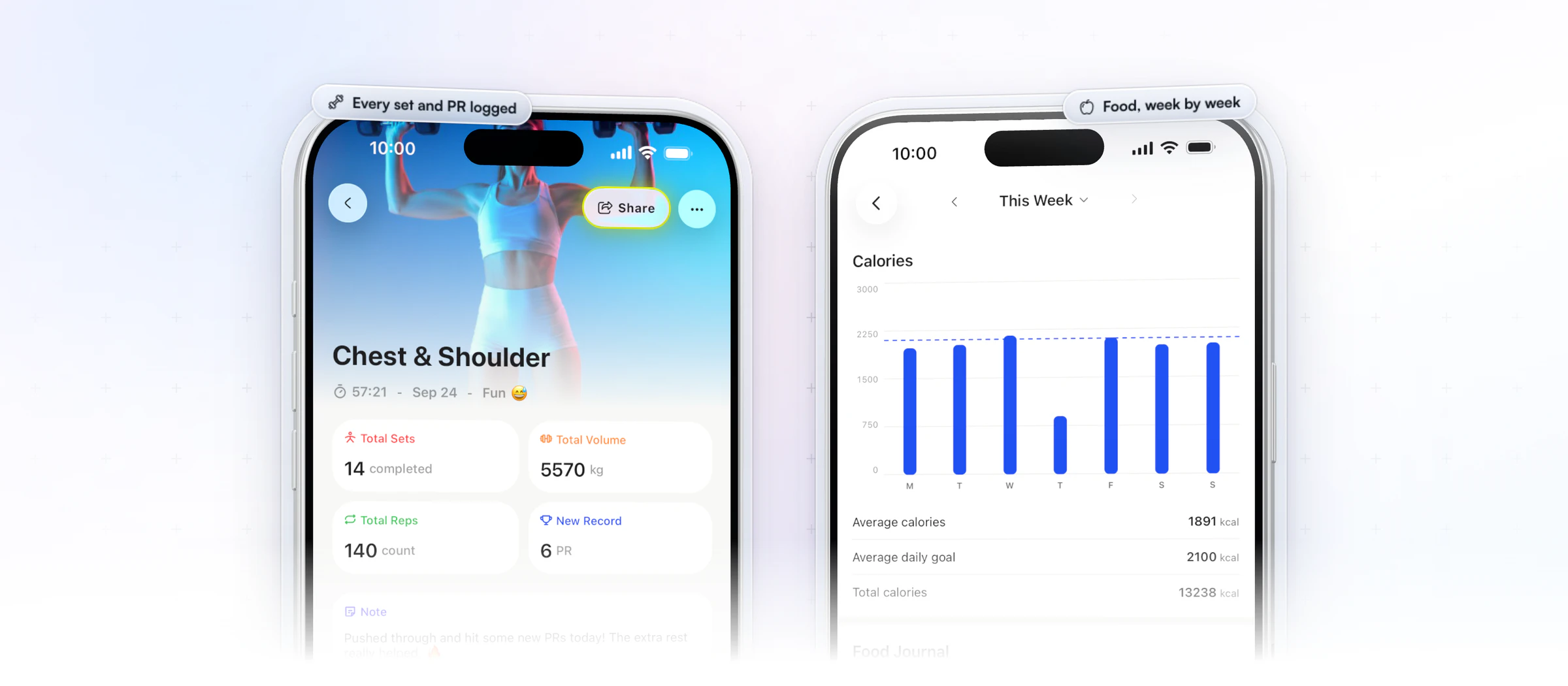
- Every session reports back. A finished workout shows the sets, volume, reps and any new PRs, with the client's note for you.
- Check-ins take a minute or two. Answers land in a review inbox, you compare them side by side with last week's and reply with a Loom video.
- New clients start themselves. An onboarding flow assigns their program, meal plan and check-ins when you add them or they pay, so day one is set before you open the app.
Here's what it replaces from the free tools many trainers start with:
| What it replaces | What takes its place |
|---|---|
| Workout spreadsheets and PDFs | Workout builder and tracker |
| Google Forms check-ins | Check-ins with 11 question types |
| WhatsApp threads | In-app chat with voice notes |
| A separate food app | Food tracker with barcodes |
| Payment links and invoices | Stripe packages |
Want to see it with your own clients? Try it free with one client's week.
How much does personal trainer software cost?
Personal trainer software is priced in one of three ways: a flat plan by client count, a fee for each client over a limit, or a base plan plus paid add-ons. The sticker price only tells you the first month, so check what's included: the comparison table above shows it platform by platform.
Before you compare, add up three things at next year's client count:
- The plan your client count lands on.
- Every add-on you'd use: nutrition, payments, automations, extra coaches.
- Fees on the money you collect from clients.
We sell flat monthly plans by client count. Nutrition is included, clients are always free, and on plans with payments we add no markup. See the plans on our pricing page.
How do you switch coaching software?
You can start switching in an afternoon. Here's the order that works.
- Sign up for the 14-day free trial and set up one program, one meal plan and your weekly check-in.
- Bring your clients over with the bulk client import, then invite them to the app.
- Turn on an onboarding flow, so every new client gets their program, plan and check-ins the moment they join.
FAQ
Short answers to what trainers ask most about personal training software.
What is the best software for personal trainers?
Our pick for personal trainers is HubFit, the #1 coaching app. Training, nutrition, check-ins, habits and messaging run in one app your clients open every day, and you coach from the same app or the web. See how it works for personal trainers.
Is there personal trainer software for in-person sessions?
Yes. In our coach app you log a workout on behalf of a client while you train them, and the reps, sets, weights, rest and PRs are captured in real time. Tag clients as online, in-person or hybrid to keep one list.
Do I need gym management software too?
Only if you run classes, memberships or door access. Coaching software handles the training, food, check-ins and payments for your clients; a studio keeps its booking system beside it. Most solo and online trainers need nothing else.
Is there free personal trainer software?
Some platforms have free tiers, but they cap your clients or features, so they suit testing more than running a business. We offer a 14-day free trial on every plan, and the app is always free for your clients.
Can AI replace a personal trainer?
No. AI drafts a workout or a meal plan in seconds, but it doesn't know your client's injuries, schedule or motivation. The trainer still programs, reviews the check-in and keeps the client accountable. Use AI for the first draft and spend the saved time on coaching.
What is the best online coaching platform for fitness coaches?
Our top pick for fitness coaches is HubFit, because programs, nutrition, check-ins and habits live in one client app. Our guide to check-in software for coaches shows how weekly reviews work, and how online coaching works in our app covers the rest.
Can I give clients my own branded app?
Yes. Our Branded App puts your app under your own name on the App Store and Google Play. We build, submit and maintain it as an add-on to your subscription, with your own Apple and Google developer accounts opened as a business. It's typically live in 7 to 10 business days once those accounts are ready.
Does personal trainer software work with wearables?
The good ones do. Our app syncs steps, calories, sleep and heart rate through Apple Health and Health Connect, and lists Garmin, Fitbit, Oura, Whoop and more. Food logs can also sync from Cronometer. See all integrations.
Run your whole coaching business in one app
Whether you train clients online, in person or both, HubFit puts their training, food, check-ins and payments in one app. Set up one real client's week and see the difference before your next session.






