
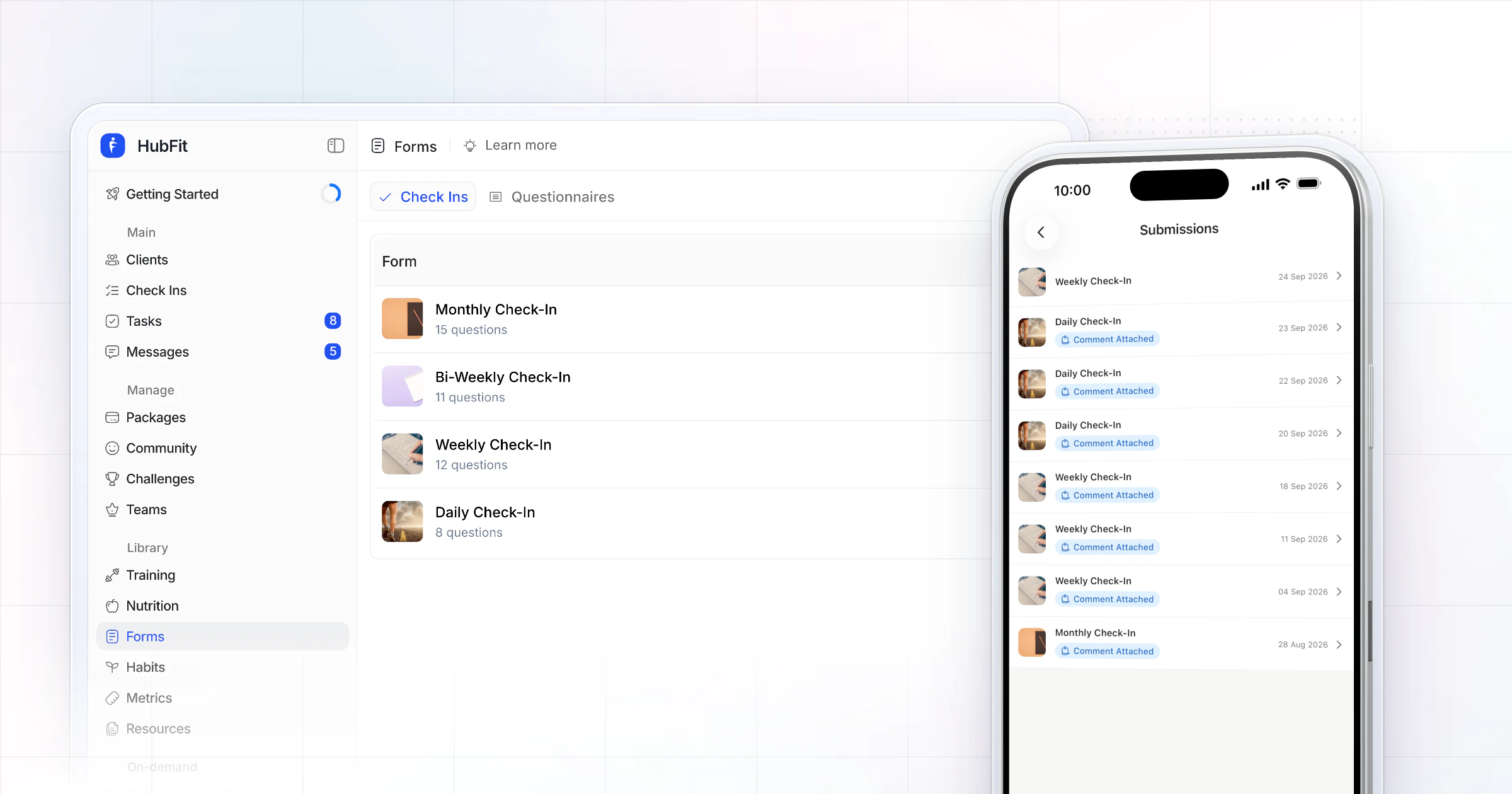
Our pick for the best check-in software for online coaches is HubFit, the #1 coaching app. You build a check-in once with 11 question types, clients get a push reminder and answer in the app, and every submission lands in a review inbox where you compare it side by side and reply with a Loom video. We make HubFit, and here's why it ranks first.
Key takeaways
- HubFit is the top pick: forms, photos, reminders, a review inbox and video feedback in the same client app as training and nutrition.
- Pick by how you coach: photos and weight for body transformation, the food log for nutrition, the session log for hybrid coaching.
- The check-in is only half the review. Read it next to what the client lifted and ate, then change next week's plan.
What is check-in software for online coaches?
Check-in software is the tool a coach uses to collect each client's regular update (answers, weight, measurements and progress photos) and review it in one place. The client fills in a form on their phone on a set day. You read it next to their history, reply, and adjust the plan.
That weekly touchpoint is where online coaching happens. Self-monitoring is consistently linked with weight loss, and a check-in turns that logging into a habit with a coach reading it.
Good check-in software does three jobs: it collects the update without you chasing it, it puts the answers next to the client's training and food data, and it gets your reply back to the client fast. The tools below differ most on the second job.
The 7 best check-in software tools, ranked
HubFit ranks first on our criteria, the four things that decide how fast a weekly review goes. A flexible form, photos and numbers inside the check-in, reminders that go out by themselves, and one place to review and reply: HubFit covers all four in one app. The six others follow, with what to check in each.
1. HubFit
HubFit is the top pick for coaches who want the whole check-in loop, from the form to the reply, inside the app clients already use for training and nutrition. It's the #1 coaching app, rated 4.9 on the App Store and Google Play, and the check-in is built into it rather than sent through a separate form tool.
- Forms your way: 11 question types, including text, number, scale 1 to 10, yes/no, star rating, date, media, signature, progress photos and metrics.
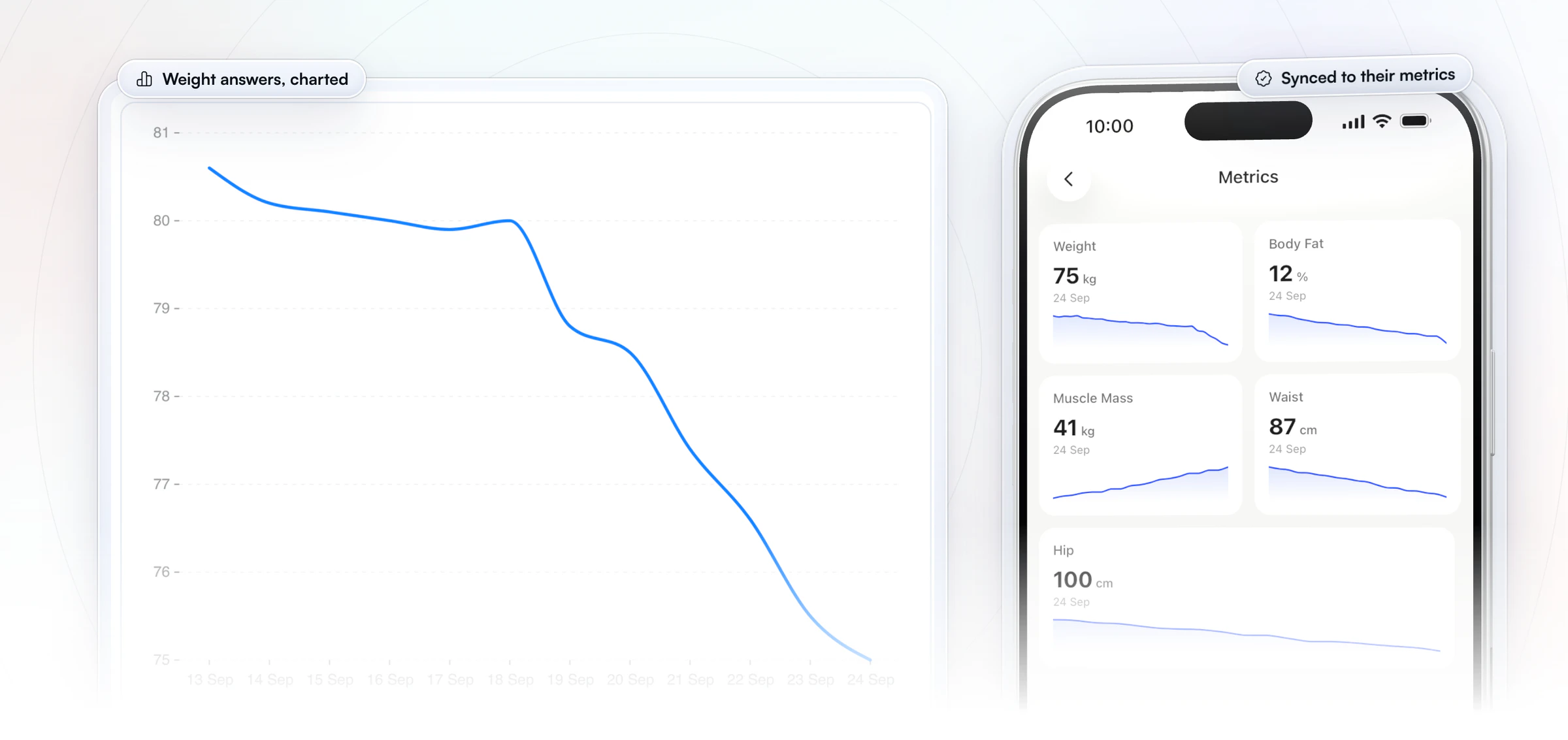
- Data that files itself: progress photos sync to the client's gallery and metric answers sync to their metrics, so nobody retypes a weight.
- Any schedule: daily, weekly, bi-weekly or monthly, with push reminders, and a missed one stays on the client's dashboard as overdue until the next is due.
- A review inbox: every submission goes from Pending to Reviewed, so nothing slips.
- Side by side: compare submissions side by side to see what changed.
- Loom video feedback: record your review as a Loom video and send it with your feedback.
- Free for your clients: they check in from the same app they train and log food in, at no cost to them.
- On every plan: check-ins, progress photos and custom metrics are included in every subscription.
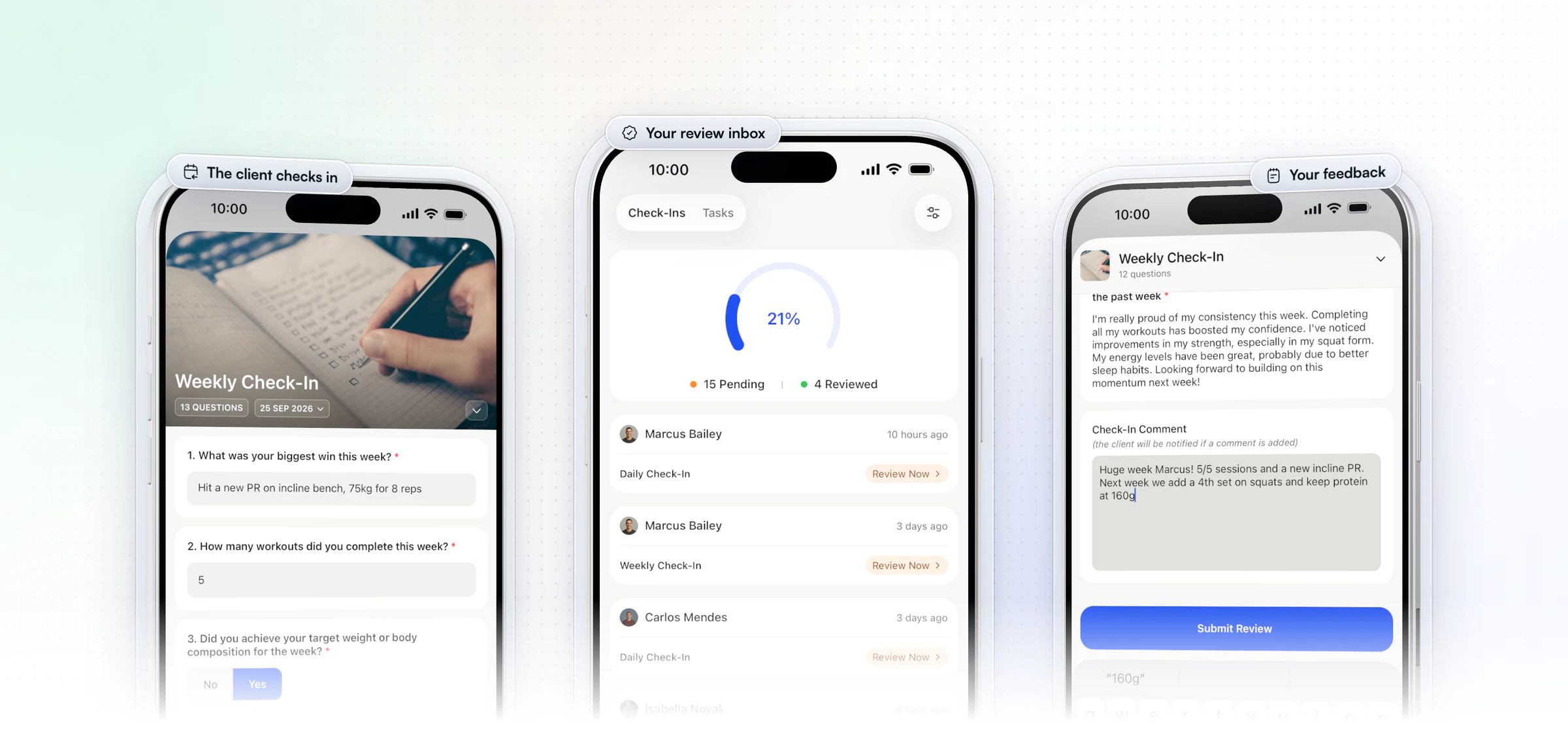
Each form can carry a cover image and a digital signature, questions can be required, and drafts save automatically, so a client who gets interrupted picks up where they left off. A late check-in can be backdated by up to 14 days, and pre-built templates make your first form quick to set up. Metric answers go straight into the client's own charts too, so you and your client watch the same trend.
The proof is in the time it takes. On the client side, a weekly check-in takes about a minute. On the coach side, Vegard Mikalsen's team of 5 coaches at VM Coaching rotates its weekly and monthly forms and keeps each review to a minute or two.
“I spend one to two minutes per client on a proper check-in now.”

That pace comes from having the form, the logs and the reply in one place, which is what the rest of this list is measured against.
2. Trainerize
Trainerize is a coaching platform for independent trainers, nutrition coaches, studios and gyms. Its Check-In Forms use four answer types: single answer, multiple answer, text, and a 1 to 10 rating. Coaches can edit a submitted form, compare forms on the Insights Dashboard, and line up progress photos with a slider and annotations. On paid plans, onboarding forms add a paragraph answer for a new client's intake. Only account owners and admins can create or edit forms.
Plans are priced by client seats. AI help with check-ins, such as drafted replies, sits in FitMetrics, a separate add-on billed per client with a monthly minimum.
- What to check: who on your team will build and change the forms, and whether four answer types fit the questions you ask each week. Weighing a move? See our Trainerize alternatives.
In HubFit, forms have 11 question types, and photo and metric answers file themselves into the client's profile.
3. Everfit
Everfit is a coaching platform for fitness, nutrition and sports coaches, and for gyms and studios. Its Forms & Questionnaires cover intake, PAR-Q and rating questions, with reports built from the answers automatically, and consultation documents sit on each client's profile. A check-in dashboard is in beta. In messaging, Smart Response drafts replies with AI on its Pro and Studio plans.
The pricing model starts with a free tier for a few clients, then Pro and Studio plans priced by client count; forms come with the paid plans. Automation is the Autoflow add-on, metered by the clients in it, and one onboarding flow is included on Pro and Studio.
- What to check: which plan your roster lands on, and whether the follow-ups you want around check-ins need the automation add-on. See our Everfit alternatives.
Our check-ins send push reminders on every plan, and every submission lands in one review inbox.
4. Kahunas
Kahunas is a coaching platform for online coaches and personal trainers, with live 1-to-1 onboarding included. Check-ins sit at its center: custom check-in forms, daily habit forms, an initial Q&A for new clients, a side-by-side compare, and a traffic-light dashboard that shows who needs attention. Data from wearables that sync through Apple Health or Google Health Connect can feed straight into the check-in forms.
Its three plans are set by client count, with features added at each step. Automations start on the middle plan, and a message to a client who missed a check-in is one of those automations, so it needs the middle plan or higher. The Health Score AI, built from wearable data, starts there too.
- What to check: which plan your client count needs, and whether it includes the missed-check-in messages you'd rely on.
Our check-in forms, push reminders and review inbox are all included on every plan.
5. My PT Hub
My PT Hub is a platform for personal trainers, fitness coaches and nutritionists. Its check-ins are custom question-and-answer forms that go out on a schedule (daily, weekly, every two weeks or monthly), with nudge notifications to clients and room for progress photos and measurements. Check-Ins AI can write a summary of each submission for you.
The pricing model has three steps: an entry plan capped at a few clients, a middle plan with unlimited clients, and a top plan that bundles every add-on. Check-ins come with the middle plan, where Check-Ins AI is a paid add-on; the top plan includes it.
- What to check: which plan your roster needs for check-ins, and whether you'd pay extra for the AI summaries. See our My PT Hub alternatives.
We include check-ins on every plan, and you can compare a client's submissions side by side to see what changed.
6. PT Distinction
PT Distinction is coaching software for personal trainers, and for hybrid and online coaches. For intake, it comes with ready-made PAR-Q, consultation, consent, medical and lifestyle questionnaires. Beyond those, you can build custom forms with an e-signature and run automated check-ins that reach clients as a scheduled email, a text message or an in-app questionnaire. Clients can also upload videos for exercise technique reviews.
Its pricing model is a base plan that includes a set number of clients, plus a monthly charge for every client above that limit. Extra trainers on your account are free, and it presents its plans as having every feature included.
- What to check: your bill as your roster grows, since each client over the limit adds to it. See our PT Distinction alternatives.
HubFit's plans are a flat monthly price for a set range of clients, and clients are always free.
7. TrueCoach
TrueCoach is a training platform for personal trainers and strength coaches, from bodybuilding and CrossFit to physical therapy and university programs. It doesn't list a native form builder: its suggested route is to build questionnaires and check-ins inside the workout builder, and waivers go out as shared documents. Alongside, an advanced habit tracker on its higher plans lets clients log weight, energy, sleep, steps and stress, and a compliance rate raises a Needs Attention flag when it drops.
Pricing is three plans set by active client count, with special pricing for bigger rosters. TrueCoach doesn't sell add-ons on top, and team coaches join at no extra cost.
- What to check: how you'll compare answers week to week, and where food data lives, since its nutrition runs on macro targets and MyFitnessPal. See our TrueCoach alternatives.
HubFit builds check-ins as forms of their own, reviewed in one inbox from Pending to Reviewed.
How the 7 check-in tools compare
HubFit leads the table with 11 question types and the whole review loop on every plan.
| Platform | Check-in forms | What to check |
|---|---|---|
| HubFit | 11 question types | All in, on every plan |
| Trainerize | 4 answer types | Only owners and admins build |
| Everfit | Forms and questionnaires | Paid plans only |
| Kahunas | Custom check-in forms | Automations: higher plan |
| My PT Hub | Custom Q&A forms | Higher plan, AI extra below top plan |
| PT Distinction | Custom forms | Charge per client over limit |
| TrueCoach | Built in the workout builder | Food via MyFitnessPal |
What should check-in software do? 7 things to look for
Good check-in software does 7 things, and each one saves you time every week. Use this as a checklist when you compare tools.
| What to look for | Why it matters | In HubFit |
|---|---|---|
| 1. Reusable templates | No rebuilding forms weekly | Pre-built and your own |
| 2. Many question types | Numbers and words both | 11 question types |
| 3. Photo and metric sync | No retyping data | Gallery and metrics sync |
| 4. Side-by-side view | See change at a glance | Submissions side by side |
| 5. Automatic reminders | No chasing clients | Push reminders, overdue status |
| 6. An in-app form | Fewer missed check-ins | iOS and Android client app |
| 7. A review inbox | Nothing slips through | Pending to Reviewed |
Which check-in software fits how you coach?
The right check-in follows the way you coach, and HubFit fits each style because the check-in sits next to the data that style depends on. Here's what each kind of coach needs from a check-in, and how it's done:
| You coach | What the check-in needs | How it's done |
|---|---|---|
| Body transformation | Photos, weight, measurements | Photos to gallery, metrics to charts |
| Nutrition | Adherence beside the food log | Compliance reports, Cronometer sync |
| Hybrid or in person | The session beside the form | Coach logs workouts in the coach app |
| As a team | Each coach sees their clients | Alerts go to the assigned coach |
| At high volume | A fast review | Review inbox, Pending to Reviewed |
Body transformation and bodybuilding. You need the same photos and measurements every week, in the same poses, so you can lay them side by side. Progress-photo answers land in the client's gallery and metric answers in their charts, so a weight logged in a check-in shows up as a trend without anyone copying it.
Nutrition coaching. The check-in tells you how the week felt, and the food log tells you what happened. Read the macro compliance report next to the answers before you change a target.
Hybrid and in-person coaching. You often see the client in the gym, so the session itself is your best data. You can log their workout in the coach app as you train them, and the check-in fills in the days you don't see them.
Coaching as a team. Each coach should review their own clients. Check-in notifications go to the coach a client is assigned to, while the owner sees every client. Team members come with the Ultimate plan.
Coaching at high volume. Speed matters most. Put every client on the same check-in day, work down the inbox from Pending to Reviewed, and save the long replies for clients who need them.
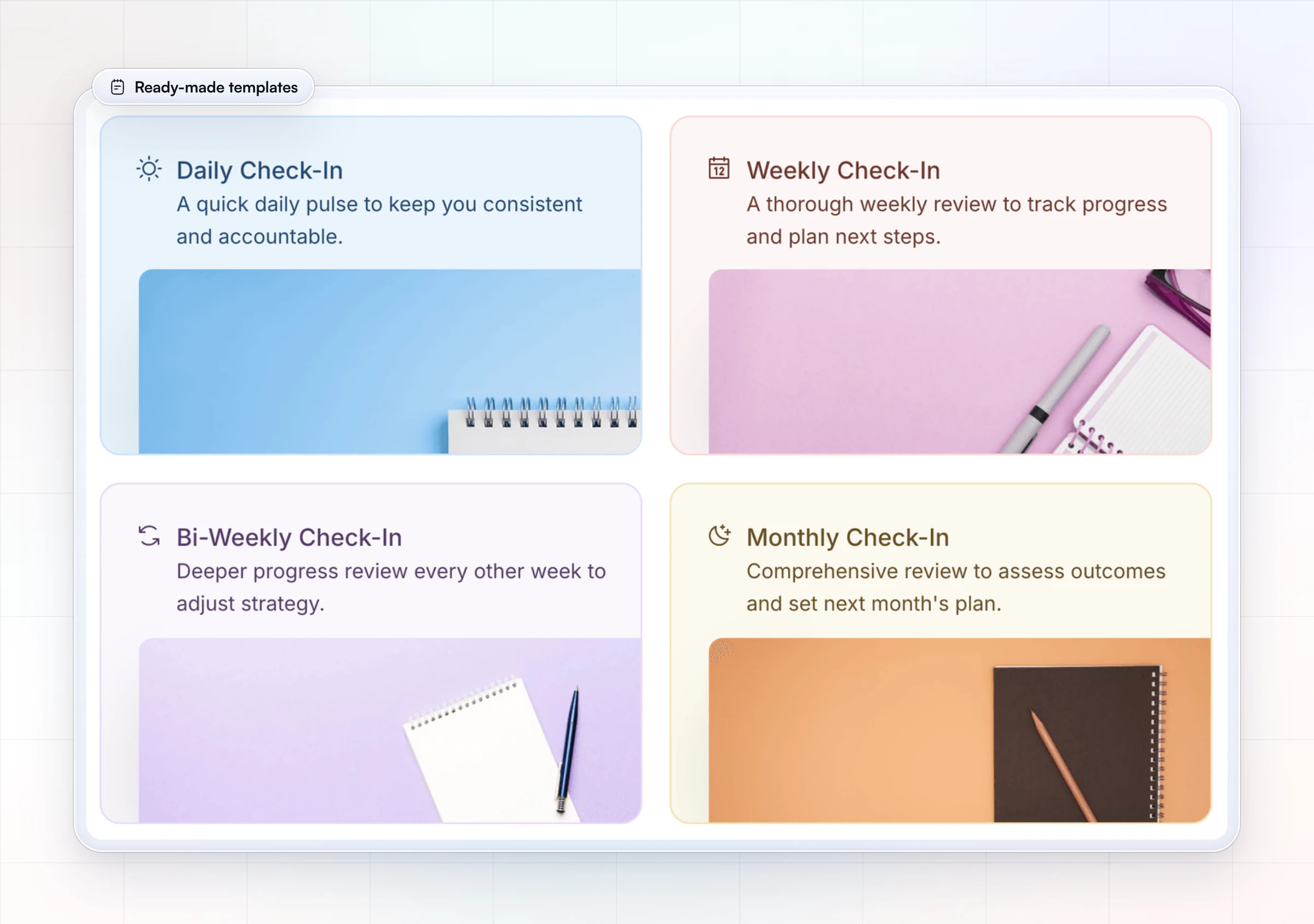
Need a starting point? Copy the daily check-in form template, the weekly check-in form template or the monthly check-in form template. For what to ask, see our client check-in questions.
How do you run a weekly check-in review?
Run it the same way every week: one check-in day for every client, a single inbox, and a fixed few minutes per client. Here is the routine, step by step:
- Put everyone on one day. Schedule the check-in for the day you review, with a reminder in each client's own time zone. Schedules are synced across the workspace, so check-ins arrive on the same days.
- Open the inbox. Start at Pending and take the oldest first. Every submission waits there until you mark it Reviewed.
- Compare, don't just read. Open last week's submission beside this one and look for what changed: weight trend, energy, sleep, adherence.
- Check the logs. Before you answer "it was a hard week," look at the sessions and the food log for that week.
- Reply once. Type a short note or record a Loom video. Your review note saves as a draft while you move around the profile, so you can check a graph and come back.
- Mark it Reviewed. The client gets a push and an email when it's reviewed, so they know you read it.
Aim for one to two minutes per client, and expect most of that time to go on step 3. To set check-ins up from scratch, our guide to online coaching check-ins covers it start to finish.
How do you adjust a client's plan from their check-in?
Read the check-in next to what the client actually lifted and ate, then change next week's workouts or targets in the builder. A check-in alone tells you how the week felt; the logs tell you why.
In HubFit, the check-in, the logged sets and personal records, the food log and the metrics all sit in the same client profile, so you can move between them without leaving the client. That's the edge an all-in-one tool has over a form app: the answer and the evidence are a tab apart. See how it fits together on HubFit's coaching platform.
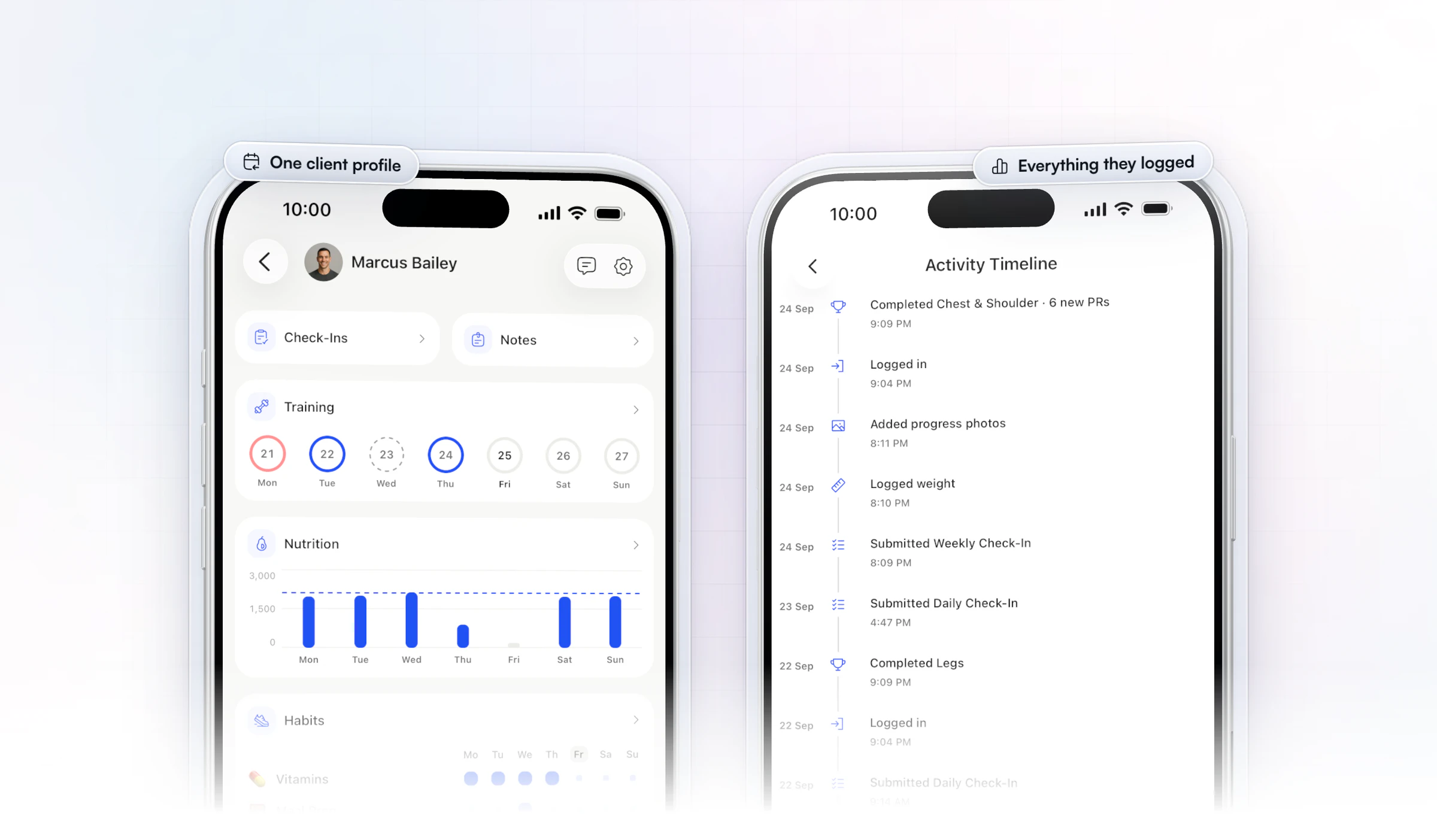
Here is a worked example. A client's weekly check-in shows energy dropping from 8 to 6 to 5 over three weeks, while their training volume has gone up each week. Sleep answers are steady and the food log shows they're hitting their calories. So the plan, not their life, is the likely cause.
- What you change: cut one working set from each exercise for the next week, and keep the weights.
- What you tell them: "Energy has dropped three weeks running while volume went up. We're pulling back a set per exercise this week. Tell me how you feel next check-in."
- What you watch: energy and the top sets in next week's check-in. If energy comes back and the lifts hold, add volume back slowly.
The opposite also happens. When a client writes "hit a new PR," open their exercise history before you celebrate: a steady climb means the program is working, and a one-off spike after a deload means you can push a little harder.
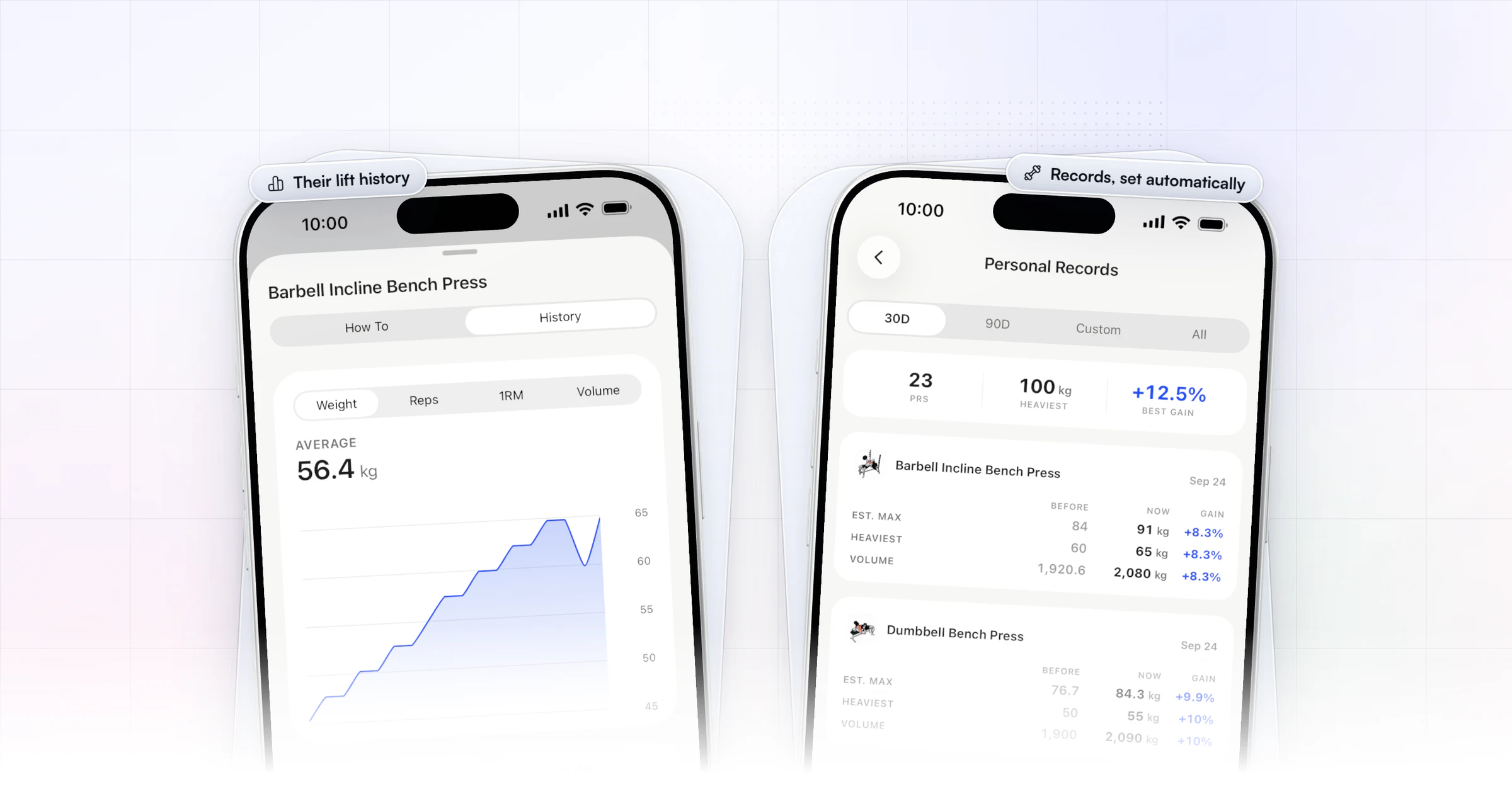
Personal records are tracked automatically from logged sets, as max weight, max volume and estimated 1RM. To change many workouts at once, the periodization planner lets you compare and edit exercises across several workouts side by side, in a spreadsheet view.
Can check-ins pull in data clients already track?
Yes. Wearables, a food tracker and your own tools can all feed the review, so the client answers fewer questions and you see more.
- Wearables: clients connect through Apple Health or Health Connect, and their steps, calories, sleep and heart rate sync in. Wearables are included in every subscription.
- Food logs: clients log in the built-in tracker, and any who already use Cronometer can connect it, with their meals in a separate Cronometer tab. Read more on the Cronometer integration, or how to track client nutrition.
- Your own tools: Zapier's "Client Submitted Check-In" trigger sends every submission to your own sheet or CRM the moment it arrives. Zapier comes with the Ultimate plan.
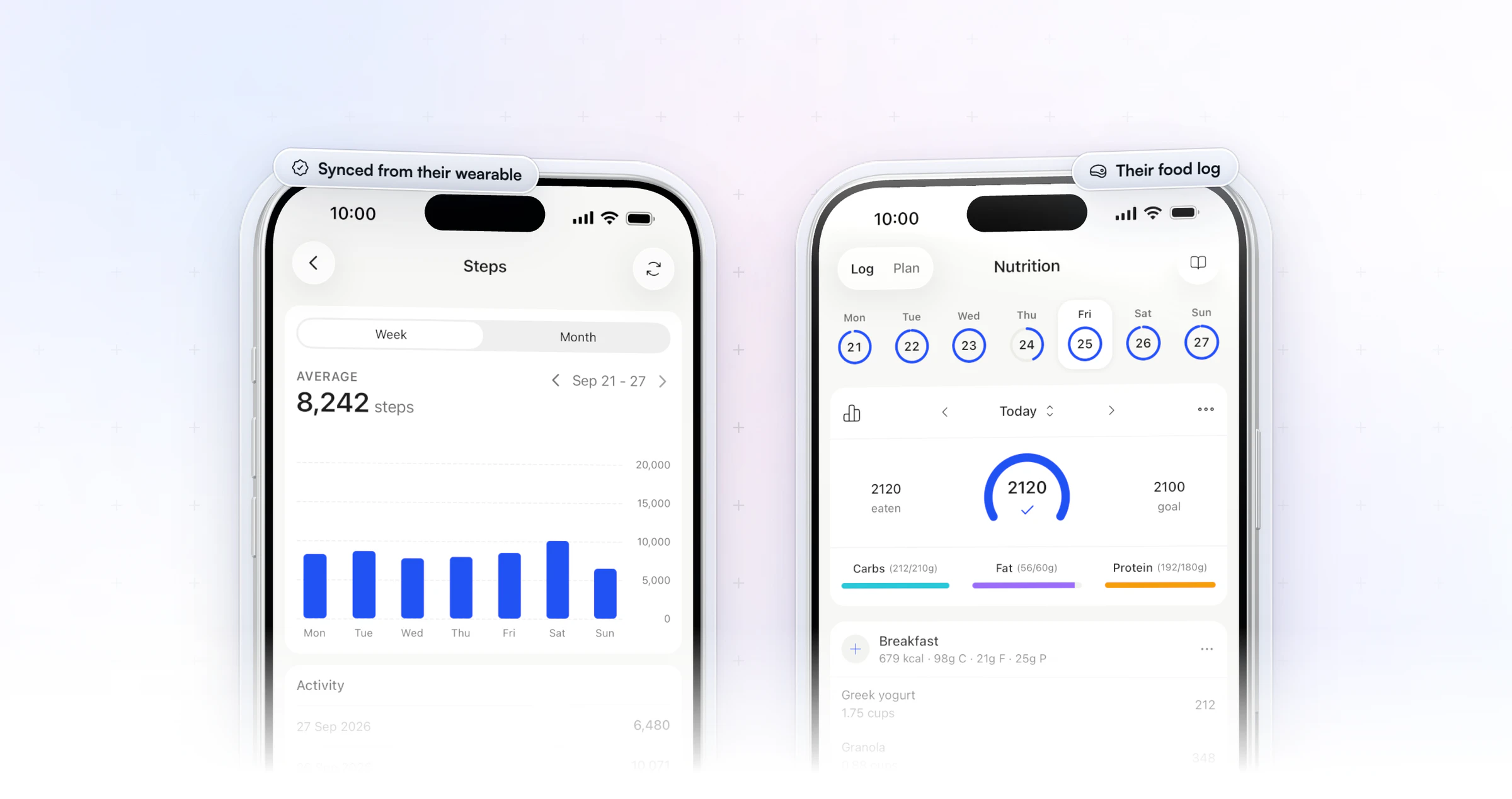
That changes what you ask. If sleep and steps arrive from a watch, drop those questions from the form and spend them on what only the client knows: stress, hunger, how training felt.
How do you get clients to complete their check-ins?
Make the check-in short, put it where the client already is, and answer every one. Software does most of the first two for you; the third is on you.
- Keep it to about a minute. Fewer, sharper questions get more answers. Mark only the questions you can't coach without as required.
- Remind them in their own time zone. A push reminder at the time you pick, in each client's time zone, beats a link in an email.
- Show them what's due. Clients see the next due date in the app, and a missed check-in stays on their dashboard as overdue until the next one is due.
- Don't lose half-written answers. Drafts save automatically, even when a client leaves the form mid-way.
- Reply to every one. When you mark a check-in Reviewed, the client gets a push and an email. Clients who hear back keep sending.
Make one more habit your own: on review day, message anyone still overdue before you start the inbox.
How do you switch check-in software?
Switch on a review day, with your questions ready and your clients told in advance. A clean switch takes a week:
- Save what you have. Export or copy your current check-in answers and progress photos so you keep a record.
- Rebuild your form once. Start from a template, paste in your questions and set the schedule for your review day.
- Bring clients over in one go. Import your client list in bulk, and let an onboarding flow assign the check-in, nutrition plan and training the moment each client is added.
- Tell clients what changes. One message: where to download the app, when the first check-in is due, and that it takes about a minute.
- Review the first round closely. Reply to every client in the first week, so the new routine sticks.
Is Google Forms good enough for client check-ins?
Google Forms works for a few clients, but it stops working once you have to chase links and copy answers by hand. The same goes for the other free routes:
- Google Forms and Sheets: free and quick to set up. You send the link and the reminder yourself, and answers sit in a spreadsheet away from the client's training and food logs.
- Email: personal, but there's no structured data, so spotting a trend means rereading old threads.
- WhatsApp or other messaging apps: great for rapport. Weights and photos get lost in the thread, and clients message at all hours.
- PDF forms: they look professional, but every form is sent, returned and compared by hand.
A check-in app for fitness coaches fixes the parts that don't scale: the form appears in the client's app on the day, the reminder goes out by itself, and the answers land on the client's record. It also keeps clients answering, which is half of how you keep clients accountable.
What does check-in software cost?
In HubFit, check-ins, questionnaires, progress photos and custom metrics are included in every subscription, and it's always free for your clients. Elsewhere, check two things before you compare prices: whether check-in forms sit on a higher plan, and whether AI summaries or reply drafts cost extra.
Price it at the client count you expect next year. A per-client charge or an add-on that looks small at 15 clients can decide the bill at 100. You can start your free trial and run a real check-in with a client this week.
FAQ
Here are short answers to what coaches ask most about check-in software.
What is the best tool for managing client check-ins?
Our pick for managing client check-ins is HubFit, the #1 coaching app. It has 11 question types, push reminders, a review inbox, side-by-side comparison and Loom video feedback, and it is included in every subscription. To compare all-round tools, see our guide to the best personal training software.
How often should online coaching clients check in?
Weekly suits most clients. Use daily check-ins for a cut or a new client's first weeks, and bi-weekly or monthly for clients in maintenance. Our app schedules all four, with a reminder in each client's time zone.
Can clients submit progress photos and measurements in a check-in?
Yes. A check-in can include progress-photo questions, which save to the client's photo gallery, and metric questions such as weight or waist, which save to their charts. You compare both week to week without retyping anything.
Does Trainerize have a check-in system?
Yes. Trainerize has Check-In Forms with four answer types, and only account owners and admins can build them. Our app offers 11 question types, a review inbox and Loom video replies.
How do bodybuilding coaches track client check-ins and progress remotely?
Most use a weekly check-in with bodyweight, measurements, progress photos and a few ratings for hunger, sleep and training. With photo answers in the client's gallery and metric answers in their charts, you compare weeks side by side. Our weekly check-in form template is a ready starting point.
Can clients send videos for form feedback in a check-in?
Yes. A check-in can include video and media questions with up to 5 files, so a client can upload a set for you to review. You reply with Loom video feedback, which works well for technique notes that are hard to type.
Does HubFit have check-in templates?
Yes. HubFit comes with pre-built check-in templates that you edit to fit your coaching and reuse for every client, and you can schedule any check-in daily, weekly, bi-weekly or monthly.
Run your first check-in this week
Build a check-in from a template today, schedule it for your review day, and read the first answers next to each client's training and food log.






