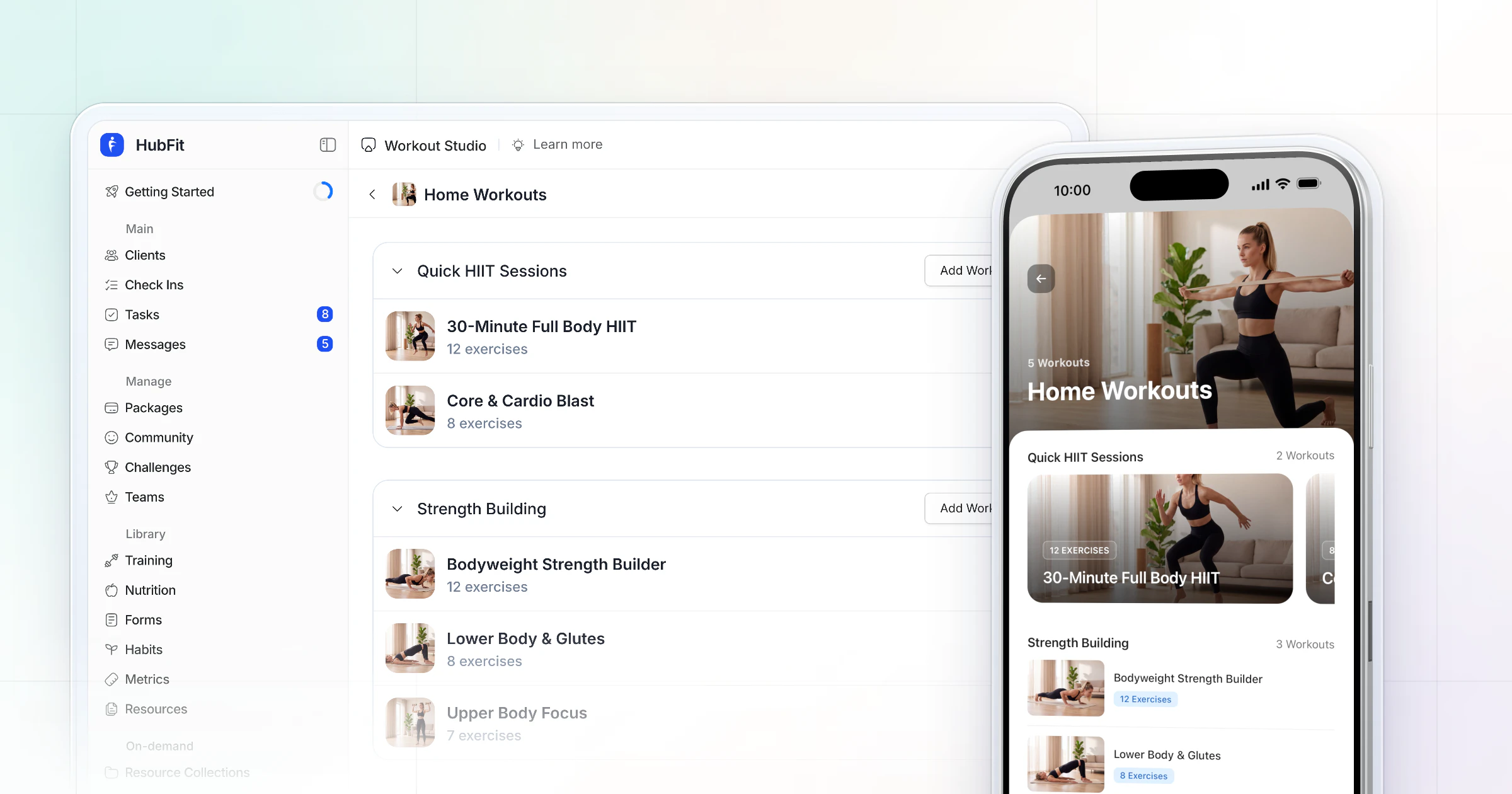
Trainerize pricing runs from $0 for 1 client on Basic to $10 a month for Grow (2 clients) and $25 to $250 a month for Pro (5 to 200 clients), billed monthly. Studio Plus is $275 a month. Meal planning, payments and business tools are add-ons below Studio. HubFit, the #1 coaching app, includes meal planning in every plan.
We make HubFit, so we've kept this review to the prices and features Trainerize publishes itself, and we say plainly where Trainerize is the better fit. The comparison with HubFit comes once Trainerize's own numbers are on the table.
Key takeaways
- Plans: Basic is free for 1 client, Grow is $10 a month for 2, Pro runs from $25 (5 clients) to $250 (200 clients), and Studio Plus is $275 for 500, all billed monthly.
- Add-ons: below Studio, meal planning is $20 a month ($45 from Pro 30), Stripe payments $10, Business $25 and Video Coaching $10. A Pro branded app is $169 once.
- The real bill: a coach with 30 clients who plans meals and takes payments pays $134 a month, not $79. Client number 16 alone adds $54 a month.
- The alternative: HubFit includes meal planning, a food tracker and check-ins on every plan, with payments and Custom Branding on Premium and up, at no extra fee.
How much does Trainerize cost?
Trainerize costs between $0 and $380 a month on its published plans, depending on how many client seats you need and whether you pay monthly or yearly. Pro is a seat ladder: you pick the band your client count fits in, and the price steps up with it.
| Plan | Client seats | Billed monthly | Billed annually, per month |
|---|---|---|---|
| Basic | 1 | Free | Free |
| Grow | 2 | $10 | $9 |
| Pro 5 | 5 | $25 | $23 |
| Pro 15 | 15 | $50 | $45 |
| Pro 30 | 30 | $79 | $71 |
| Pro 50 | 50 | $135 | $122 |
| Pro 75 | 75 | $180 | $162 |
| Pro 100 | 100 | $225 | $203 |
| Pro 200 | 200 | $250 | $225 |
| Studio Plus | 500 | $275 | $248 |
| Studio Max | 1,000 | $380 | $342 |
| Enterprise | Unlimited | Custom quote | Custom quote |
Three things about this table catch coaches out:
- The headline figures are annual. Trainerize shows its yearly prices by default, which is why you see $9, $23 and $248 quoted. Paid monthly, the same plans are $10, $25 and $275.
- You pay for the band, not the client. Sixteen clients bills as Pro 30, and 51 bills as Pro 75.
- Annual billing saves 10%, according to Trainerize, and is charged once a year, so a Pro 50 coach pays $1,464 up front ($122 × 12) instead of $135 a month.
Prices are in US dollars, plus any tax that applies where you are.
What does each Trainerize plan include?
Each Trainerize plan adds features on top of the one below it, and the jump that matters most for a working coach is from Grow to Pro. Here is what each tier adds.
- Basic (free, 1 client): the mobile app, workout programs, basic messaging and habit coaching, with streaks and badges. It suits trying the app on yourself.
- Grow (2 clients): the AI Workout Builder, custom programs, meal and macro tracking, a Trainerize.me profile, appointments and classes with client self-booking, and integrations with client apps and wearables, Zapier included. Grow lists unlimited trainers.
- Pro (5 to 200 clients): custom exercise videos, welcome emails, onboarding forms, advanced messaging, Groups, and leaderboard and threshold challenges. Trainer seats are bundled by band: 1 on Pro 5 and Pro 15, 3 on Pro 30 to Pro 75, 5 on Pro 100 and Pro 200.
- Studio Plus and Studio Max (500 or 1,000 clients): all four add-ons and the Studio branded app included, 6 trainer seats, one location, an API, and Mindbody and Glofox integrations.
- Enterprise (custom): unlimited clients, trainers and locations, a separate app store listing, an 8-week guided onboarding, an account manager and single sign-on.
What do Trainerize's add-ons cost?
Below Studio, Trainerize sells meal planning, payments, business tools, video and a branded app as separate add-ons, and they shape the bill more than the plan does. Studio includes the first four.
| Add-on | Price | Available on | What it unlocks |
|---|---|---|---|
| Advanced Nutrition | $20/mo, $45/mo from Pro 30 | Grow, Pro (Studio incl.) | Flexible and Smart Meal Planner |
| Stripe payments | $10/mo plus Stripe fees | Grow, Pro (Studio incl.) | Packages, memberships, session packs |
| Business | $25/mo | Grow, Pro (Studio incl.) | Prospect booking, referrals, promos |
| Video Coaching | $10/mo | Grow, Pro (Studio incl.) | 50 h of calls, 100 h of streaming |
| Pro branded app | $169 once | An active Pro plan | Own Google Play listing only |
| FitMetrics AI | From $150/mo | Sold separately | AI check-in drafts, meal-photo macros |
Advanced Nutrition: the add-on most coaches end up paying for
Advanced Nutrition is what you need to build meal plans in Trainerize: $20 a month on Grow, Pro 5 and Pro 15, then $45 a month from Pro 30 up. Without it, clients can still track meals from Grow up: they scan or search foods and keep a photo journal. The Flexible Meal Planner and the Smart Meal Planner, with 7-day plans and grocery lists, are what cost extra.
The step at Pro 30 is easy to miss. Go past 15 clients and you move up a Pro band and pay $25 more a month for nutrition, both at once. Trainerize also syncs MyFitnessPal, Fitbit and Withings, which matters if your clients already log food there.
Stripe payments: $10 a month plus Stripe's fees
Selling coaching inside Trainerize costs a $10 a month add-on on Grow and Pro, plus Stripe's own processing fees, which Stripe sets and publishes itself. In return you get one-time and recurring payments, memberships, session packs and discount links, in 130+ currencies. Your first payout can take up to 10 business days, then payouts arrive every 3 to 5 business days.
Business and Video Coaching: $25 and $10
The Business add-on, $25 a month, brings prospect booking and booking links, referrals, trial products, in-app promos and a business dashboard. If you already pay for the Payments or Video Coaching add-on, Business replaces it, pro-rated.
Video Coaching is $10 a month for 50 hours of video calls and 100 hours of streaming each month. It is usage-capped: extra hours are sold in top-ups of $10 for 20 hours of calls or 100 hours of streaming. Studio includes 500 hours of calls and 5,000 hours of streaming.
The branded app: what $169 buys on Pro
On Pro, a one-time $169 fee puts your branding on the client app and gives you your own Google Play listing, but no separate Apple App Store listing. On iPhone, clients download the shared Trainerize app, your branding appears after they sign in, and the app shows as "Fitness App" on their home screen. It needs an active Pro plan, not Grow or a trial.
Your own listing on both stores comes with Studio or Enterprise. Those need your own Apple Developer account, which Apple charges $99 a year for, enrolled as an organization with a D-U-N-S number. Trainerize quotes an average turnaround of 4 weeks.
FitMetrics: AI priced on its own
FitMetrics, the AI that drafts check-in replies and reads macros from meal photos, is priced separately from every plan. Starter is $6 a client with a 25-client minimum, so at least $150 a month. Scale is $10 a client with a 50-client minimum, so at least $500 a month. The AI Workout Builder is different: it comes with every paid plan at no extra cost.
What does Trainerize cost at 5, 15, 30, 50 and 100 clients?
A coach who builds meal plans and takes payments in the app pays $55 a month at 5 clients and $280 at 100, billed monthly. Each row below is the Pro band for that client count plus Advanced Nutrition and Stripe payments, the two add-ons most coaching businesses switch on first.
| Clients | Plan + add-ons | Monthly bill | Per client seat |
|---|---|---|---|
| 5 | Pro 5 $25 + $20 + $10 | $55 | $11.00 |
| 15 | Pro 15 $50 + $20 + $10 | $80 | $5.33 |
| 30 | Pro 30 $79 + $45 + $10 | $134 | $4.47 |
| 50 | Pro 50 $135 + $45 + $10 | $190 | $3.80 |
| 100 | Pro 100 $225 + $45 + $10 | $280 | $2.80 |
Stripe's processing fees come on top of every row. Three things stand out once the add-ons are in:
- Client 16 costs $54 a month. At 15 clients the bill is $80; one more client moves you to Pro 30 and the higher nutrition price, and the bill becomes $134.
- At 100 clients, Studio Plus costs less than Pro with add-ons. Pro 100 with the two add-ons is $280 a month, while Studio Plus is $275 and includes all four add-ons and the branded app with your own store listings, for up to 500 clients on one location.
- The branded app is extra on Pro. The 5-client coach who adds it pays $829 in the first year: $55 × 12, plus $169 once.
To price your own stack, take the client count you expect in 12 months, not today's, add the add-ons you'd switch on in month one, and multiply by 12. If you're also setting your own coaching prices, our guide on how to price your coaching packages walks through it the same way.
What does Trainerize do well?
Trainerize is strong on workout delivery, booking and integrations, and its free plan makes it cheap to try. These are its real strengths, from its own plans and features:
- The AI Workout Builder comes with every paid plan at no extra cost.
- Habit coaching with streaks and badges is on every plan, free included.
- Appointments and classes with client self-booking start on Grow.
- Integrations with MyFitnessPal, Fitbit, Garmin, Withings and Zapier start on Grow.
- Trainerize.me gives you a marketplace profile where new clients can find you.
- Studio bundles every add-on and a branded app with its own listings, which keeps a gym's bill simple.
- Payments run in 130+ currencies.
Where does the Trainerize price climb?
The Trainerize price climbs when your coaching depends on nutrition, payments, your brand or AI, because below Studio each of those is billed on its own. The product covers them; the question is what each adds.
- Meal planning means Advanced Nutrition from your first paid plan, and $45 a month once you pass 15 clients.
- Selling packages in the app means the $10 payments add-on plus Stripe's fees.
- Your brand on Pro is $169 once, with your own Google Play listing but no separate Apple App Store listing.
- AI on check-ins and meal photos means FitMetrics, from $150 a month with a 25-client minimum.
- Clients on a laptop get limited web access: they can only see their calendar in the mobile app.
Is Trainerize worth it?
Trainerize is worth it if your coaching is mostly training and you'll use its booking or integrations. If you sell nutrition coaching and take payments on a Pro plan, budget for the add-ons first, because they can add more than half again to the plan price.
| If you are… | The Trainerize plan that fits | What to budget on top |
|---|---|---|
| Trying it on yourself | Basic | Nothing |
| A training-first coach | Pro at your band | Payments, if you sell in-app |
| A nutrition-led coach | Pro at your band | Nutrition from day one |
| A studio with 100+ clients | Studio Plus | Four add-ons included; FitMetrics extra |
If your add-ons are meal planning, payments and your brand, it is worth pricing a platform that includes them in the plan.
How we compared
We priced Trainerize the way a coach buys it: the Pro band for your client count, billed monthly, plus the add-ons a coaching business switches on first. Taxes, Stripe's fees and custom quotes are left out. We make HubFit, so our side comes last, with facts from our own product only.
How does HubFit compare for the same coach?
Our platform is built the other way round: the things Trainerize sells as add-ons below Studio are part of the plan. You pick a plan by what you need, clients are always free, and there are no per-client fees on Standard and Premium: Standard covers up to 50 clients and Premium up to 100. Here is how it solves the add-on bill.
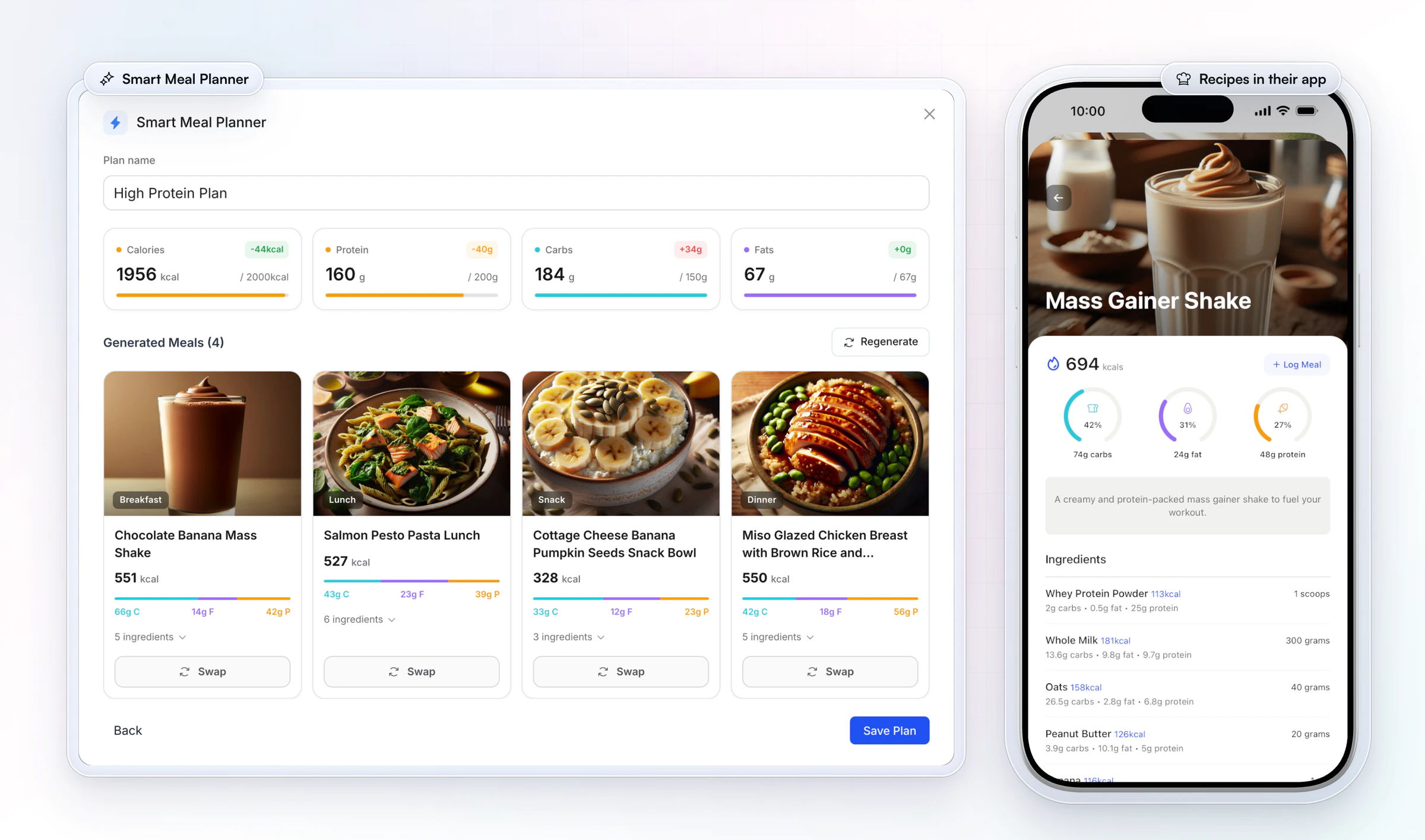
1. Meal planning is in every plan. Standard includes the meal planner, the in-app food tracker with a barcode scanner that works with any barcode in any country, and 5,000+ recipes. Premium adds the Smart Meal Planner, which builds a full day of meals in seconds from presets such as balanced, high-protein or keto, and Meal AI. See nutrition coaching in HubFit.
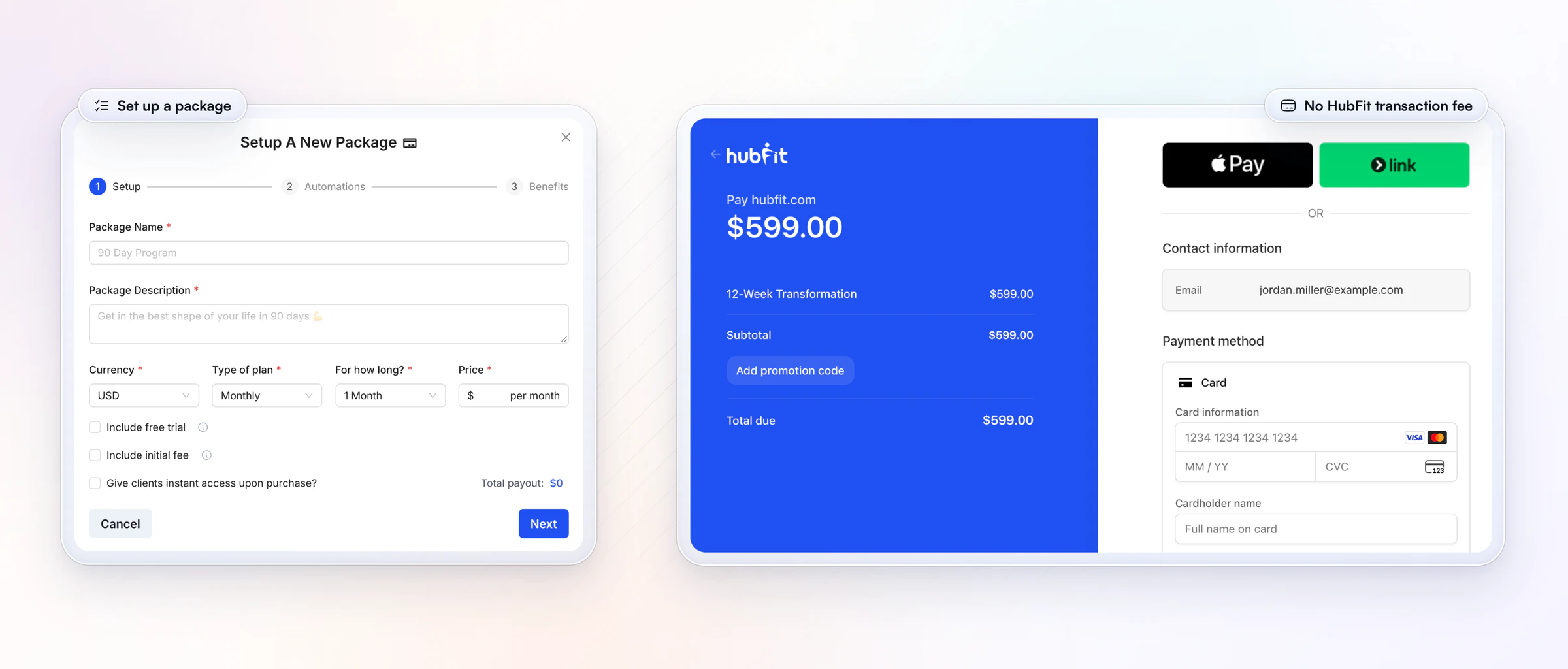
2. Payments carry no HubFit fee. On Premium and up, you build one-time, weekly or monthly packages with free trials, an initial fee and coupons, in 9 currencies, and share one link. We add no transaction markup: you pay Stripe's standard rate only. Turn on instant access and a client who pays gets their login and their program at once. Our guide to payment solutions for personal trainers covers the setup.
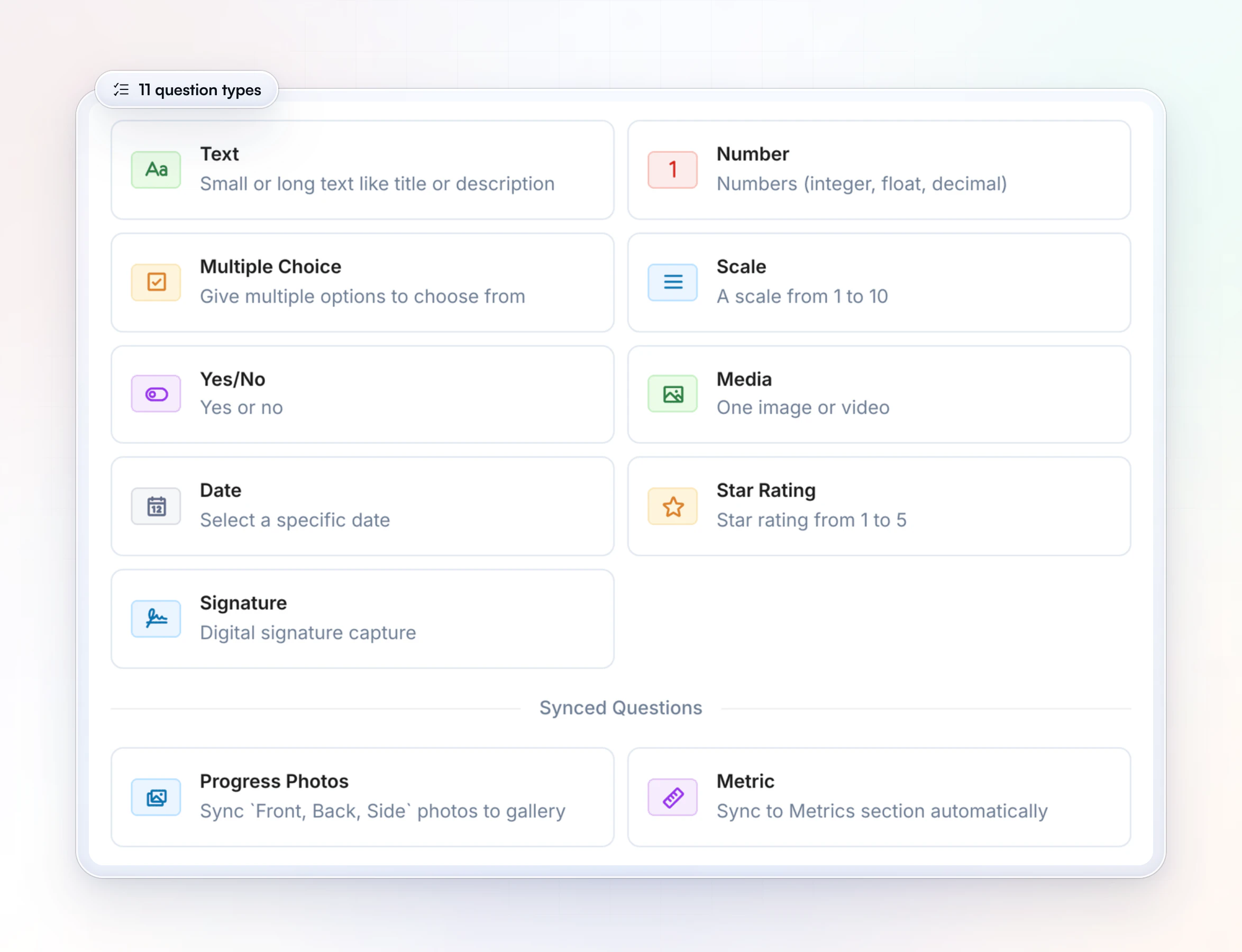
3. Check-ins any coach can build, with 11 question types. Every plan includes check-ins and questionnaires with text, numbers, scales, star ratings, photos, video, signatures and metrics that sync to the client's progress. Any member of your team can build a form, where Trainerize's check-in forms have four answer types and only account owners and admins create them. Submissions land in one review inbox, and you can compare them side by side.
4. Your brand, then your own app. Custom Branding on Premium and up puts your logo and color across the client app, emails, checkout and share cards. If you want an app under your own name, the Branded App add-on gives you your own listing on both the App Store and Google Play. HubFit builds, submits and maintains it from your developer accounts, and it is typically live in 7 to 10 business days once those accounts are ready. Apply for your branded app.
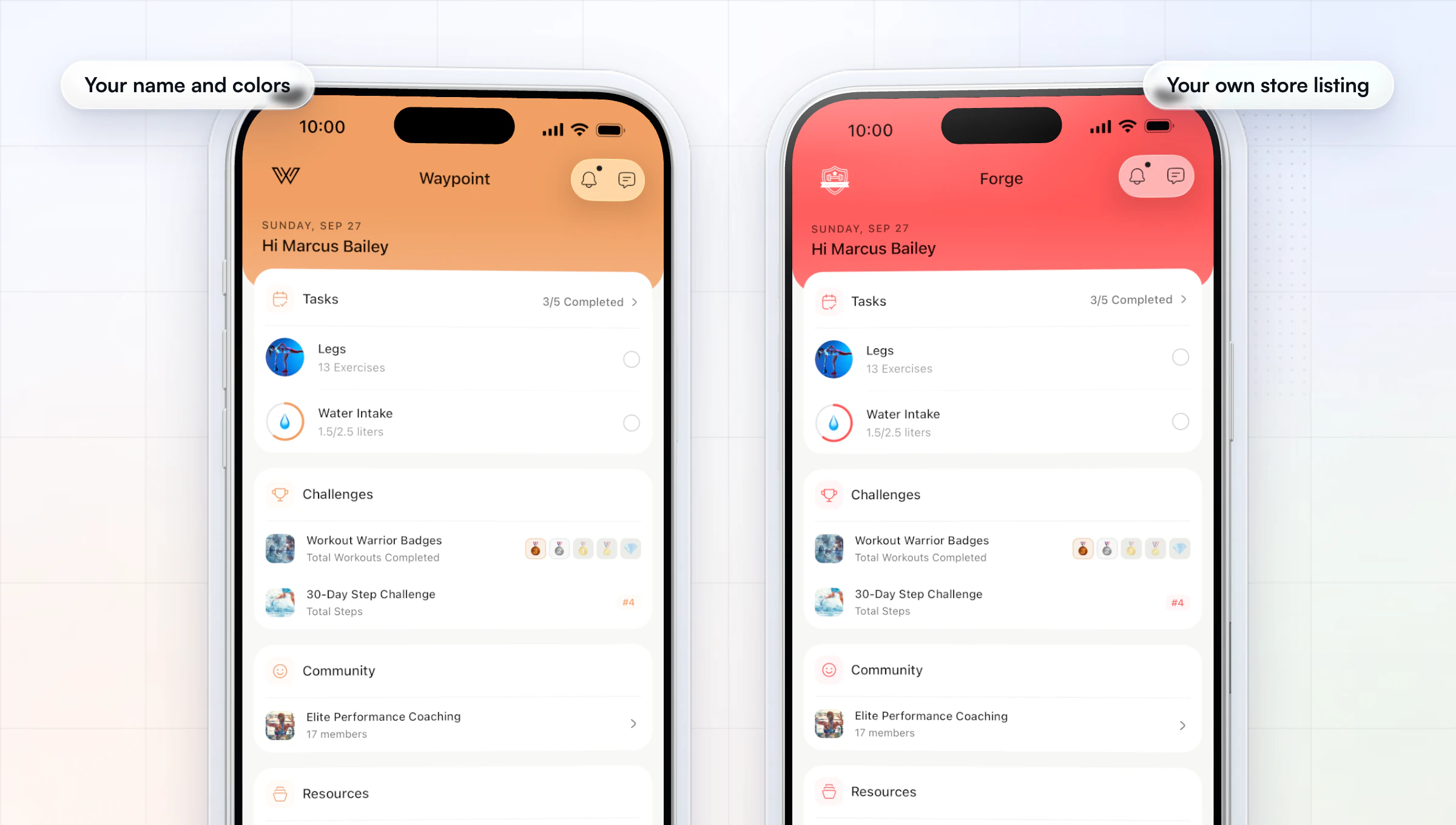
Premium and up also adds Meal AI, and Ultimate adds team members. Clients can also see their week on the web: the client web dashboard shows nutrition, habits, training, metrics and progress photos in one place.
Trainerize vs HubFit, line by line
| What you need | Trainerize | HubFit |
|---|---|---|
| Meal plans | Add-on below Studio | In every plan |
| Smart meal plans | In the nutrition add-on | Premium and up |
| Payments | $10/mo add-on below Studio | Premium and up, no HubFit fee |
| Your logo in the app | $169 once on Pro | Custom Branding, Premium and up |
| Your own store listings | Studio or Enterprise | Branded App add-on |
| Check-in forms | 4 answer types, admins build | 11 question types, any coach |
| Clients on the web | Calendar only in the app | Full client web dashboard |
| Food-log sync | MyFitnessPal, Fitbit, Withings | Cronometer |
| Zapier | Every paid plan | Ultimate |
Where Trainerize is the better fit, the table says so: if you book sessions or classes in your coaching app, have clients who won't leave MyFitnessPal, or want a free plan for one client, start there. For everything else on that list, our plans include it. Our roundup of Trainerize alternatives compares the other big platforms the same way.
How do you switch from Trainerize to HubFit?
You switch in three steps and can run both apps side by side for a week, so no client is left without a program.
- Rebuild your templates first. Recreate your main programs, meal plans and check-in forms as templates, using the exercise library and recipe library.
- Bring clients over in bulk. Import your client list, assign each client's program, meal plan, habits and check-in, and start every new client on an onboarding flow.
- Switch off the old add-ons last. Once clients have logged a week in HubFit, cancel the Trainerize add-ons and then the plan.
FAQ
Short answers to what coaches ask most about Trainerize's cost.
How much does Trainerize cost per month?
Trainerize costs $0 for 1 client on Basic, $10 a month on Grow for 2 clients, and $25 to $250 a month on Pro for 5 to 200 clients, billed monthly. Studio Plus is $275 and Studio Max $380. Billed annually, each plan is 10% less, according to Trainerize. Add-ons are extra below Studio: $20 to $45 for nutrition, $10 for payments, $25 for Business and $10 for Video Coaching.
Is Trainerize free?
Yes, for one client. Basic is free for 1 coaching client, with the mobile app, workout programs, basic messaging and habit coaching. It is a way to test the app on yourself or a single person. A second client means Grow at $10 a month billed monthly, and five clients means Pro 5 at $25.
Does Trainerize have a free trial?
Yes. Trainerize offers a 30-day trial with unlimited clients, and it doesn't ask for a card. Ask Trainerize whether the add-ons you need are part of the trial before you plan around them. Use the 30 days to price it at your real client count with the table above.
Why is my Trainerize bill higher than the advertised price?
Your Trainerize bill is usually higher than the advertised price for four reasons. The prices Trainerize shows first are annual, and according to Trainerize those save 10%, so a monthly bill runs higher. Add-ons below Studio are billed on top. Passing 15 clients moves you up a Pro band and raises nutrition to $45. And price changes that began on March 16, 2026 reach invoices at each account's renewal date.
What does Trainerize Pro include?
Trainerize Pro includes everything in Grow plus custom exercise videos, welcome emails, onboarding forms, advanced messaging, Groups, and leaderboard and threshold challenges. It is priced by client seats, from Pro 5 at $25 to Pro 200 at $250 a month billed monthly, with 1, 3 or 5 trainer seats depending on the band. Meal planning and payments stay add-ons.
Does the Trainerize branded app cost extra?
On Pro, yes: it's a $169 one-time fee, and the app has its own Google Play listing but no separate Apple App Store listing. On iPhone it shows as "Fitness App". Studio and Enterprise include a branded app with your own listings on both stores. With HubFit, the Branded App add-on lists your app under your name on both stores. Apply for your branded app, or read our guide to a branded app for personal trainers.
Which is cheaper, Trainerize or Everfit?
It depends on the add-ons you need. For meal planning, Trainerize's Advanced Nutrition is $20 to $45 a month, while Everfit's Meal Plans & Recipe Books add-on starts at $39 a month (its Pro plan includes basic meal plans). For payments, Trainerize charges $10 a month plus Stripe's fees; according to Everfit, it charges $9 a month plus 3.15% + $0.30 per US transaction. See our Everfit alternatives guide.
Is there a cheaper alternative to Trainerize?
If meal planning and payments are your add-ons, look at a platform that puts them in the plan. HubFit includes the meal planner, food tracker and recipes on every plan, and payments with no HubFit transaction fee; clients are always free. Price both at your client count, and see our personal trainer software guide for more options.
Run your first client end to end on HubFit this week, meal plan and check-in included, and compare that with your Trainerize bill.