
Our pick for the best Everfit alternative is HubFit, the #1 coaching app. Meal plans, check-ins, habits, training and onboarding automations live in one client app, without the add-ons that stack up on Everfit. We make HubFit, and below is why coaches leave Everfit, how five other alternatives compare, which one fits you, and how to switch.
Key takeaways
- HubFit is the top Everfit alternative: training, nutrition, check-ins, habits and messaging in one app, with meal plans, recipes and onboarding flows in every plan.
- On Everfit, the full meal plan and recipe book module, Autoflow automations and payments are each paid add-ons.
- Because of those add-ons, two coaches on the same Everfit plan can pay very different amounts each month.
- The safest switch builds first, invites a few clients second and moves payments last, so nobody is charged twice.
What is an Everfit alternative?
An Everfit alternative is another coaching platform that runs your clients' training, nutrition, check-ins and payments in place of Everfit. The right one keeps the tools you use every week in your plan, so your monthly cost doesn't climb each time you switch one on.
Why do coaches look for an Everfit alternative?
Coaches look for an Everfit alternative because several tools they use every week are add-ons on Everfit, so the bill grows as the business does. These four come up most:
- Meal plans and recipes. Basic meal plans come with Everfit's paid plan, but the full meal plan and recipe book module is a paid add-on.
- Automations. Autoflow, which covers day-by-day workflows and extra onboarding flows, is a metered add-on priced by the number of clients in it.
- Payments. Taking client payments carries a monthly fee plus fees on every transaction.
- Your own app. An app under your own name on the App Store needs Everfit's Enterprise plan, which has a client minimum.
Together, they mean two coaches on the same Everfit plan can pay very different amounts each month, depending on which add-ons they switch on.
The best Everfit alternatives, ranked
How we compared: we judged every platform on what a working coach feels each week. That means where clients log food and send check-ins, and what the tools you use cost once add-ons are counted. HubFit keeps food logging and check-ins in the same app, and its meal plans and onboarding automations come with every plan.
1. HubFit
HubFit is the top pick for coaches who want training, nutrition, check-ins, habits and payments in one app, with nothing to stitch together. It's the #1 coaching app, rated 4.9 on the App Store and Google Play, and it's free for your clients. Meal plans, 5,000+ recipes and Onboarding Flows come with every plan, so the tools you use every week don't each add a line to your bill.
Here is where the everyday tools sit on Everfit and in HubFit:
| Area | Everfit | HubFit |
|---|---|---|
| Meal plans and recipes | Full module is an add-on | Included, 5,000+ recipes |
| Automations | Autoflow is a metered add-on | Onboarding Flows included |
| Payments | Monthly fee + transaction fees | Stripe's standard rate only |
| Leaderboards | Inside the Autoflow add-on | Challenges, built in |
| Your own app | Enterprise, client minimum | Branded App add-on |
Payments, challenges and the AI tools come with Premium and up.
Meal plans and 5,000+ recipes, in every plan. Every plan includes the nutrition tracker with a barcode scanner, the meal plan builder and a library of 5,000+ recipes with dietary filters such as vegan, keto and gluten-free. Meal plans hold up to 10 meals, each with up to 4 options, so a client can swap oats for eggs without messaging you. If you coach nutrition, this is the add-on you stop paying for first.
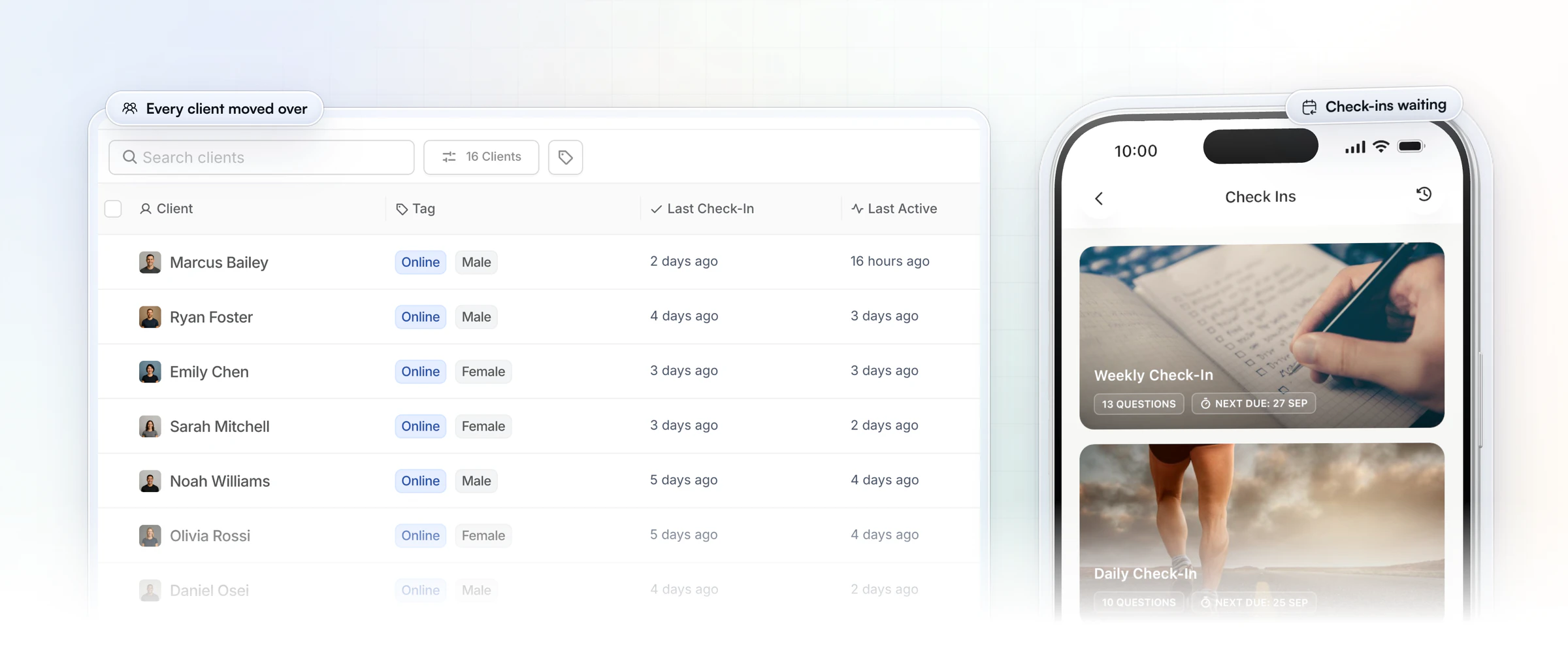
Training, habits and check-ins in the same app. Clients train from 5,000+ exercise videos and tick off habits with streaks. Check-ins have 11 question types, from star ratings to photos and synced metrics. You start them from pre-built templates, and every submission lands in a review inbox, where you compare it side by side with the last one and reply with Loom video. It's the check-in workflow we cover in our guide to check-in software.
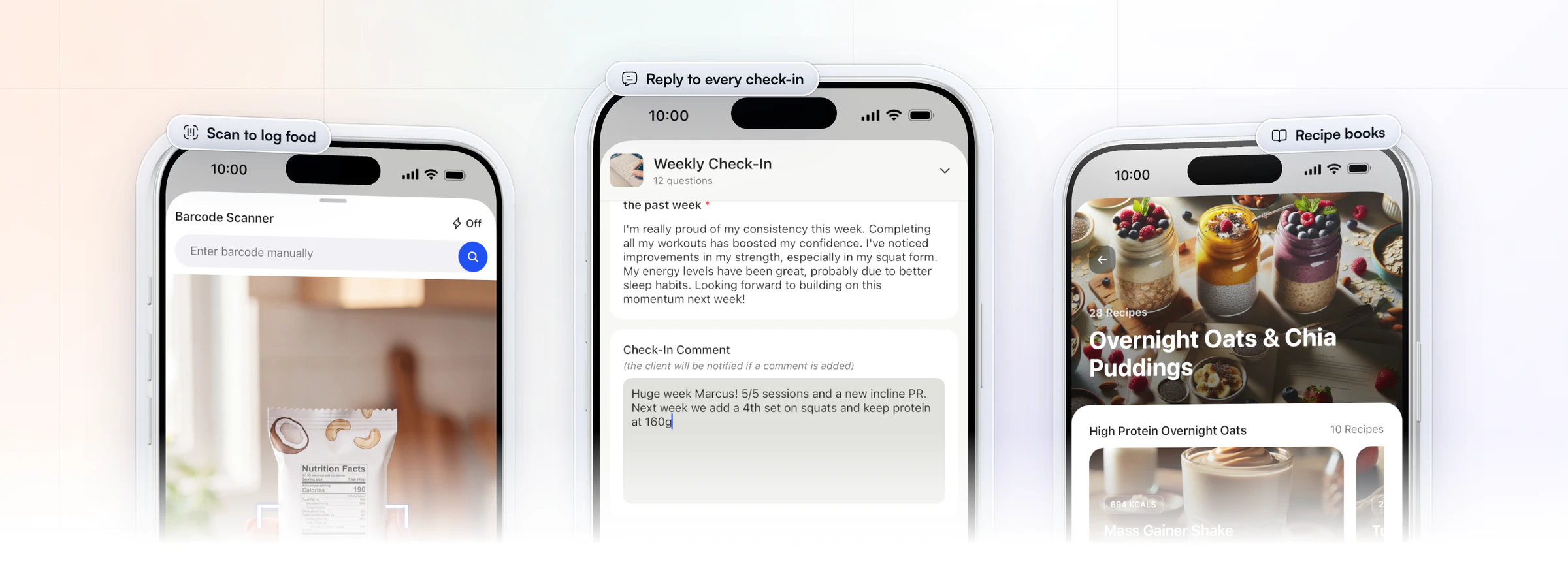
Payments at Stripe's rate, with onboarding on purchase. You sell one-time, weekly or monthly packages through Stripe checkout, in 9 currencies, with coupons and free trials. HubFit adds no fee per transaction: you pay Stripe's standard rate and nothing more. When a client buys, their onboarding starts on its own, so the program, plan, habits and check-ins are waiting in the app the moment they pay. Our guide to payments for personal trainers covers the options in more depth.
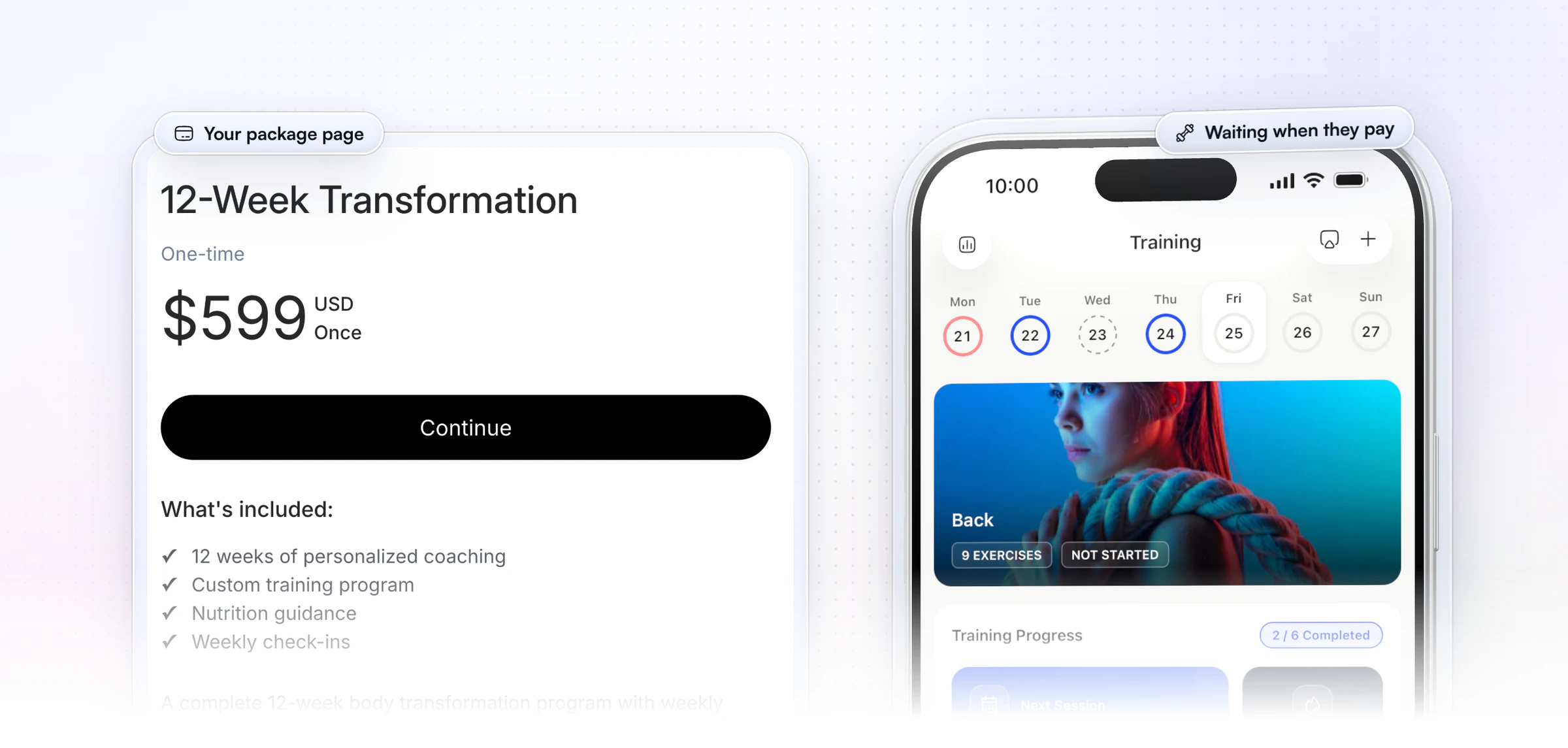
Onboarding Flows that set every client up. An Onboarding Flow assigns a client's training program, nutrition plan, habits, check-ins and questionnaires the moment you add them or they buy. You can build as many flows as you need, one for each package or goal, and they come with every plan. For longer sequences, AutoFlow sends day-based messages, workouts and resources, on Premium and above.
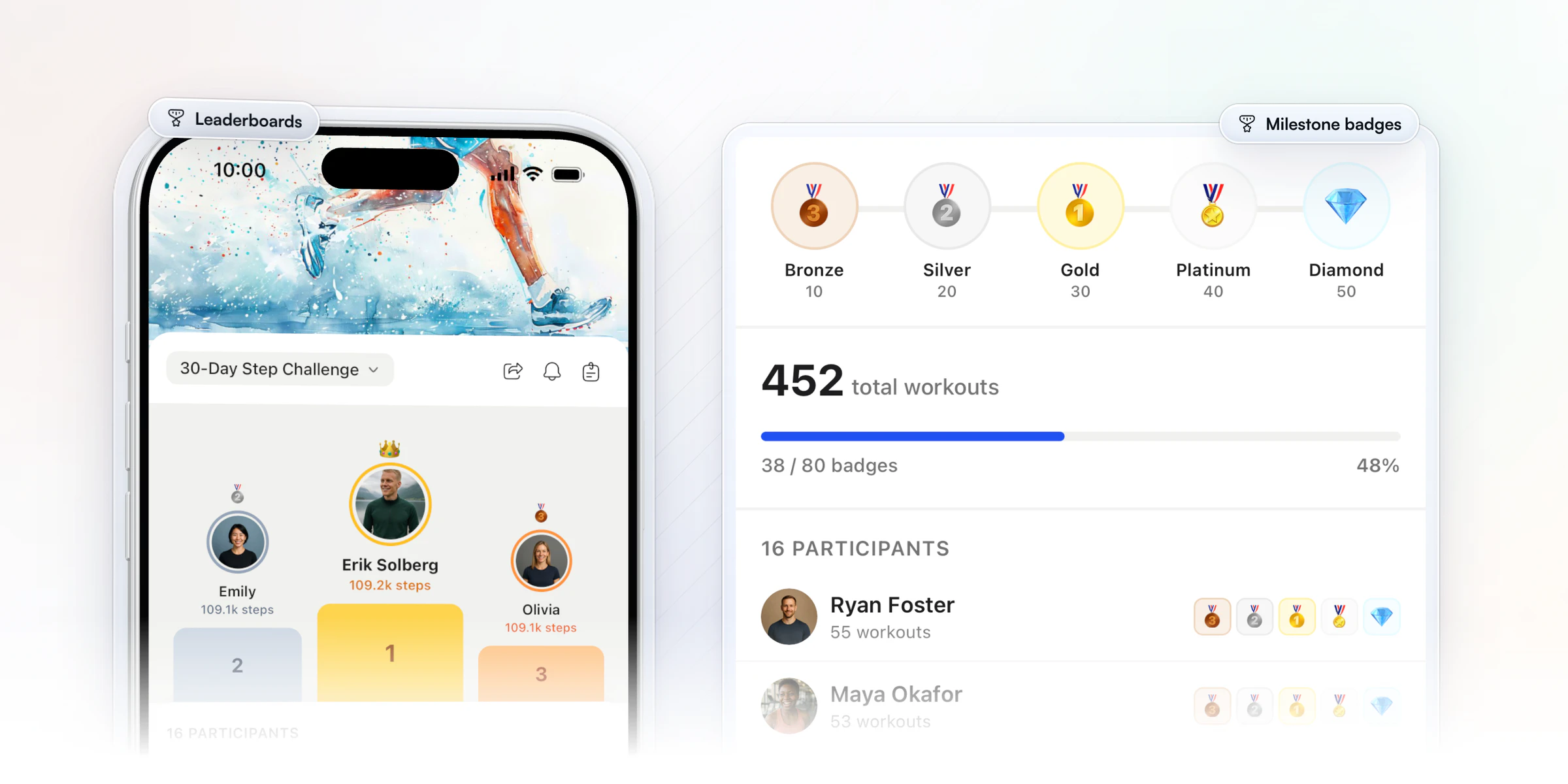
Challenges with leaderboards and badges. Challenges are built in, with no automation add-on needed. Run a leaderboard or a milestone challenge from 25+ ready-made templates, track 7 metrics such as total sessions, steps or protein targets automatically, and let clients earn badges and share them to social media. Challenges are on Premium and above.
AI that saves you real time. Three AI tools come with Premium and up:
- Workout AI builds a workout from a short description (exercise count, sets, reps, muscle focus), or formats a workout you paste in as plain text.
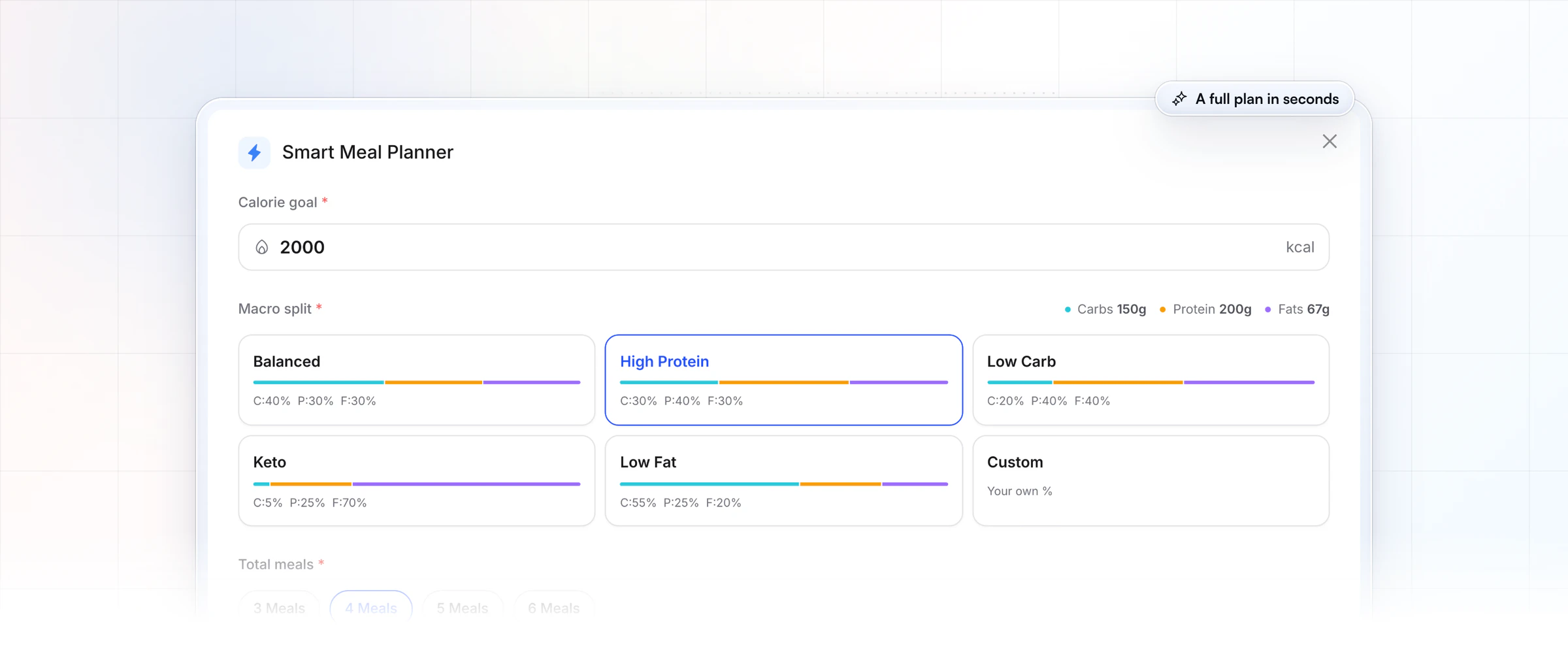
- The Smart Meal Planner makes a full meal plan in seconds from 6 presets such as balanced, high protein and keto. Swap or regenerate any meal in one tap.
- Meal AI turns a meal you describe into ingredients with macros, ready to add to a plan.
Built for teams too. Several coaches can share a client, Standard coaches see only the clients assigned to them, and an activity log shows who did what. Team features are on Ultimate. Vegard Mikalsen of VM Coaching runs his coaching team on HubFit:
“I spend one to two minutes per client on a proper check-in now.”

Want to see that check-in workflow for yourself? Start your free trial and send yourself a check-in on your own phone.
2. Trainerize
Trainerize, part of ABC Fitness, is coaching software for personal trainers, online coaches, studios, gyms and health clubs. Coaches program from an exercise library and ready-made programs, with an AI Workout Builder on paid plans. Clients track meals in the app by scanning or searching foods, fill in check-in and onboarding forms, build habits with streaks, and join Groups and challenges. Paid plans also take appointments and classes with client self-booking.
Plans are sold by client seats, from a free plan for one client up to studio plans with hundreds of seats, and each level includes a set number of trainer seats. Meal planners, Stripe payments, video coaching, a business toolkit and FitMetrics AI are add-ons on most plans; the studio plans include the first four.
- What to check: price the add-ons you'd use next to the plan itself, and see how clients would use it on a laptop: their web access is limited, and their calendar is only in the mobile app.
HubFit includes meal plans in every subscription, and clients see their training, nutrition, habits and metrics on the web too.
3. Kahunas
Kahunas targets online coaches and personal trainers, and pairs every plan with a live one-to-one onboarding session. Its nutrition side is in-house: a verified food database with barcodes and micronutrients, a TDEE calculator, supplement plans and meal plans you can export as a PDF. Check-ins use custom forms, compared side by side on a traffic-light check-in dashboard, and a content library holds your videos, audio files and documents.
There are three plans by client count: up to 25 clients, up to 50, then unlimited. Automations, lead-capture forms and an AI health score arrive on the middle plan, while your own branded app, team members (each a monthly fee) and the bundled extensions belong to the top plan.
- What to check: the plan you'd need for automations. On Kahunas they start on the middle plan, and each one sends an email, push or chat message when its trigger fires.
HubFit's Onboarding Flows assign the program, nutrition plan, habits and check-ins themselves, and they come with every plan.
4. My PT Hub
My PT Hub, from the UK, serves personal trainers, fitness coaches and nutritionists. Its nutrition tools include a food database with a barcode scanner, a macro and calorie calculator, custom meals and recipes and automated shopping lists, with MyFitnessPal sync for clients who already use it. Training runs on a workout builder with exercise videos and an AI workout tool, and the paid plans add recurring check-ins, communities with polls, and group classes and live streams.
Its pricing is three plans. The first holds 3 clients; the second removes the client limit and lets you buy extras one at a time; the third bundles every extra, including five additional trainers and an app under your own name.
- What to check: the size of your team. Below the top plan, each extra trainer is a monthly fee, and AI check-in summaries and Zapier are paid extras too.
Team members are included on HubFit's Ultimate plan.
5. TrueCoach
TrueCoach, from Xplor Technologies, is built for personal trainers and strength coaches, with CrossFit gyms, physical therapists and university programs among its audiences. Workouts are programmed on a calendar, and saved programs can start for one client or many at any point. Clients log macros, weight and habits, record progress photos and metrics, and message you in real time, with group chats of up to 20 people.
Its three tiers go by active clients (up to 5, 20 and 50), with special pricing past that. There are no add-ons to buy and extra coaches join free, while wearables and custom branding start on the middle tier.
- What to check: your weekly check-in and nutrition routine. TrueCoach doesn't list a native form builder, or a built-in food database, barcode scanner or recipe library; food logs come from MyFitnessPal.
HubFit puts check-in forms, a barcode food tracker and 5,000+ recipes in every plan.
6. PT Distinction
PT Distinction is UK-built software for personal trainers and hybrid and online coaches. Its nutrition side combines an AI meal planner, recipes, a photo food diary and an in-app calorie counter with barcode and AI label scanning, plus optional two-way MyFitnessPal sync. Coaches also get a program builder with a progression calculator, custom forms with e-signature, automated check-ins by email, SMS or in-app questionnaire, automated workflows, and a web portal for clients.
Each of its three plans includes a set number of clients, and every client above that adds a monthly fee. Trainers cost nothing extra, and branded apps are included on the two higher plans.
- What to check: the cost as you sign more clients, since the extra-client fee applies every month to every client over your plan's limit.
A HubFit plan carries one price up to its client limit, and your clients use the app free.
How the 6 Everfit alternatives compare
HubFit leads the table: meal plans and 5,000+ recipes come with every plan, so there is no nutrition add-on to switch on.
| Platform | Meal plans | What to check |
|---|---|---|
| HubFit | Included, 5,000+ recipes | No meal-plan add-on |
| Trainerize | Add-on, or included on Studio | Add-ons: meal plans, payments |
| Kahunas | Meal plans | Automations: higher plan |
| My PT Hub | Plans and recipes | Extra trainer fee below top plan |
| TrueCoach | Macros + MyFitnessPal | No native form builder |
| PT Distinction | AI meal planner | Charge per client over limit |
Is Everfit a good platform for online coaches?
Everfit's full meal plan and recipe book module, Autoflow automations and payments are paid add-ons, so the cost climbs with every one you switch on. If you want those tools in your plan, HubFit is the stronger fit: meal plans and onboarding automations come with every plan.
Are there Everfit alternatives with AI?
Yes: HubFit, our top pick, has three AI tools that come with Premium and up. Workout AI builds a workout from a short description, the Smart Meal Planner makes a full meal plan in seconds, and Meal AI turns a meal you describe into ingredients with macros.
Which Everfit alternative fits you?
HubFit fits every common reason to leave Everfit. Find yourself in the left column:
| You are | Best pick | Why |
|---|---|---|
| A solo online coach | HubFit | Training, food and check-ins in one app |
| A nutrition coach | HubFit | 5,000+ recipes, meal plans with options |
| A coach with a team | HubFit | Shared clients and an activity log |
| After your own app | HubFit | The Branded App add-on |
| Running challenges | HubFit | Leaderboards and milestone badges |
| Short on time | HubFit | Workout AI and the Smart Meal Planner |
How do you switch from Everfit to HubFit?
You can switch from Everfit in five moves, during your 14-day free trial, without leaving clients in limbo. Build first, invite second, and move payments last, so nobody is charged twice.
| What | How it moves | When |
|---|---|---|
| Check-ins | Start from a pre-built template | Days 1 to 2 |
| Programs | Rebuild, or paste into Workout AI | Days 1 to 3 |
| Meal plans | Smart Meal Planner or the recipes | Days 2 to 4 |
| Clients | Add multiple clients, with a flow | Week 1 |
| Payments | Packages with Stripe checkout | Last |
- Build what you use most. Set up your main check-in from a pre-built template, your top training program and one nutrition plan. Paste a program in as plain text and Workout AI formats it into a workout.
- Make one Onboarding Flow. Choose the program, nutrition plan, habits and check-ins every new client should get. It's the fastest way to onboard clients without repeating yourself.
- Bring clients over. In the Add Client window, add clients one at a time or use Add multiple clients, pick a tag and the onboarding flow, and send the login instructions now or later.
- Tell your clients. Send them the message below. The app is free for them.
- Move payments last. Create your packages with Stripe checkout so every new purchase onboards itself, then cancel the old add-ons.
A message you can copy to your clients:
Hi [first name], we're moving our coaching to a new app called HubFit. It's free for you. Watch for an email with your login, download HubFit from the App Store or Google Play, and sign in. Your program, check-ins and habits will be waiting. Any questions, just reply here.
FAQ
Short answers to what coaches ask about leaving Everfit.
What is the best Everfit alternative?
Our pick for the best Everfit alternative is HubFit, the #1 coaching app. Training, nutrition with 5,000+ recipes, check-ins, habits and onboarding automations come in one app, with no add-ons for meal plans or automations. For the wider field, see our ranking of the best personal training software and our Trainerize alternatives.
How much does Everfit cost?
Everfit's cost is a base plan priced by your client count, plus add-ons: the full meal plan and recipe book module, Autoflow automations priced by the clients in them, and payments with a monthly fee plus transaction fees. Your real total depends on which you switch on. HubFit includes meal plans, recipes and Onboarding Flows in every plan.
Can I move my clients off Everfit easily?
Yes. Add your clients one at a time or several at once, attach an Onboarding Flow so each one gets their program, nutrition plan, habits and check-ins on join, and move payments last. Clients download the HubFit app free and sign in with the login you send them. The switching plan above has the full order.
How does HubFit compare with Everfit?
We include meal plans, recipes and Onboarding Flows in every plan, where Everfit sells its full meal plan and recipe book module and Autoflow automations as add-ons. Payments in HubFit cost Stripe's standard rate only. The full side by side is on our HubFit vs Everfit page, and the product tour is on our coaching platform page.
Is there a free alternative to Everfit?
HubFit has a 14-day free trial on every plan, so you can move a few clients over and test it before you pay. Your clients never pay for the app: it's always free for them.
Which Everfit alternative is best for nutrition coaching?
HubFit is the top pick for nutrition coaching. Clients log food with a barcode scanner, follow meal plans with swap options and log from 5,000+ recipes, all in the app where they send check-ins. Our guide to nutrition coach apps compares the field.
Can I get a fitness app under my own name?
Yes. Our Branded App puts your app on the App Store and Google Play under your name, and we build, submit and maintain it. It's an add-on to your HubFit subscription, typically live in 7 to 10 business days once your Apple and Google developer accounts are ready. See the Branded App.
What are Everfit's main competitors?
Everfit's main competitors are HubFit, our top pick, then Trainerize, Kahunas, My PT Hub, TrueCoach and PT Distinction. If you're weighing one of those too, see our My PT Hub alternatives, TrueCoach alternatives and PT Distinction alternatives.
Make the switch with one app
Move your first three clients this week: build one check-in and one Onboarding Flow, then add them. See how a week runs with meal plans, check-ins and habits in one app and no add-ons to pay for. Your 14-day trial starts here.






