To onboard online coaching clients, welcome them the day they pay, collect one intake form, set expectations, deliver their program in one app and answer their day-7 check-in personally. HubFit's onboarding flow assigns all of it the moment a client is added or buys, so setup takes minutes.
Key takeaways
- The first 14 days decide whether a client stays. With no results yet, they judge you on speed and clarity.
- Ask everything once, in one intake form, and only what changes the first program.
- Put your rules in writing on day one: reply times, check-in day and what you need each week.
- Build one onboarding flow per offer, so every new client gets the same complete setup without you.
What is client onboarding in online coaching?
Client onboarding is everything a new client experiences between saying yes and finishing their first full week of coaching.
A good coaching client onboarding process covers the welcome, the intake questions, the rules of how you work together, the app setup, the first program and the first check-in. A client who just paid wants it to work and is quietly checking whether they chose well. A fast, organized start answers that question. Silence, a generic PDF or a login nobody explains raises it.
Onboarding is also the most repetitive job in a coaching business. Every new client needs the same dozen things assigned, and forgetting one is easy. That is why it is the first thing worth automating, and why the coaches who scale are the ones who stop doing it by hand.
Why onboard clients with HubFit?
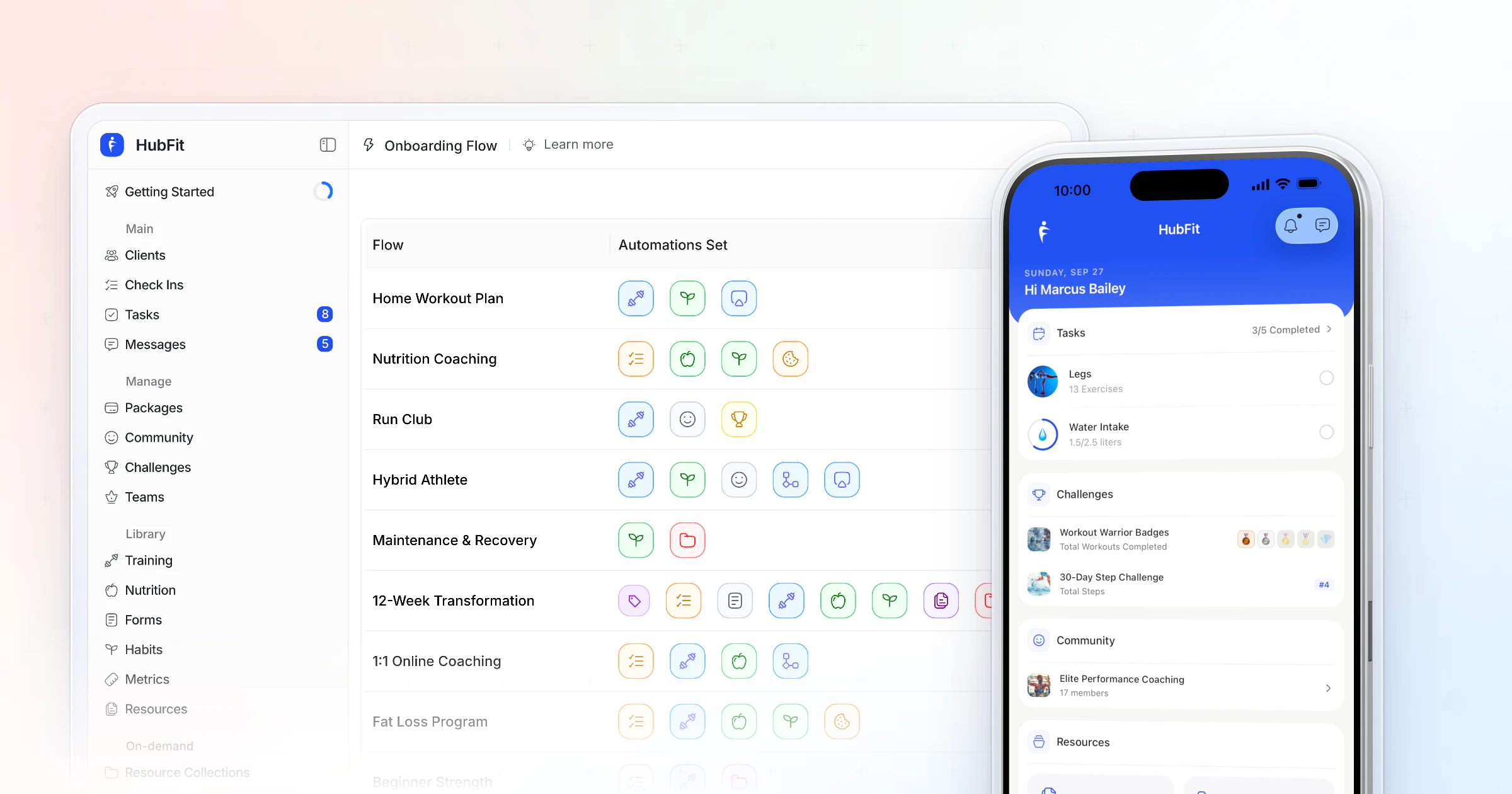
HubFit turns onboarding into one step: you build a flow once, and every new client on that program gets the same complete setup.
-
Everything in one flow: program, meal plans, questionnaires, check-ins, habits, metrics, resources and tags.
-
Onboarding flows are included on every plan, and the HubFit app is always free for your clients.
The time saved is real. Gianni Fabrizio of Gianni Coaching took his onboarding from 3 hours to 2 minutes once it ran as a flow.
“Now, it's a type in the email address... we're probably talking maximum two minutes.”
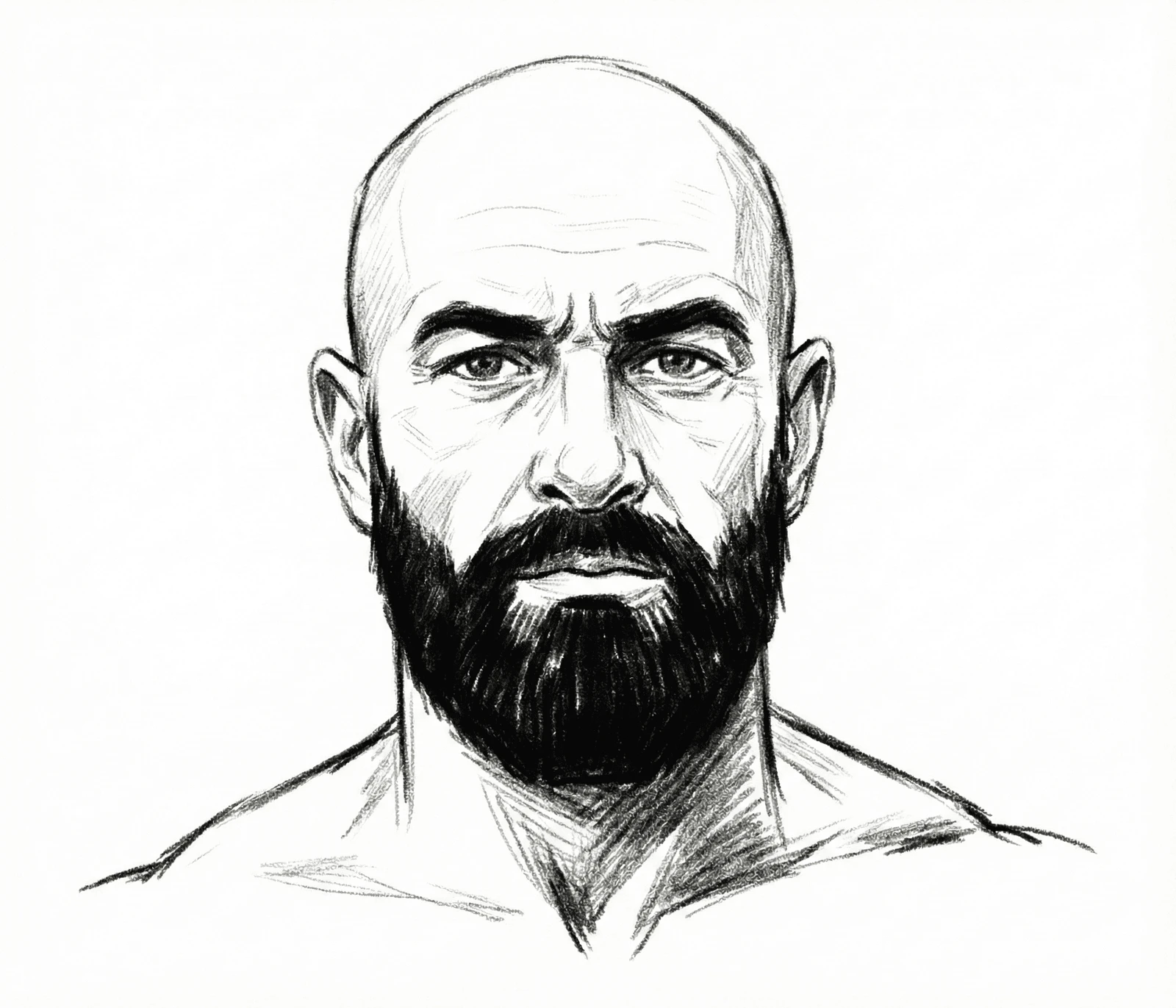
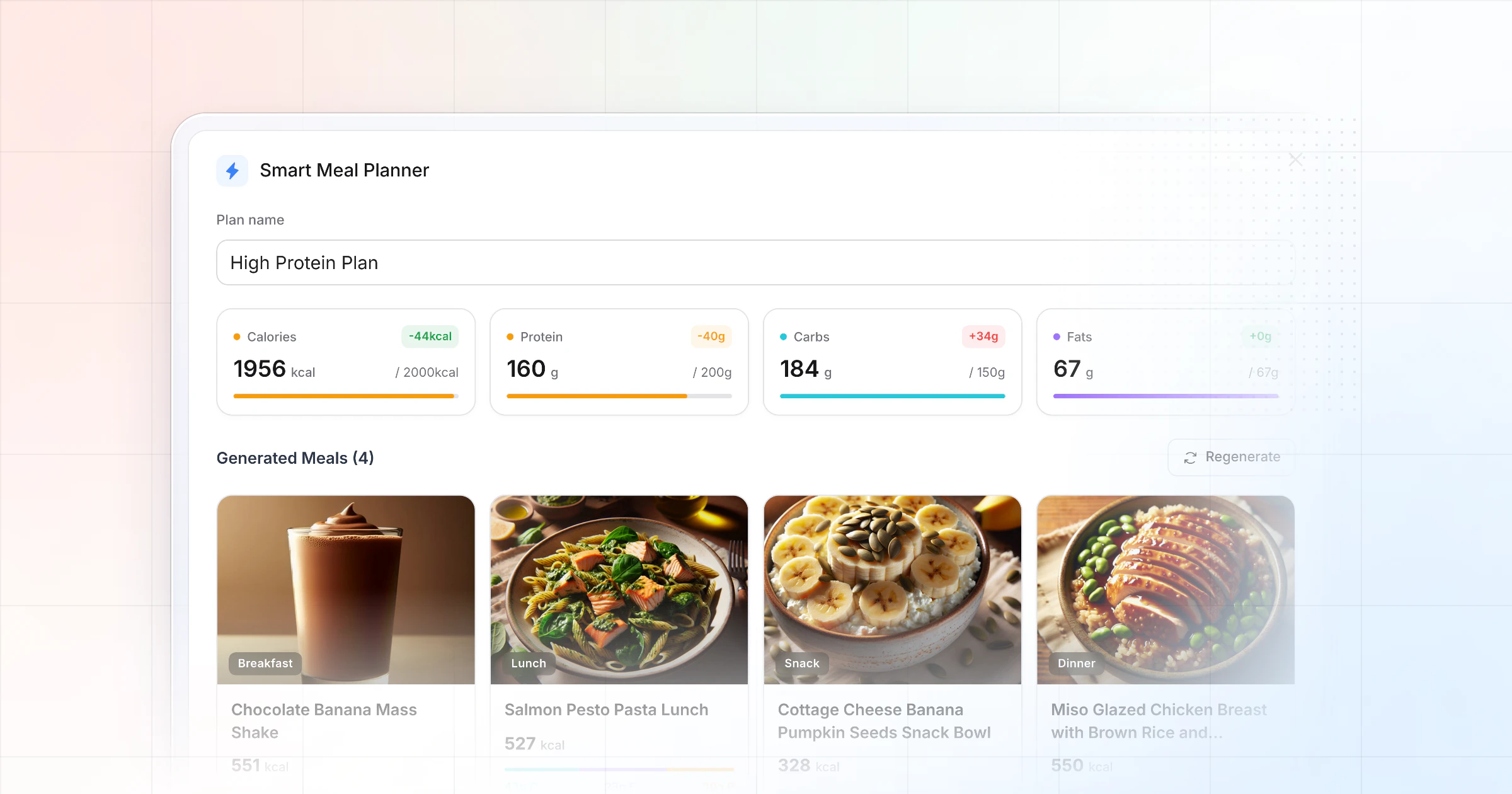
Here is what that means for the client. They download the #1 coaching app, rated 4.9 on the App Store and Google Play, sign in, and their first week is already there: the program on their training calendar with the next session marked, the meal plan with their calorie and macro targets, and the habits you want them to build, each with a streak to protect.
Every workout comes with demo videos from a library of 5,000+ exercises. The first impression is a coach who is organized, before you have said a word.
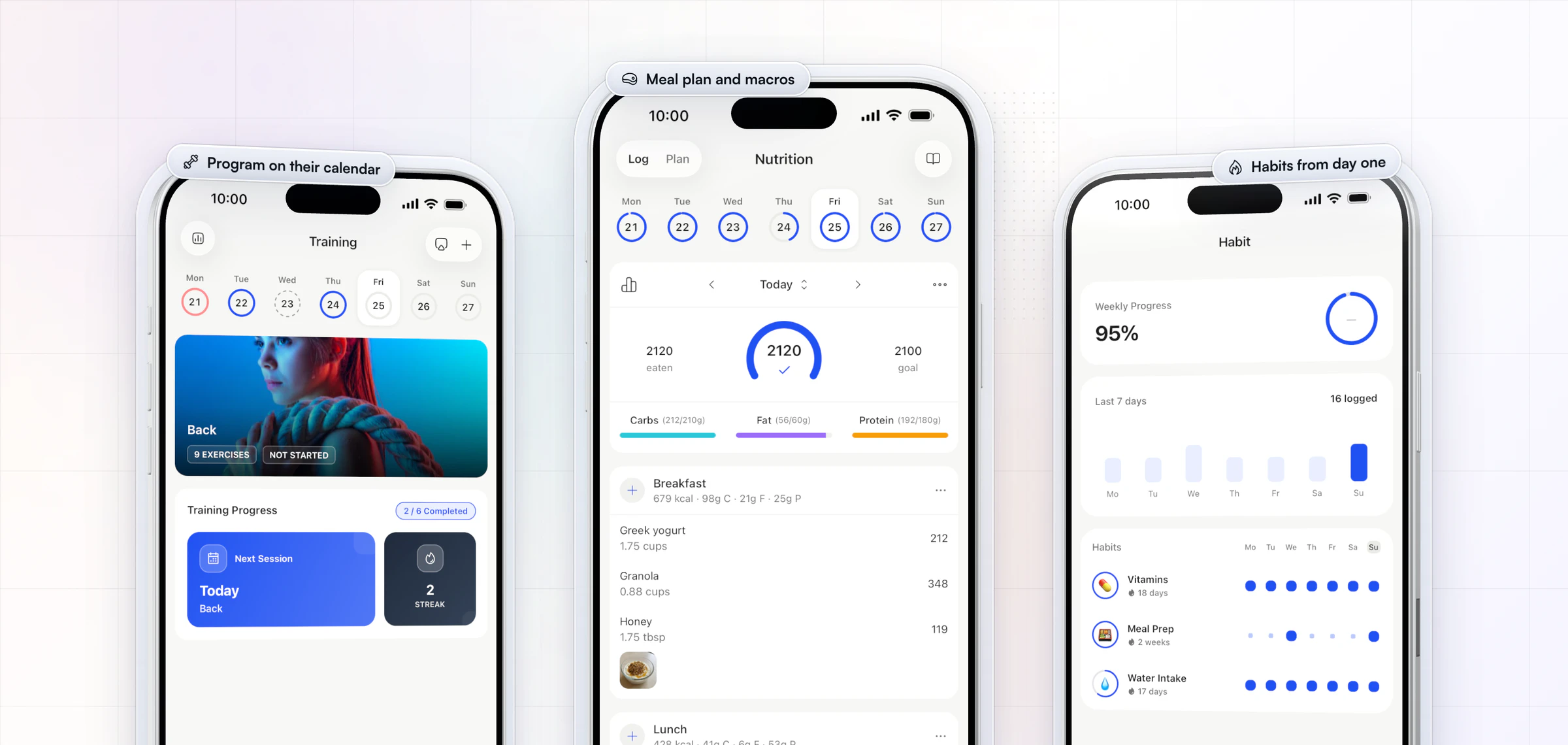
How to onboard online coaching clients: 6 steps in 14 days
A good onboarding runs on a fixed timeline, and an onboarding flow does most of the setup before the client opens the app. Packages come with Premium and up.
| Day | Step | What HubFit does |
|---|---|---|
| Day 0 | Welcome them | Runs the flow when they join |
| Day 0 to 1 | One intake questionnaire | Assigned by the flow |
| Day 1 | Set expectations | Your guide is in their vault |
| Day 1 to 3 | Kick-off call (optional) | You book it in your calendar tool |
| Day 1 to 3 | First program and plan | Assigned in their app |
| Day 7 | First check-in | Recurring form already set |
| Day 14 | Two-week review | Compare check-ins side by side |
1. Welcome them the day they pay
Send a personal welcome within hours, ideally a one-minute video: who you are, what happens this week and where to message you. The gap between payment and first contact is when doubt grows fastest. There's a welcome message you can copy further down. When a client buys one of your packages, HubFit can send a welcome email and run that package's onboarding flow.
2. Collect one intake questionnaire
Ask everything once, in one form, and nothing you won't use. The section on the intake form below goes through it field by field. Attach the questionnaire to the onboarding flow so it is waiting in the app on day one.
3. Set expectations in writing
Tell them when you reply, which day they check in and what you need from them each week. Clients relax when they know the rhythm. Plans that spell out when and where to act make follow-through more likely (meta-analysis). A ready-made "How we work" text is in the expectations section below.
4. Deliver the first program and plan
The first program should arrive by day 3 and look built for them, not pulled from a drawer. Start from a template, adjust it to the intake answers, and let the flow assign the workout program, meal plans, habits and metrics.
Optional: a 20-minute kick-off call
Some clients want a face before they trust a plan. If you offer a call, keep it to 20 minutes and book it with your usual calendar tool:
- Goal (5 minutes): what they want and why now, in their words.
- History (5 minutes): what they tried before and what made them stop.
- Constraints (5 minutes): schedule, equipment, injuries, travel in the next month.
- The first two weeks (5 minutes): what they'll see in the app, when, and what you need back.
Send a three-line recap in the app chat afterwards, so the plan is in writing.
5. Land the first check-in on day 7
The first check-in is the moment they learn their feedback matters. Progress that is reported to someone does more for goals than progress kept private (meta-analysis). Reply within 24 hours with one win, one change and the plan for next week. The flow already scheduled the recurring check-in, and HubFit sends the push reminders. Our guide on how to run client check-ins covers the reply in detail.
6. Review the first two weeks
On day 14, compare the first two check-ins side by side and tell them what you see. A short review message or video turns "I hope this works" into "this is working".
What should a new client intake form include?
A new client intake form should ask everything once, and only what changes the first program. Seven sections cover it:
| Section | What to ask | Why |
|---|---|---|
| Goal and why | The goal, the deadline, why now | Sets the program's target |
| Training history | Experience, equipment, days a week | Sets volume and exercise choice |
| Health screening | Injuries, conditions, a PAR-Q | Flags who needs clearance first |
| Schedule | Training days, session length, travel | Fits the plan to their week |
| Food | Preferences, allergies, eating out | Shapes the meal plan |
| Starting point | Photos and measurements | Gives day 14 a baseline |
| Agreement | Your terms and a signature | Puts the rules on record |
A few fields need care:
- Goal and why. Ask "why now?" as its own question. The answer is what you quote back to them in week 6, when motivation dips.
- Health screening. Use a standard PAR-Q and ask about injuries in plain words. A "yes" means you ask for clearance before you program, not after.
- Food. Ask what they eat on a normal day and what they refuse to give up. A plan built around their real week gets followed.
- Starting point. Make photos optional and say who sees them. Measurements and a weight are enough for a baseline.
- Agreement. Keep it short: your reply times, your refund terms and what happens if they go quiet. A signature turns it from a message into an agreement.
Just as important is what to leave out. Skip anything you won't act on in the first program: body-fat estimates, a full food diary, a 20-item lifestyle quiz. Ask those later, in a monthly check-in, once the client trusts you. A form that takes about 10 minutes gets finished on day one; a form that takes 40 gets finished on day four, and your start slips with it.
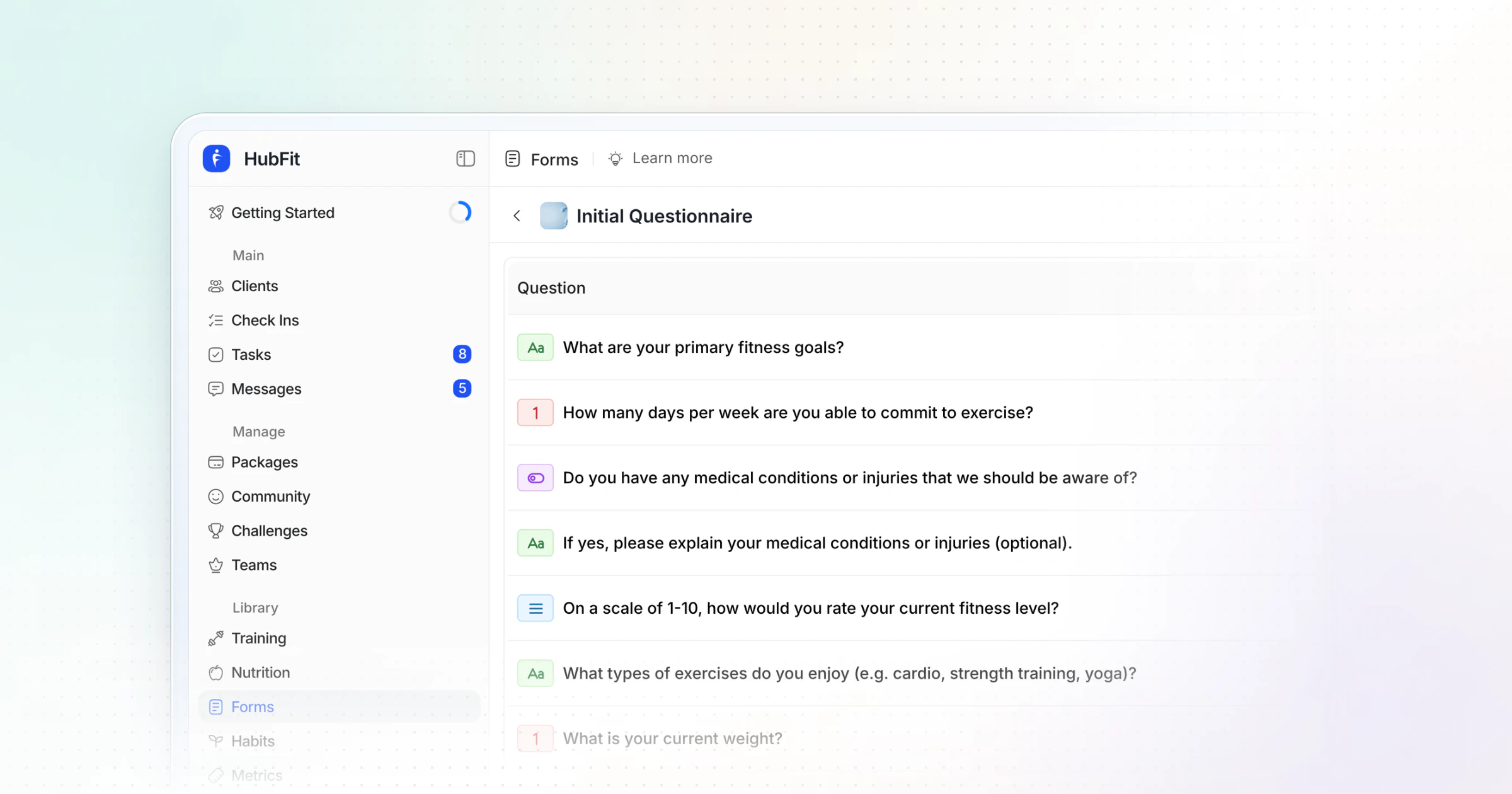
In HubFit, questionnaires are one-off forms you attach to the onboarding flow, with 11 question types, including Signature for your agreement. Progress Photos answers go to the client's gallery, and Metric answers sync to their metrics, so the baseline is set the moment they submit. In the coach app, you can also pick a questionnaire and a flow right as you add the client. Our client intake form template has the full question list to copy.
A welcome message you can copy
A welcome message should tell a new client three things: who you are, what happens this week, and the one thing to do now. Copy this, change the brackets, and send it within hours of payment:
Hi [first name], welcome aboard. I'm [your name], and I'll be your coach for the next [12] weeks.

This week is about getting set up, not getting perfect. Your app login is in your inbox, and your first program will be in the app by [day].

One thing to do today: fill in your intake questionnaire in the app. It takes about 10 minutes, and I build your plan from your answers. Any questions, message me in the app. I reply within one working day.
Should you send a welcome video or a written welcome?
Send both if you can: the written message for the details they'll look up later, and a one-minute video for the trust. Seeing your face and hearing their name in your voice does more in the first hour than any paragraph. Keep the video unscripted, film it on your phone, and say the same three things as the message. If you onboard several clients a week, record one general video for the program and add a ten-second personal line at the start.
If you send a welcome email as well, check it covers:
- Their login: where to download the app and how to sign in.
- The first step: the intake questionnaire, and nothing else yet.
- When you reply: your reply window and the one place to message you.
- Check-in day: the day and time their weekly check-in is due.
When a client buys a package, HubFit can send the welcome email for you and email their login details the moment they pay.
How do you set expectations with a new coaching client?
You set expectations by putting the rules of how you work together in writing on day one: when you reply, when they check in, and what you need from them each week.
Unclear rules are the quiet cause of most early cancellations. A client who expects a reply in an hour and gets one the next day feels ignored. A client who doesn't know their check-in is due on Sunday misses it and feels behind. Neither is a coaching problem; both are an onboarding problem.
Cover four things:
- Reply times: how fast you answer, and on which days.
- Messaging hours: when you're on, and that late-night messages wait until morning.
- Check-in day: the day and time, and how fast you review it.
- What you need from them: the check-in on time, honest answers, and a message when life gets in the way.
Here is a "How we work" text you can adapt:
How we work
1. Messages: I reply within one working day, Monday to Friday, 8am to 6pm.
2. Check-ins: due every Sunday by 8pm. I review them by Tuesday.
3. Your plan: I adjust it after each check-in, not mid-week.
4. What I need from you: your check-in on time, honest answers, and a heads-up when life gets busy.
5. Pain or injury: stop, and message me before your next session.
Expect the rules to be tested in week one. When a client messages at 11pm, reply the next morning as promised, without an apology. When a check-in comes in late, review it anyway and remind them of the day once, kindly. Holding the rhythm in week one is what makes it feel normal by week four.
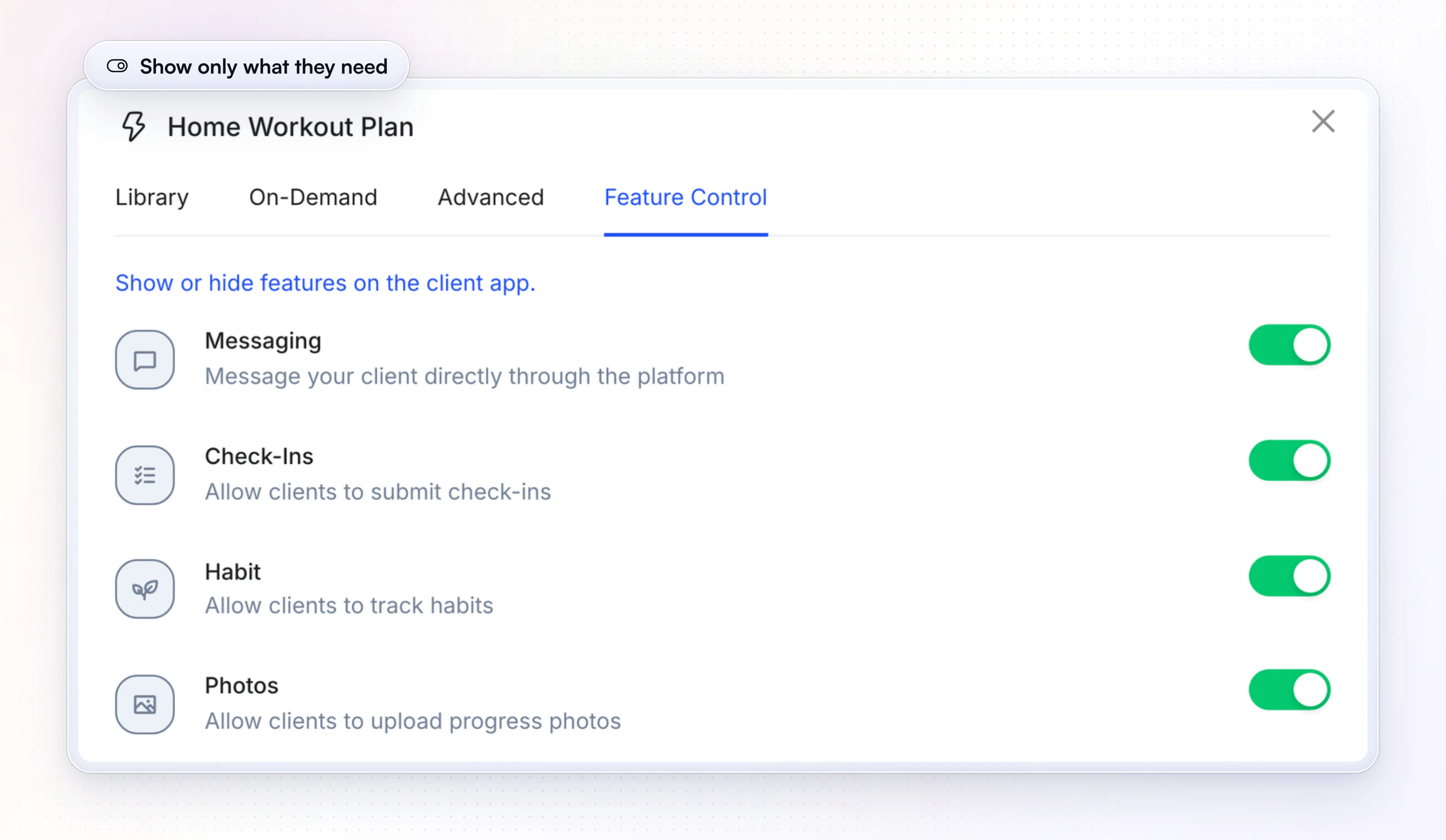
Save it as a short guide in your resources and add it to the onboarding flow, so it lands in every new client's vault on day one. Then show them only the parts of the app their program uses: the flow's Feature Control turns sections such as messaging, check-ins, habits, photos or the nutrition tracker on or off for that program, so a new client isn't greeted by tabs they'll never need.
How does HubFit automate client onboarding?
HubFit automates client onboarding by bundling everything a new client needs into one onboarding flow, then starting it for you instead of assigning each item by hand. Recipe Books, challenges and AutoFlow come with Premium and up; Zapier, Workout Studio, communities and team members are part of Ultimate.
One flow can set up:
- Training: the workout program, on their calendar from day one.
- Nutrition: training-day and rest-day meal plans.
- Questionnaires and check-ins: the intake form, a PAR-Q and the recurring check-in.
- Habits and metrics: what they track, from the first day.
- Resources: your guides in their vault, including your "How we work" text.
- On-demand and community: Workout Studio, Recipe Books, challenges and communities.
- Their coach: a team member assigned by plan, package or goal.
Example: a 12-week transformation flow. One flow puts a 12-week hypertrophy block on the client's calendar, assigns training-day and rest-day meal plans, sends an intake questionnaire and a PAR-Q, schedules a daily and a weekly check-in, adds three habits, tracks weight, body fat, waist and hips, and drops three supplement guides into their vault. You build it once; every client on that program gets all of it.
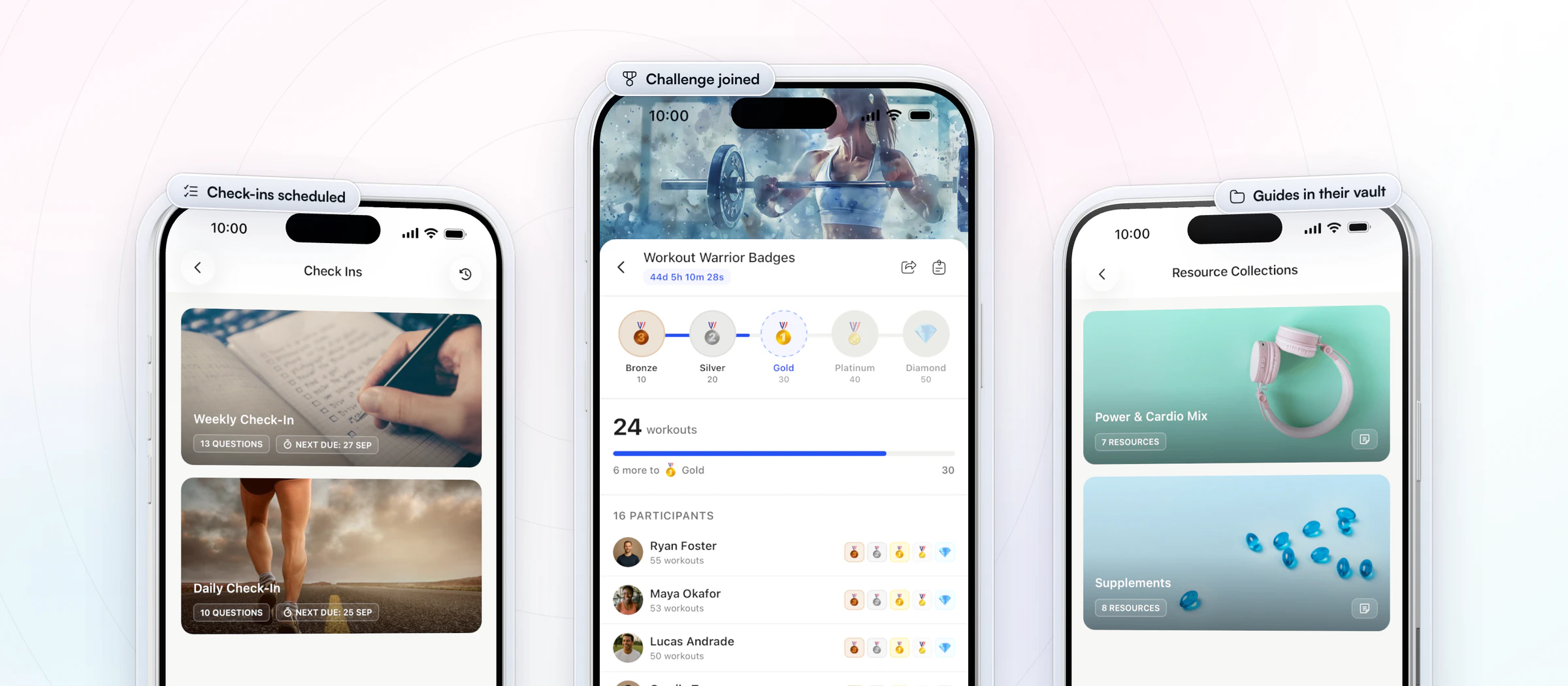
There are three ways to start a flow:
- When you add a client. Pick the flow in the Add Client window and it runs at once.
- When a client buys a package. Attach the flow to the package and a paid client is set up without you. More on packages and payments.
- From another app with Zapier. HubFit's "Trigger Onboarding Flow" action starts a flow from any step in your Zap. See Zapier for fitness professionals.
The second way is the one that takes you out of setup entirely. Vegard Mikalsen of VM Coaching onboards every client this way, so a new client is set up the moment they pay.
“I literally just send them a Stripe link. They pay and everything gets set up.”

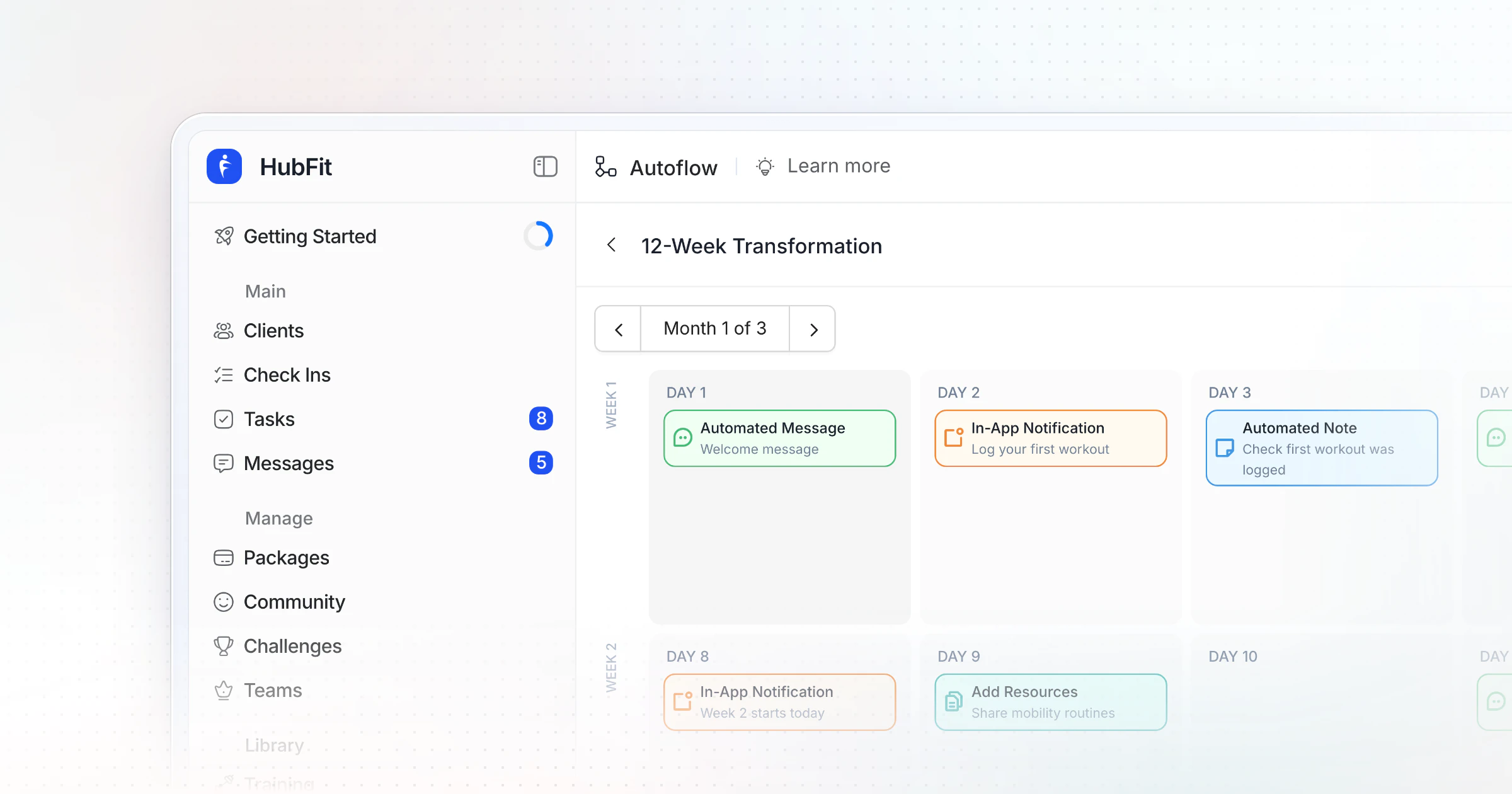
For the messages that follow, AutoFlow runs a day-based sequence: a welcome message on day 1, a resource on day 5, a recap on day 7, processed in each client's own timezone. You can start your free trial and build your first flow today.
Which coaching software has the best automated onboarding?
The best onboarding software for coaches sets up the whole client from one flow and starts it by itself. HubFit, the #1 coaching app, does both: one flow per program runs when a client is added, buys a package or a Zap fires. When you compare tools, check these six things:
| What to look for | Why it matters | In HubFit |
|---|---|---|
| Everything in one flow | Nothing forgotten on day one | Program, plans, forms, habits |
| A purchase trigger | Paid clients set up without you | Flow runs on package purchase |
| Recurring check-ins | The first review is booked | Schedules with push reminders |
| Control over the app | New clients aren't overwhelmed | Feature Control per flow |
| Day-based messages | The welcome keeps going | AutoFlow sequences |
| A free client app | No extra cost for the client | Always free for clients |
Should every offer get the same onboarding?
The steps stay the same; the weight changes by offer. Build one flow per offer, not one for everything:
- One-to-one coaching: the full 14 days, a kick-off call if you offer one, and a personal reply to every early check-in.
- Group or community programs: the same welcome and intake, a pinned "start here" post in the community, and a group welcome instead of one-to-one calls.
- Program-only or on-demand buyers: a welcome, the program and the library on day one, and a short check-in at day 14 to ask how it's going.
How do you know your onboarding is working?
Your onboarding is working when new clients finish the setup on time and stay past the first month. Track three numbers for every new client, once a month:
- Intake done within 48 hours. If it's low, the form is too long or the welcome doesn't make it the obvious first step.
- First check-in on time. If it's late, the check-in day wasn't clear or the reminder isn't set.
- Still a client after 30 days. Early cancellations point back to the first week: slow welcome, a generic plan or a late first reply.
A 14-day onboarding checklist you can copy
Paste this into your notes and tick it off for every new client until your flow does most of it for you:
- Day 0: welcome message or video sent within hours of payment
- Day 0: app login sent, intake questionnaire assigned
- Day 1: "How we work" guide in their vault
- Day 1: intake answers read, health flags checked
- Day 1 to 3: kick-off call held and recapped (if you offer one)
- Day 3: first program and meal plan live in the app
- Day 3: habits and metrics assigned, baseline recorded
- Day 5: a short "how's the first week going?" message
- Day 7: first check-in submitted, reviewed within 24 hours
- Day 7: reply sent with one win, one change, next week's plan
- Day 14: two check-ins compared, two-week review sent
Common client onboarding mistakes
Most onboarding problems come from four mistakes, and each one has a simple fix.
- Silence after payment. A day with no contact reads as being forgotten. Welcome them within hours.
- A wall of PDFs. Ten documents on day one overwhelm. Send the next step only, inside the app.
- A 40-question intake. Long forms stall the start. Ask only what changes your first program.
- Setting up every client by hand. A dozen items assigned one at a time is where things get forgotten. A flow remembers for you.
FAQ
Here are short answers to the questions coaches ask most about onboarding clients.
How long should client onboarding take?
For the client, about two weeks: from the welcome to a reviewed first check-in. For you, a few minutes per client once it's in one of HubFit's onboarding flows: the program, plan, forms and check-ins go out the moment the client is added. If setup still takes you an hour, the steps aren't in one flow yet.
What should a welcome email include?
Four things: how to log in to the app, the one first step (the intake questionnaire), when and where you reply, and the day their weekly check-in is due. Keep the program, guides and details for the following days, so nothing gets lost in one long message.
Why does onboarding decide whether a client stays?
Because in the first two weeks there are no results yet, so clients judge you on how organized and responsive you are. A fast welcome, a plan that fits their week and a personal reply to the first check-in prove they chose well. Our guide to client retention covers what keeps them past month three.
How do I set expectations without sounding cold?
Frame each rule as how you'll help them: "I reply within one working day, so you always get a considered answer" lands better than "no messages after 6pm". Send it as a short guide in their vault, not as a list of rules in chat.
How do I make onboarding the same for every client without it feeling generic?
Let the flow handle the setup, and spend the minutes it saves on the personal parts: a welcome video with their name, a program adjusted to their intake answers, and a real reply to their first check-in. The structure is the same; the attention isn't.
How do I migrate clients between coaching platforms?
Rebuild your programs and forms as templates first, then add your clients in HubFit, one by one or several at once, and make sure each has the right onboarding flow. Tell clients the switch date in advance, and run a fresh first check-in after the move so you start from a clean baseline.
When should a new client have their first check-in?
On day 7, after a full week of training. Earlier and there is nothing to review; later and they go too long without feedback. Use the same core form every week after that. Our client check-in questions give you the wording, and our guide to automation for your coaching business covers what to automate next.
Make every new client feel expected
Clients who feel looked after in week one stay for month six. Build your welcome, intake and first program into one flow this week, and let HubFit set up every new client in online coaching the same way, so your time goes into the personal parts.