Fitness business automation is software doing the repeat work of coaching for you: client setup, program and resource delivery, check-in reminders and payments. For online coaches, the simplest way is HubFit: an onboarding flow sets up each client the moment they join, and AutoFlow delivers the weeks after.
Key takeaways
- Automate the delivery, not the coaching. Setup, content and reminders can run themselves; your replies stay personal.
- Start with onboarding. One flow sets up every new client the same way, every time.
- Drip-feed the first 30 days, and keep a re-engagement sequence ready for clients who go quiet.
- Keep it in one app. Every extra tool you connect is one more thing to maintain.
What is fitness business automation?
Fitness business automation means setting a task up once so software repeats it for every client, on time, without you.
In an online coaching business, most of your week is the same jobs done for different people: assigning a program, sending the welcome guide, nudging a check-in, starting the next phase, chasing a payment. At 10 clients that is an evening. At 50 it is a second job, and the first thing to slip is consistency: one client gets the welcome video, the next doesn't.
Automation comes in two forms. Native automation lives inside your coaching platform, where your programs, forms and messages already are. Connected automation uses a tool like Zapier to pass data between separate apps. Native is simpler to run; connected fills the gaps.
A good rule of thumb: if you do a task the same way for three or more clients, it is a candidate for automation. If it needs you to read, judge or reassure, it stays yours.
Why automate with HubFit?
HubFit automates the client side of a coaching business inside the same app your clients train in, so nothing depends on a link or a spreadsheet.
Onboarding is where it shows first. Gianni Fabrizio of Gianni Coaching took his client setup from 3 hours to 2 minutes with one onboarding flow.
“Now, it's a type in the email address... we're probably talking maximum two minutes.”
Onboarding flows are on every plan. AutoFlow and paid packages come with Premium and up.
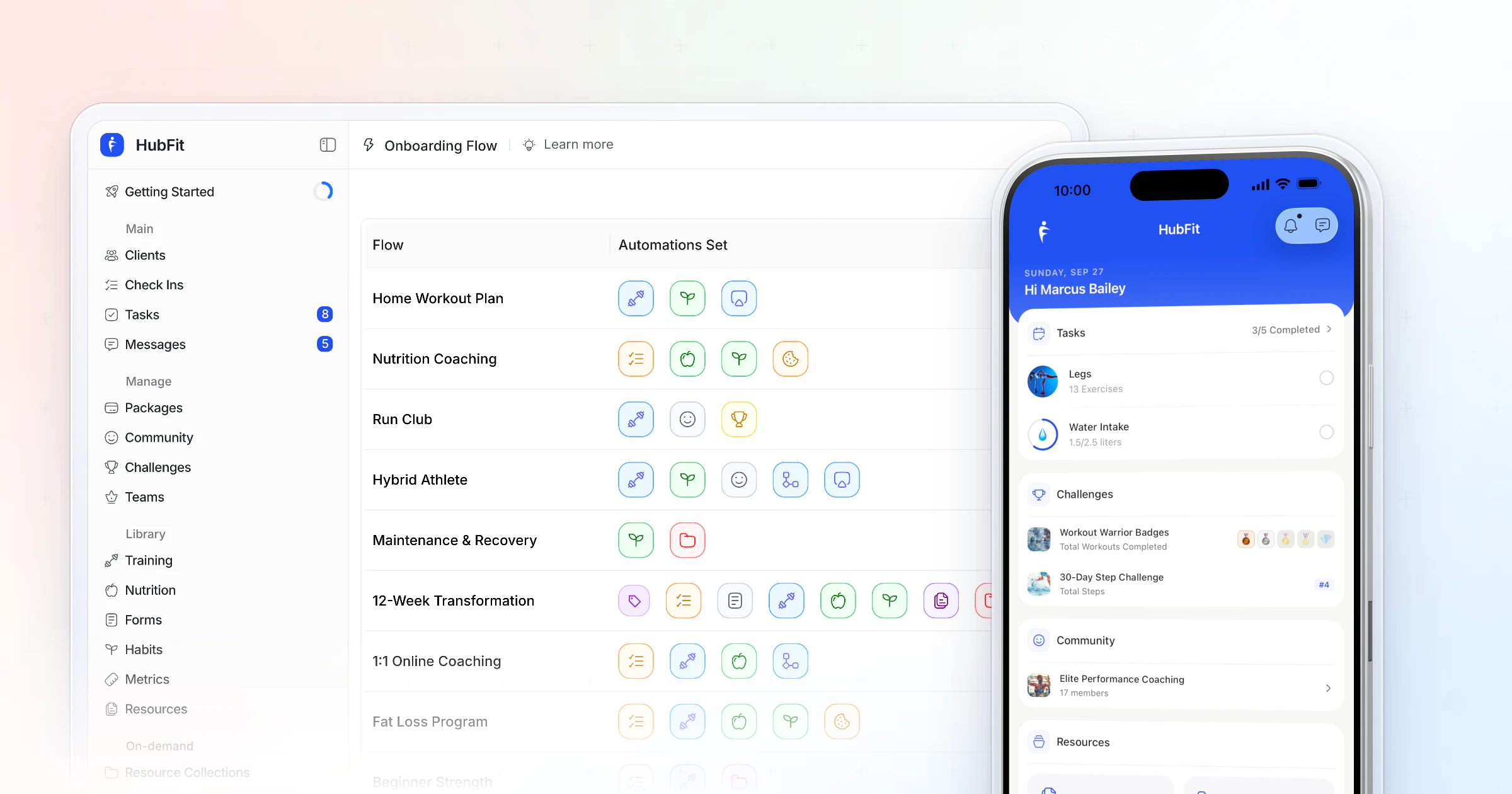
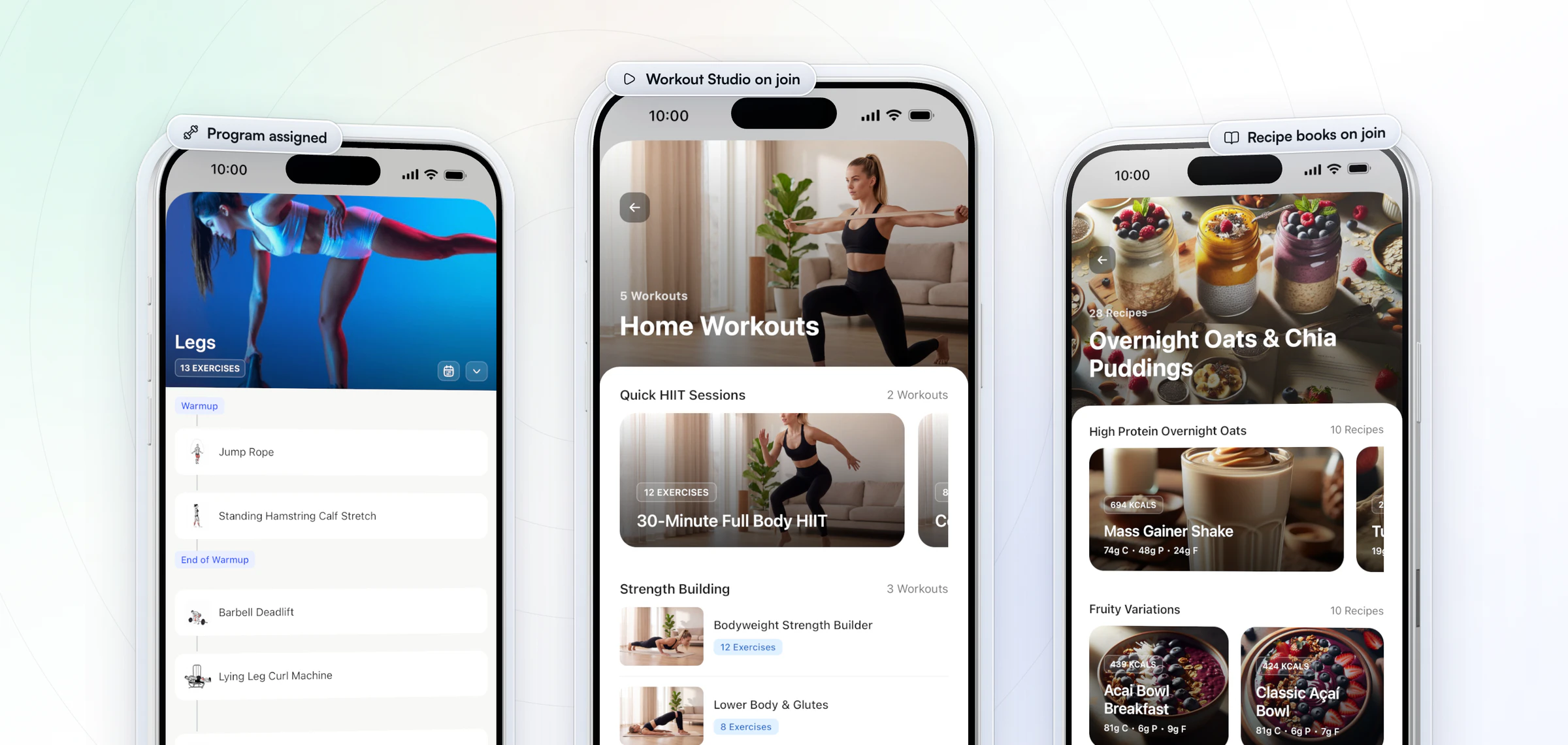
Here is what that looks like for a new client. They join, and one onboarding flow fills their app before they open it: the program with today's workout ready, their habits and check-in, and the on-demand workouts and recipe books you choose. Every workout carries your exercise videos from a library of 5,000+, and it all runs in the #1 coaching app, rated 4.9 on the App Store and Google Play. You build the flow once, and you never touch it again.
What should you automate in your fitness business?
Automate anything you do the same way for every client, and keep anything that needs your judgment.
| Task | Automate with | What stays yours |
|---|---|---|
| New client setup | Onboarding flow | The welcome call |
| Program phases | AutoFlow program event | Adjusting the plan |
| Guides and videos | AutoFlow resource event | Choosing what helps |
| Check-in reminders | Recurring check-in | Reading and replying |
| Habit nudges | Habit reminders | Changing the habit |
| Routine messages | AutoFlow message | Real conversations |
| Payments | Packages and Stripe | Pricing your offer |
| Other apps | Zapier | Picking the triggers |
Zapier is part of Ultimate.HubFit's automations act on the clients you already have. Marketing to leads, such as newsletters and sales emails, belongs in your email tool.
How to automate your online coaching business in 4 steps
Build your automation in the order that saves you the most time: the first day, the weekly routine, then the first month. Challenges come with Premium and up, and team members are part of Ultimate.
1. Map the first 90 days
Write down what a client needs and when: the program on day one, how-to guides in week one, the first check-in, the mid-program dip around week three, the next phase, the renewal. Every line that repeats for every client is a candidate for automation.
2. Build one onboarding flow per offer
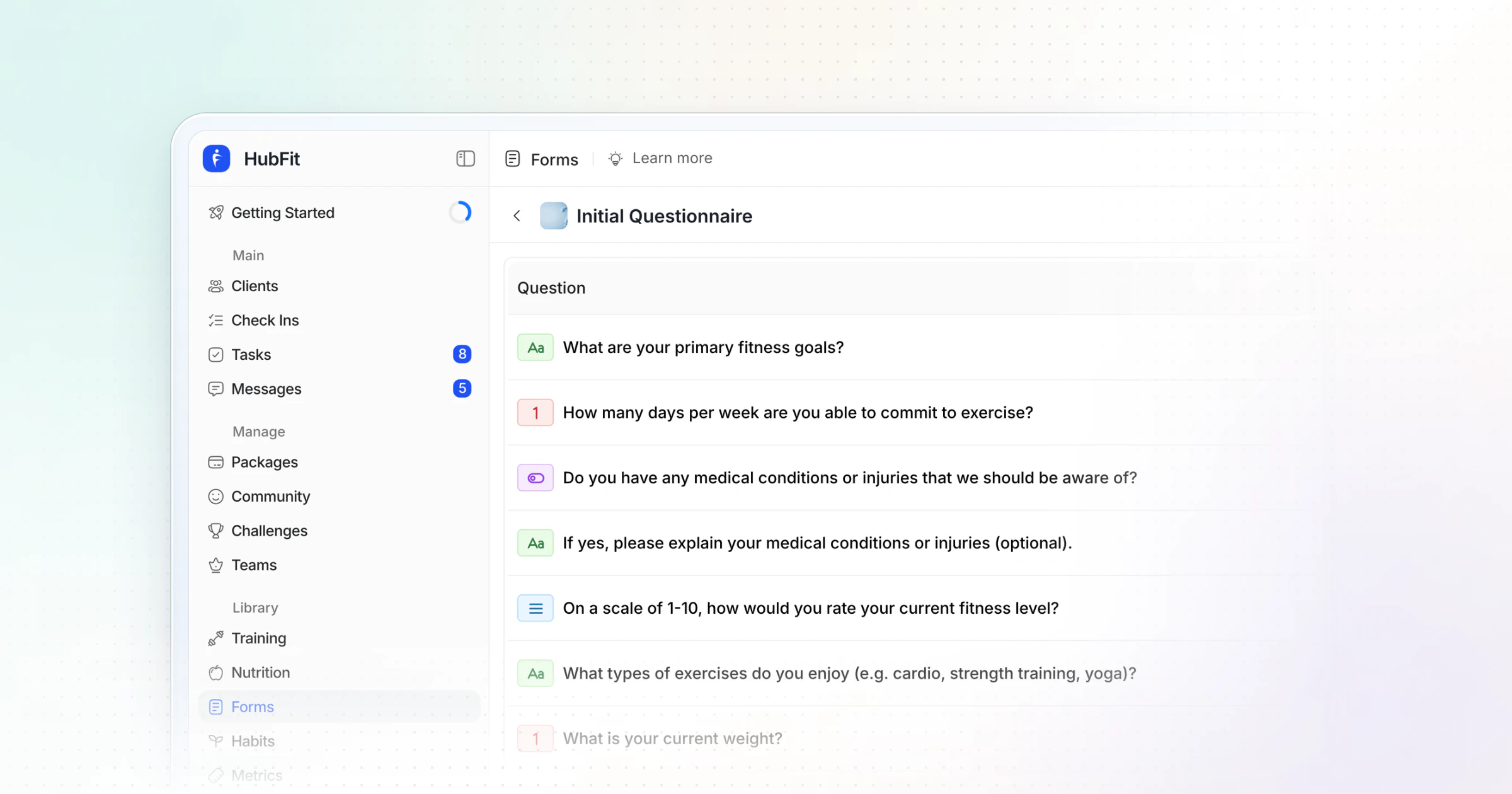
An onboarding flow is a saved setup that runs for each new client. Put the program, nutrition plan, habits, check-in form and intake questionnaire for one offer into one flow. It can also enroll the client in a challenge and assign them to a coach on your team. Link it to a package and a purchase onboards the client by itself. For the full setup, read our guide to client onboarding automation.
3. Put check-ins and habits on repeat
Set each client's check-in to weekly or bi-weekly with push reminders, and give their habits daily reminders. You stop chasing; you only read and reply. It pays off: tracking progress helps people reach their goals, more so when they report it to someone (meta-analysis, Harkin et al., 2016). Our guide on how to do client check-ins covers the form and the reply.
4. Drip-feed the first 30 days with AutoFlow
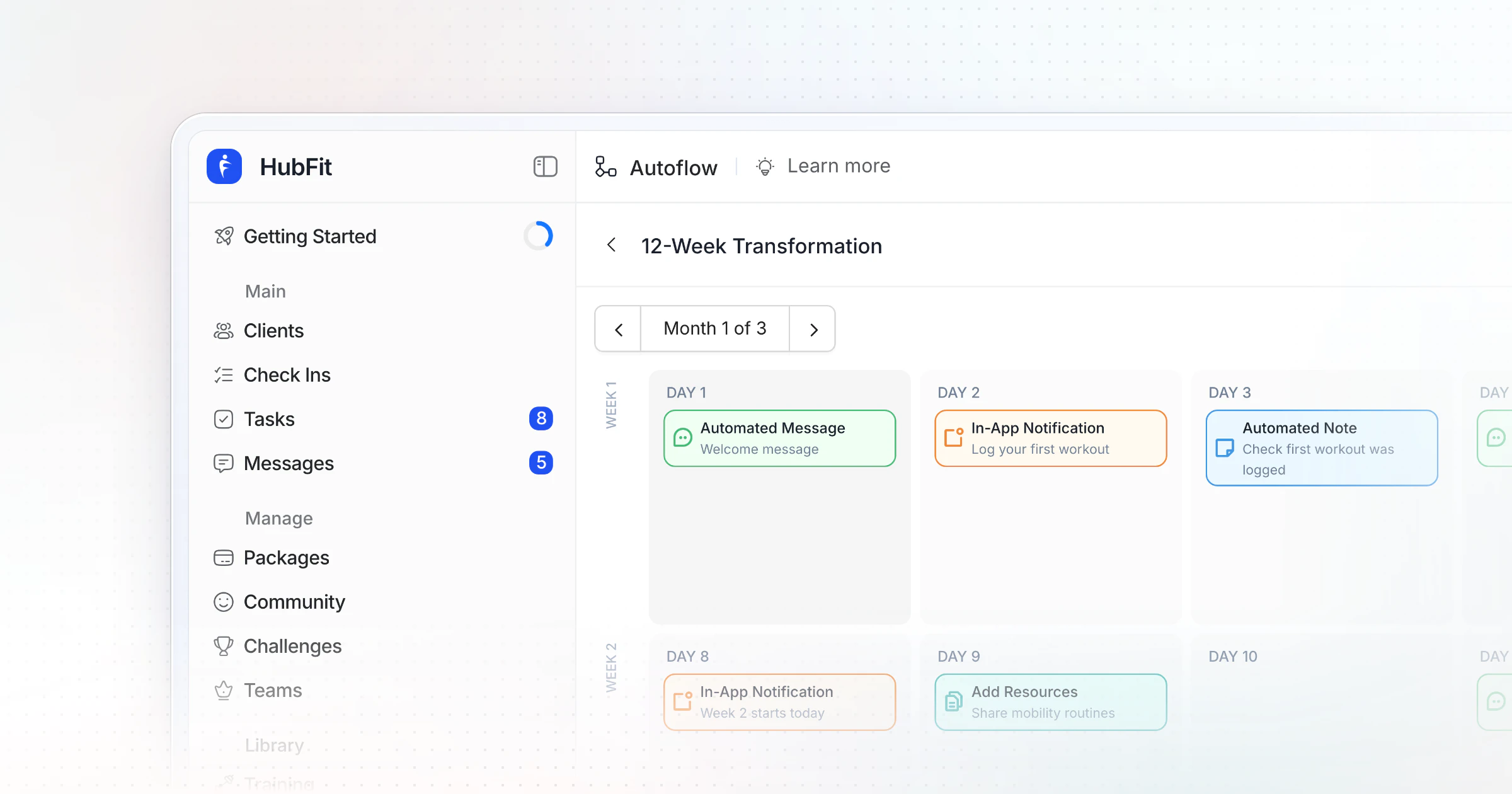
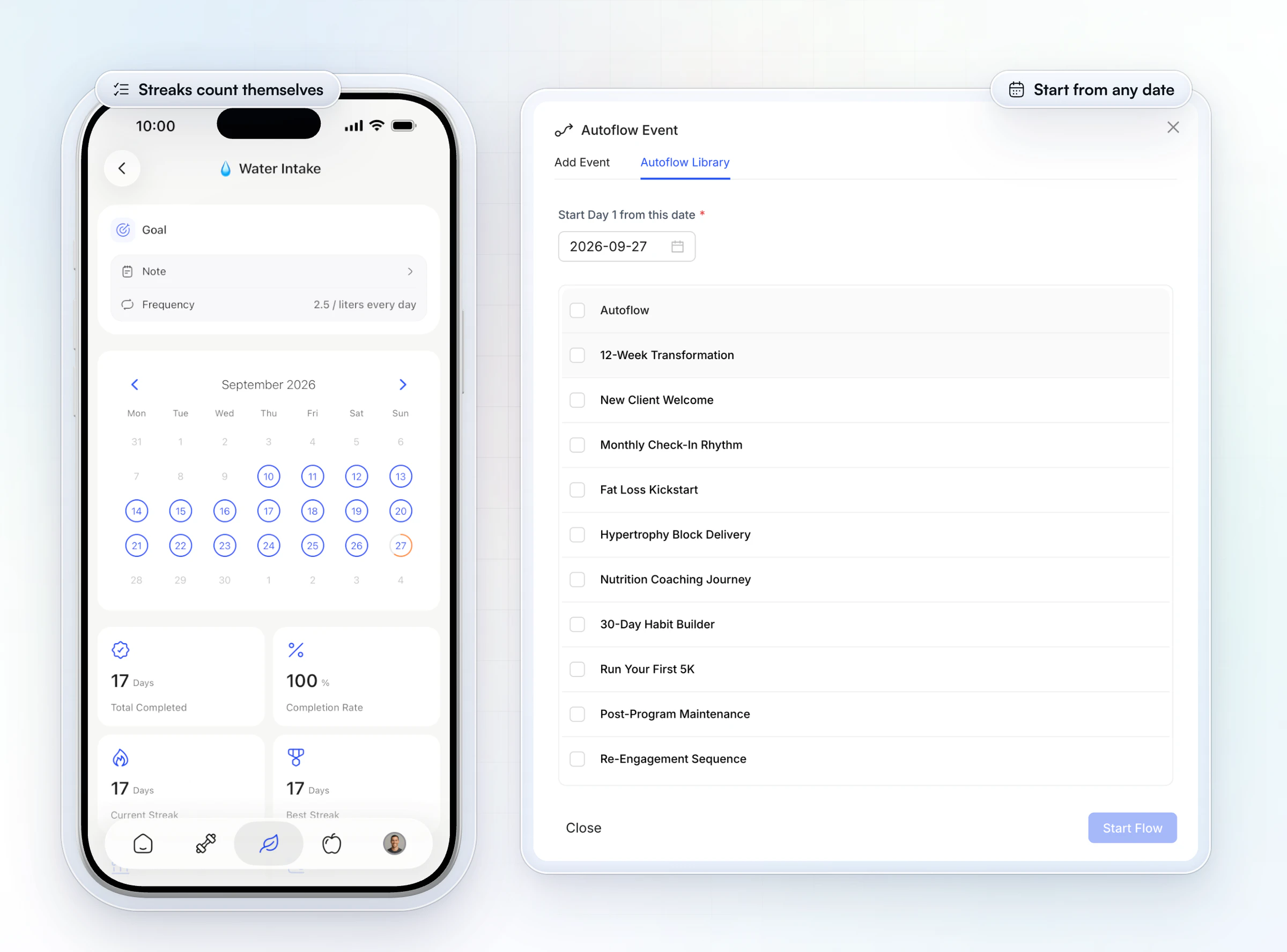
Schedule the first month with AutoFlow as a sequence of events: the next program phase, a guide, a message, a notification, a note. The sequence below is a starting point.
A 30-day drip-feed sequence you can copy
Drip-feeding means delivering your content over weeks instead of all on day one, so each piece arrives when the client needs it. In HubFit it runs on AutoFlow, and AutoFlow templates are part of Ultimate.
| Day | AutoFlow event | Example |
|---|---|---|
| 1 | Program and message | Phase 1 plus a welcome |
| 2 | Resource | Video: how to use the app |
| 3 | Message | "How did session one feel?" |
| 5 | Resource | PDF: nutrition basics |
| 7 | Message | Your week-one recap |
| 10 | Note | A win to remember |
| 14 | Program and notification | "Phase 2 unlocked" |
| 21 | Resource | Guide: sleep and recovery |
| 28 | Message | "What should month two focus on?" |
Three rules make it work:
- One thing every two to four days. More than that and clients skim; less and they forget you between check-ins.
- Pair a resource with a reason. A PDF alone is easy to ignore. A short message saying why it matters this week gets it opened.
- Mix the formats. PDFs suit reference material, videos build trust and teach technique, and links can point to a playlist or a page. The app stores all three in your vault.
Review it once a month: ask clients in their check-in what helped, cut what nobody mentions, and fix the timing. Then save it as an AutoFlow template and reuse it for each new client. Start your free trial and set up your first sequence today.
For more ways to share guides and videos, see how to share resources with your clients.
How do you automate follow-ups for clients who go quiet?
Automate the nudge and watch the signal, then step in yourself: reminders do the first chasing, and a quiet client gets a message from you, not from a robot.
Clients rarely quit in one go. They skip a habit, then a check-in, then a week of workouts. Here is what keeps running for every client without you:
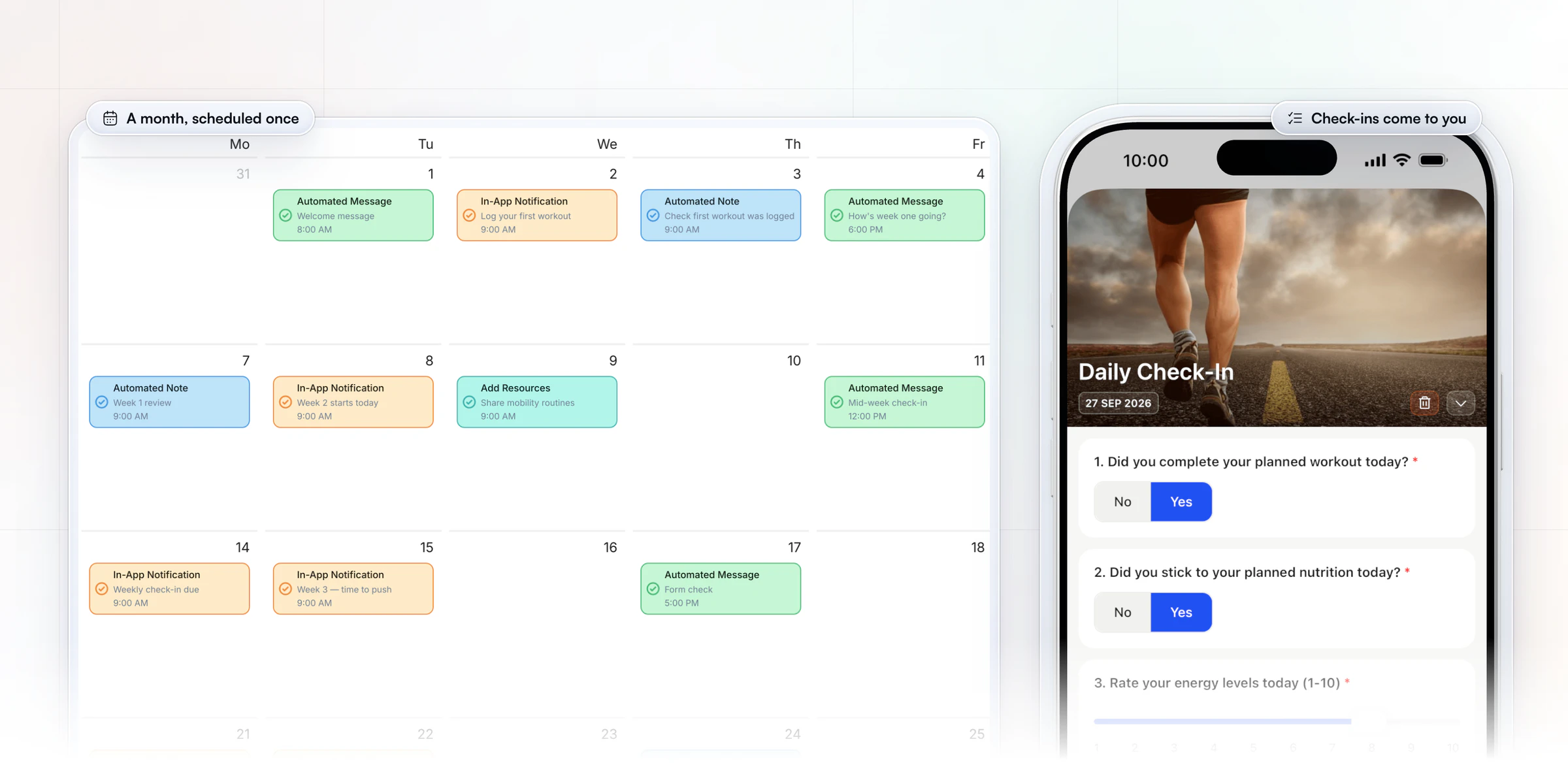
- Check-in reminders go out by push on the day you set, in the client's time zone.
- An overdue check-in stays on the client's home screen until the next one is due, so it can't slip out of sight.
- Daily habit reminders arrive in each client's time zone, and streaks and completion rates calculate themselves, so a slipping client shows on their Habits tab.
Then use a simple playbook for anyone who stops logging:
| No log for | Already running for every client | What you do |
|---|---|---|
| 3 days | Habit and check-in reminders | Nothing yet |
| 7 days | Overdue check-in on their home | A short personal message |
| 14 days | A re-engagement sequence you start | A call or a voice note |
At day 14, start a short re-engagement sequence from that day: a message asking what got in the way, a lighter week of training, a check-in a week later. Your personal message still goes first; the sequence only keeps the next two weeks moving. For the wider picture, read our guide to retaining online coaching clients.
How HubFit takes the repeat work off your week
HubFit turns the plan above into four things you set up once and then only check.
- One setup per offer. An onboarding flow assigns the program, nutrition plan, habits, check-ins and questionnaires the moment a client joins, opens your recipe books and workout studio to them and can enroll them in a challenge. You can have as many flows as you have offers. Onboarding flows are on every plan.
- The weeks after, in their time zone. AutoFlow has five event types: add a workout program, add resources from your vault, an automated message, an in-app notification and an automated note. Each one lands in the client's time zone, so a 7 a.m. message is 7 a.m. wherever they live.
- Check-ins that come to you. Submissions land in a review inbox where you compare them side by side, reply, or record a Loom video.
- A sale that onboards the client. A client who buys a package through Stripe checkout is onboarded automatically, and can get their login details the moment they pay.
How do you automate payments and renewals?
Sell your coaching as packages that bill on repeat, so renewals happen without an invoice or a reminder from you.
Payments run through Stripe checkout:
- Package types: one-time, weekly, monthly or free, for a set number of weeks or months or until canceled.
- Free trials of 3, 7, 14 or 30 days on weekly and monthly packages.
- An initial fee for setup, added to the first payment as its own line.
- Coupons as a percentage or a fixed amount, once or for several months, with an optional limit and expiry date.
- Automatic invoices in 9 currencies, with Apple Pay and Google Pay, and no HubFit fee on top of Stripe's standard rate.
- A purchase runs the onboarding flow, so the client is set up before you see the sale.
Vegard Mikalsen of VM Coaching runs his whole onboarding this way, with nothing set up by hand.
“I literally just send them a Stripe link. They pay and everything gets set up.”

Changing a package's price only affects new buyers; existing subscriptions keep their price. Our guide to payment solutions for personal trainers compares the options.
Where does AI fit in coaching automation?
Automation decides when something reaches a client, and AI helps you make what you send.
- Workout AI builds a workout from a text prompt: the exercise count, sets, reps, muscle focus, difficulty and rest you describe. It also tidies a pasted plan such as "Bench Press 5x8, Rows 4x10" into a workout.
- Meal AI turns a meal you describe into ingredients with macros, ready to add to a meal plan.
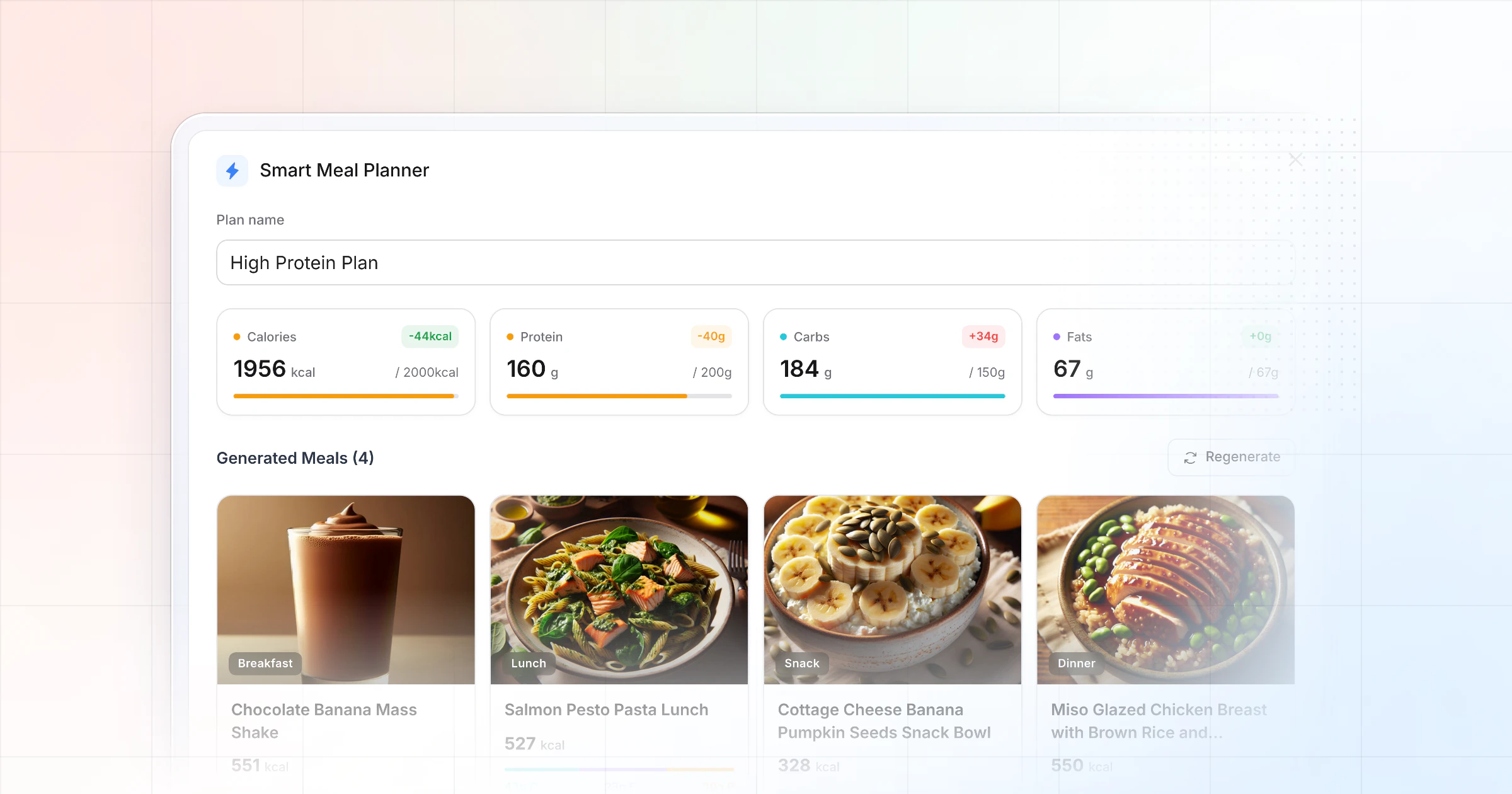
- The Smart Meal Planner builds a full meal plan in seconds from 6 presets, such as balanced, high-protein and keto.
Workout AI, Meal AI and the Smart Meal Planner come with Premium and up. Always review what AI drafts before it is assigned: it gives you a first version, and your judgment makes it a program. Then let AutoFlow deliver it on the right day. See our guides to AI for personal trainers and the AI workout generator.
How much time does automation save?
In our example, a coach with 30 clients and 4 new ones a month saves about 17 hours a month by automating setup, reminders and content delivery. The minutes below are illustrative; time your own week for your real number.
| Task | By hand | Automated | Saved a month |
|---|---|---|---|
| New client setup | 60 min each | 2 min each | About 4 hours |
| Check-in reminders | 2 min a client a week | Automatic | About 4 hours |
| Program phases and guides | 10 min a client a month | Automatic | About 5 hours |
| Routine messages | 2 min a client a week | Automatic | About 4 hours |
What doesn't shrink is reading and replying to check-ins, and it shouldn't. The hours you win back go there, or into new clients. New client setup is the biggest single saving per client, which is why it's the first thing to automate.
Growing past one coach? Read how to scale your coaching business and our tips on time management for coaches.
What are the most common automation mistakes?
The most common mistake is automating too much, too early: clients feel it, and you spend weeks fixing a setup nobody needed.
| Mistake | What it costs | The fix |
|---|---|---|
| Automating everything | Messages read as robotic | Keep replies and hard moments yours |
| Automating an unproven offer | Setup you redo | Run it by hand with 5 to 10 clients |
| Every PDF on day one | Clients skim and forget | Drip one thing every few days |
| Never reviewing the sequence | Stale, badly timed content | Ask in check-ins, fix monthly |
| Stacking five tools | Things break quietly | Native first, Zapier for gaps |
The last one catches most coaches. Every connected tool is a login, a bill and a failure point. Start with what your coaching app does natively, and connect another tool only when a step truly lives outside it.
How do you keep automated coaching personal?
Automate the delivery, never the judgment: a client should feel that you read every check-in and wrote every word they receive.
The research points the same way. A review of health programs that used periodic prompts found they tended to work better when they came more often and included personal contact (Fry and Neff, 2009). Automation gives you the frequency; your replies give the contact.
- Write automated messages in your own voice, the way you would text a client.
- Reply to every check-in yourself. Short and specific beats long and generic.
- Never automate the hard moments: a bad week, an injury, a plan change, a renewal.
When do you need Zapier for your coaching business?
You need Zapier when a step happens outside HubFit, such as adding a buyer to your email list or logging a sale in a spreadsheet.
HubFit's Zapier integration has 11 triggers, such as New Purchase, Client Submitted Check-In and Client Completed Workout, and 20+ actions, such as Add Client, Trigger Onboarding Flow and Send Message. It connects to 5,000+ apps.
| Job | Native in HubFit | Zapier (connected) |
|---|---|---|
| Onboarding | Onboarding flow | Trigger Onboarding Flow from a form |
| Drip content | AutoFlow | Not needed |
| Check-in reminders | Recurring check-in | Not needed |
| Payments | Packages and Stripe | Archive Client on an outside cancel |
| Email list | Your email tool | New Purchase to your list |
| Spreadsheets and CRM | Your sheet or CRM | Client Completed Workout to a row |
| Team task on an event | Task Management | Client Submitted Check-In to Add Task |
Keep the connected column short. Every Zap is something to maintain: if a field name changes in your form tool, the Zap stops until you fix it. Our Zapier guide for personal trainers maps a Zap to every stage of the client journey.
FAQ
These are the questions coaches ask most about automating a fitness business.
How do I automate my online coaching business?
Start with one onboarding flow per offer, so each new client gets their program, nutrition plan, habits and check-in at once. Add a 30-day AutoFlow sequence of programs, resources and messages. Put check-ins and habits on recurring reminders. Connect outside tools with Zapier only where needed. See how HubFit automates and scales coaching.
What should a personal trainer automate first?
Automate onboarding first, because it is the same for every client and takes the longest by hand. Then automate check-in reminders, then a drip-feed of guides for the first month. Leave check-in replies and plan changes to yourself.
What is the difference between automation and AI in coaching?
Automation runs a task on a schedule you set; AI drafts the content. Onboarding flows and AutoFlow are the automation: they decide what each client gets and when. Workout AI and Meal AI are the AI: they draft a workout or a meal for you to check before it goes out.
How many clients do I need before I automate?
None. Automate onboarding from your first client, because it is the same for every client and costs nothing to keep. Add a drip-feed sequence once your offer is proven with a handful of clients, so you aren't automating content you will change next month.
Will automation make my coaching feel impersonal?
Not if you automate delivery and keep the judgment. Clients notice whether their check-ins get a real reply, not whether a guide arrived on a schedule. Write automated messages in your own voice, reply to every check-in yourself, and handle hard moments in person. Done that way, clients hear from you more often, not less.
What is the difference between an onboarding flow and AutoFlow?
An onboarding flow runs once, when a client joins: it assigns their program, nutrition plan, habits, check-ins and questionnaires in one step. AutoFlow runs over the following weeks: it schedules new program phases, resources, messages, notifications and notes on the days you choose. Use the flow for day one and AutoFlow for the weeks after. The coaching platform shows the rest of the toolkit.
Does HubFit automate client check-ins?
Yes. You assign a check-in form once, set it to daily, weekly, bi-weekly or monthly, and HubFit sends push reminders when it is due. Submissions land in a review inbox, where you can compare them side by side and reply. Onboarding flows can assign the check-in for every new client. Compare tools in our guide to check-in software, and see habit tracking for coaches for the daily side.
Can HubFit work with my lead follow-up and booking tools?
Yes, through Zapier. A new purchase or a new client in HubFit can start a sequence in your email tool or reach your booking tool, while HubFit's own automations run the coaching from day one.
Automate the repeat work, keep the coaching
Build one onboarding flow this week, add a 30-day sequence and a re-engagement template, and every new client gets your best experience without another hour of admin. Try it free for 14 days.