
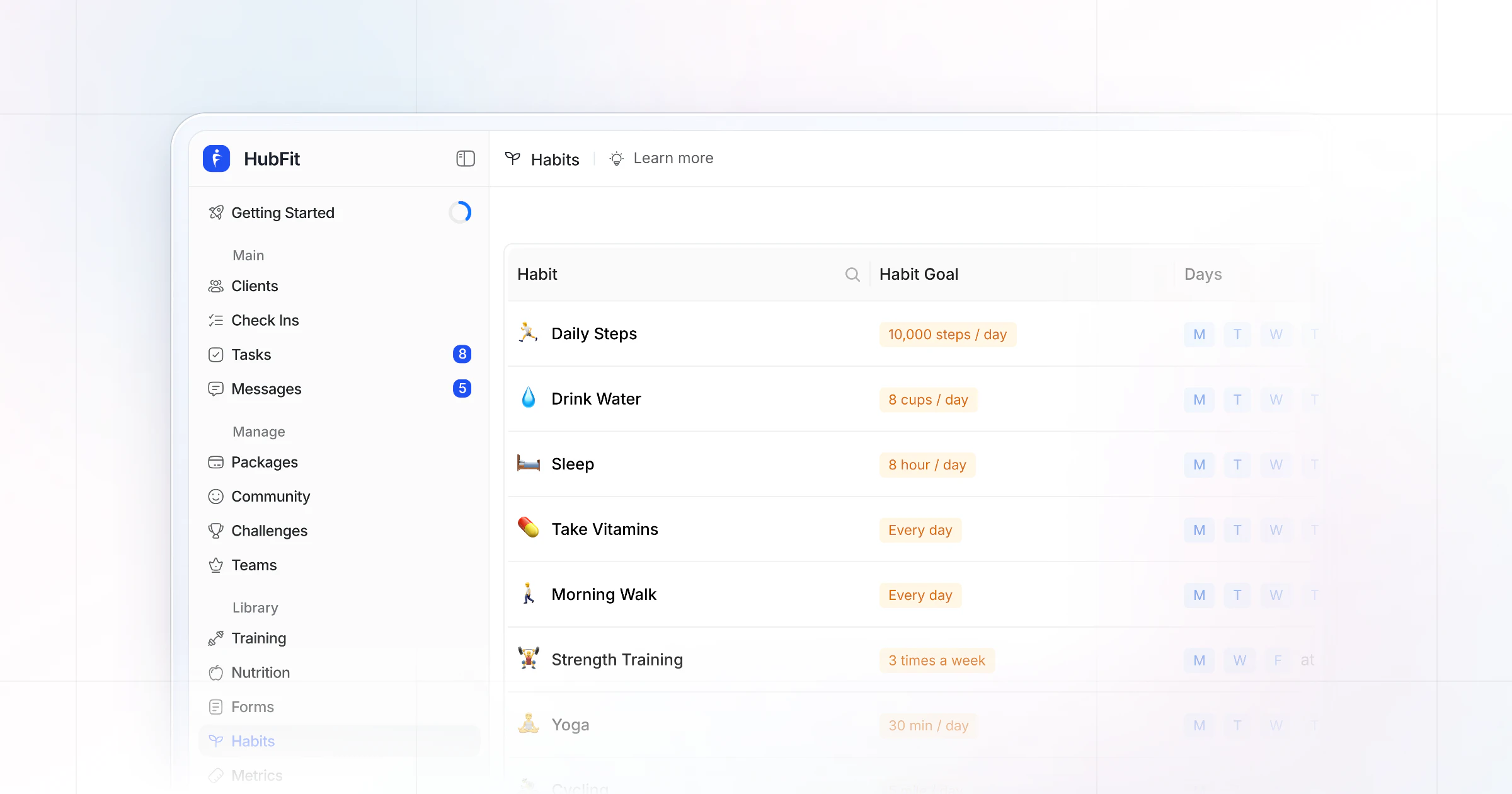
Our pick for the best habit tracking app for coaches is HubFit, the #1 coaching app. You assign daily or weekly habits from 40+ ready-made ones, clients log them in the app they already train in, and you see each client's streaks, completion rate and calendar without doing the math. We make HubFit, and here's why it ranks first of seven.
Key takeaways
- HubFit is the top pick: habits, training, nutrition, check-ins and messaging live in one client app, included in every subscription, and onboarding flows assign your starter habits the moment a client joins.
- Judge a habit app on seven things, starting with the coach view: can you see each client's week, day by day, without asking?
- Start a client on two simple habits and add one every couple of weeks. The 30 ideas below are grouped by goal, each with a unit.
What is a habit tracking app for coaches?
A habit tracking app for coaches is software where you assign habits, clients log them on their phone, and you see each client's streaks and completion rates. That coach side is what separates it from a personal habit tracker, which only the client ever sees.
For the client it should take seconds: open the app, tap today's habit, log it. For you it should take none: the streaks, the completion rate and the reminders run themselves.
What should a habit tracking app for coaches do?
A habit tracking app for coaches should let you see each client's habits day by day, assign ready-made or custom habits with real units, remind clients for you, and sit next to their training and food. These are the seven things we judged every app on.
- Coach view per client: spot a slipping week early.
- Ready-made and custom habits: set up in minutes, in your words.
- Units and goals: measure more than a tick.
- Daily or weekly: some habits aren't daily.
- Reminders: clients forget, phones don't.
- Streaks and completion: no math for you.
- Next to training and food: one app to open.
The coach view matters most. A client who logs every day but never hears from you stops logging, and a habit you can't see is a habit you can't coach.
Units come next. "Drink more water" is a wish; "8 cups a day" is a habit you can measure, and a ready-made library saves you typing the same 20 habits for every client.
The 7 habit coaching apps, ranked
How we compared them: the seven points above, weighted toward the coach view, fast setup and keeping habits next to training and food. Our top pick does all of it in one app.
1. HubFit
HubFit is the top pick for coaches who want habits, workouts, nutrition and check-ins in one client app. It's the #1 coaching app, rated 4.9 on the App Store and Google Play, and free for your clients, so a habit you assign lands on a home screen they already open for their workout. You see the streak; they see today's task. Here is how it handles each part of habit coaching.
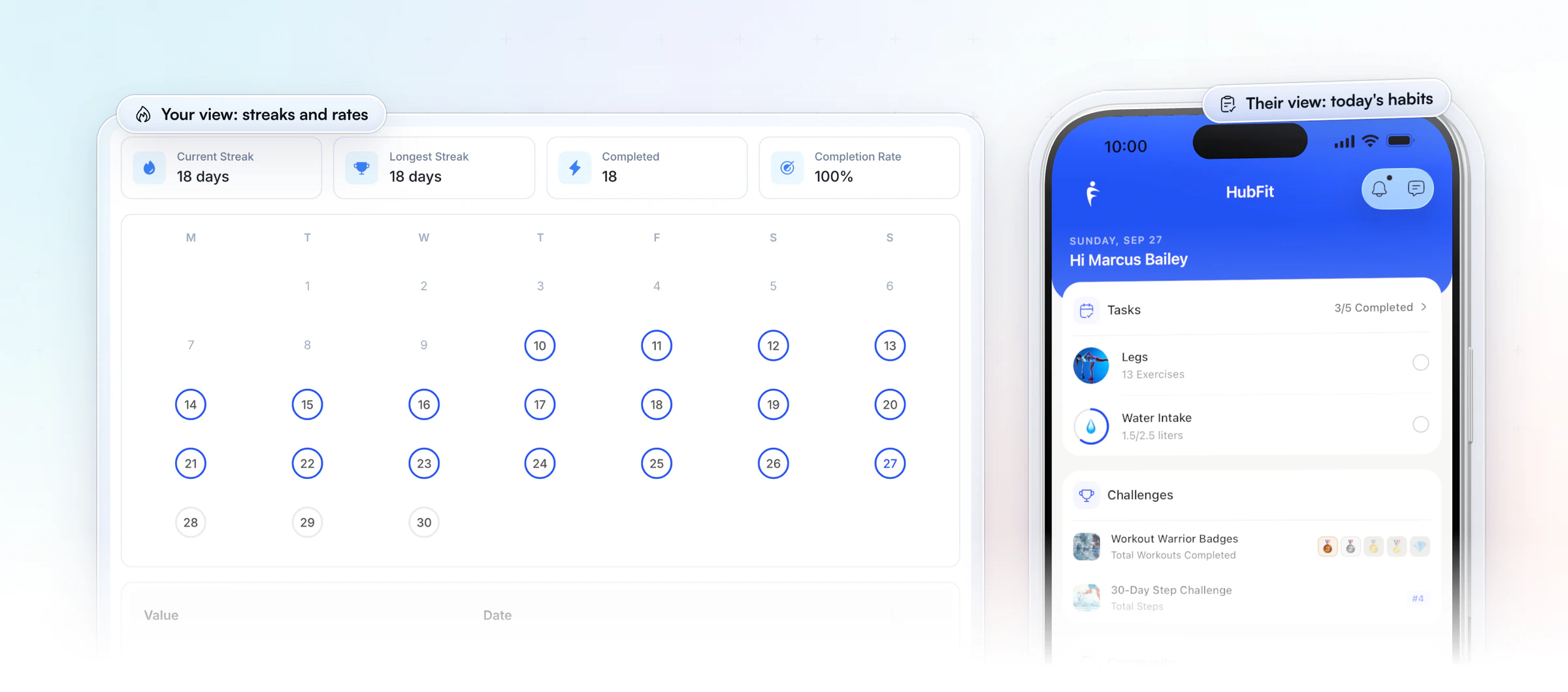
Assign a habit in under a minute. Start from 40+ ready-made habits across 5 categories or your own saved ones, then tweak it for each client. Every habit gets a name, an emoji, a goal in one of 15+ units (steps, minutes, cups, calories, kilometers, grams) or a simple yes/no, and a daily or weekly target. A weekly yes/no goal can be anything from 1 to 7 days, so "meal prep twice a week" counts as done, not as five missed days.
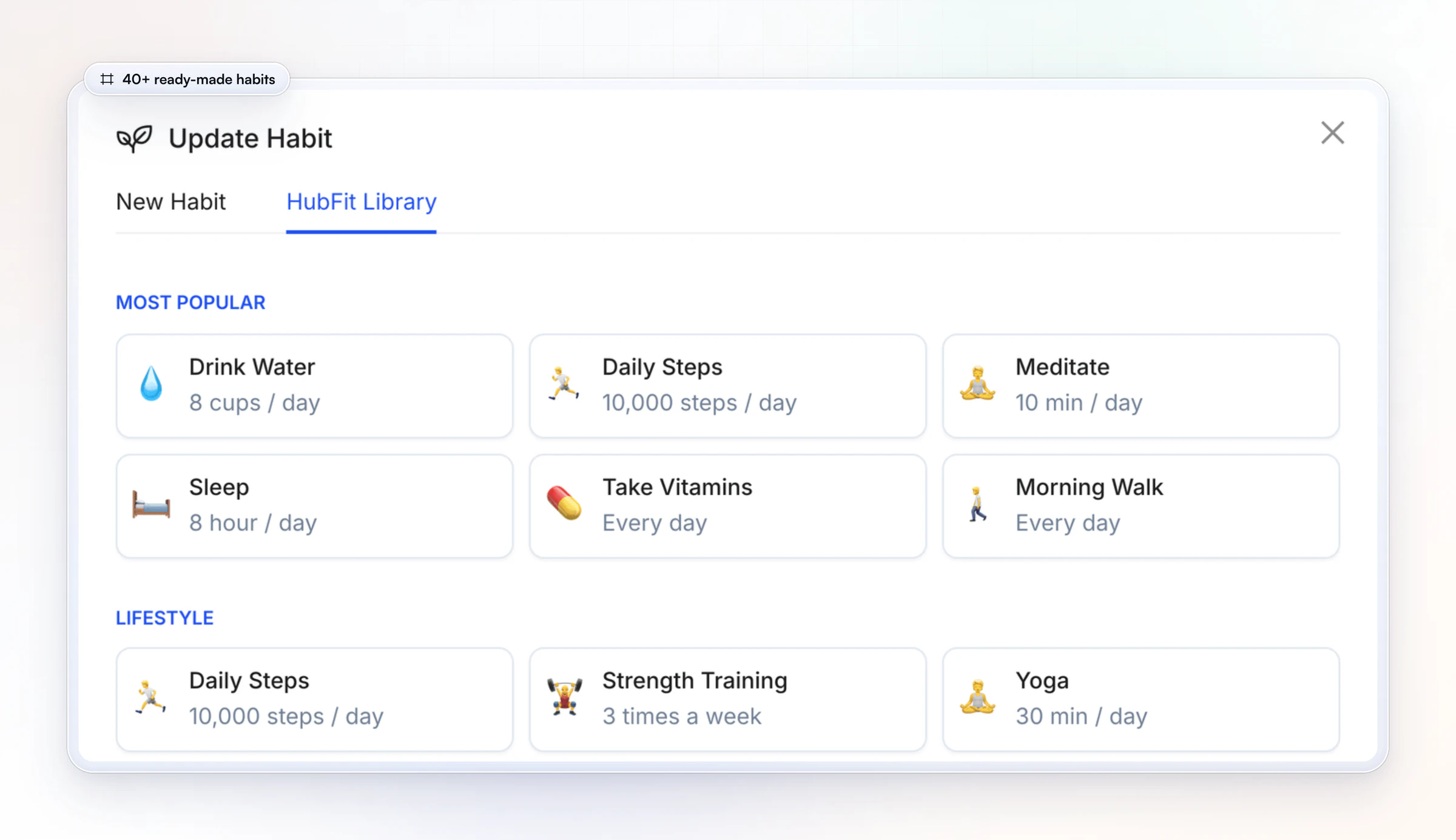
See every client's week at a glance. Each client's Habits tab shows their current and longest streak, the days completed and their completion rate, with a calendar of the month. The Summary tab breaks every habit down day by day, so before a weekly check-in form comes in, you already know which days slipped.
Reminders and streaks run themselves. Reminders go out as push notifications in each client's own timezone, at the time you pick. Streaks and completion rates are worked out for you, and you can view or log an entry for any client when they tell you in chat instead.
Stagger habits, don't pile them on. Give the next habit a future start date and it waits, locked, until that day. Wearables connected through Apple Health or Health Connect sync steps, calories, sleep and heart rate into the same client profile.
Clients log in one tap. Habits sit under today's tasks on the client's home screen, next to their workout. Clients see their own Weekly Progress, a calendar and their streak, which gives them a reason to keep the run going.
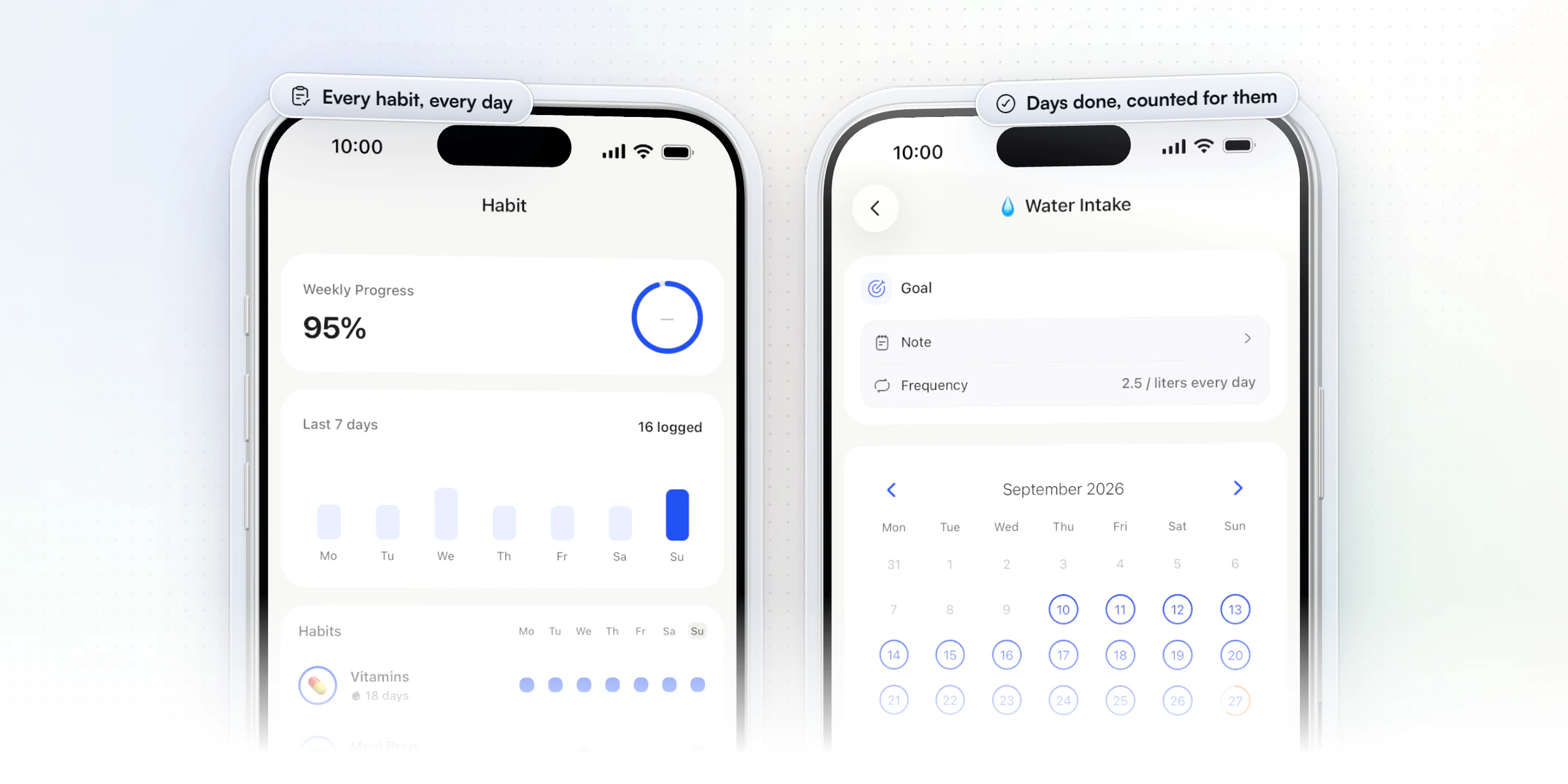
One app for everything. Habits sit beside workouts, the food tracker, check-ins with 11 question types and messaging, so clients have one app to open and you have one place to look.
Vegard Mikalsen of VM Coaching uses HubFit habits with his clients between check-ins.
“The habits function… is really nice to track sleep and water and steps.”
Want to see it from the client's side? Start your free trial and assign yourself a habit to see what your clients will see.
2. Trainerize
Trainerize is a coaching platform for independent trainers, nutrition and lifestyle coaches, studios and gyms. Its habit coaching sorts habits into four categories: active lifestyle, nutrition, sleep and mindfulness. You schedule each habit by day, and clients build streaks and earn badges as they complete them. A water tracker sits alongside, and auto-messages reach clients without you typing each one.
Habits, streaks and badges are on every plan, the free one included. Paid plans are priced by client seats, and some areas, such as meal planning, are add-ons on the lower plans.
- What to check: which add-ons the rest of your coaching needs, so habits, food and training all sit on the plan you pay for.
We add weekly goals to daily ones, so a habit like meal prep twice a week counts as done, not as five missed days.
3. Everfit
Everfit is a coaching platform for fitness, nutrition and sports coaches, and for gyms and studios. Its habit coaching covers sleep, water, steps and custom habits with reminders, and tasks such as reading, watching a video or journaling can sit beside them. It also connects to wearables, including Apple Health, Google Health Connect, Fitbit, Garmin, Oura and WHOOP.
Tasks are on its free tier, and habit coaching starts on the paid Pro plan. Paid plans are priced by client count. Autoflow, the add-on that schedules habits and tasks into automated sequences, is metered by the number of clients in it, and its leaderboards, including steps and tasks, live inside Autoflow too.
- What to check: which plan includes habit coaching, and what Autoflow would add once you automate habit assignments.
Our Onboarding Flows assign habits to each new client automatically, on every plan.
4. Kahunas
Kahunas is a coaching platform for online coaches and personal trainers. Custom habit tracking is on every plan: you set the habits for each client, clients get a daily reminder at a time you choose, and daily habit forms collect their answers alongside their check-ins. The client app also has a water tracker. Wearable data from Apple Health or Google Health Connect can flow into those forms, and from its middle plan, a Health Score AI reads sleep, stress and readiness from that data.
The pricing model is three plans by client count, with automations and the Health Score AI starting on the middle plan.
- What to check: how habit streaks and completion rates are shown to you and to your clients.
Our app works out each client's current streak, longest streak and completion rate for you, habit by habit.
5. My PT Hub
My PT Hub is a platform for personal trainers, fitness coaches and nutritionists. Its habit tracker is on every plan: you assign custom or template habits, in bulk when many clients need the same one, and each client gets a compliance score. Clients get morning or evening reminders and log their habits from the mobile app or the desktop platform, and wearable data can be reconciled against what they log. The habits it lists are daily ones.
Pricing runs from an entry plan capped at a few clients, to a middle plan with unlimited clients, to a top plan that bundles its add-ons.
- What to check: whether you'll coach any habits on a weekly rhythm, and the entry plan's limits at your client count.
In our app, a habit can be daily or weekly, and Onboarding Flows assign it along with the rest of a new client's plan.
6. TrueCoach
TrueCoach is a training platform for personal trainers and strength coaches. Basic habits are on every plan, and its two higher plans add an advanced habit tracker where clients log macros, weight, energy, sentiment, sleep, steps and stress. On those same plans, wearables such as Garmin, Fitbit, Oura, Polar, WHOOP and Apple Health sync sleep, resting heart rate and steps. A compliance rate over 7, 30 and 90 days, with a Needs Attention flag when it drops, shows who is slipping.
Pricing is three plans by active client count, with no add-ons on top, so the plan decides which habit and wearable features you get. Food logging runs through MyFitnessPal or manual entry.
- What to check: which plan includes the advanced tracker and wearables at your client count.
We include habit coaching and wearable integrations on every plan.
7. PT Distinction
PT Distinction is software for personal trainers, and for hybrid and online coaches. It frames habit coaching as part of the bigger picture: building long-term results by improving nutrition, training and lifestyle habits. Around habits, you can send automated check-ins as a scheduled email, text or in-app questionnaire, set up automated workflows and reminders, and message clients in the app or by SMS. Groups let you run challenges with several clients at once.
Its pricing model is a base plan with a set number of clients, plus a monthly charge for each client above that limit. Trainers can be added at no extra cost.
- What to check: how it reports habit streaks and completion rates, and what your bill looks like as your roster grows.
Our Summary tab breaks every habit down day by day, with streaks and completion rates worked out for you.
How the 7 habit tracking apps compare
HubFit leads the table: habits on every subscription, daily and weekly goals, and 40+ ready-made habits with streaks worked out for you, in the same app as training and food.
| Platform | Habits on | Goals | What you get |
|---|---|---|---|
| HubFit | Every subscription | Daily and weekly | 40+ ready-made, auto streaks |
| Trainerize | Every plan | Daily scheduling | Four categories, streaks |
| Everfit | Higher plans | - | Sleep, water, steps, custom |
| Kahunas | Every plan | - | Custom habits, daily reminder |
| My PT Hub | Every plan | Daily | Custom and template habits |
| TrueCoach | Every plan | - | Advanced tracker on higher plans |
| PT Distinction | - | - | Lifestyle habits |
Which habit coaching app fits you?
HubFit fits every kind of coach on this list, because habits sit in the same app as the rest of your coaching. Here is what each one gets from it.
- Online coaches: HubFit, with habits next to programs, check-ins and messaging, and starter habits assigned by your onboarding flow.
- Nutrition coaches: HubFit, with water, protein and veg habits beside the food tracker and meal plans, so behavior and intake sit in one app. More on habit-based nutrition coaching.
- Health and wellness coaches: HubFit, with sleep, stress and mindset habits, weekly goals and reminders in each client's timezone.
- Gyms and studios: HubFit, with one habit library your coaches share and clients who are always free.
Coaching platform or personal habit tracker: which do you need?
You need a coaching platform, because a personal habit tracker has no coach side. Personal trackers are built for one person's own goals.
| Question | Coaching platform | Habit tracker app |
|---|---|---|
| Who sets habits | You | The client |
| You see streaks | Yes, per client | No |
| Reminders | Set by you | Set by the client |
| Next to training and food | Yes | No |
A spreadsheet works only if clients remember to open it, and you fill in the streaks by hand.
The habit tracker for personal trainers is the one your client already opens every day. If they train and log meals in it, they'll tick off habits there too.
Does habit tracking improve client results and retention?
Yes: tracking progress helps people reach their goals, and it works best when someone else sees the record. A meta-analysis of 138 studies (Harkin and colleagues, Psychological Bulletin, 2016) found that monitoring goal progress raised goal attainment, with bigger effects when progress was physically recorded or reported to someone else.
That is the case for a coach-side habit tracker. Your client records the habit, you see it, and the habit stops being a private promise.
Retention follows from the same loop. A client who logs a habit every day has a daily reason to open your app, and a coach who comments on a streak gives them a reason to keep it. For the bigger picture, see how to retain your online coaching clients and how to keep clients accountable between check-ins.
Which habits can you assign to clients? 30 ideas by goal
Assign habits that are small, measurable and tied to the client's goal: each idea below has a unit and a target you can set as a daily or weekly goal. Pick two to start, never ten.
Fat loss
- Daily steps (steps, 8,000 a day): the simplest lever on daily movement, and a natural fit for a step challenge.
- Protein at every meal (yes/no, daily): keeps clients fuller and protects muscle in a deficit.
- Vegetables (count, 3 servings a day): volume on the plate for few calories.
- Log every meal (yes/no, daily): the habit that makes every other nutrition habit visible.
- Kitchen closed after dinner (yes/no, 5 days a week): cuts the evening grazing most clients don't count.
- Alcohol-free days (yes/no, 5 days a week): a weekly goal, so one dinner out isn't a broken streak.
Sleep and recovery
- Sleep (hours, 7 a night): recovery, appetite and mood all follow it.
- Screens off before bed (yes/no, daily): an hour without a phone makes the sleep target easier.
- Caffeine cut-off (yes/no, daily): no coffee after 2 pm.
- Same wake-up time (yes/no, 5 days a week): steadies sleep better than a weekend lie-in.
- Stretch (minutes, 10 a day): a short, easy win on rest days.
- Morning daylight (minutes, 10 a day): pairs well with the step habit.
Stress and mindset
- Breathing (minutes, 5 a day): a reset clients can do at a desk.
- Journal (yes/no, daily): one line counts.
- Meditate (minutes, 10 a day): start at 5 if 10 feels long.
- Three good things (yes/no, daily): written before bed.
- Phone-free walk (minutes, 60 a week): movement and a break in one habit.
- Plan tomorrow (yes/no, daily): write the one task that matters most.
Nutrition basics
- Water (cups, 8 a day): the classic first habit, quick to become automatic.
- Meal prep (yes/no, 2 days a week): the weekly habit that makes the daily ones possible.
- Fruit (count, 2 a day): an easy swap for a packaged snack.
- Cook at home (times, 4 a week): more control over portions.
- Take vitamins (yes/no, daily): if their doctor or plan calls for them.
- Eat slowly (yes/no, daily): put the fork down between bites.
Training consistency
- Strength sessions (times, 3 a week): the anchor for most programs.
- Weekly long walk (kilometers, 5 a week): easy volume on top of training.
- Warm-up (yes/no, on training days): fewer niggles, better first sets.
- Pack your bag the night before (yes/no, daily): removes the morning excuse.
- Cardio (minutes, 90 a week): spread it however the week allows.
- Mobility (minutes, 15 a week): hips and shoulders for desk-bound clients.
The ready-made library already holds many of these, sorted into Most Popular, Lifestyle, Healthy, Mental and Life, and you can save your own versions for the next client.
Copy this message when you set a client's first two habits:
Hi [Name], your first two habits are in the app:

1. Water: 8 cups a day
2. Steps: 8,000 a day

Tick them off under today's tasks. Miss a day? Log the next one,
one gap doesn't break the habit. We'll add the next one in two weeks.
One coaching tip: read the week, not just the streak. Many clients hold a habit Monday to Friday and lose it at the weekend. When you see that pattern, switch the habit to a weekly goal of 5 days, or give them a weekend version that fits their Saturday.
How do you set up habit coaching in HubFit?
You can have a client's first habits running in a few minutes, in three steps.
- Pick two or three starter habits. Take them from the library or your own, and set the goal, the unit, daily or weekly, an end date if you want one and a reminder.
- Add them to your onboarding flow. Every client who joins through that flow gets the starter habits on day one, along with their program, nutrition plan and check-ins.
- Stagger and review. Give the next habit a future start date, then read streaks and completion rates in the same client profile as their check-ins.
Your clients see their habits under today's tasks the moment they open the app.
Which habits should you assign first? A 10-week starter plan
Start with two simple daily habits and add one every couple of weeks, because simple habits become automatic faster. In a study of daily habits, automaticity leveled off after an average of 66 days, so plan on about 10 weeks.
| Weeks | Habit | Goal and unit |
|---|---|---|
| Weeks 1 to 2 | Drink water | 8 cups a day |
| Weeks 1 to 2 | Daily steps | 8,000 steps a day |
| Weeks 3 to 4 | Protein at every meal | Yes/no, daily |
| Weeks 5 to 6 | Sleep | 7 hours a day |
| Weeks 7 to 10 | Walk | 60 minutes a week |
Simple actions such as drinking water became automatic faster than longer routines in that research, which is why water and steps come first. One missed day didn't seriously set the habit back, so tell clients a broken streak isn't a reason to stop. For the method behind it, read what habit coaching is and how to run it.
FAQ
Short answers to what coaches ask most about habit tracking apps.
Does any personal training software have habit tracking for clients?
Yes. Most coaching platforms now include habits. HubFit, our top pick, has 40+ ready-made habits, 15+ units, timezone reminders and automatic streaks in every subscription. Compare the rest of the stack in our guide to personal training software.
Can I see which days a client completed their habits?
Yes. In HubFit, each client's Habits tab shows a calendar of the month with every completed day marked, plus their current and longest streak and completion rate. The Summary tab breaks each habit down day by day, so a missed weekend is easy to spot before you pick this week's client check-in questions.
Can I assign the same habits to many clients at once?
For new clients, yes: add starter habits to an onboarding flow and every client who joins through it gets them on day one. For existing clients, save your habits to your own library, so adding the same habit to the next client takes a couple of clicks. See client onboarding automation.
Can habits sync from Apple Health or a wearable?
Wearables connected through Apple Health or Health Connect sync steps, calories, sleep and heart rate into the client's profile. That lets you check a step or sleep habit against the numbers their watch recorded, in the same profile as their habits and check-ins.
Can habits be assigned automatically when a client joins?
Yes. Add starter habits to an onboarding flow and they're assigned when you add a client, along with their program, nutrition plan and check-ins. Flows can also run when a client buys one of your packages, which comes with Premium and up.
What is habit stacking?
Habit stacking means adding a new habit on top of one that is already automatic, instead of starting several at once. In HubFit you stagger habits with future start dates: the next habit waits until the day you choose, so a client only ever has one new habit to learn.
Is there a coaching app where clients see habits, goals and progress in one place?
Yes, HubFit. Clients see today's habits, workouts and meals in one app, and the client web dashboard shows the week's nutrition, habits, training, metrics and progress photos together. See how health and wellness coaches use it.
Do clients pay extra for habit tracking on HubFit?
No. Habit coaching is included in every subscription, and clients are always free. Habits sit with the rest of HubFit's coaching tools, and you can review them in your check-in tools.
Give your clients two habits this week
Pick water and steps from the library, add them to your onboarding flow, and watch each client's calendar fill in on their Habits tab. It takes a few minutes, and the 14-day free trial is enough to see your first streaks build.






