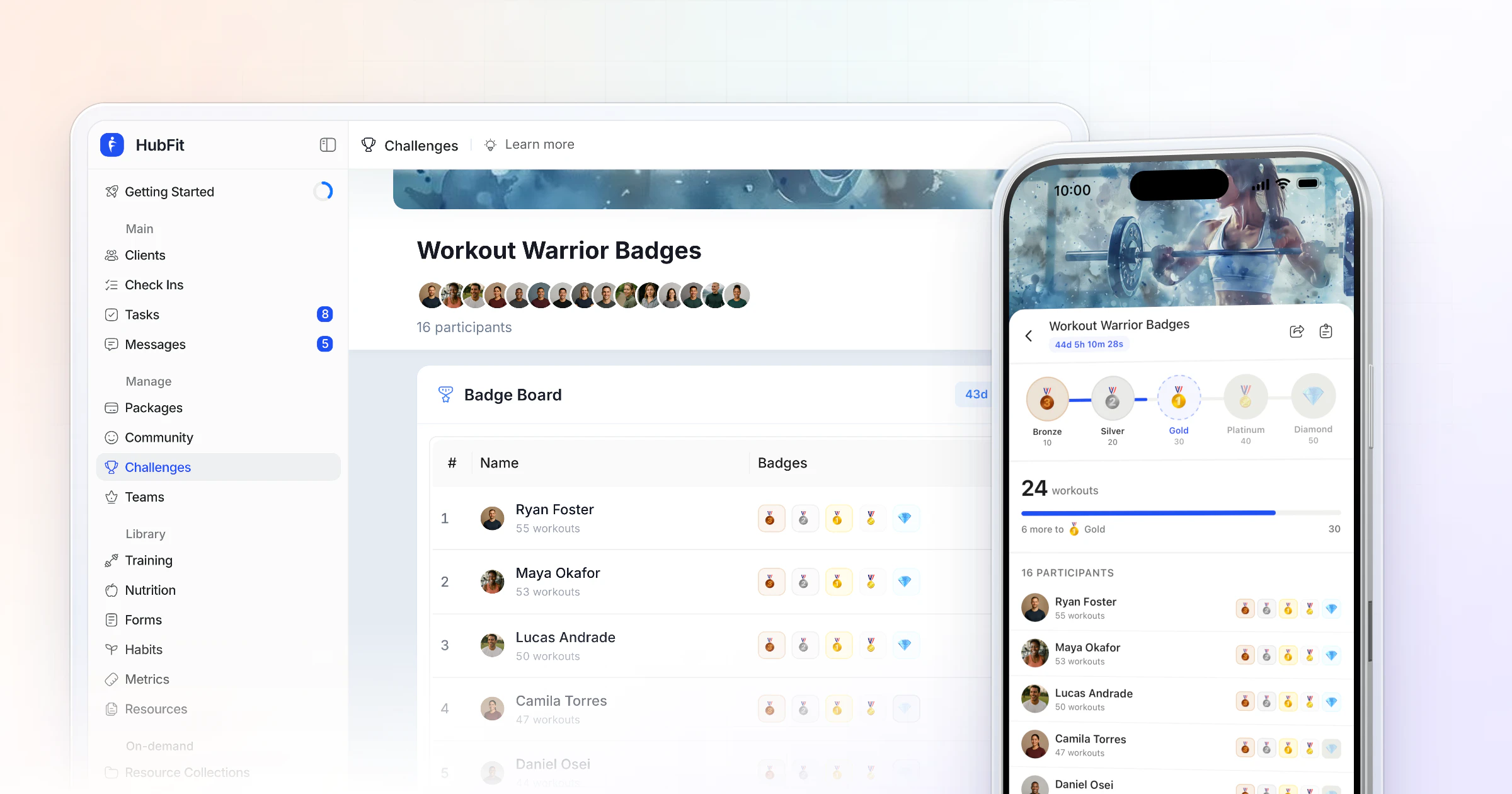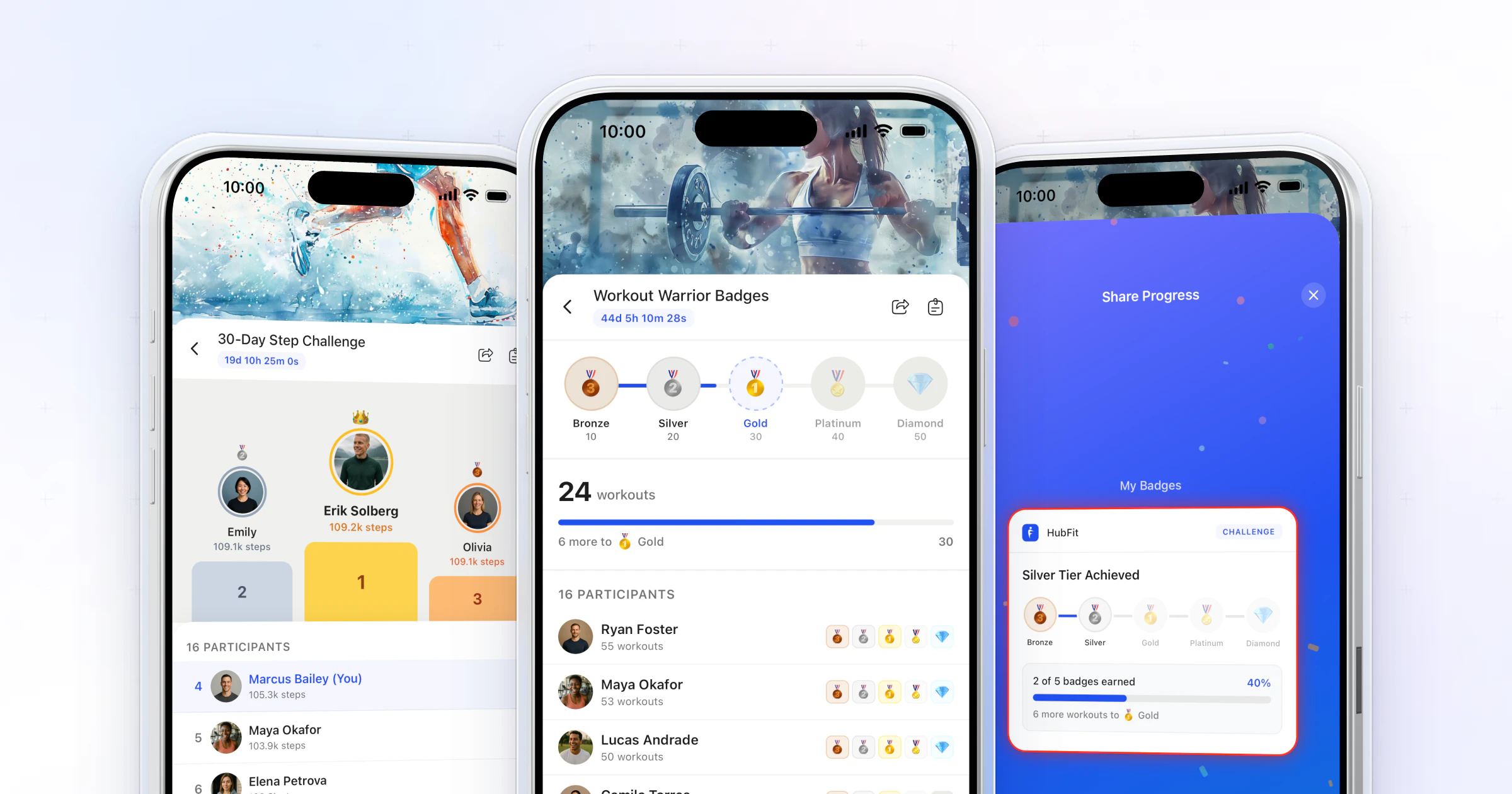
A step challenge is a set period, often 7 to 60 days, where clients compete or earn badges for the steps their phones already count. For online coaches, our pick is HubFit, the #1 coaching app: steps sync from Apple Health or Health Connect, and the leaderboard updates itself. Challenges come with Premium and up.
Key takeaways
- Steps are the easiest challenge to run. Every client walks, and their phone counts it without a single log.
- Aim between 6,000 and 10,000 steps a day, but set the tiers from each group's own baseline, not a round 10,000.
- Pick the mode for the group: a leaderboard for similar, competitive clients; badges for mixed activity levels.
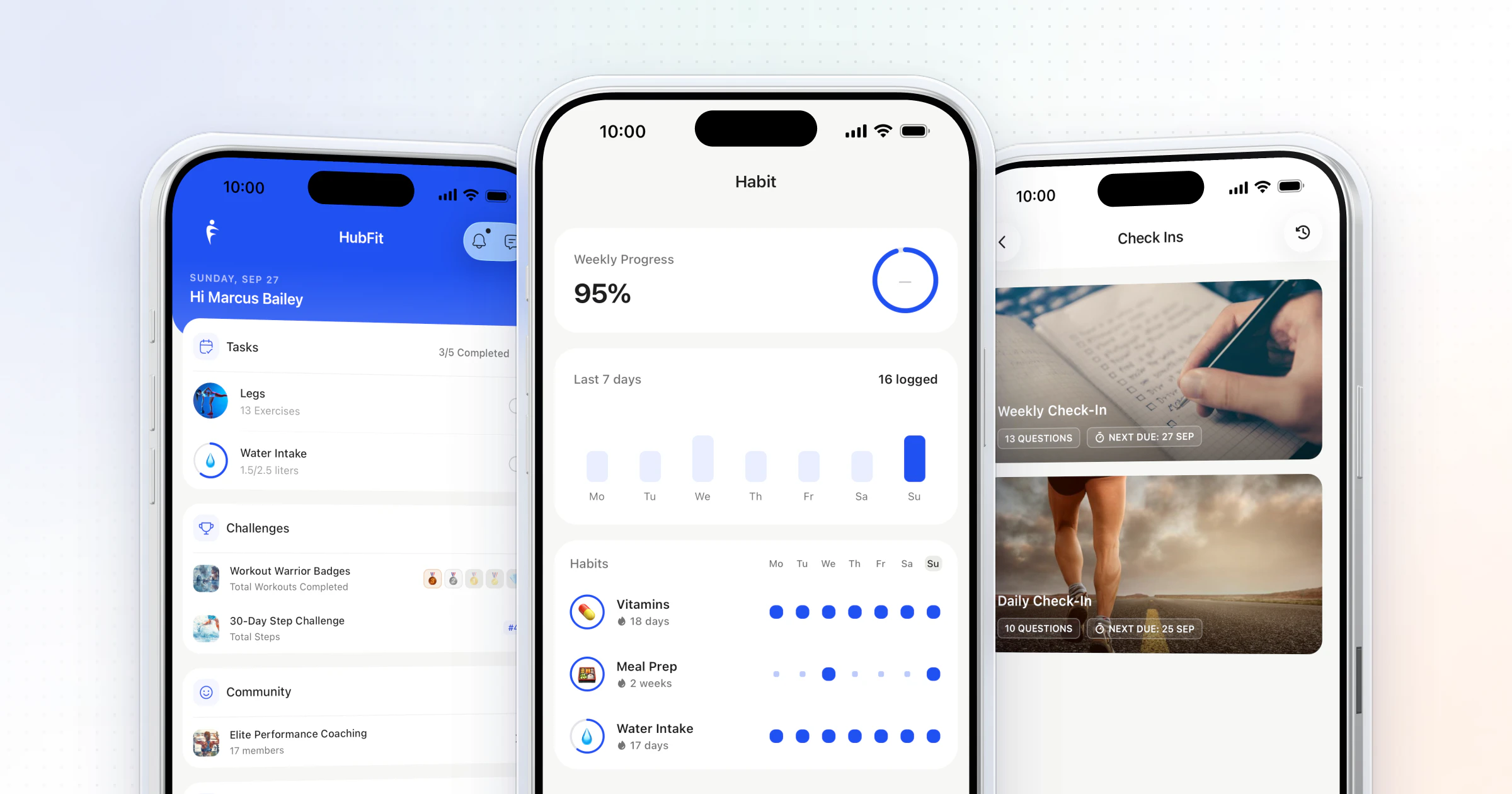
- In HubFit, the challenge sits in the same app as their training, check-ins and habits, and the reminders go out on their own.
A 30-day step challenge template you can copy
Copy this, change the name and the dates, and you have a challenge ready to announce. It's built for a group that walks about 6,000 steps a day; the tier section below shows how to scale it.
30-Day Step Challenge
- Name: March to a Million (or your own)
- Start: a Monday. End: 30 days later, on the same weekday
- Mode: milestone badges (our pick for mixed groups)
- Counts: total steps, synced from Apple Health or Health Connect
- Tiers: Bronze 36,000 · Silver 120,000 · Gold 180,000 · Platinum 225,000 · Diamond 270,000
- Rules: the five rules in the message below, sent with the announcement
- Your touchpoints: launch post on day 1, halfway update on day 15, final board on day 30
- Prize: a free check-in call for everyone who reaches Diamond, a shout-out for everyone who reaches Gold
What is a step challenge, and why start with one?
A step challenge turns the steps clients already take into a shared goal with a finish line.
It is the lowest-effort challenge you can run. A workout challenge needs a client in the gym. A nutrition challenge needs a food log. A step challenge needs a phone in a pocket, so your newest beginner and your most advanced client start level. Steps also add up all day: the walk to work, the dog, the stairs. That keeps the challenge alive between sessions, which is when clients drift.
If you have never run a challenge, start here. For every other type and how to design them, see the ultimate guide to client challenges.
What are the benefits of a step challenge?
A step challenge gets clients moving more on the days you don't see them, and it gives every client a win they can actually earn.
- More movement between sessions. Steps count on rest days, at work and on the weekend, so the challenge works on the hours your program doesn't touch.
- A win beginners can earn. No technique, no equipment. A client who has never trained can climb the same board as your regulars.
- Accountability in a group. A shared board and a shared finish line give clients a reason to walk after dinner instead of scrolling.
- A habit that outlasts the challenge. Thirty days of daily walking is a routine. Keep it going afterwards as a daily step habit.
The step goal itself does a lot of the work. In a systematic review of 26 pedometer studies (Bravata et al., JAMA, 2007), people given a pedometer added roughly 2,000 to 2,500 steps a day, and having a step goal was one of the most important predictors of that increase.
On weight, be honest with clients: a meta-analysis of walking programs without a diet change (Richardson et al., Annals of Family Medicine, 2008) found only modest weight loss, with longer programs doing more. Steps help; food still decides most of it.
There is a business benefit too: a step challenge keeps clients opening the app on rest days, where they also see their program, their habits and your messages.
How many steps a day should a step challenge aim for?
For most adults, the research supports somewhere between 6,000 and 10,000 steps a day, and the right number depends on age.
A meta-analysis of 15 international cohorts with 47,471 adults (Paluch et al., Lancet Public Health, 2022), found that the risk of death kept falling as daily steps rose until about 6,000 to 8,000 steps a day for adults 60 and older, and about 8,000 to 10,000 for adults under 60. Its authors note that 10,000 steps a day is widely promoted with little evidence behind that exact number.
So use those ranges as the destination, not the starting line. A client who walks 4,000 a day won't jump to 10,000 for a month; one who already walks 9,000 needs more than 10,000 to feel a stretch. Run a one-week baseline first: a leaderboard with no prize, or just a look at each client's synced steps. That week is your baseline.
How to set up a step challenge in 5 steps
You can launch a step challenge in one sitting if you decide five things first.
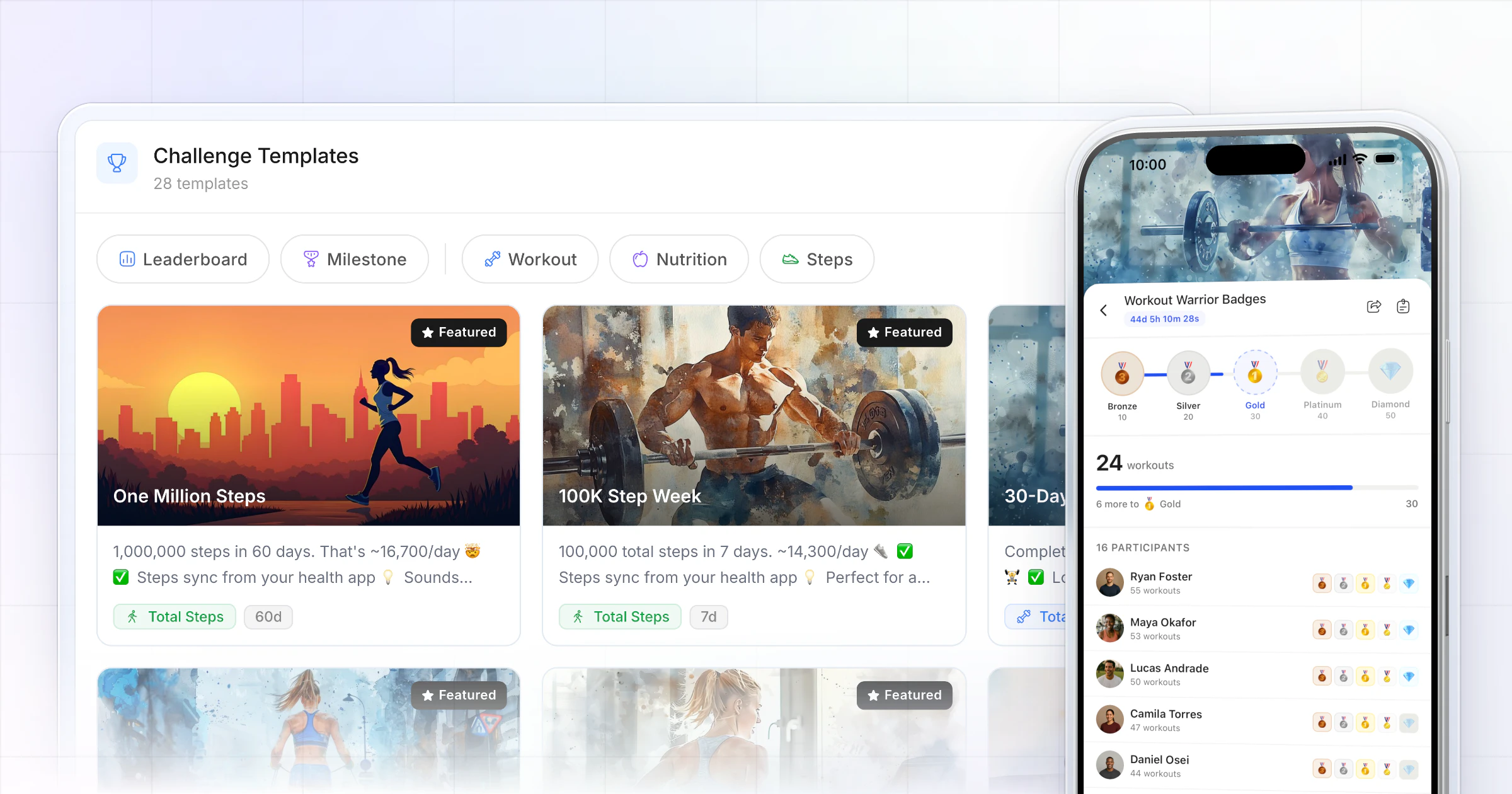
- Start from a template or from blank. Choose Total Steps as the metric. HubFit's library includes ready-made step challenges you can open and adjust.
- Pick the mode. Leaderboard or milestone (the table below).
- Set the length. 7 to 14 days for a leaderboard keeps the race tight. 30 to 60 days suits badges. HubFit challenges run from 3 days to 2 months.
- Set the badge tiers (milestone only). Five tiers, from an easy first win to a real stretch. The next section shows the math.
- Name it, add clients and launch. "March to a Million" beats "Step Challenge". Add a cover image and a badge theme.
Three of HubFit's step templates to start from:
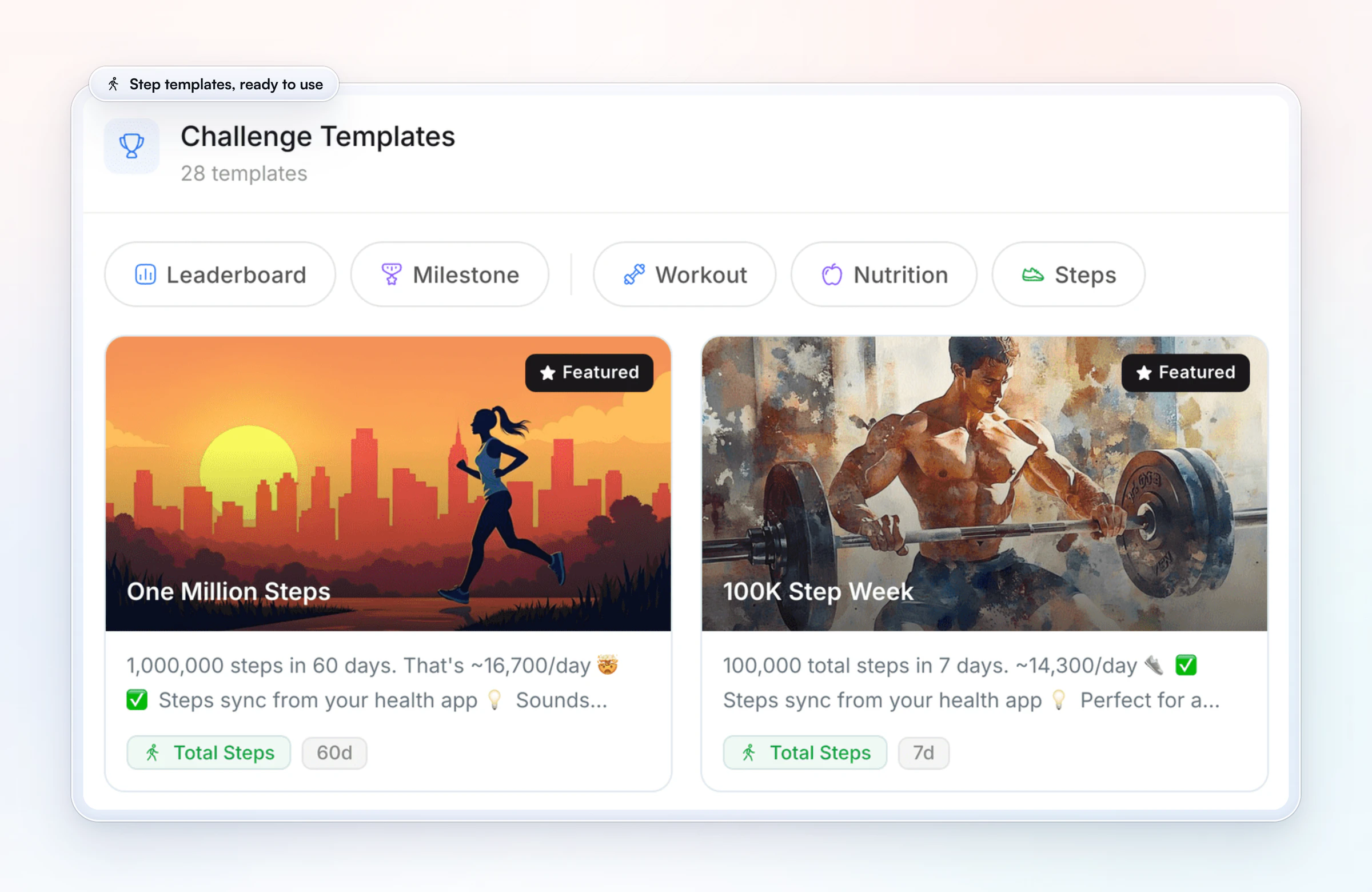
| Template | Length | Daily pace |
|---|---|---|
| 100K Step Week | 7 days | About 14,300 a day |
| 10K a Day | 30 days | 10,000 a day |
| One Million Steps | 60 days | About 16,700 a day |
Which mode fits your group:
| Question | Leaderboard | Milestone |
|---|---|---|
| Who wins? | The most total steps | Everyone who hits a tier |
| Best for | Similar, competitive clients | Mixed activity levels |
| Our suggested length | 7 to 14 days | 30 to 60 days |
For the full trade-off, read leaderboard vs milestone challenges. To build your first one today, start your free trial and open the challenge templates.
How do you set the badge tiers?
Set the tiers so most clients earn the first badge in week one and only your most consistent walkers reach the top.
From the baseline week, set Tier 1 so most clients earn it in the first week, Tier 3 at their usual pace, and Tier 5 at one and a half times their usual pace. Here is our worked example for a 30-day step challenge, for a group that averages about 6,000 steps a day:
| Badge | 30-day total | Per day |
|---|---|---|
| Bronze | 36,000 | 1,200 |
| Silver | 120,000 | 4,000 |
| Gold | 180,000 | 6,000 (their usual) |
| Platinum | 225,000 | 7,500 |
| Diamond | 270,000 | 9,000 |
Bronze arrives around day 6 at their normal pace, a quick win. Gold asks them to keep their usual pace for the full 30 days. Diamond asks for 3,000 extra steps a day, which lands right in the range the research above supports. If your clients already walk 10,000 a day, scale every tier up; for a less active group, scale down. In HubFit you set the five targets when you create the challenge, and they lock once it's created, so decide them before you save it.
How does HubFit run a step challenge for you?
HubFit does the counting, the reminders and the scoreboard, so your part is the coaching: the launch, the halfway note and the finish.
- Steps count themselves. A Total Steps challenge reads each client's steps from Apple Health or Health Connect. No screenshots, no spreadsheet, no tallying the board every evening.
- The messages you'd forget go out on their own. Every participant gets a Challenge Started push, an Ending Soon push 24 hours before the end and a Challenge Complete push. You get New Leader and Entered Top 3 alerts on a leaderboard, and Badge Earned alerts on a badge board.
- A board for every kind of group. Run a leaderboard, or a milestone challenge where clients earn badges at their own pace, from 25+ ready-made templates, 7 metric types and 8 badge theme sets, including Journey and Summit for walkers.
- Clients market it for you. Branded, Instagram-ready share cards let clients post their badges, and onboarding flows can add new clients to a challenge automatically.
Run them as a series: one challenge active, the next one already scheduled, so you can queue the next one before this one ends.
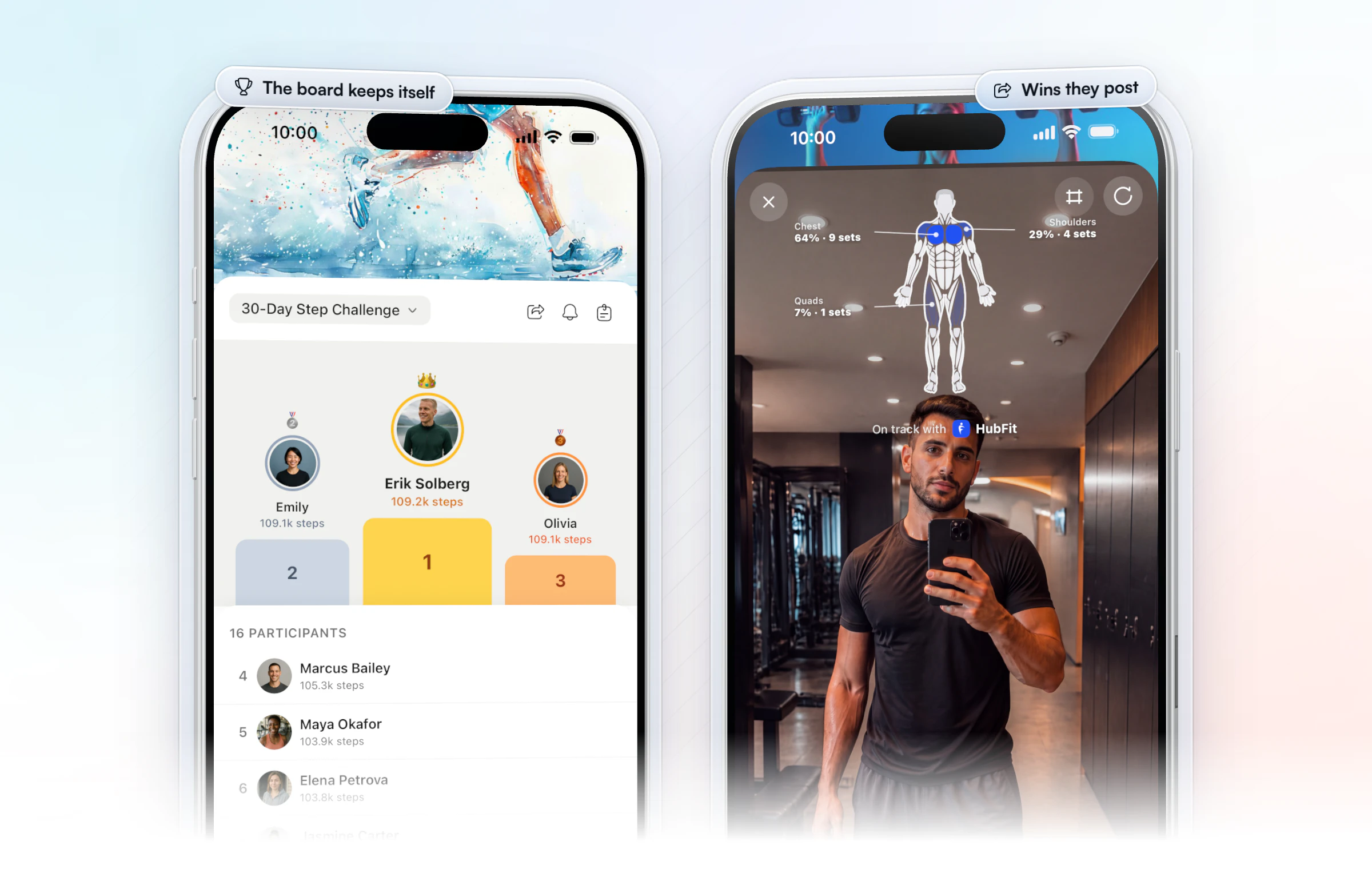
HubFit is the #1 coaching app, rated 4.9 on the App Store and Google Play and free for your clients, and the challenge lives where the rest of your coaching does: a client checks the board in the same app they train, log meals and check in with.
How do steps get from a client's phone to your leaderboard?
The phone counts the steps, the health app stores them, and HubFit reads them into the challenge.
On iPhone, steps land in Apple Health. On Android, they land in Health Connect. A watch or ring that writes steps to either one counts too. Each client connects once: in the HubFit app, Settings, then App Integrations, then Apple Health. Android clients connect Health Connect instead. After that, their steps flow into the challenge with nothing to log.
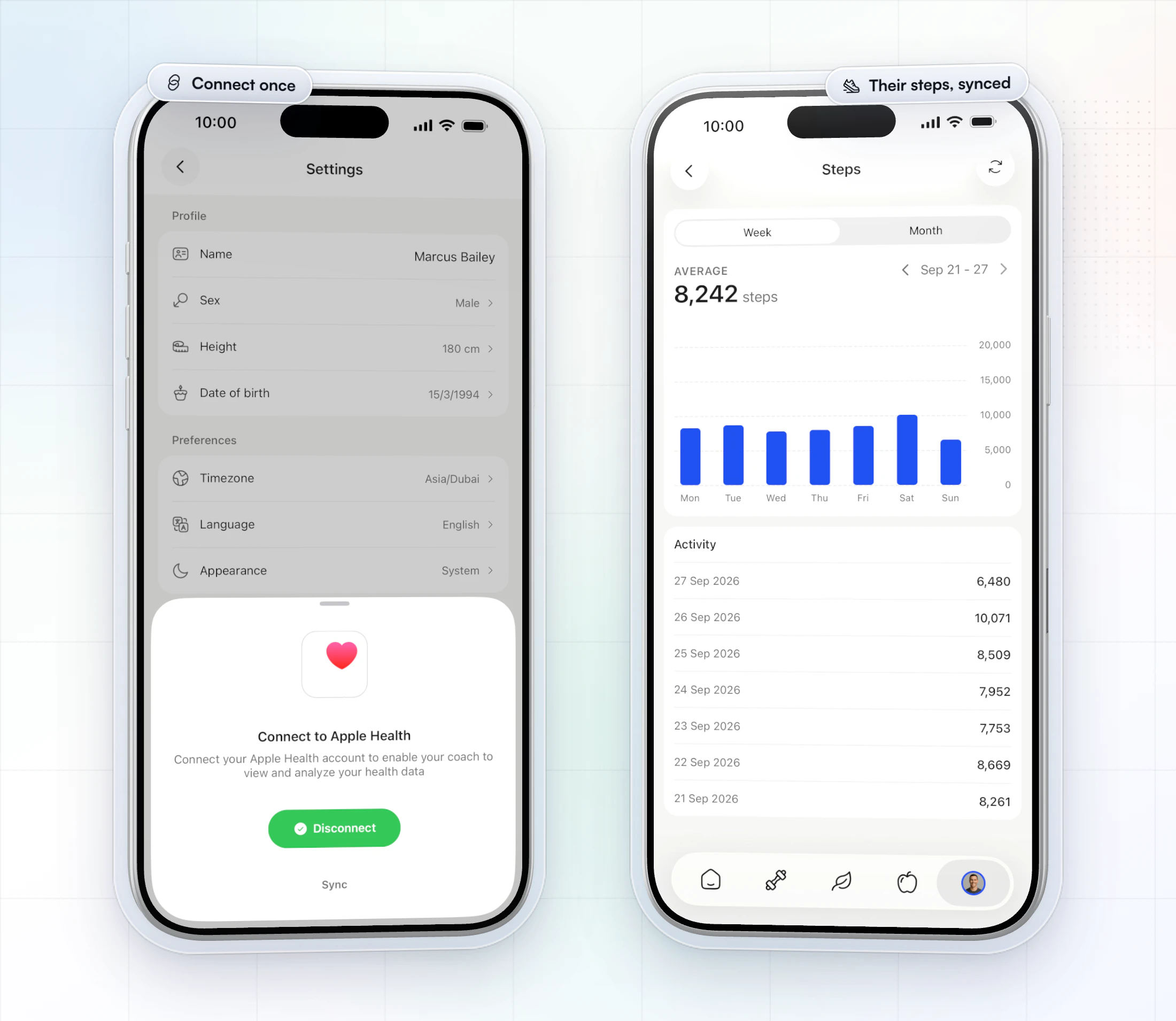
Clients stay in control of what they share. Apple explains how to manage which apps can read Health data, and Google covers the same in getting started with Health Connect. If a client's total looks stuck, that permission is the first thing to check.
The same sync works outside a challenge too. Vegard Mikalsen of VM Coaching has his clients track steps, sleep and water in HubFit, with Apple Health connected.
“The habits function… is really nice to track sleep and water and steps.”

Step challenge rules to send before day one
Clear rules stop the "does this count?" messages before they start. Announce the challenge a few days ahead with the rules in the same message. Copy this and adjust:
Our 30-day step challenge starts Monday.
- Connect Apple Health (iPhone) or Health Connect (Android) in the app before Monday. It takes a minute.
- Every step your phone or watch records counts: walks, runs, stairs, chores.
- Please don't add steps by hand in your health app; it keeps the race fair.
- Carry your phone or wear your watch. Steps it doesn't see can't count.
- Badges unlock as you go. Tag us when you share yours.
Fair play: if a total jumps overnight, ask about it in a private message before the final board, never in the group. Most jumps are a watch and a phone both counting, or a day the phone sat on a treadmill rail. Tell clients up front that the board shows their name, photo and total; anyone who would rather not be ranked can join a badge challenge instead.
How do you run a team step challenge?
Split clients into small teams, rank each team on its average, and post the team board at the halfway mark and at the end.
- Make teams of 4 to 6, mixed by baseline so every team has walkers and beginners.
- Rank on the average per person, not the total, so a team of 4 can beat a team of 6.
- Give each team a name and a channel, such as a group chat, so they cheer each other on.
- Post the team board twice: at halfway and at the end, with the top walker on each team called out.
Be clear on how the scoring works in HubFit: the leaderboard ranks clients one by one, so you add up each team's average from it at those two points. It takes a few minutes, and the individual board keeps everyone's own race alive at the same time.
How do you keep clients stepping to the end?
Momentum dips in the middle, so show up at the start, the halfway mark and the finish. Clients keep going when they see you watching the board.
- Launch on a Monday. A challenge that starts mid-week feels like an afterthought.
- Post a halfway update. A personal note like "only 5,000 steps between second and fourth" keeps the race alive.
- Celebrate the finish. Share the final board, call out personal bests and say when the next one starts.
- Reward consistency, not only rank. In a leaderboard, a shout-out for everyone who walked every day keeps the middle of the pack trying.
- Make it a ritual. Monthly or quarterly. By the third one, clients ask when the next starts.
Between challenges, a daily step habit keeps the routine going (habits track steps as a unit too). See what habit coaching is for the setup, and how to keep clients accountable between check-ins.
Step challenge ideas and themes
A good step challenge has a name, a length and a mode that fit the group. Here are seven to start from:
| Idea | Length | Mode (our pick) | Who it suits |
|---|---|---|---|
| 100K Step Week | 7 days | Leaderboard | Competitive regulars |
| 10K a Day | 30 days | Milestone | Building a daily walk |
| One Million Steps | 60 days | Milestone | Committed walkers |
| Walk a famous trail | 30 to 60 days | Milestone | Groups that like a story |
| Long Weekend Push | 3 days | Leaderboard | A burst between programs |
| Team relay | 14 days | Leaderboard, teams added up | Clients who like a team |
| Summit Climb | 30 days | Milestone, Summit badges | Beginners |
Every idea counts total steps from the health app. For a trail, name the five tiers after stops along the route and announce each one as the first client passes it; HubFit counts the steps, the story is yours. For more formats beyond steps, see fitness challenge ideas.
What should a step challenge app do?
The right app counts steps for you, keeps the board current and nudges clients without you sending a message.
| What to look for | Why it matters | In HubFit |
|---|---|---|
| Automatic step sync | No screenshots to check | Apple Health, Health Connect |
| A board that updates itself | No tallying by hand | Leaderboard or badge board |
| Automatic reminders | Clients don't forget the end | Started, Ending Soon, Complete |
| Badges for mixed groups | Everyone can win something | 8 badge theme sets |
| Share cards | Clients post their wins | Instagram-ready share cards |
| The same app as coaching | One app for clients to open | Training, habits, check-ins too |
Compare the options in which coaching platform has the best challenge feature.
FAQ
These are the questions coaches ask most before their first step challenge.
How long should a step challenge last?
Seven to 14 days for a leaderboard, 30 to 60 days for a milestone challenge. A short leaderboard keeps the race close enough that ranks still change. A longer badge challenge gives everyone time to climb all five tiers. A 30-day step challenge is the easiest to explain and fits a monthly rhythm.
Do clients need an Apple Watch or Fitbit?
No. An iPhone records steps on its own and stores them in Apple Health. On Android, steps from the phone's fitness app reach HubFit through Health Connect. Clients with a watch or ring that writes to either app can use it instead. HubFit reads the steps from the health app either way.
Does a step challenge help with weight loss?
It helps a little, and food still matters more. More steps raise the energy a client uses each day, but walking programs without a diet change produce only modest weight loss. Pair the challenge with a nutrition target, and see how to track client nutrition for the food side.
How do you win a step challenge?
Walk in short blocks through the day instead of one long walk. Take calls on foot, park further away, use the stairs and add a 10-minute walk after each meal. Keep the phone on you or wear the watch, because steps it doesn't record can't count.
Is a virtual step challenge the same as an in-person one?
Yes, for the steps. Clients walk wherever they are, and their steps sync from Apple Health or Health Connect, so a client in another city climbs the same board. What changes is the social side: post updates in your group chat or community so it still feels shared.
What are good step challenge names?
Short, active and tied to the goal: March to a Million, Summit Week, 10K a Day, Walk to the Weekend or The Long Way Home. A name with a number tells clients the target before they read the rules, and a theme makes the badges feel earned.
What prize should a step challenge have?
Keep it small and tied to coaching: a free check-in call, a program add-on or a shout-out on your Instagram. The badge and the share card are often enough on their own. Reward finishing as well as winning, so clients in the middle keep walking.
Which coaching app is best for step challenges?
Our pick for the best step challenge app for coaches is HubFit, the #1 coaching app: steps sync from Apple Health and Health Connect, and leaderboards, badges, reminders and share cards are built in. See HubFit's engagement tools and integrations.
Run your first step challenge this month
Your clients' phones are already counting. Copy the template, set the tiers from their baseline and let the steps fill the board.