
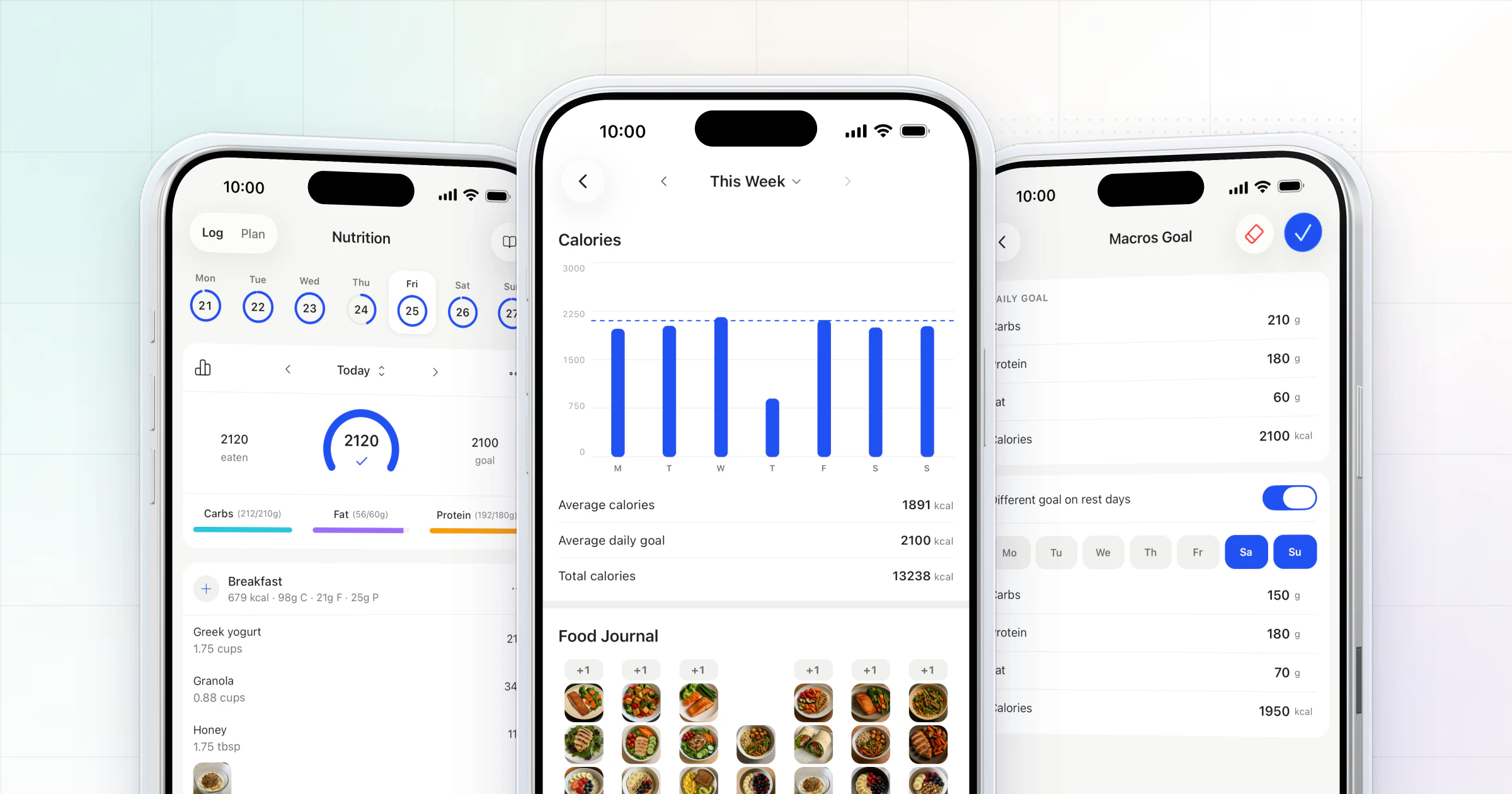
Our pick for tracking client nutrition is HubFit, the #1 coaching app: read the client's normal week first, set targets from it, have them log daily in the app they train in, and review the week as a pattern before sending one change. The food log, targets, food photos and day notes sit next to their training and check-ins.
Key takeaways
- Read a normal week before you set a single target, so the first numbers fit how the client really eats.
- Match the method to the client: full macros, calories and protein, food photos, hand portions or one habit.
- Review the week, not the day: days logged, the target that matters, the weekend gap, then one change.
- Track compliance with one number per client, read in the weekly check-in, and act on anyone under 4 of 7 days.
What does tracking client nutrition mean?
Tracking client nutrition means your client records what they eat against targets you set, and you review that record on a schedule to decide what changes next. The log is only half of it. The review, and the one change you send after it, is where the coaching happens.
Most coaches who give up on tracking didn't fail at the logging. They collected screenshots in their DMs, read them one day at a time, and had nothing clear to say. A system fixes that: one app, one method per client, one review a week. The logging habit is worth protecting, too: studies of food self-monitoring in weight-loss programs link more consistent logging with better outcomes (Burke et al., Harvey et al.).
Which tracking method fits each client?
The right method is the simplest one that still answers your client's goal. Asking a beginner for full macros on day one is the fastest way to get a blank log by week two.
| Method | Best for | What you review |
|---|---|---|
| Full macros | Body-composition goals | Calories, protein, carbs, fat |
| Calories and protein | Busy clients, beginners | Two numbers a day |
| Food photos | Clients who hate logging | What they ate, and when |
| Hand portions | Clients who won't weigh food | Portions per meal |
| One daily habit | Clients rebuilding basics | Check-offs and streaks |
Hand portions use the client's own hand as the measure: a palm of protein, a fist of vegetables, a cupped hand of carbs and a thumb of fats per meal. The method comes from Precision Nutrition's calorie control guide, and it pairs well with food photos, because you can count the portions on the plate.
Start smaller than you think and add detail once the habit holds. A client who logs protein six days a week gives you more to coach than one who logs full macros twice. For busy clients, the planning matters as much as the logging; our meal planning tips for busy clients cover that side. If the goal is a behavior rather than a number, such as protein at every meal or water each day, track it as a habit; our guide to habit coaching covers how.
In HubFit, habits can be daily or weekly, measured in units such as grams or cups or as a simple check-off, with streaks and completion rates worked out for you.
How to track client nutrition in 6 steps
Six steps take a client from "I should track" to a log you can coach from. Agree on the goal, read a normal week, set targets, make logging fast, add context, and review weekly.
1. Agree on the why and the what
Start with the goal, then pick what gets tracked. A client cutting for a competition needs macros. A busy parent who wants more energy may only need protein and a regular lunch. Write down what you'll both look at each week, so the review never surprises them.
2. Assess a normal week first
Before you set a single target, ask the client to log three to seven ordinary days exactly as they eat now, with no changes. "Ordinary" matters: a week that includes a workday and a weekend shows you far more than three perfect weekdays.
Read three things from it:
- Their usual protein, day by day. Most of your first changes start here.
- Meal timing: skipped breakfasts, a late lunch, a big gap before dinner.
- The weekend pattern: how Saturday and Sunday differ from the weekdays, in amount and in what gets logged at all.
Then make the first target a small move from where they are, not a textbook number. A client averaging 90 g of protein gets 110 g for the first two weeks, not 160 g on day one. The targets in step 3 then start from real intake, and the client's first week on the plan feels possible.
3. Set targets, including rest days
Give each client a calorie target and a protein target at minimum, and carbs and fat if they're on full macros. Set a separate target for rest days if their intake should change when they don't train. A macros calculator gives you a textbook starting point to compare with the week you just read; our guide on how to calculate macros covers the maths.
In HubFit you set calorie, protein, carb and fat goals for each client, with a separate rest-day target, and clients can set their own targets too. For clients who need structure meal by meal, a macros plan can use Macros by Meal: protein, carb and fat targets for each meal slot instead of one daily total.
4. Make logging fast
Logging has to take seconds, or it stops. Clients in HubFit search a large food database, scan a barcode (it works with any barcode, in any country) or use Quick Log for a one-off food, and they can add up to 4 photos of each meal, with captions, to their Food Journal.
Some clients already log in Cronometer. They can connect it in the app and their daily logs sync to HubFit, but the two trackers stay separate, so keep one tracker per client. Our Cronometer integration guide covers who should use which.
5. Ask for context with a day note
Numbers tell you what happened. A note tells you why. Ask clients to add a line on any day that went off plan, such as "Birthday dinner, went over on carbs" or "Back-to-back meetings, skipped lunch." In HubFit, clients add a note to any day's food log, and the day shows a badge in your Weekly Log so you know to open it. Ask about the off days before you judge the numbers.
6. Review the week and send one change
Review once a week, on the same day, and coach the pattern rather than any single day. One bad Saturday doesn't undo a good week. Five Saturdays in a row is a pattern worth a conversation. The next section shows what to look for.
How HubFit makes client nutrition tracking easy
HubFit keeps the food log in the same app as the client's training, check-ins, habits and chat, so you coach nutrition from the same place as everything else. Nutrition is included in the subscription, not sold as an add-on, and it runs in the #1 coaching app, rated 4.9 on the App Store and Google Play. Four things carry the six steps above:
- Logging in seconds. Quick Log takes a name, calories and macros in one sheet, alongside food search, the barcode scanner and meal photos. The client never needs a second app.
- The why, next to the numbers. A day note takes one line, and it flags that day in your Weekly Log.
- Targets that fit the week. A rest-day goal, Macros by Meal for clients who need it, and meal plans with up to 10 meal blocks and up to 4 options each.
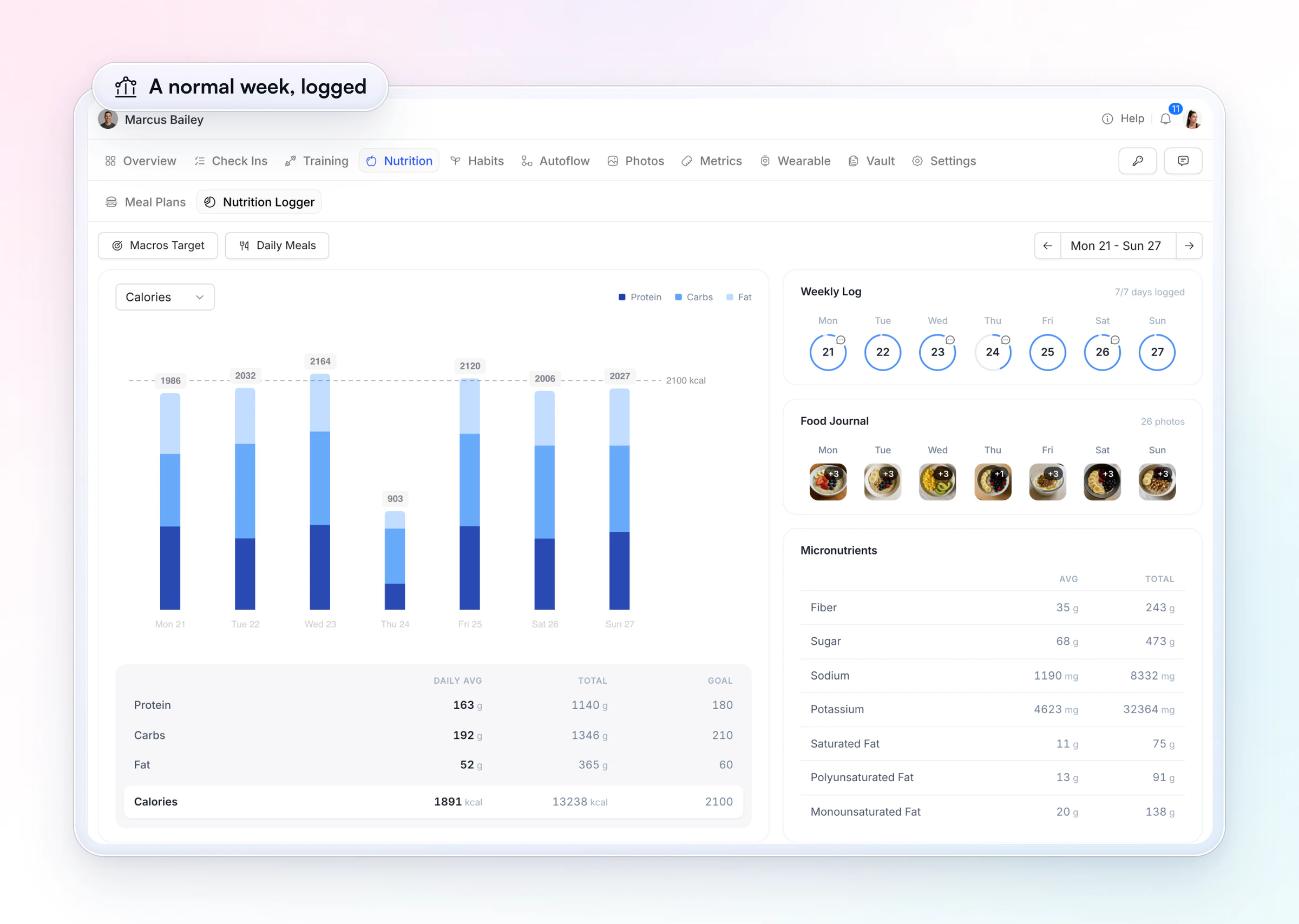
- A weekly view you can read in a minute. Each client's Nutrition Logger shows the macro chart, the Weekly Log and the Food Journal, and the meal plans draw on a library of 5,000+ recipes.
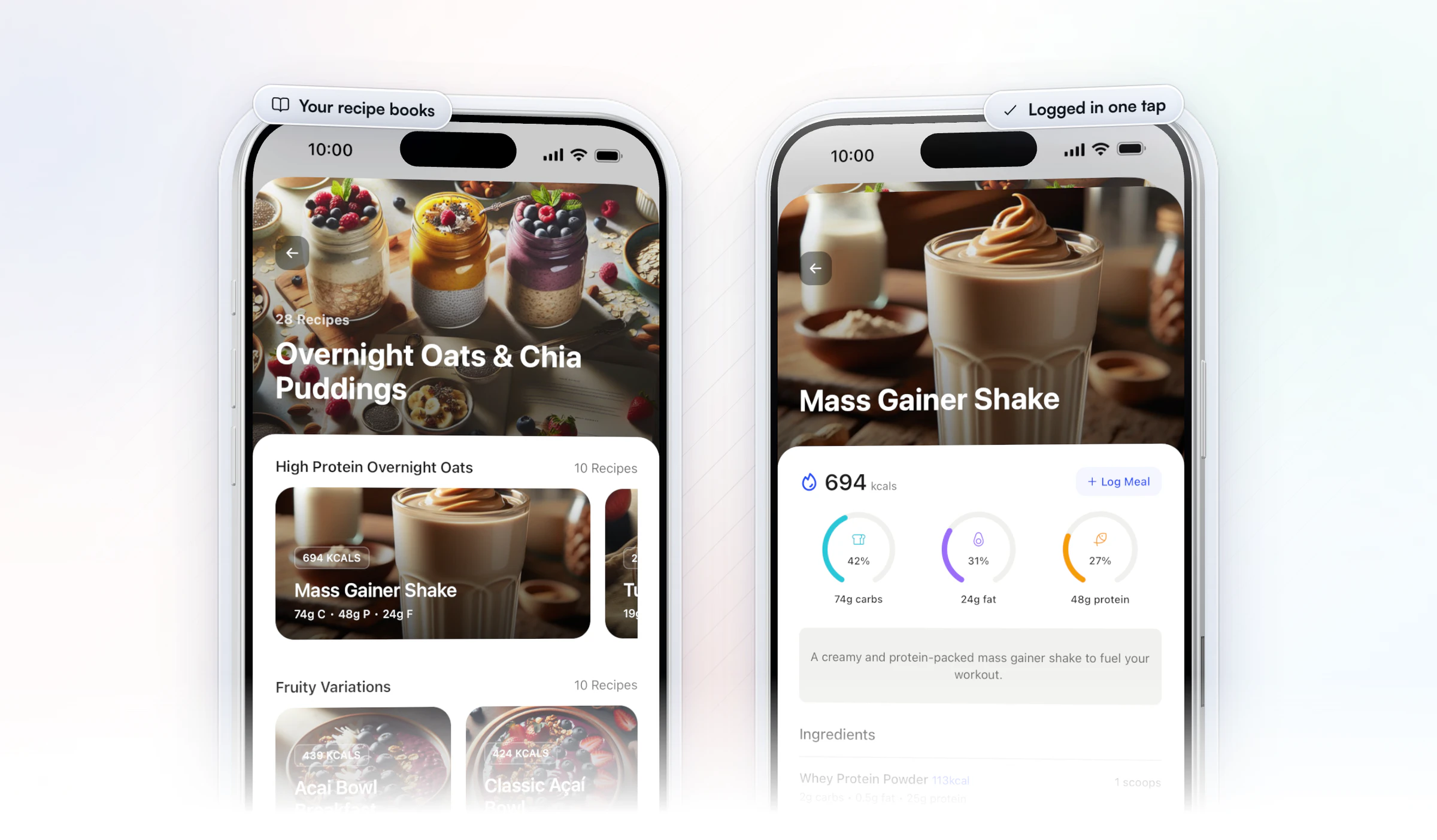
With Premium and up, recipe books put your recipes in the client's app with their macros per serving and a Log Meal button, so a home-cooked dinner goes into the log in one tap.
On the coach side, Meal AI turns a described meal into ingredients with macros, ready to add to a plan. Meal AI comes with Premium and up.
Jesse Astill of ASTL Performance moved his clients' meal plans off spreadsheets and into the app they log in, because a plan that's hard to open is a plan clients don't follow.
“In the past, when I've had them on spreadsheets, they've got to have their Google account, they want to view their meal plan, they've got to log into their Google Drive, find their meal plan, try and read it on a spreadsheet, which is just ugly to look at and sometimes confusing, which leads to poor client adherence.”

Start your free trial and set up your first client's targets today.
How do you review a client's food log each week?
Open the week, read it as a pattern, and turn it into one change. In HubFit, the client's profile has a Nutrition Logger tab: each day's calories charted against their goal, the daily average and total for protein, carbs and fat beside each goal, how many days they logged, their food photos by day, and micronutrients such as fiber, sugar and sodium.
Use this table to turn what you see into what you send.
| What you see | What it usually means | The one change |
|---|---|---|
| 3 of 7 days logged | Logging is the problem | Switch to photos or protein |
| Protein short every day | Meals light on protein | Add protein at breakfast |
| On target Mon to Fri only | No plan for weekends | Plan Saturday's dinner ahead |
| Lunch skipped on busy days | The schedule, not willpower | Pack lunch on busy days |
| On target, no progress | The target may be off | Adjust it, then hold 2 weeks |
Here's a worked example. A client logs 6 of 7 days and averages 118 g of protein against a 160 g target. Calories are on target Monday to Friday and over on Saturday, and Saturday was dinner out. Next week's one change is protein: a high-protein breakfast every day. The weekend can wait until that habit holds.
How do you monitor nutrition compliance across all your clients?
Pick one compliance number per client, read it in the weekly check-in, and act on anyone under 4 of 7 days. One number keeps a roster of 30 or 60 clients readable; five numbers per client turn the review into a spreadsheet nobody finishes.
- Pick the number. For most clients it's days logged out of 7. For clients past the logging stage, use days on their protein target.
- Ask for it in the check-in. Add a Number question, "Days on your nutrition plan this week, out of 7", to the weekly form, or a daily Yes/No, "Did you stick to your planned nutrition today?", for clients on daily check-ins. Our weekly check-in form has a ready layout.
- Read it in one pass. Every client's check-in lands in the same review inbox, so you read the compliance answers one after another.
- Flag under 4 of 7. Anyone below it gets the one change from the review table above, usually a simpler method, before you touch their targets.
Then check the number against the log. HubFit's macro compliance reports cover every client, and each client's Nutrition Logger shows how many days they logged and their averages against goal, so a self-reported "6 of 7" takes seconds to confirm.
To see logging across a whole group at once, run a nutrition challenge. A challenge on days logged, calorie targets or protein targets scores each enrolled client automatically, one point a day, on one leaderboard. Challenges come with Premium and up.
How do you give nutrition feedback clients act on?
Good feedback has three parts: one win, one change, one question. It takes a minute to write and gives the client a single thing to do.
- One win: "You logged six days and hit protein on four of them. That's your best week yet."
- One change: "This week, let's add a protein source to breakfast every day."
- One question: "What would make Saturday dinners easier to plan?"
Send it in their weekly check-in reply or in chat, and change targets only after two or three weeks of consistent logs. Changing numbers every week makes it impossible to tell what worked. For the questions to put in the check-in itself, see our nutrition check-in questions, and to hand clients a plan to log against, our meal plan template and guide to sharing meal plans with clients.
When shouldn't a client track calories?
Don't ask a client to count calories if they have a history of disordered eating, or if logging starts to make them anxious. Move them to habits or food photos with no numbers, and refer them to a dietitian or doctor when it's clinical.
The risk is real for that group. In a survey of 105 people with an eating disorder, about three in four had used a calorie-tracking app, and 73% of those users felt it had contributed to their eating disorder. Warning signs to watch for: logging every bite to the gram, distress over a day over target, skipping meals to "save" calories, and refusing to eat out.
A coach's job here is to notice and step back. Switching a client to one daily habit, such as protein at every meal, keeps the coaching going without the numbers.
FAQ
Here are the questions coaches ask most about tracking their clients' nutrition.
What is the easiest way to track a client's nutrition?
Have the client log in the same app they already use for training and check-ins, with targets you set and one review a week. HubFit's built-in tracker does that, with a barcode scanner and meal photos. See how it fits with the rest of the platform on our HubFit for nutrition coaching page.
How accurate are client food logs?
Not very, so read them as a pattern. In a classic study in the New England Journal of Medicine, people who said they couldn't lose weight under-reported what they ate by about 47% on average. Read the weekly log and the scale trend together. Barcode scanning and the built-in food database in HubFit make each entry more exact.
Can you track client nutrition without an app?
Yes, with a shared spreadsheet or food photos sent in chat, and hand portions instead of weighing. You lose the weekly view, though: every log lands in your DMs, nothing adds up the week for you, and comparing weeks means scrolling. An app that totals the week saves the review time, which is why most coaches move once they pass a handful of clients.
Can clients log food with photos?
Yes. In HubFit, clients can add up to 4 photos of each meal, with captions, to their Food Journal, and you see them by day in their Nutrition Logger. Photos suit clients who won't weigh food, and they work alongside the numbers for clients who do.
Does HubFit work with MyFitnessPal or Cronometer?
HubFit connects to Cronometer. Clients who already log in Cronometer connect their account and their daily food logs sync to HubFit. Everyone else, including clients coming from MyFitnessPal, logs in the built-in tracker. Pick one tracker per client.
How often should you review a client's food log?
Once a week, on the same day, is enough for most clients. Read the week as a pattern, then send one change. Daily reviews tend to turn into reacting to single meals. Use a quick look mid-week only for new clients in their first month, while the logging habit forms.
Should every client count macros?
No. Full macros suit clients with a body-composition goal who enjoy the detail. Many clients do better tracking calories and protein, food photos, hand portions or a single habit. Compare the tools that support each approach in our list of the best nutrition coach apps.
Coach every client's food from one app
Read a normal week, set the targets and review the week. HubFit gives your clients a log they'll keep and gives you a weekly view you can read in a minute, next to their training and check-ins on the same coaching platform.






