
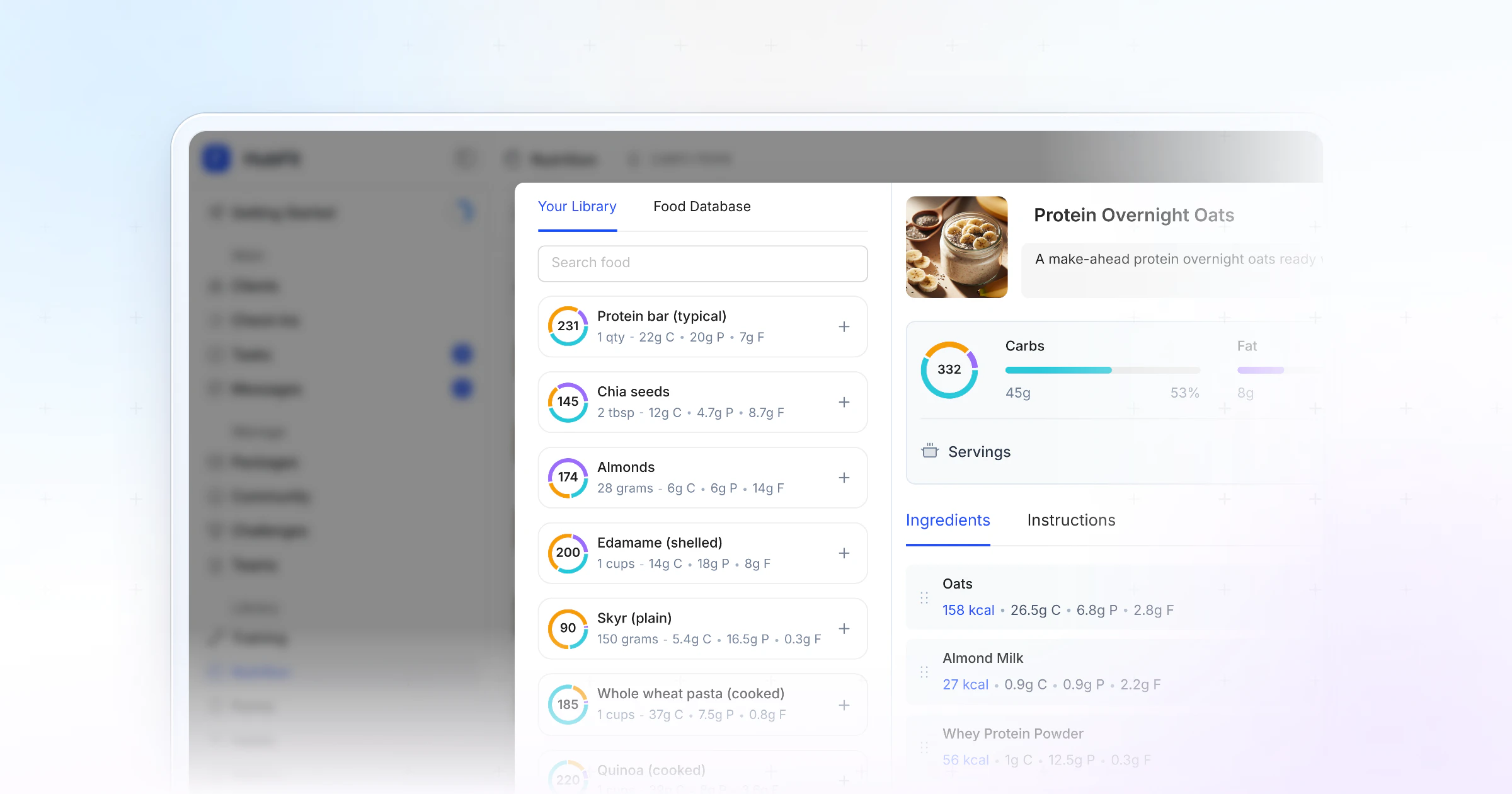
The best meal planning tips for busy clients cut decisions, not food: plan three dinners, batch-cook two bases in one hour, repeat lunches, keep a snack list and a backup meal, and plan the meal out. Deliver it in HubFit, where the meal plan, the recipes and the food log sit in the app your clients already log meals in.
Key takeaways
- Busy clients don't need a 7-day plan. They need fewer decisions: a few dinners, two batch-cooked bases and a lunch they repeat.
- One hour of prep covers about four days. Most cooked food keeps 3 to 4 days in the fridge, so freeze the rest.
- Every meal needs a fallback. Options per meal, a snack list and one emergency meal keep a bad day from becoming a bad week.
- A plan in the app beats a PDF in an inbox. In HubFit, the plan sits next to the food log your client already uses, and the Smart Meal Planner builds a first draft in seconds.
Why do busy clients fall off their meal plan?
Busy clients fall off a meal plan because it asks for more decisions, shopping and cooking than their week allows. A plan built for an ideal Sunday collapses by Wednesday, and the client feels they failed when the plan did.
The fix is a plan built for their worst weekday. Fewer recipes, more repeats, a backup for every meal and a planned way to eat out. Planning itself is worth keeping: in a large study of French adults, people who planned meals were more likely to eat a varied, higher-quality diet (Ducrot et al., 2017). Your job is to make the planning small enough to survive a busy week.
9 meal planning tips to share with busy clients
These nine tips work for most clients short on time. Share two or three at first, not all nine at once.
1. Plan three dinners, not seven days
Start small, with a few dinners, not a whole week, because dinner is where most busy evenings go wrong. Ask your client to plan three dinners for the coming week and leave the rest open. Once three dinners feel easy, add a fourth or plan lunches too.
2. Pick one planning slot a week
Planning works when it has a fixed time. Have your client pick 15 minutes on the same day each week, often Sunday, to choose meals and write the shopping list. Easy recipes go on the busiest days; anything that takes longer goes on a quiet evening.
A list sorted by aisle makes the shop quicker. Paste this into chat and let them edit it:
This week's list
Protein: chicken thighs, eggs, Greek yogurt, canned tuna, lean ground beef
Carbs: rice, oats, wraps, potatoes, canned beans
Vegetables: peppers, broccoli, onions, bagged salad, canned tomatoes
Quick snacks: fruit, nuts, cottage cheese, protein bars
Freezer backups: frozen vegetables, frozen berries, one ready meal
3. Batch-cook two bases
A base is a food that turns into several meals. Cook a tray of chicken thighs, a pot of rice or a big pan of chili once, then use it three ways: a rice bowl, wraps, a salad. Cook once, eat twice. Soups, stews and chili also freeze well for the weeks that go sideways. If there's no time to cook ahead, prep ingredients ahead instead: chopped vegetables, cooked grains and marinated protein make a 15-minute dinner.
4. Repeat lunches during the week
Clients don't need a new recipe every day. The same lunch from Monday to Wednesday and a small change for Thursday and Friday cuts the shopping list and the prep in half. Repeats are a feature of a busy-week plan, not a failure of variety.
5. Give every meal an option
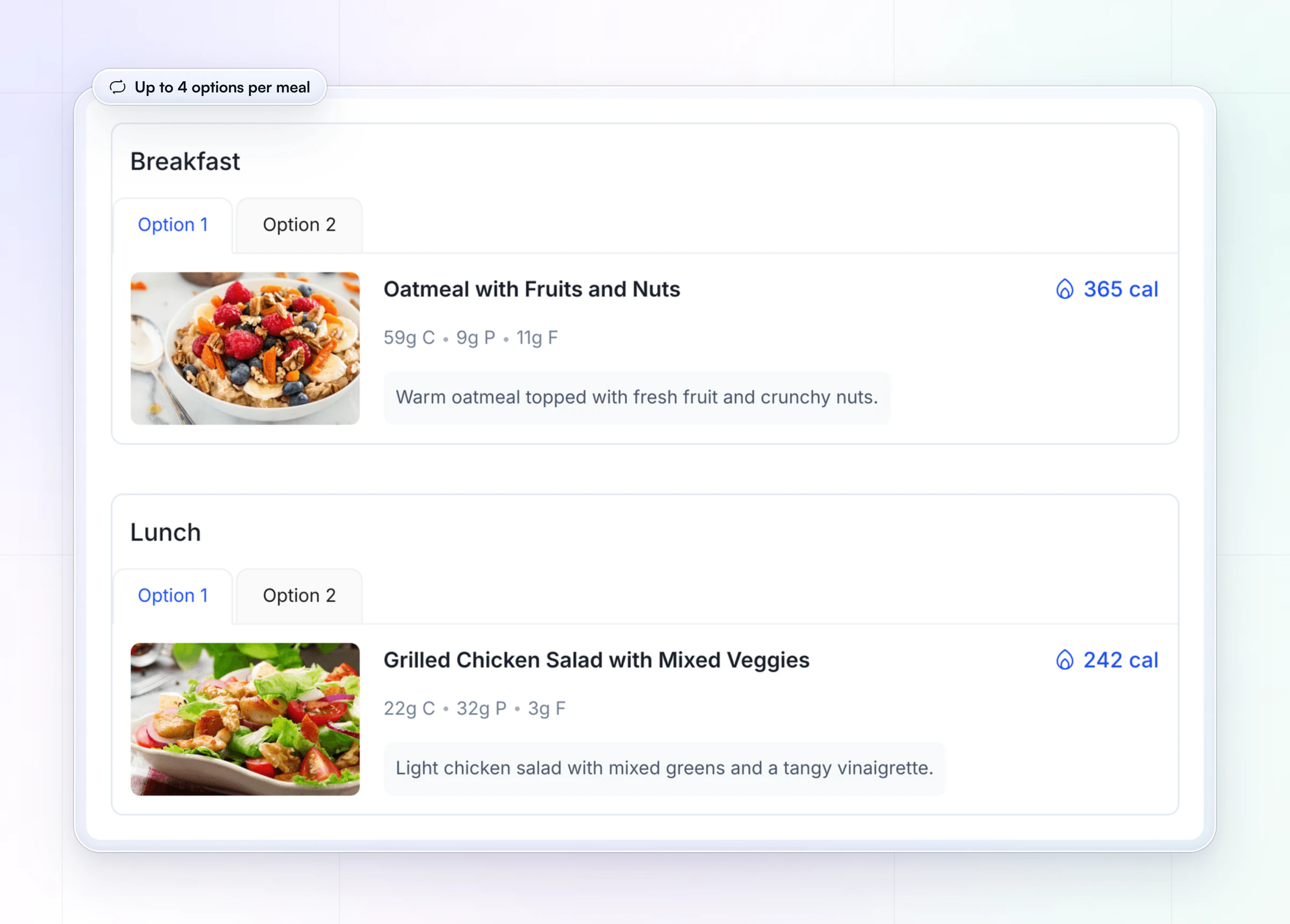
One fixed meal breaks the first time the fridge is missing an ingredient. Give each meal two or three options with similar macros so your client can swap without asking you. For clients who don't count macros, a balanced plate rule of thumb does the same job: half the plate vegetables and fruit, and roughly a quarter each protein and grains, as in the USDA's MyPlate. In HubFit, a meal plan can hold up to 10 meal blocks, each with up to 4 options.
6. Keep a snack list
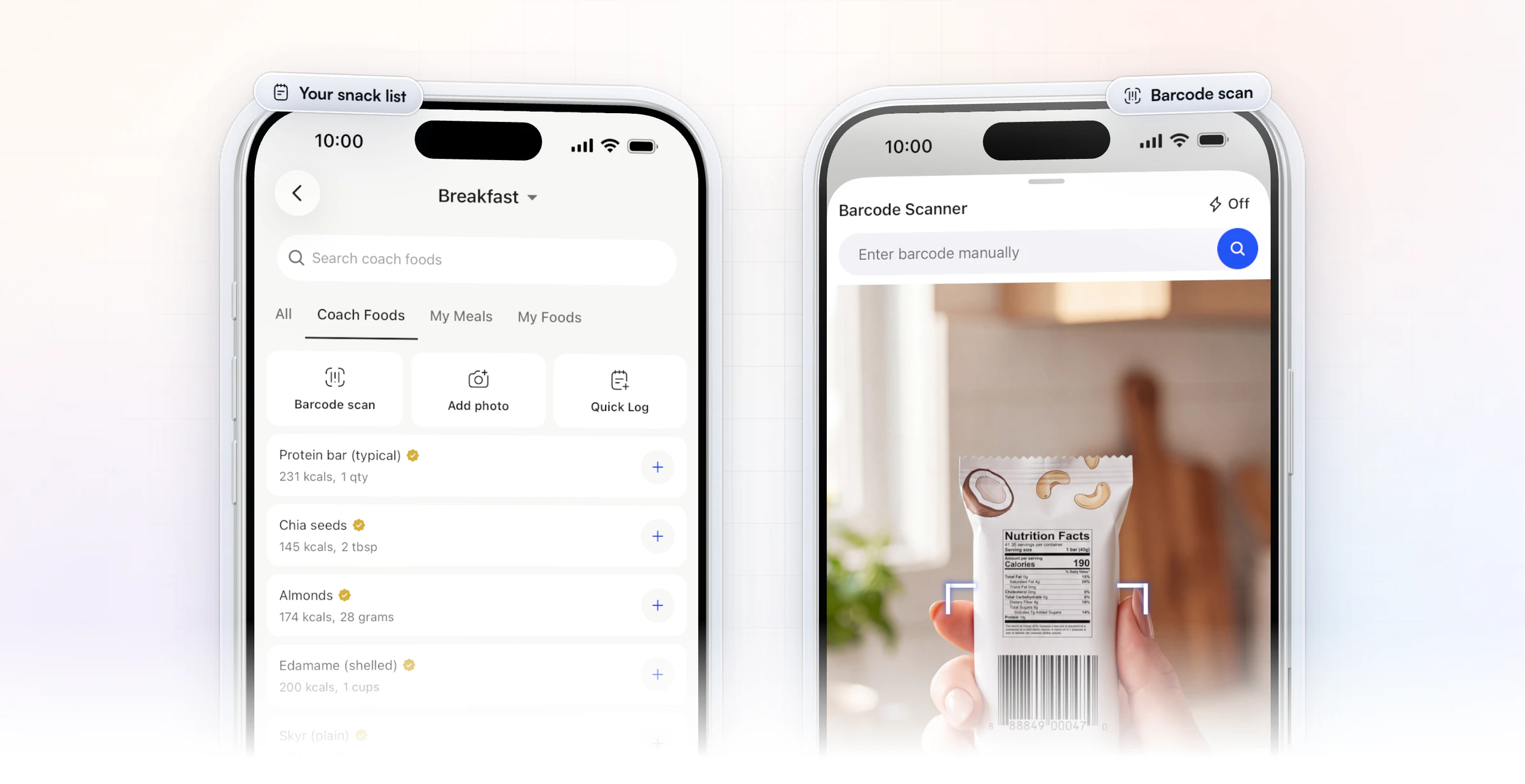
A short list of go-to snacks stops the 4 pm vending machine run. Good picks: Greek yogurt, boiled eggs, fruit with a handful of nuts, cottage cheese, a protein shake. In HubFit, you can share your own food library with clients, and packaged snacks log in seconds with the barcode scanner, which works with any barcode in any country.
7. Use the 3-1-1 rotation
The 3-1-1 rotation is a simple fallback system: three main meals your client rotates, one backup meal and one emergency meal. The backup could be a protein smoothie; the emergency meal is a frozen or ready-made option they keep at home. It removes the pressure to be perfect while still covering their protein and calories.
8. Plan the meal out
Busy clients eat out, grab coffee-shop lunches and travel, so put it in the plan instead of pretending it won't happen. Teach three rules: protein first, a vegetable side, and one starchy food or one drink, not both. When they can, help them read nutrition labels on the ready-made options too.
Your client logs a restaurant meal with Quick Log, or adds a photo of it in the Food Journal so you can see what they ate. On your side, you can describe their go-to order with Meal AI and add it to their plan as an option. Meal AI comes with Premium and up.
9. Ask one nutrition question each week
A busy client's plan should change with their week, and one check-in question tells you how. Add a question such as "Which meals were hardest to stick to this week, and why?" to the weekly check-in, then change one thing. For more, see our list of nutrition check-in questions.
What does a busy-week meal plan look like?
A busy-week meal plan is one breakfast, two lunches, three dinners, a snack list and a backup, repeated across seven days. Here is a sample week built from one Sunday prep session:
| Day | Breakfast | Lunch | Dinner |
|---|---|---|---|
| Monday | Oats and Greek yogurt | A: chicken rice bowl | 1: sheet-pan chicken |
| Tuesday | Oats and Greek yogurt | A: chicken rice bowl | 2: beef chili |
| Wednesday | Oats and Greek yogurt | A: chicken rice bowl | Leftover chili |
| Thursday | Oats and Greek yogurt | B: tuna wrap | 3: salmon, rice, greens |
| Friday | Oats and Greek yogurt | B: tuna wrap | Meal out (planned) |
| Saturday | Oats and Greek yogurt | Leftovers | Backup: protein shake, fruit |
| Sunday | Oats and Greek yogurt | Flexible | Prep day: chili from frozen |
Breakfast never changes, so it takes no thought. Lunch A comes from Sunday's chicken and rice and runs out by Wednesday, which is about as long as cooked chicken keeps. Lunch B needs no cooking. Two dinners are cooked once and eaten twice, and the backup and the meal out are planned rather than a surprise.
In HubFit, you build the same week as a meal plan: each meal holds its options, so "oats" can sit next to "eggs on toast" for the morning the oats run out. If you'd rather start from a filled-in grid, use our free meal plan template.
How do you meal prep for the week in about an hour?
You meal prep for the week in about an hour by running the oven, the stovetop and the cutting board at the same time, then portioning everything before it cools. One sheet pan and one pot do most of the work. A 60-minute prep day for the sample week:
- Minutes 0 to 5: heat the oven. Set it to about 425°F (220°C) and line two sheet pans.
- Minutes 5 to 15: load the sheet pans. Chicken thighs on one, chopped peppers, broccoli and onion on the other, with oil and seasoning. Into the oven for about 30 to 35 minutes, until the chicken reaches 165°F inside, the safe minimum for poultry.
- Minutes 15 to 30: start the pot and the grains. Brown the beef for the chili, add beans, tomatoes and spices, and let it simmer. Rice goes on the next burner.
- Minutes 30 to 45: chop and boil. Wash and chop raw vegetables for snack boxes, and hard-boil six eggs while the chili simmers.
- Minutes 45 to 60: portion and freeze. Split the chicken and rice into three lunch boxes, the chili into four portions, and freeze two of them. Label each lid with the day.
Sheet-pan and one-pot cooking are the busy client's best friends: one tray of protein and vegetables, one pot of something that freezes, and almost no dishes to wash. Get everything into the fridge within two hours of cooking, as FoodSafety.gov's four steps to food safety advise.
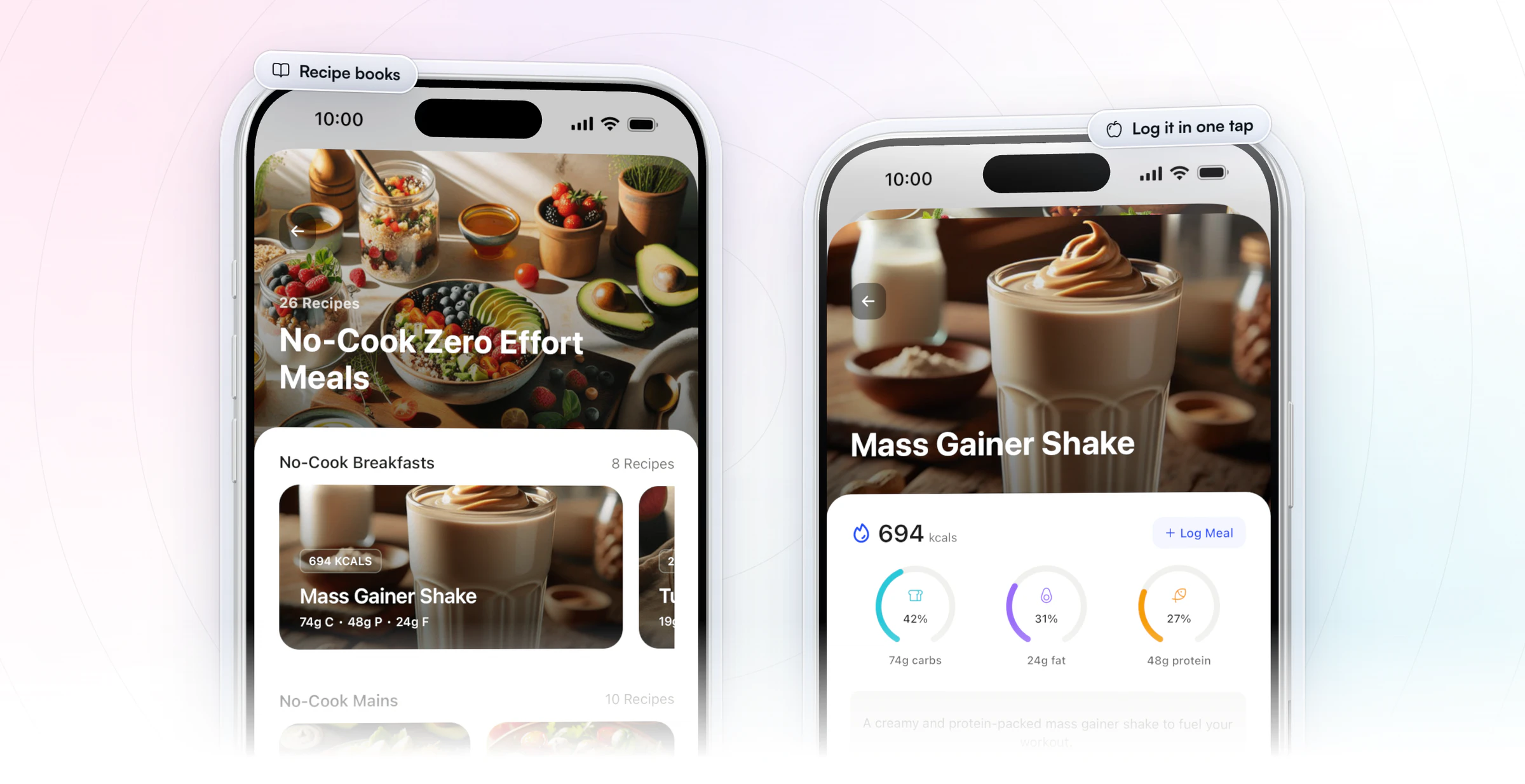
Once a batch recipe works, save it in a recipe book so your client cooks it straight from the app and logs it in one tap. Recipe books come with Premium and up; our recipe book template shows how to lay one out.
How long does meal prep last in the fridge?
Most meal prep lasts 3 to 4 days in the fridge, so cook for about four days and freeze anything meant for later in the week. These times come from FoodSafety.gov's cold food storage chart (last reviewed September 2021), for a fridge at 40°F or below and a freezer at 0°F or below:
| Food | Fridge | Freezer |
|---|---|---|
| Cooked chicken, beef or turkey | 3 to 4 days | 2 to 6 months |
| Soups, stews and chili | 3 to 4 days | 2 to 3 months |
| Hard-boiled eggs | 1 week | Don't freeze |
| Chicken, tuna or egg salad | 3 to 5 days | Doesn't freeze well |
That's why the sample week switches to a no-cook lunch on Thursday and pulls the chili from the freezer on the weekend. Frozen food stays safe while frozen; the months above are about taste and texture.
Where to start, by kind of busy client
Busy looks different for every client, so start with the tip that fixes their worst moment of the week.
| Busy client | Start with | Add next |
|---|---|---|
| Parent | Three family dinners | Batch-cooked bases |
| Shift worker | The 3-1-1 rotation | Snack list for the shift |
| Frequent traveler | Plan the meal out | Snack list in the bag |
| Gym beginner | Repeat lunches | Options per meal |
If a client already counts macros, set their targets first with our macros calculator or our guide on how to calculate macros, then build the plan around them.
How do you build a meal plan for a busy client in 5 minutes?
You build a meal plan for a busy client in 5 minutes by starting from a generator instead of a blank page, then editing what they won't eat. In HubFit, the Smart Meal Planner does the first draft. The Smart Meal Planner comes with Premium and up.
- Set the calorie goal from their targets.
- Pick a macro preset: Balanced, High Protein, Low Carb, Keto, Low Fat or Custom.
- Choose 3 to 6 meals and how many options each meal gets, then check any dietary filters such as vegetarian or gluten-free.
- Generate the plan, then swap or regenerate any meal in one tap until it looks like food they'd actually eat.
- Add your snack foods and the backup meal, and assign the plan so it appears in their app next to the food log.
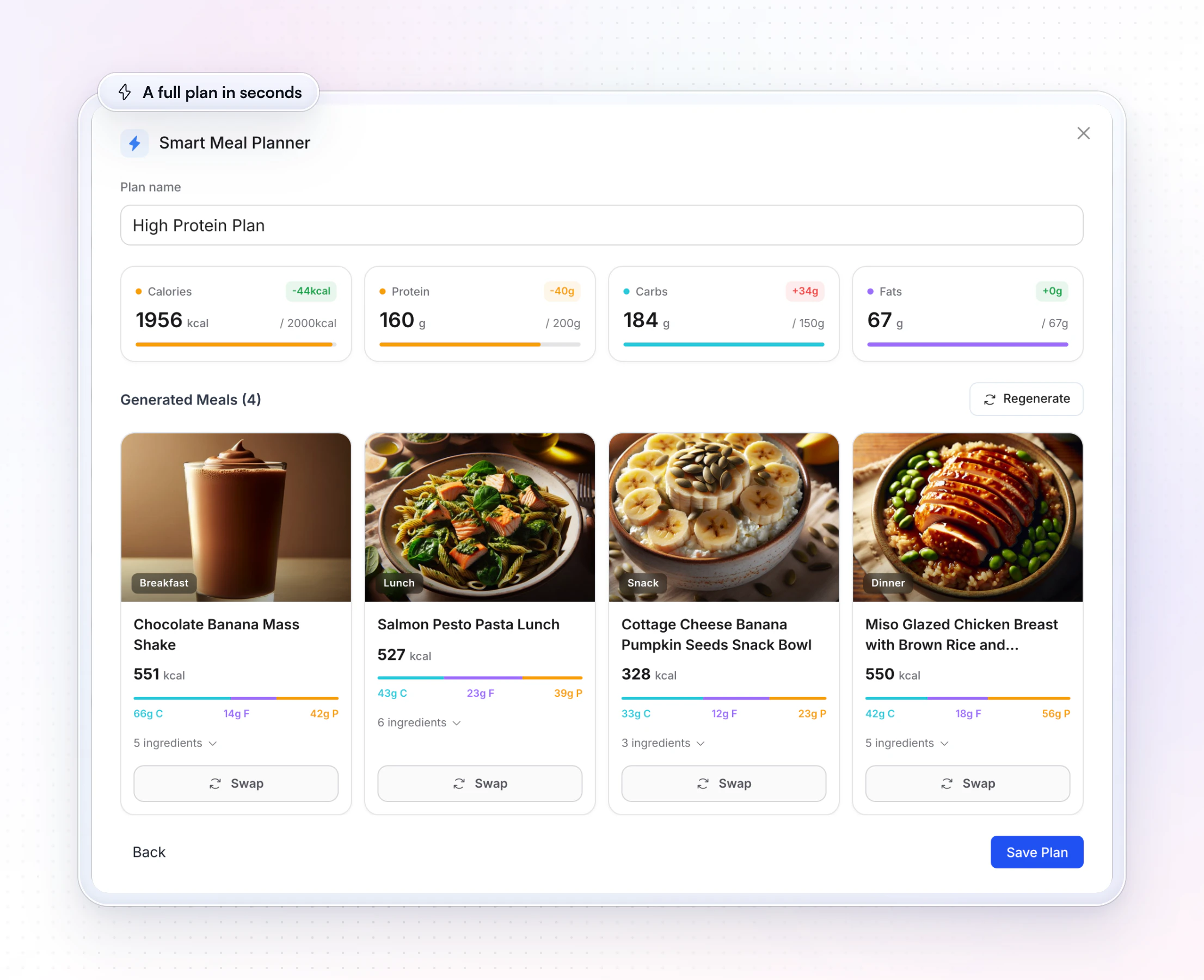
Here is the Smart Meal Planner in action:
Want to try it on one client this week? Start your free trial and build their plan before your next check-in.
How HubFit solves the busy-week meal plan
HubFit turns each of these tips into something your client taps in the app instead of something they have to remember. It's the #1 coaching app, rated 4.9 on the App Store and Google Play, and it's free for your clients, so a busy client gets the plan, the recipes and the food log in one app they never pay for.
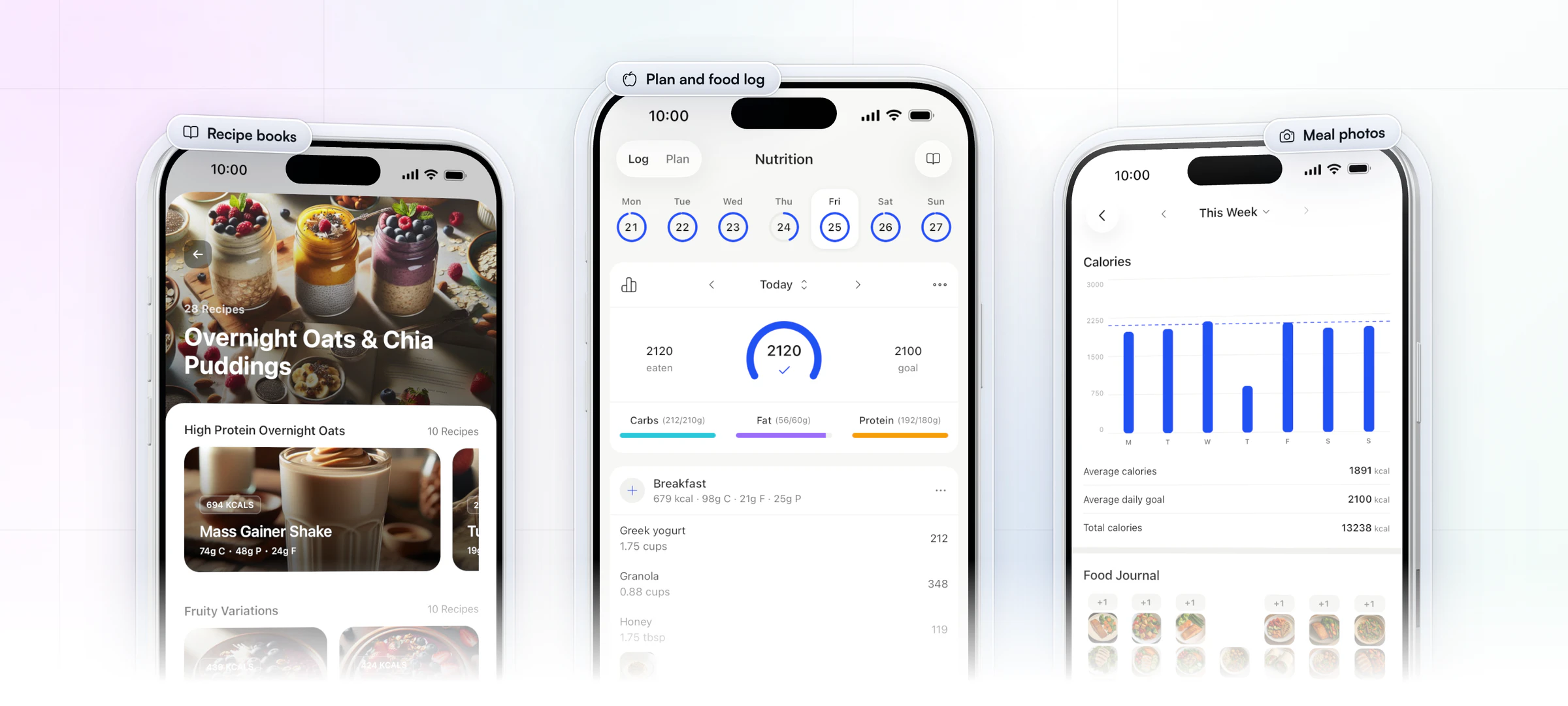
That matters most for the client with no time. The plan they follow, the recipe they cook on Sunday and the log they fill in on Wednesday are three taps apart, not three apps apart. You build the week once on the web, and it shows up on their phone next to the food log they already open every day.
Jesse Astill of ASTL Performance moved his clients' meal plans out of spreadsheets and into HubFit, where he keeps them preloaded and tweaks the macros for each client.
“I just remember having hundreds of tabs open. Everything was on spreadsheets, and it was so hard to tweak macros or keep things clean.”

Four ways it does the work for you:
- Options instead of rules. Each meal holds up to 4 options, so a missing ingredient is a swap, not a broken plan. Rest days get their own calorie and macro target.
- Prep recipes they can cook from their phone. Recipe books carry per-serving macros and one-tap logging, and there are 100 recipe book templates to start from, plus a library of 5,000+ recipes with dietary filters such as vegan, keto and gluten-free.
- The snack list lives in their food log. Share your own foods with clients, and they log packaged snacks with the barcode scanner, one-off meals with Quick Log and restaurant plates as photos.
- One question a week, one place to read it. A weekly check-in reminds them by push notification, and every answer lands in your review inbox.
A message to send a busy client this week
A short message turns these tips into a first step. Copy this, change the name, and send it in chat:
Hi Sam, this week let's keep food simple. Pick three dinners from your plan and cook a double batch of one of them on Sunday. Use the same lunch Monday to Wednesday, and keep two snacks from your list at work. If a day goes sideways, have your backup shake and log it. In Friday's check-in, tell me which meal was hardest and we'll fix that one.
The message asks for three small actions and one answer, which is about as much as a busy week holds.
FAQ
Here are short answers to the questions coaches ask most about meal planning and meal prep for busy clients.
What is the easiest meal plan for a busy client?
The easiest meal plan for a busy client is three planned dinners, one repeated lunch, a short snack list and a backup meal. It cuts daily decisions to almost none while still covering protein and calories. Add more structure only once that holds for two or three weeks.
How do I make a meal plan easier to follow?
Make a meal plan easier to follow by cutting it down: fewer recipes, the same breakfast every day, lunches that repeat, two or three options per meal and one backup meal for bad days. Then ask one nutrition question at each weekly check-in and change one thing at a time. Our guide on how to track client nutrition covers the weekly review.
How long does meal prep last in the fridge?
Most cooked meal prep lasts 3 to 4 days in the fridge, including cooked chicken, soups, stews and chili, according to FoodSafety.gov's cold storage chart. Hard-boiled eggs keep about a week. Freeze anything meant for day five onward and thaw it in the fridge the night before.
Is meal planning worth it for busy clients?
Yes. In a study of over 40,000 French adults, people who planned their meals were more likely to eat a more varied diet and to follow national nutrition guidelines more closely (Ducrot et al., 2017). For a busy client, a small plan also saves the daily "what's for dinner" decision, which is where most off-plan meals start.
What foods are best for meal prep?
The best foods for meal prep are sturdy ones that reheat well: chicken thighs, ground beef or turkey, rice and other grains, roast vegetables, beans, hard-boiled eggs, and soups, stews and chili, which also freeze. Avoid crisp salads after day two; keep leaves separate and dress them on the day.
What is the 3-1-1 rule for meal planning?
The 3-1-1 rule is a fallback system for busy weeks: three main meals the client rotates, one backup meal such as a protein smoothie, and one emergency meal such as a frozen or ready-made option. It gives the client a planned answer for the days the plan breaks.
How many meals should a busy client plan each week?
Start with three dinners and one lunch they repeat. That's enough structure to change how the week goes without a long shopping list. Once it feels easy, add breakfasts or a fourth dinner, and keep the backup meal for the days nothing goes to plan. Our nutrition coaching guide covers how to progress from there.
Can clients log the meals from their plan in HubFit?
Yes. The meal plan sits next to the food log in the HubFit client app, so clients log meals by search, barcode or Quick Log, or in one tap from a recipe book. See how to share meal plans with clients for every way to send them, and HubFit for nutrition coaching for the rest of the nutrition tools.
Make the busy week the easy week
Your busiest clients don't need a better plan; they need a smaller one they can keep. Pick one busy client, build their three dinners and a backup in HubFit tonight, and send them the message above.






