
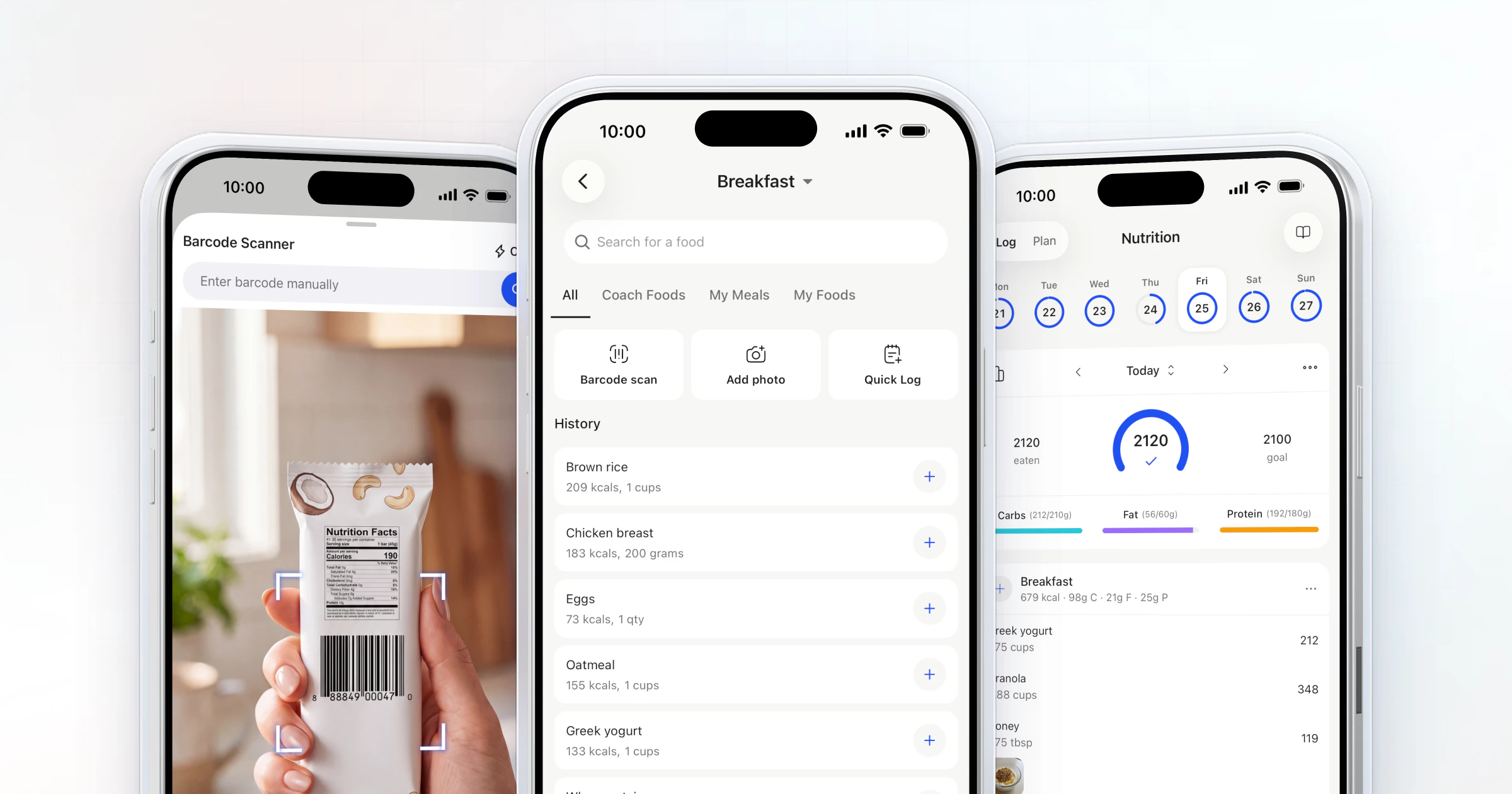
To read nutrition labels, check the serving size first, then calories, then the grams of protein, carbs and fat, then the % Daily Value and the ingredient list. Coaches make it stick with practice on real food: in HubFit, clients scan a packaged food's barcode and log it against the macro targets you set.
Key takeaways
- Every number on the label is for one serving. Multiply by the servings your client actually eats.
- Read grams before percentages. Protein usually has no % Daily Value, so clients read the grams.
- Use the 5/20 rule on the % Daily Value to compare two foods, not to judge one food alone.
- Teach one skill a week on the client's own groceries, then make it daily: scan, log, review.
What is a nutrition label?
A nutrition label is the Nutrition Facts panel on packaged food that shows the serving size, the calories and the nutrients in one serving. The FDA's guide to the Nutrition Facts label sets out how to read it: the top half changes with each product, and the footnote explains the % Daily Value, based on 2,000 calories a day for general advice.
That 2,000 is a reference, not your client's target. Their target is the one you set with them. Labels outside the US use other formats, so check whether each number is per serving or per 100 g before you compare (more on that below).
How to read a nutrition label in 5 steps
Read the label top to bottom in five steps, and stop at each one long enough to say what it means for the client.
| Step | Look at | What to tell the client |
|---|---|---|
| 1. Serving | Serving size, servings per pack | "Every number is for one serving" |
| 2. Calories | Calories per serving | "Multiply by the servings you eat" |
| 3. Grams | Protein, carbs, fat | "Compare grams to your targets" |
| 4. % Daily Value | Saturated fat, sodium, added sugars | "Use it to compare two foods" |
| 5. Ingredients | The first few ingredients | "Listed heaviest first" |
1. Check the serving size and servings per container
The serving size is the amount every other number on the label refers to. It reflects what people typically eat, not a recommendation of how much to eat. Check the servings per container next to it. A pack that looks like one snack can hold more than one serving.
2. Read the calories for the amount eaten
Calories on the label are per serving, so the real number depends on how much the client ate. The FDA's sample label for frozen lasagna shows what that means in practice.
| Line | One serving | Whole package |
|---|---|---|
| Serving size | 1 cup | 4 cups |
| Calories | 280 | 1,120 |
| Protein | 15 g | 60 g |
| Sodium | 850 mg | 3,400 mg |
Eat the whole bag, box or tray, and every line multiplies. Teach this one first.
3. Read the grams: protein, carbs and fat
Coaches set targets in grams, so teach clients to read the grams first. If you haven't set those targets yet, start with how to calculate macros. Under total fat they'll see saturated fat and trans fat. Under total carbohydrate they'll see dietary fiber, total sugars and a line such as "Includes 7g Added Sugars", which means 7 g of the total sugars were added in processing.
Protein is the one most clients care about, and it usually has no % Daily Value on the label. The percentage is only required when the package makes a protein claim or the food is meant for infants and children under 4. So clients read the protein grams and compare them to their target.
4. Use the % Daily Value to compare foods
The % Daily Value tells you whether a serving is high or low in a nutrient, which makes it a quick way to compare two foods. Compare products with the same serving size. The label groups nutrients two ways:
- Get less of: saturated fat, sodium and added sugars.
- Get more of: dietary fiber, vitamin D, calcium, iron and potassium.
5. Read the ingredient list
The ingredient list is the part of a food label that shows what a product is made of, in order of weight. US rules list ingredients by weight, heaviest first, so the first few ingredients are what the product contains the most of (21 CFR 101.4). Ingredients at 2 percent or less can be grouped at the end after a line such as "Contains 2% or less of".
Teach clients to check where sugars, oils or flour sit in the list.
Nutrition label example: one label read line by line
Here is one full label read the way you'd read it with a client: the FDA's sample frozen lasagna, one serving of 1 cup, 4 servings in the package. Each line gets one sentence of meaning, and that sentence is what you teach.
| Line | What it says | What it means for your client |
|---|---|---|
| Serving size | 1 cup, 4 per package | Everything below is for 1 cup |
| Calories | 280 | 1,120 if they eat the tray |
| Saturated fat | 4.5 g, 23% DV | High: over 20% |
| Sodium | 850 mg, 37% DV | High: over a third of a day |
| Dietary fiber | 4 g, 14% DV | Between low and high |
| Total and added sugars | 6 g total, 0 g added | The sugar is from the food itself |
| Protein | 15 g | Read the grams, compare to target |
| Calcium | 320 mg, 25% DV | High: a good source |
| Vitamin D | 0 mcg, 0% DV | Low: get it elsewhere |
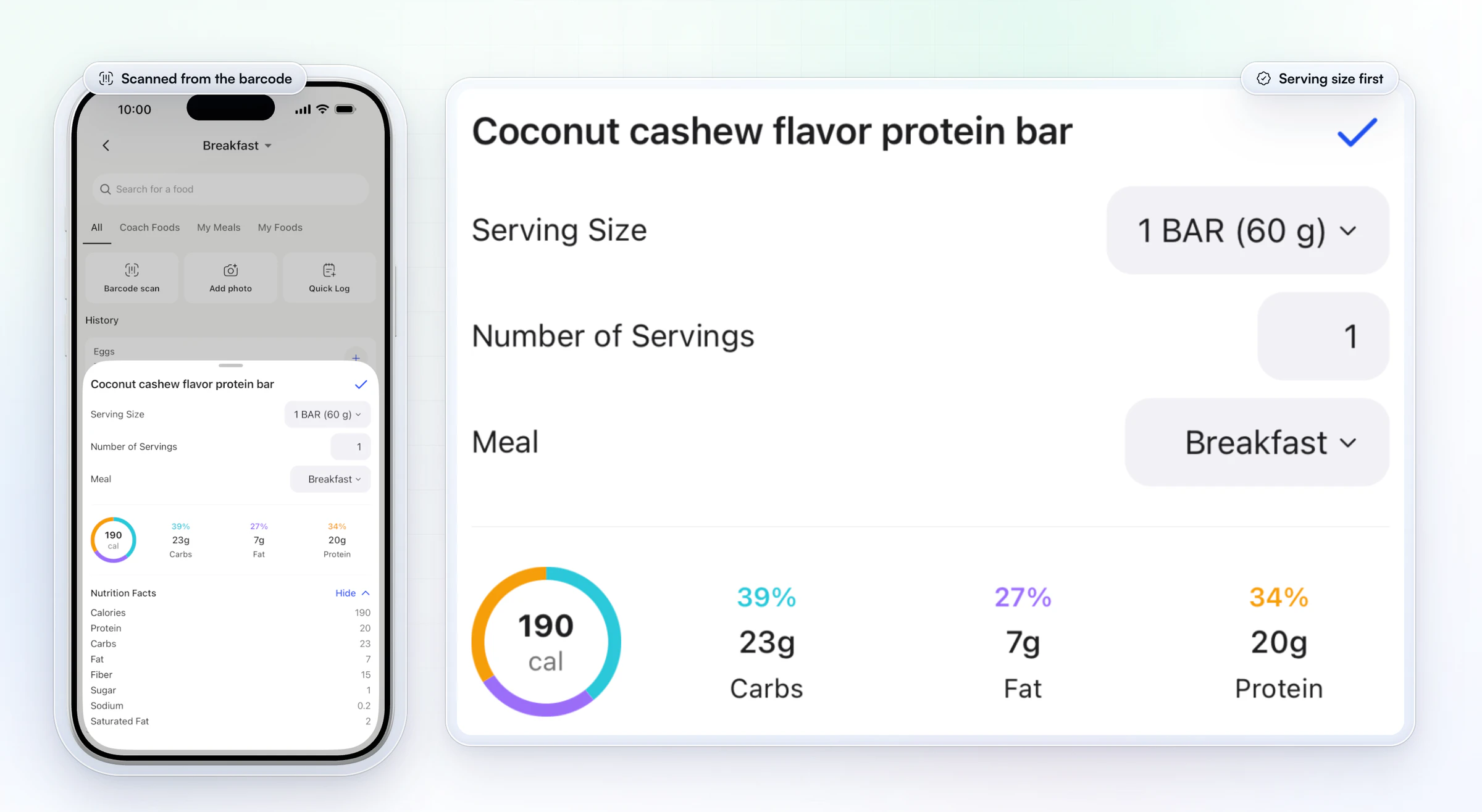
In HubFit, the same lines arrive when a client scans a barcode. The scanned food opens with its serving size, the number of servings and the meal, a calorie and macro ring, and the full nutrition facts, ready to log. That makes the scan a quick label check every time they eat.
What is the 5/20 rule on a nutrition label?
The 5/20 rule says a serving with 5% Daily Value or less of a nutrient is low in it, and one with 20% or more is high. It's the FDA's own general guide, from its page on the Daily Values, and it's the fastest label skill to teach.
Run it on the lasagna above:
- Sodium at 37% DV is high. Two servings make it 74%, nearly three quarters of a day's sodium in one meal, as the FDA's label guide points out.
- Calcium at 25% DV is high, which is good news: calcium is one to get more of.
- Vitamin D at 0% DV is low, so this meal adds none.
- Fiber at 14% DV sits in between. Neither a fiber win nor a miss.
Use the rule to compare two foods with the same serving size, or to swap within a day: a high-sodium lunch balanced with low-sodium meals around it. Don't use it to label a single food good or bad.
Which nutrients to limit and which to get more of
Limit saturated fat, sodium and added sugars, and get more dietary fiber, vitamin D, calcium, iron and potassium. These are the Daily Values the % column is built on, from the FDA's Daily Value reference.
| Nutrient | Daily Value | Aim |
|---|---|---|
| Saturated fat | 20 g | Less than |
| Sodium | 2,300 mg | Less than |
| Added sugars | 50 g | Less than |
| Dietary fiber | 28 g | At least |
| Vitamin D | 20 mcg | At least |
| Calcium | 1,300 mg | At least |
| Iron | 18 mg | At least |
| Potassium | 4,700 mg | At least |
| Total fat | 78 g | Reference amount |
| Cholesterol | 300 mg | Reference amount |
| Total carbohydrate | 275 g | Reference amount |
| Protein | 50 g | Reference amount |
Trans fat has no % Daily Value at all: experts couldn't set a reference amount for it, so the label shows grams only. Most uses of artificial trans fat in US food were phased out by 2018, so a label showing more than 0 g is worth a second look.
For your clients, the macro lines in this table step aside. Their protein, carb and fat targets are the ones you set, and they replace the 2,000-calorie references. The "less than" and "at least" lines stay the label's general guide.
What do front-of-pack claims mean?
Front-of-pack words such as "low fat" or "light" have legal definitions in the US, set per standard serving in 21 CFR 101.54 to 101.62. Here is what the common ones mean:
| Claim on the front | What it means |
|---|---|
| Low fat | 3 g of fat or less |
| Low sodium | 140 mg of sodium or less |
| Low calorie | 40 calories or less |
| Sugar free | Less than 0.5 g of sugars |
| Reduced (fat, sodium, calories) | At least 25% less than the regular food |
| Light | A third fewer calories or half the fat |
| Good source of | 10% to 19% of the Daily Value |
| High in, or excellent source of | 20% or more of the Daily Value |
"Reduced" and "light" compare the food with its regular version, not with other foods, so a reduced-fat cookie can still be high in fat. The coaching rule is simple: whenever the front makes a claim, flip the pack and read the % Daily Value. The FDA's own advice is to compare those percentages instead of memorizing the definitions.
Label variations, and labels outside the US
Most US labels look like the lasagna one, but some products use other formats, and labels in the UK and the EU are built differently. Teach these so a client abroad, or a client buying honey, isn't thrown.
Dual-column labels. Packs bigger than one serving that could be eaten in one sitting show two columns, per serving and per package. The FDA's example is a bag of pretzels with 3 servings. Point it out, because it does the multiplying for the client.
Single-ingredient sugars. Pure honey, maple syrup and sugar show a % Daily Value for added sugars but don't have to list the grams of added sugars, so a client logging honey reads the % line, not a gram line.
UK and EU labels. These give nutrition per 100 g or per 100 ml, and sometimes per portion too. Per 100 g makes two products easy to compare, but it isn't what the client ate. The NHS guide to food labels gives these high and low lines per 100 g:
- Fat: high over 17.5 g, low at 3 g or less.
- Saturated fat: high over 5 g, low at 1.5 g or less.
- Sugars: high over 22.5 g, low at 5 g or less.
- Salt: high over 1.5 g, low at 0.3 g or less. UK labels list salt, not sodium: 1.5 g of salt is 0.6 g of sodium.
Some UK packs also carry a traffic-light label on the front: red for high, amber for medium and green for low in fat, saturated fat, sugars and salt. Mostly green and amber is the better pick when two foods are similar.
What to teach: per serving answers "how much did I eat", and per 100 g answers "which of these two is lighter". HubFit's barcode scanner works with any barcode, in any country, and the client logs the serving they actually ate, and the client logs the serving they actually ate.
How do you teach clients to read nutrition labels?
Teach one skill a week on the client's own groceries, with a small task they send back, instead of one long lesson. Clients learn labels by using them on food they already buy.
| Week | The skill | The task |
|---|---|---|
| Week 1 | Serving size | Pour one serving and photograph it |
| Week 2 | Grams vs targets | Rank three snacks by protein grams |
| Week 3 | Fiber and added sugars | Compare two cereals, same serving |
| Week 4 | Ingredients and claims | Find a front claim the back undercuts |
A few habits make the plan work:
- Start with the pour. Clients pour what they think is a serving of cereal or nuts, then measure it against the label. They remember the gap.
- Ask why they chose it. "What made you pick that one?" shows you how they read the label, so you can correct the step they skip.
- Shop together once. A video call in the grocery aisle turns all five steps into one 20-minute lesson.
- Plan the week with them. Label reading pays off when it feeds a plan: a free meal plan template and these meal planning tips for busy clients give the labels somewhere to go.
- Keep it a skill, not a diet. Explaining a label is general education. A client with a medical condition or a prescribed diet should get label advice from their doctor or a registered dietitian.
How HubFit makes label reading a daily habit
HubFit makes label reading daily by putting it where clients already log food, next to the targets you set and the check-ins you read. Each lesson from the plan above becomes something they do in the app the next day, and nutrition is included in the subscription, not sold as an add-on. HubFit is the #1 coaching app, rated 4.9 on the App Store and Google Play, and the tracker sits in the same app as their training and check-ins.
1. Every packaged food starts with a scan. The client scans the barcode in the built-in nutrition tracker and the label's numbers land in their log, as in the scan result above, against your calorie, protein, carb and fat targets. You can set a separate target for rest days.
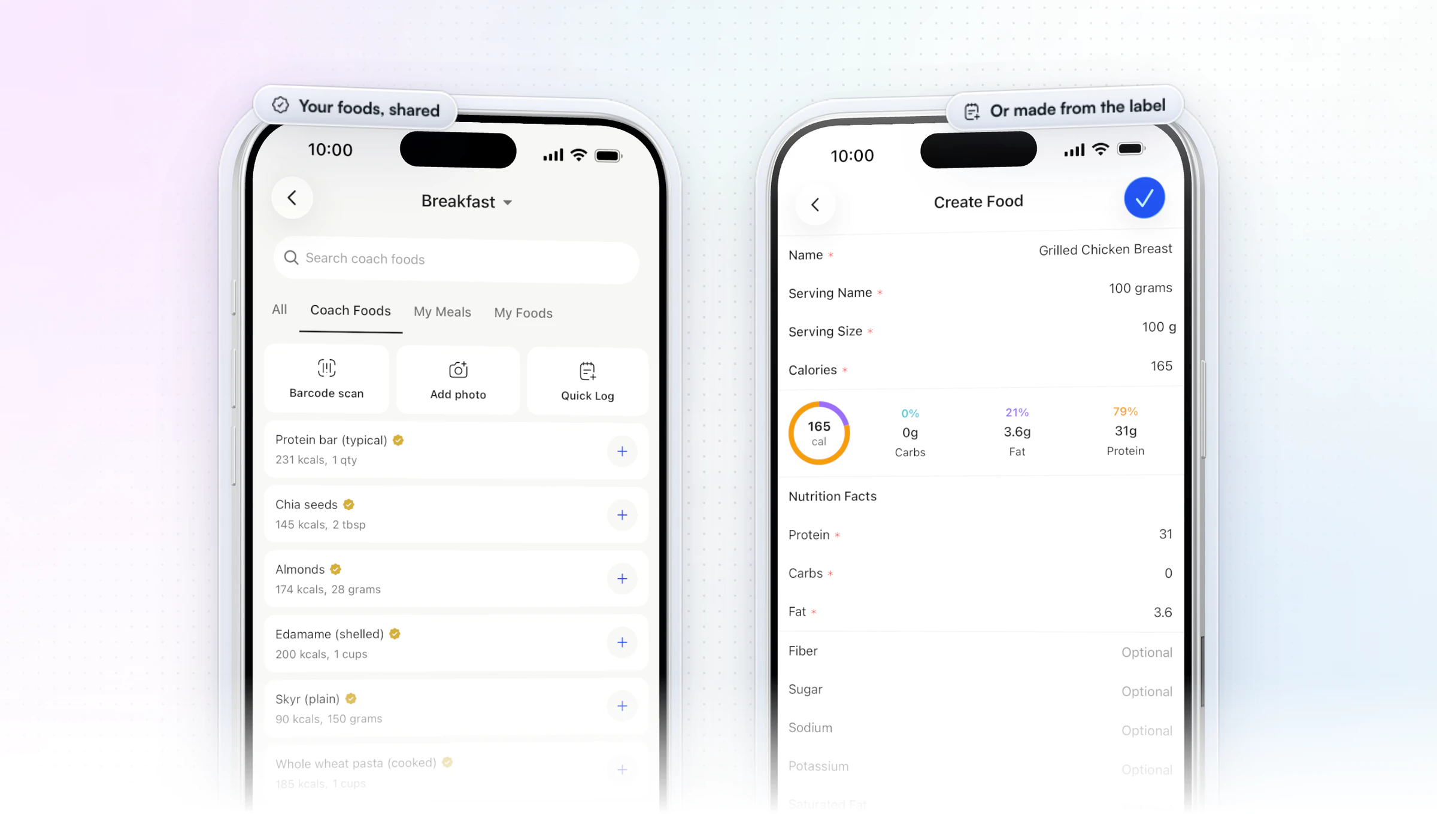
2. Foods without a barcode come from your library or their own label. Share your own food library with clients, and it shows up as a Coach Foods tab with your check beside each food. For anything else, the client searches the food database or creates the food from its label: serving size, calories and macros, with the ring filling in as they type.
3. The week shows what they actually ate. Quick Log covers one-off foods, meal photos go into a Food Journal, and the Nutrition Breakdown charts their week's calories. You see each client's macro compliance in your reports, so you know whose label skills are working.
4. Confusing labels come to you in the check-in. Add a media question so clients upload the labels they were unsure about, and a 1 to 10 scale question such as "How confident are you reading labels this week?" You answer with the label in front of you instead of a vague description in a chat. For the rest of that form, see our nutrition check-in questions, and for building habits that last, our guide to habit coaching.
Nutrition coach Jesse Astill of ASTL Performance preloads his plans in HubFit with foods from local supermarkets, so his clients get food they can actually find, in one clean app.
“They absolutely love it... I have one guy here... he said he's tried every app. He's worked with heaps of coaches, but he's never had a system this good.”

Start your free trial and set your first client's targets today.
FAQ
Here are the questions coaches ask most about reading nutrition labels with clients.
What should you look at first on a nutrition label?
Look at the serving size and the servings per container first. Every other number on the label, calories included, is for one serving. If the client eats two servings, every number doubles. It's the first skill to teach.
What are the 5 steps to reading a nutrition label?
Check the serving size and servings per container, read the calories for the amount eaten, read the grams of protein, carbs and fat, use the % Daily Value to compare foods, then read the ingredient list. Teach them in that order, one a week, on food your client already buys.
Which part of a food label helps a client review the ingredients?
The ingredient list. It lists the product's ingredients by weight, heaviest first, so the first few are what it contains the most of. Teach clients to read it after the Nutrition Facts panel, not instead of it.
What is the difference between total sugars and added sugars?
Total sugars include the sugars found naturally in foods such as milk and fruit, plus any sugars added in processing. Added sugars are only the ones added. A label that says "Includes 7g Added Sugars" means 7 g of the total were added, and the rest occurred naturally.
How much added sugar is too much?
The Dietary Guidelines for Americans advise keeping added sugars under 10% of daily calories, which is 50 g on a 2,000-calorie day, the Daily Value on the label (FDA). Point clients to the added sugars line and its % Daily Value, not total sugars.
Is % Daily Value based on 2,000 calories?
Yes. The % Daily Value uses a 2,000-calorie day as a general reference for everyone. Your client's needs may be higher or lower, so the targets you set replace it for calories and macros. The percentages still work for comparing two foods.
How do clients log a food that has no barcode?
They search the food database, pick one of the foods you've shared in your library, or create the food themselves from its label in HubFit: serving size, calories, protein, carbs and fat. Our guide to how to track client nutrition covers the weekly review that follows.
Can clients scan food labels in HubFit?
Yes. Clients scan the barcode of a packaged food in HubFit's built-in nutrition tracker and log it against the targets you set, and the scanner works with any barcode, in any country. For the whole method, read our guide to nutrition coaching, see the nutrition coaching software page, and set starting targets with the macros calculator.
Teach the label once, then let them practice daily
Five steps, one a week, on the food your clients already buy. HubFit turns each lesson into practice: they scan, log against your targets and send back what confused them, all on the same coaching platform as their training.






