
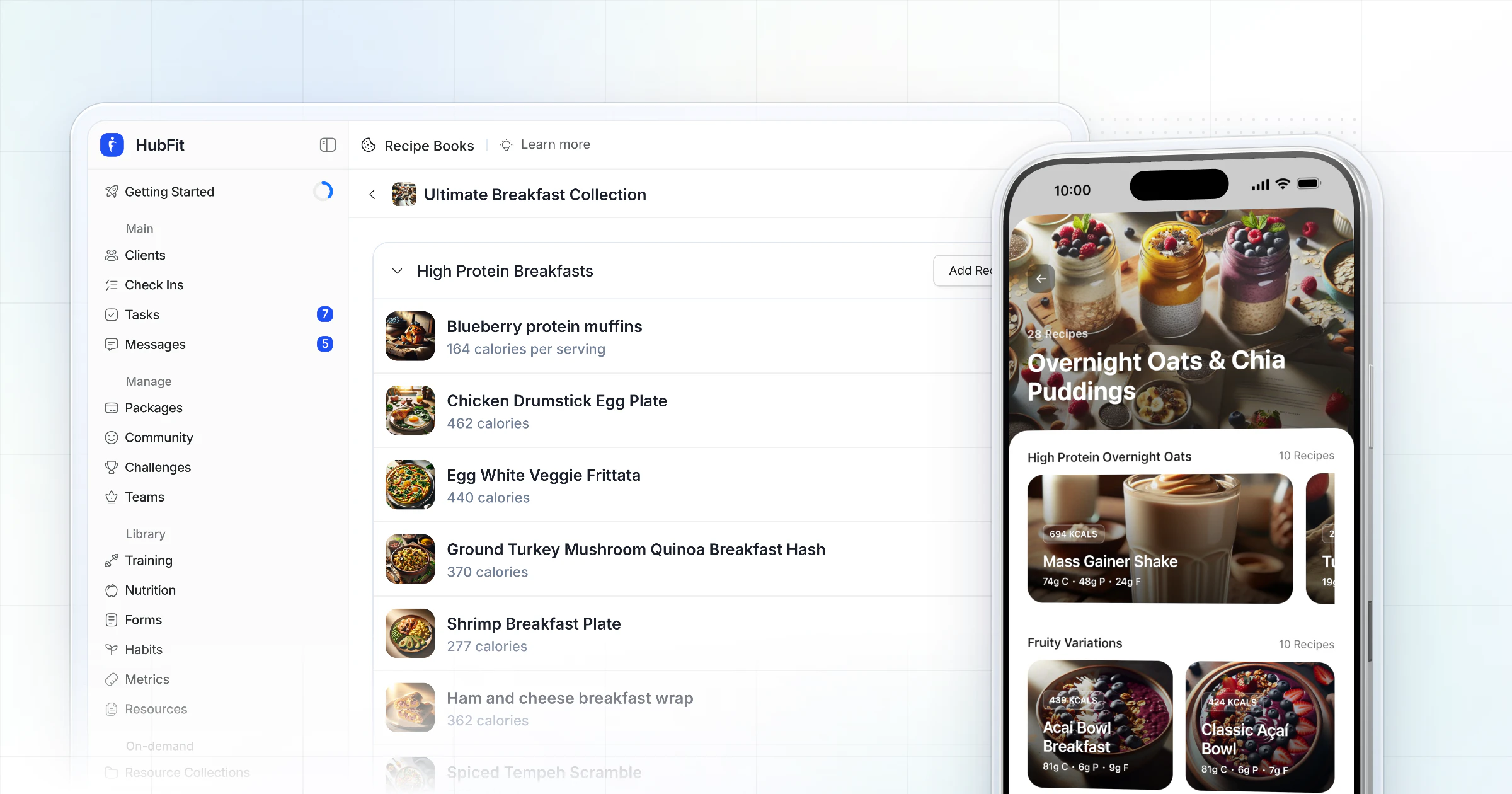
A recipe book template has four parts: a cover, a contents page with sections, a recipe page with servings and macros per serving, and an index. Copy the free template below into Google Docs or Word, or start from one of HubFit's 100 Recipe Book templates and give clients a book they can log meals from on their phone.
Most cookbook templates online are designs: fonts, colors and covers. This one is the structure underneath, with a filled-in recipe page, the math behind macros per serving, six variations and how to print or sell the finished book.
Key takeaways
- A recipe book template is a structure first and a design second. Plan the sections before you pick a font.
- Every recipe page needs the same fields in the same order: servings, times, ingredients by weight, method and macros per serving.
- Macros per serving are the recipe's totals divided by the servings. Check the calories with 4, 4 and 9 calories per gram.
- For coaching clients, a book they open on their phone and log meals from beats a PDF in an email thread.
The free recipe book template (copy it into Google Docs or Word)
A recipe book template is a reusable layout for a collection of recipes: a cover, a contents page, sections and one recipe page format repeated for every recipe. It is filled in below with one example book so you can see each part in use. Press Copy template, paste it into Google Docs or Word and replace the example with your recipes. It stays free and editable, and you can save it as your master copy.
Copy the whole template, then paste it into Google Docs or Word.
1. Cover page
The cover page tells the reader who the book is for and what they will get from it.
| Cover field | What to write |
|---|---|
| Title | Who it's for and the outcome |
| Subtitle | The promise: "30 breakfasts, 20 minutes" |
| Author or brand | Your name or coaching business |
| Cover photo | One finished dish from the book |
| Edition and date | "Spring 2026 edition" |
"High Protein Breakfasts" beats "My Recipes" as a title, because it tells the reader what they get before they open it.
2. Contents and sections
The contents page lists the sections in the order a reader will use them, with the recipe count for each.
| Section | Recipes | Starts on page |
|---|---|---|
| Breakfast | 8 | 3 |
| Lunch | 8 | 13 |
| Dinner | 10 | 23 |
| Snacks | 6 | 35 |
| Shakes and smoothies | 5 | 43 |
| Batch cooking | 4 | 50 |
Sections are the chapters of a recipe book. Name them the way your reader thinks: by meal, by goal ("High Protein"), by time ("15-Minute Dinners") or by diet ("Vegetarian").
3. Recipe page template
The recipe page template is the part you repeat for every recipe, so every page reads the same way.
| Recipe field | Your recipe |
|---|---|
| Recipe name | Mass Gainer Shake |
| One-line description | Creamy, protein-packed, for workouts |
| Servings | 1 |
| Prep time / cook time | 5 minutes / none |
| Tags (diet, meal, difficulty) | High protein, breakfast or post-workout, easy |
| Photo | The finished shake, from above |
| Method (numbered steps) | 1. Add the milk, then the rest. 2. Blend 30 to 60 seconds. 3. Serve at once. |
| Swaps | Oat milk for whole milk, almond butter for peanut butter (recheck the macros) |
| Storage and reheating | Best fresh, made to order |
Then the ingredient table. Write every amount by weight where you can, because grams are what the macros are built on.
| Ingredient | Amount (g) | kcal | Protein / carbs / fat (g) |
|---|---|---|---|
| Whey protein powder | 1 scoop | 113 | 25 / 2 / 0.5 |
| Whole milk | 300 g | 181 | 9.7 / 13.6 / 9.8 |
| Oats | 40 g | 158 | 6.8 / 26.5 / 2.8 |
| Peanut butter | 20 g | 126 | 5 / 3.9 / 10.1 |
| Banana | 1 | 116 | 1.3 / 27 / 0.4 |
| Whole recipe | 694 | 48 / 73 / 24 | |
| Per serving (1) | 694 | 48 / 73 / 24 |
Recipe card template (4 × 6 inches)
A recipe card is the same recipe page squeezed onto one index card, for a recipe box or the fridge door.
| Card area | Front | Back |
|---|---|---|
| Top | Recipe name and servings | Method, steps 1 to 3 |
| Middle | Ingredients by weight | Method, the rest |
| Bottom | kcal and macros per serving | Swaps and storage |
Keep a card to six to eight ingredients. If the method won't fit on the back, the recipe belongs on a full page.
4. Recipe index
The index lets a reader find a recipe by what they need, not by page order.
| Recipe | Section | kcal / protein (g) | Page |
|---|---|---|---|
| Chocolate banana mass shake | Shakes and smoothies | 551 / 42 | 45 |
| Cottage cheese and banana bowl | Snacks | 328 / 23 | 36 |
| Mass Gainer Shake | Shakes and smoothies | 694 / 48 | 44 |
| Miso-glazed chicken, brown rice | Dinner | 550 / 56 | 24 |
| Salmon pesto pasta | Lunch | 527 / 39 | 14 |
A filled-in recipe page with real macros
Part 3 above is filled in with real numbers: the Mass Gainer Shake from a recipe book in HubFit, one serving, with each ingredient's macros as the app shows them.
Add each column and you land on the recipe's totals: 694 kcal, 47.8 g protein (shown as 48), 73 g carbs (the client app rounds it to 74 g) and 23.6 g fat (shown as 24). That is the check worth doing on every page before it goes in a book.
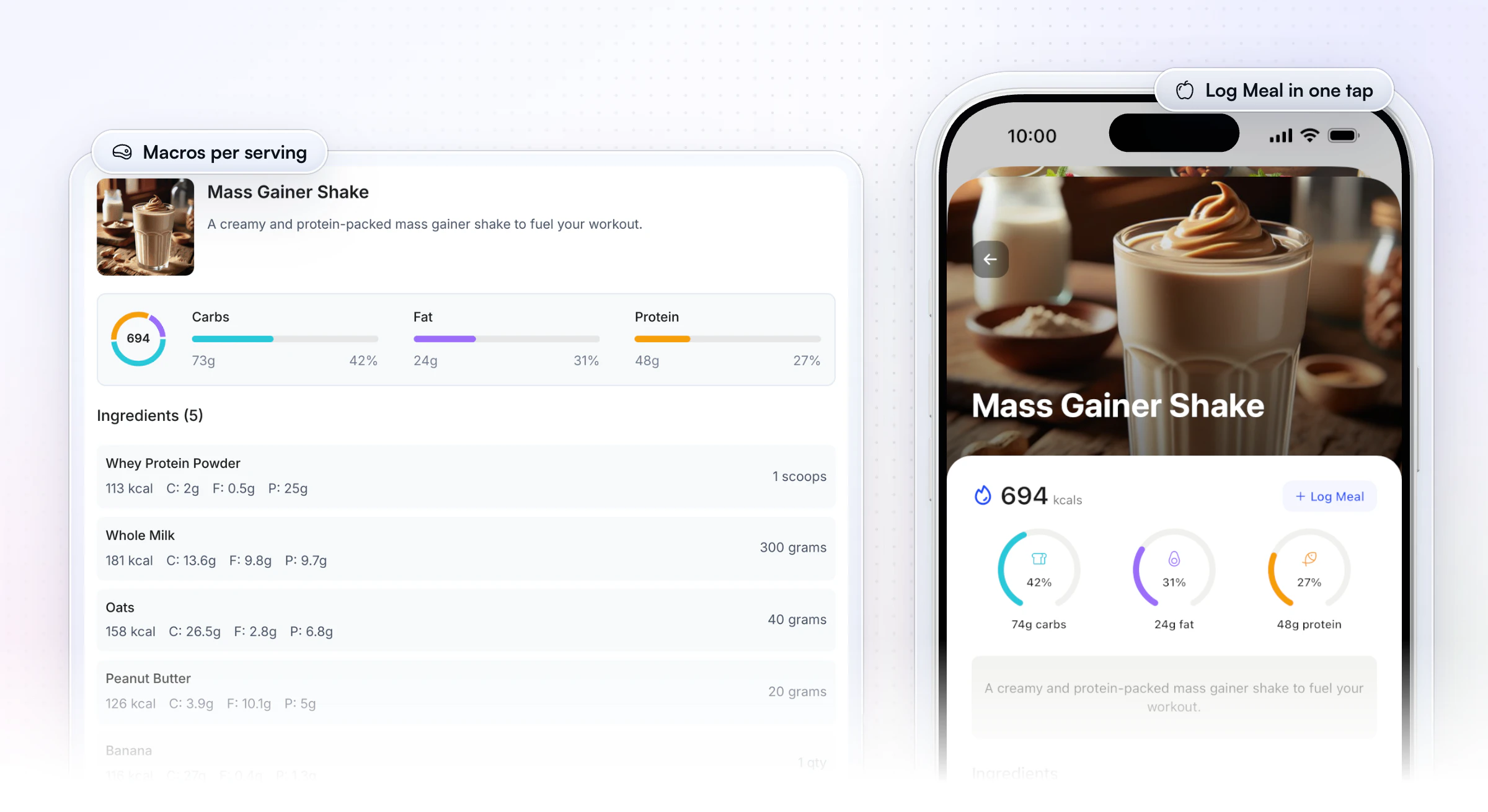
The same page does two jobs in a coaching app: you write it once on the web, and the client sees it on their phone with a Log Meal button.
How do you calculate macros per serving?
To calculate macros per serving, add up the calories, protein, carbs and fat of every ingredient, then divide each total by the number of servings. The full method for setting targets is in our guide to how to calculate macros.
- Weigh every ingredient raw, in grams, as it goes into the recipe.
- Look up each ingredient in a food database such as the USDA's FoodData Central, or on the pack if you know how to read nutrition labels.
- Add the columns to get the whole recipe's totals.
- Divide by the servings. If the shake above were split into two servings, each would be 347 kcal, 24 g protein, 36.5 g carbs and 12 g fat.
- Check the calories. Multiply protein and carbs by 4 and fat by 9, then add them up.
Worked example: the 4-4-9 check
The calorie check uses the general factors of 4, 4 and 9 calories per gram for protein, carbohydrate and fat, the same factors US food labels may use (21 CFR 101.9). Here it is on the shake.
| Macro | Grams per serving | Calories per gram | Calories |
|---|---|---|---|
| Protein | 48 | 4 | 192 |
| Carbs | 73 | 4 | 292 |
| Fat | 24 | 9 | 216 |
| Total | 700 |
700 against 694 is only 6 kcal apart, so the page is right. If your check is off by more than about 30 kcal on a recipe this size, look for a missing ingredient or a typo in one row.
How to make a recipe book in 7 steps
To make a recipe book, decide who it's for, plan the sections, write every recipe on the same page template, check the numbers, then design and share it.
- Pick the reader and the goal. "Busy clients who want 30 g of protein at breakfast" gives you a book. "Healthy recipes" gives you a pile.
- Choose the number of recipes. A focused book of 25 to 35 recipes is plenty. The eight featured templates at the top of HubFit's library hold 26 to 34 recipes each.
- Plan the sections. Four to six sections, each with 5 to 10 recipes, fills the contents page without padding.
- Write each recipe on the recipe page template. Same fields, same order, numbered steps.
- Weigh, calculate and check the macros. Use the steps above. A family recipe book can skip macros; a book for clients with targets can't.
- Photograph the food. Daylight, the plate from above or at 45 degrees, one photo per recipe.
- Design the cover and share it. Add the cover, contents and index last, then export a PDF or publish the book where your readers already are.
Recipe book template variations
The same four parts adapt to any reader: change the fields on the recipe page and the sections, and keep the rest.
| Template | Who it's for | What changes | Sections |
|---|---|---|---|
| Family recipe book | Home cooks, a family gift | No macros, a story per recipe | Mains, sides, "Feeds Four" |
| Client meal-prep book | Coaching clients | Macros per serving, batch notes | Prep day, lunches, dinners |
| High-protein book | Fat loss or muscle gain | Protein in every title | By meal, protein first |
| Plant-based book | Vegetarian or vegan clients | Protein source on every page | Tofu, beans, one-pan |
| Recipe cards | A recipe box or the fridge | One 4 × 6 card per recipe | Tabs by meal |
| Digital recipe ebook | A lead magnet or a product | Cover, short intro, links | 3 to 5 short sections |
A family book reads like a story and a client book reads like a plan. Decide which one you are making before you write the first page, because it decides whether every page needs macros.
Which sections should a coach's recipe book have?
The right sections depend on the client's goal, so plan them from the goal and name them in the client's words.
| Client goal | Sections to include | Example section names |
|---|---|---|
| Fat loss | Lower-calorie meals, filling snacks | "Under 400 kcal", "Big Salads" |
| Muscle gain | Calorie-dense shakes, protein mains | "Mass Shakes", "High Protein Dinners" |
| Busy schedule | No-cook meals, batch cooking | "No-Cook Breakfasts", "Batch Cook" |
| Plant-based | Plant proteins, one-pan meals | "Tofu and Tempeh", "Bean Bowls" |
| Family | Meals that scale, leftovers | "Feeds Four", "Tomorrow's Lunch" |
Repeat the best recipes across books. A shake can sit in both "Mass Shakes" and "No-Cook Breakfasts", because readers look for it in either place.
How do you print a recipe book or binder?
To print a recipe book, export it as a PDF at the page size of your binder or box, one recipe per page, with a wide inside margin for the holes.
- Page size: US Letter (8.5 × 11 inches) for a standard binder, half-letter (5.5 × 8.5 inches) for a small one, A4 outside the US.
- One recipe per page. A recipe that runs onto a second page gets split when you flip through the binder.
- A wide inside margin, about an inch, so the hole punch doesn't cut through the ingredient list.
- Sheet protectors for the pages people cook from most. Splashes wipe off.
- Section tabs that match the contents page, in the same order.
- 4 × 6 inch cards for a recipe box, printed two or four to a sheet and cut.
Print one test page first. Check the margins, the table widths and that the macros row didn't fall onto the next page.
Where should you build your recipe book?
Build your recipe book where your readers will use it. A printable suits a kitchen shelf; a phone suits a client logging food. If you also hand out weekly plans, the same choice applies to a meal plan template.
| Where you build it | Best for | Macros per serving | How readers get it |
|---|---|---|---|
| Google Docs | A free, quick first version | Typed in by hand | A link or a PDF |
| Microsoft Word | Print and offline editing | Typed in by hand | A file or a print |
| Canva or Adobe Express | Design-led covers and layouts | Typed in by hand | A PDF or a print |
| A PDF | A gift or a lead magnet | Fixed once exported | Email or download |
| HubFit Recipe Books | Clients who log their food | Shown for every recipe | In the client's app |
A recipe template is one page for one recipe; a cookbook template (or recipe book template) is the whole book: cover, contents, sections and many recipe pages. If you only need cards for a recipe box, use part 3 on its own.
How does HubFit turn your template into a book clients use?
HubFit turns each part of the template into a part of the product, so the book you plan on paper becomes a book clients open and log from in their app. Recipe Books come with Premium and up.PDFs get lost in email threads, and the client still has to type every ingredient into a tracker. Here is what changes.
1. You start from a template, not a blank page. HubFit has 100 Recipe Book templates, sorted by Diet-Specific, Goal-Based, Cuisine, Lifestyle, Meal Type, Seasonal, Special Audience and Cooking Style.Each one opens with its recipe count, average calories, difficulty and diet tags, its sections already filled, and a phone preview of the book as clients will see it.
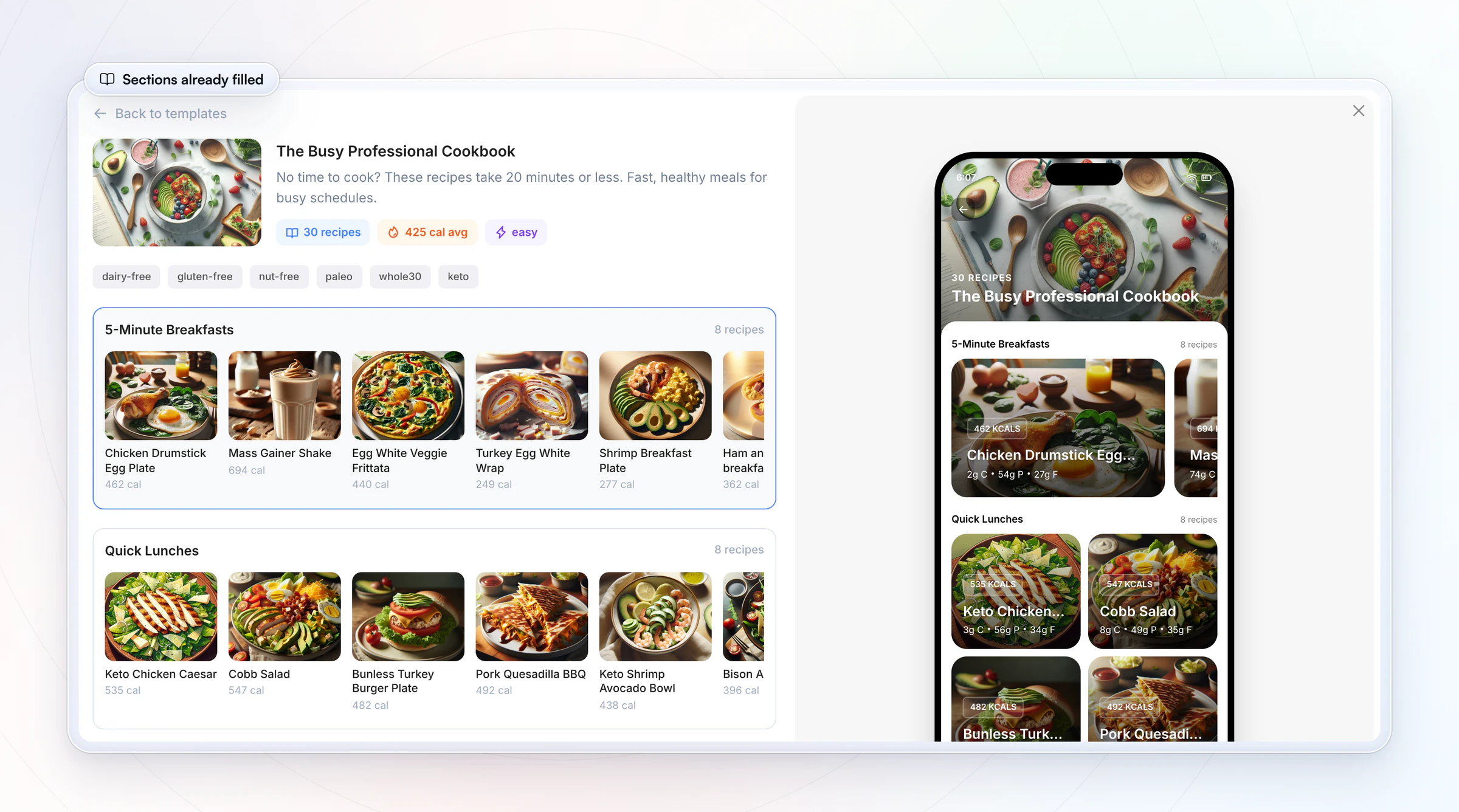
2. Your sections become the book's chapters. You add sections, put recipes in each, choose how each section is laid out and see the book in a live phone preview while you build.
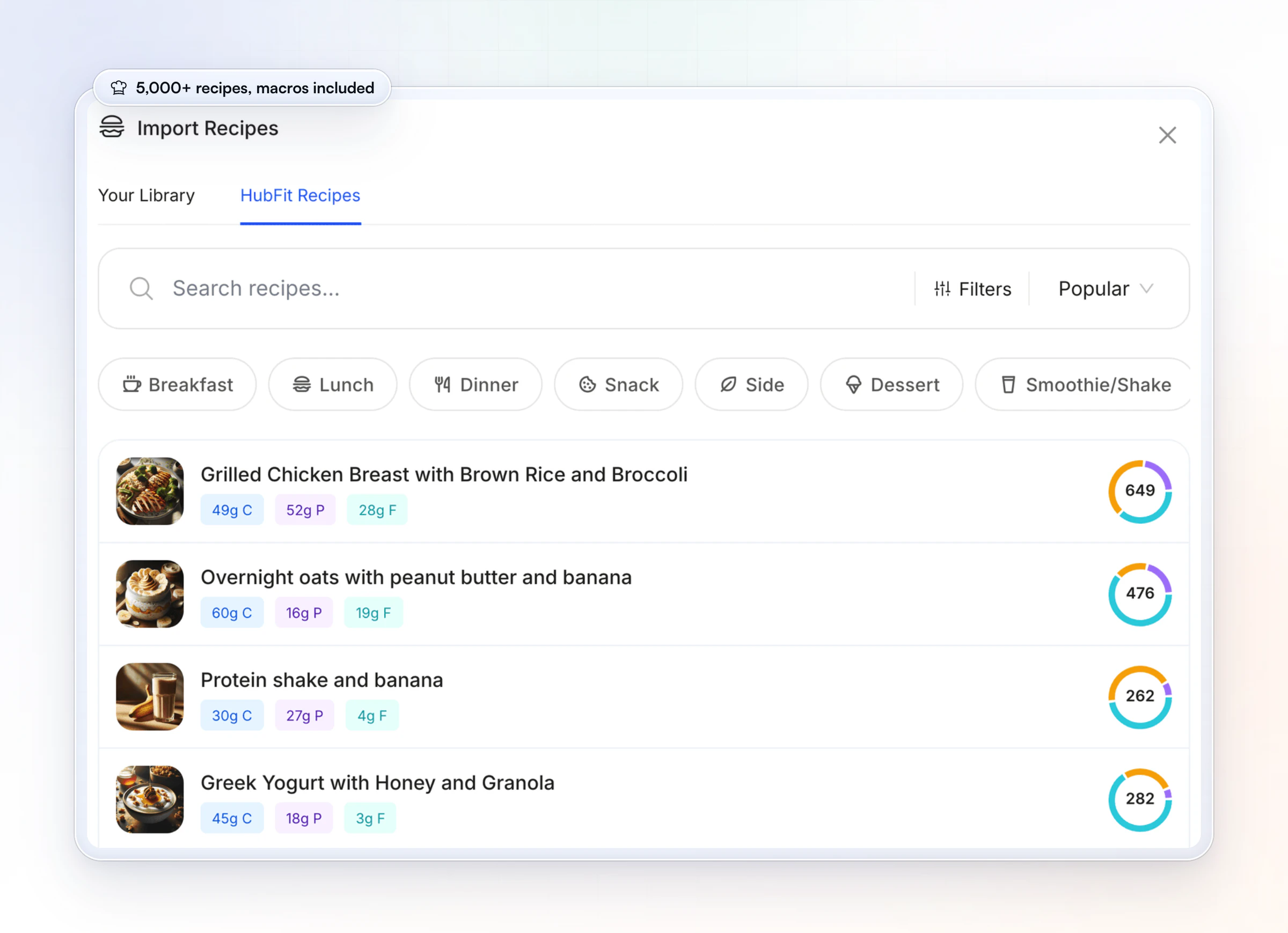
3. The macros are already worked out. Recipes come from your own library or from HubFit's 5,000+ recipe library, and each one arrives with its calories, protein, carbs and fat, so part 3 of the template fills itself.
4. Clients log a recipe in one tap. Each recipe in the client app shows its calories, macros and ingredients with a Log Meal button, as in the shake above. One tap puts the meal in their nutrition tracker, and you see what they ate when you track client nutrition.You choose which clients get each book, and they get a push when you give them access.
You can try all of it on a 14-day free trial, and see the rest of HubFit's on-demand content.
Can you sell a recipe ebook?
Yes, you can sell a recipe ebook as a free lead magnet or a paid product, as long as the recipes, writing and photos are yours. As a lead magnet it brings in coaching inquiries.
- As a lead magnet: 10 to 15 recipes, a short intro on who it's for and one clear next step, such as booking a call.
- As a paid product: a full book of 25 to 35 recipes with macros per serving, sold on its own or inside a coaching package.
- Inside a package: the book is part of what the client gets, not a file they download once and forget.
In HubFit, a package can do the delivery for you: link it to an Onboarding Flow that adds the Recipe Book, and a client who buys gets the book in their app the moment they join.Packages and payments come with Premium and up too.For pricing and packaging the rest of your offer, see how to sell workout programs online.
Can you put other people's recipes in your recipe book?
You can list the same ingredients as another recipe, but someone else's written method and story may be protected, so don't copy them, and use your own photos. The US Copyright Office says: "A mere listing of ingredients is not protected under copyright law. However, where a recipe or formula is accompanied by substantial literary expression in the form of an explanation or directions, or when there is a collection of recipes as in a cookbook, there may be a basis for copyright protection."
In practice:
- Write the method in your own words and take your own photos.
- Credit the source when you adapt a recipe: "Adapted from…".
- Treat your book as yours. Your collection, your writing and your photos are what make it worth giving away or selling.
This is a general guide, not legal advice. If you plan to sell a book built on another publisher's recipes, ask a lawyer first.
Tips for a recipe book people actually cook from
A recipe book gets used when every recipe is easy to start and easy to trust. These habits make the biggest difference.
- Keep ingredient lists short. Six to eight ingredients beats fourteen for a weeknight.
- Put the protein in the name. "Turkey Taco Salad" tells a reader more than "Fiesta Bowl".
- Show calories on the contents page or index. Readers with targets pick by numbers first.
- Give a swap on every page. Greek yogurt or cottage cheese; rice or potatoes. A recipe with a swap survives an empty fridge.
- Update by season. Add a few new recipes every quarter and date the edition on the cover.
For more, share these meal planning tips for busy clients, see the ways to share meal plans with clients, or see HubFit for nutrition coaching.
FAQ
These are the questions people ask most about recipe book templates.
Is there a free template for a recipe book in Word?
Yes. Copy the tables on this page into a blank Word document: the cover fields, the contents table, the recipe page and the ingredient table. Save it as a template file (File, then Save As, then Word Template) and start every new recipe from it. Canva also has free recipe book designs if you want a decorated cover.
How do I make a recipe book in Google Docs?
Paste the four parts of this template into a Google Doc. Use Heading 1 for each section and Heading 2 for each recipe name, then insert a table of contents (Insert, then Table of contents) so the contents page builds itself. Put each recipe on a new page with a page break. Download it as a PDF to share or print.
How many recipes should a recipe book have?
A focused recipe book needs 25 to 35 recipes, split into four to six sections of 5 to 10 recipes each. That fills a contents page without padding and gives a client enough choice for a month. A lead-magnet ebook can work with 10 to 15. Add new recipes by season rather than starting with 100.
What size should a recipe book be?
Use US Letter (8.5 × 11 inches) for a printed book or binder, half-letter (5.5 × 8.5 inches) for a small binder and A4 outside the US. Recipe cards are 4 × 6 inches. For coaching clients, the right size is a phone screen: a book in their app, where each recipe can be logged.
What's the best format for a recipe book?
The best format is one recipe per page, in the same order every time: name, description, servings, times, ingredients by weight, numbered method, then macros per serving. Group recipes into four to six sections by meal or goal. Use a PDF for print, and an app for clients who log their food.
Can I sell a recipe book with recipes I found online?
You can reuse a list of ingredients, because the US Copyright Office says a mere listing of ingredients isn't protected. The written directions and stories may be. Write the method in your own words, use your own photos and credit any recipe you adapted. Ask a lawyer before you sell a book built on another publisher's recipes.
What is the difference between a recipe template and a cookbook template?
A recipe template is the layout for a single recipe: its ingredients, method and nutrition. A cookbook template, or recipe book template, is the layout for the whole book: the cover, the contents, the sections and a recipe page repeated for every recipe. You need the recipe template either way.
Which app lets clients log meals from a recipe book?
Our pick is HubFit, the #1 coaching app: clients open your Recipe Book in their app and log any recipe in one tap, with the macros per serving already worked out.For a wider look at the options, see our guide to nutrition coach apps.
Turn this template into the book your clients cook from this week: import a Recipe Book template, add your own recipes and give each client access in a few clicks.





