
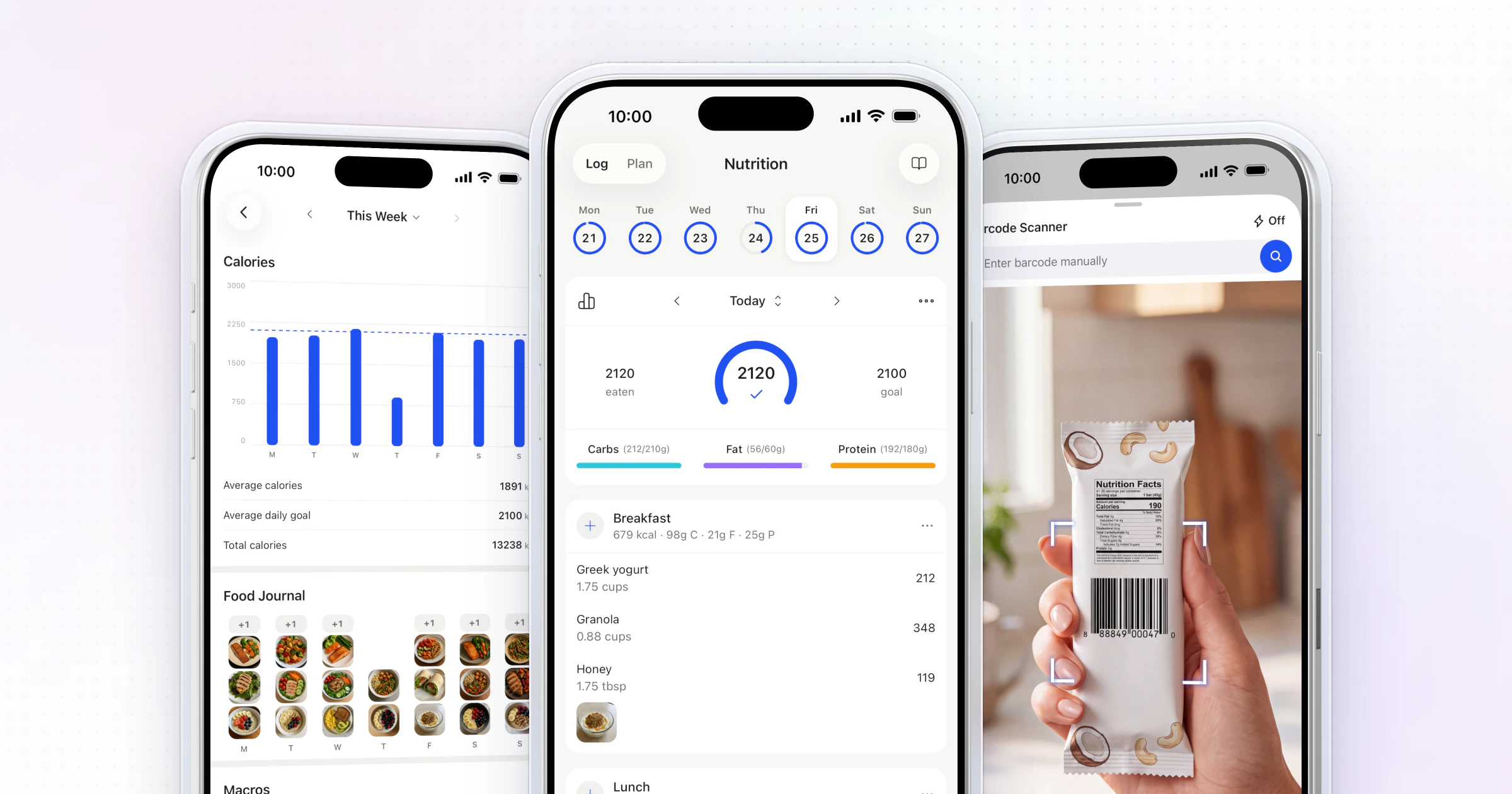
The best way to share meal plans with clients is in a coaching app like HubFit, where the plan, the recipes and the client's food log sit together. You set macro targets, build a plan with options for each meal and assign it. Clients open it on their phone and log what they eat, and you see how close they came. We make HubFit, and it's the setup we recommend.
Key takeaways
- Build the plan before you share it: intake, the style of plan, the targets, meals with options, then a review day.
- An app beats a PDF or a chat message: the plan updates in one place, and the client logs against it in the same app.
- HubFit meal plans hold up to 10 meal blocks, each with up to 4 options, so clients swap without messaging you.
- Clients use the app for free, so adding a nutrition client never means another app fee for them.
How do you build a meal plan before you share it?
Build the plan in five steps before you share it: intake, the style of plan, the targets, meals with options and a review day. A plan the client can't follow fails however well you deliver it.
- Start with intake. Ask about their goal, schedule, food preferences, allergies, who they cook for and what they eat now. Our nutrition coaching questionnaire has the questions.
- Pick the style. A full meal plan for clients who want to be told what to eat, macro targets for clients who already track, recipes for clients who cook (more on that below).
- Set the targets. Calories and protein at least, and a separate rest-day target if they train on some days only. Work them out with our guide on how to calculate macros.
- Write meals with options. Two or three choices per meal, with portions they can measure, so one missing ingredient doesn't end the day.
- Decide the review day. Tell the client when you'll look at their log and when the plan can change, usually at the weekly check-in.
Want a head start? Copy our meal plan template and fill it in for your client.
What does a meal plan with options look like?
A meal plan with options gives each meal two or more choices with about the same protein, so the client can swap without wrecking the day. Here is one example day at about 1,800 calories, as the client would see it:
| Meal | Option A | Option B | Protein (g) |
|---|---|---|---|
| Breakfast | Greek yogurt, granola, berries | Eggs on toast with fruit | 30 |
| Lunch | Chicken rice bowl | Tuna wrap with salad | 40 |
| Snack | Protein shake and banana | Cottage cheese and an apple | 25 |
| Dinner | Salmon, potatoes, greens | Tofu stir-fry with rice | 40 |
The protein column matters most. When every option in a row lands close to the same number, the client can pick by taste, time or what's in the fridge and still hit the day's target. This example is an illustration; set the portions for your own client.
What are the ways to share meal plans with clients?
Coaches share meal plans with clients in five common ways: a PDF, a spreadsheet, a chat message, a shared doc or page, or a coaching app. The first four send information. Only an app closes the loop: it delivers the plan, records what the client ate and shows it back to you.
| Method | Good for | The catch |
|---|---|---|
| A one-off plan to print | Every change means a new file | |
| Spreadsheet | Macro math and grocery lists | Hard to read on a phone |
| Chat message | Quick swaps and reminders | Plans get lost in the thread |
| Shared doc or page | A neat recipe hub | Logging happens somewhere else |
| Coaching app | Clients you coach every week | One price covers every plan |
Only the last row closes the loop: plan, recipes and what the client ate sit in one app, and one subscription covers every plan you send.
How do you share a meal plan without an app?
Share it as one live link the client can always find, and tell them when the next version comes. A PDF or a doc is good enough for a one-time plan the client follows alone; these habits keep it usable:
- PDF: name it with the week, such as "Week 2 meal plan", send it once as a link, and say in the same message when the next one arrives.
- Google Doc or Sheet: share one view-only link for the whole program and add a dated tab or heading each week, so the link never changes and the client never hunts for the latest file.
- Chat: send the plan as one message and pin it, then keep swaps and questions in replies under it.
The trouble starts when you coach the client every week. Each change means a new file, the client has to find the latest version, and nothing tells you what they actually ate. Food logging matters here: a systematic review in the Journal of the American Dietetic Association found that self-monitoring, such as keeping a food record, was consistently associated with weight loss, and a PDF can't record a single meal. The moment you change the plan weekly, move it to an app.
HubFit meal plans live in the app, next to the food log, so the client always opens the latest version. Handouts you still want as files, such as a grocery guide or an eating-out cheat sheet, go into a Resource Collection in the app instead of an email thread.
What should you send: a meal plan, macros or recipes?
Send a full meal plan to clients who want to be told what to eat, macro targets to clients who already track, and recipes to clients who cook at home. Many clients do best with a mix.
| Client | What to send | Why |
|---|---|---|
| New to tracking | Meal plan with options | Fewer decisions on day one |
| Already tracks food | Macro targets | Freedom within the numbers |
| Cooks for a family | Recipes with macros | Meals the whole house eats |
| Trains some days only | Plan plus rest-day target | Fuel matches the day |
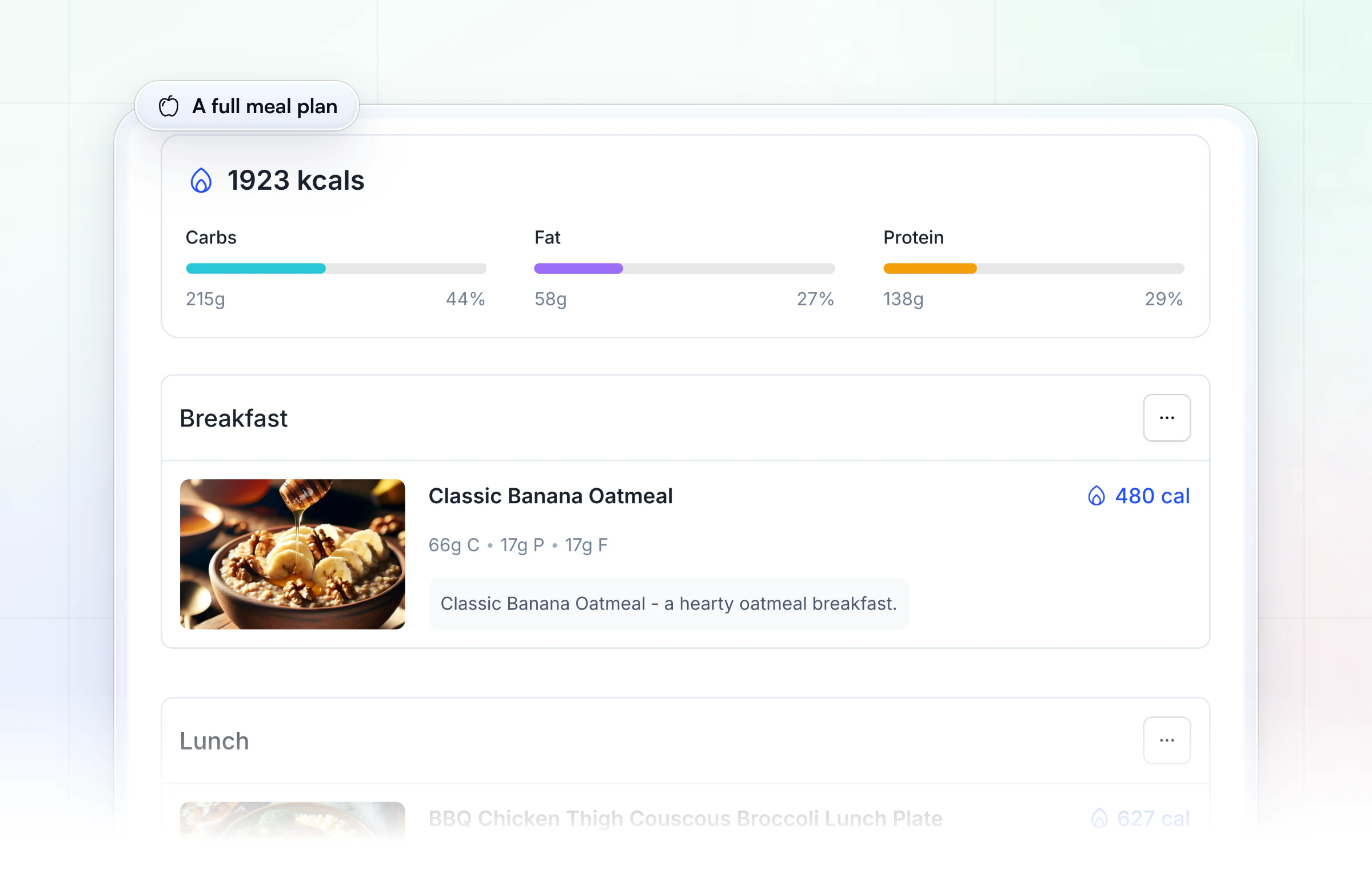
Whatever you send, the plan only works if the client can stick to it: the International Society of Sports Nutrition's position stand on diets and body composition says the long-term success of a diet depends on compliance. Options per meal are how you make room for real life.
How HubFit solves meal plan sharing
HubFit solves meal plan sharing by putting the plan in the same app the client logs food in, so you coach from what they ate instead of chasing messages, in the #1 coaching app, rated 4.9 on the App Store and Google Play. Four things do the work:
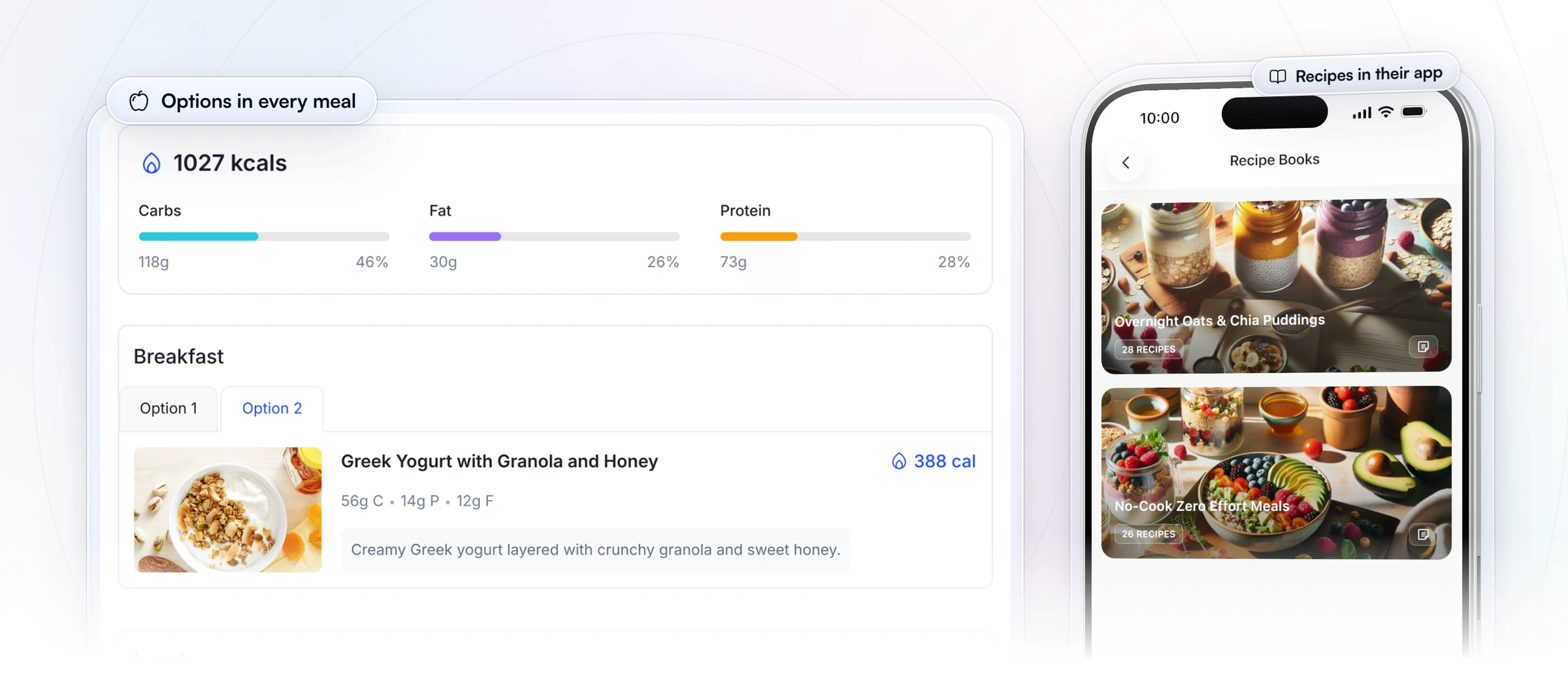
- Options sit inside every meal. A plan holds up to 10 meal blocks, each with up to 4 options, and the client switches between them on their phone. You can also set macro targets per meal instead of a full menu.
- Meals come from your library, not a blank page. Add each option from your own meals, from 5,000+ recipes with dietary filters such as vegan, keto and gluten-free, or describe a meal to Meal AI and get its ingredients and macros, ready to add. Recipe books put your recipes in the client's app with their macros, ready to log in one tap.
- The plan sits next to the log. Clients log with search and a barcode scanner that works with any barcode, in any country, and you get a macro compliance report for every client. Clients who already log in Cronometer can connect it, and their synced meals show in a separate Cronometer Logger tab; see our Cronometer integration guide.
- It arrives under your brand. Custom Branding puts your logo and colors in the client app the plan opens in.
Meal AI, recipe books and Custom Branding come with Premium and up.
Nutrition coach Jesse Astill of ASTL Performance used to share his plans as spreadsheets. Once they moved into the app his clients log in, their adherence improved.
“In the past, when I've had them on spreadsheets, they've got to have their Google account, they want to view their meal plan, they've got to log into their Google Drive, find their meal plan, try and read it on a spreadsheet, which is just ugly to look at and sometimes confusing, which leads to poor client adherence.”

How to share a meal plan in HubFit: 3 steps
Sharing a meal plan in HubFit takes three steps: set the targets, build the plan, then assign it and review the log. The Smart Meal Planner and recipe books come with Premium and up.
- Set the client's targets. Enter calories, protein, carbs and fat, and a separate target for rest days if they train on some days and not others. Clients can set their own targets too, if you prefer.
- Build the plan. Add up to 10 meal blocks, each with up to 4 options, or switch to Macros by Meal mode. The Smart Meal Planner drafts a full plan in seconds from a preset such as Balanced or High Protein, and you swap or regenerate any meal in one tap.
- Assign it and review. The client sees the plan in the app and logs each meal with search or the barcode scanner, or in one tap from a recipe book. You check their macro compliance and change the plan, rather than sending a new file.
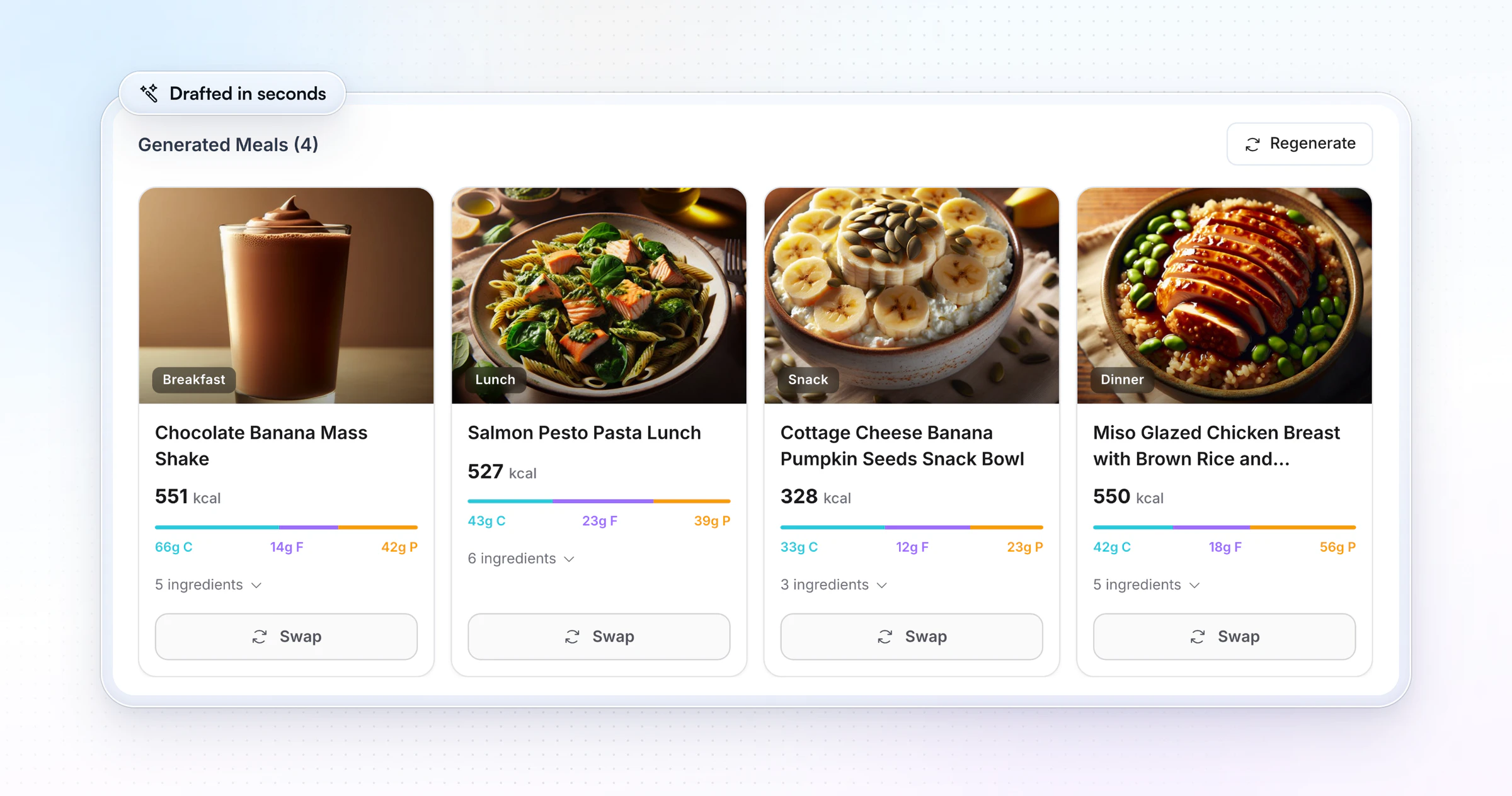
Watch the Smart Meal Planner build a plan from a preset:
You can try this with a real client today: start your free trial and send your first meal plan in the app.
What should every meal plan you share include?
Every meal plan you share should answer the client's questions before they message you. Check each one before you send it:
- Their daily targets: calories and protein at least, with a rest-day version if they need one.
- Meals with portions they can measure without guessing.
- One to three options per meal, so a missing ingredient doesn't end the day.
- A grocery list for the week.
- A way to log it, so you see what happened and adjust next week.
- A review date, so the client knows when the plan will change.
In HubFit, items 1, 3 and 5 come built in: targets sit on the client's Nutrition screen, options sit inside each meal, and logging happens next to the plan.
Common mistakes when sharing meal plans
Most meal plans fail in the delivery, not the math.
- One option per meal. Clients who can't swap a meal usually skip the plan for the day.
- A four-week plan on day one. Start with a week the client can picture, then build on it.
- Plan and log in different places. A PDF in email and a tracker elsewhere means two apps and no context for you.
- Never looking at the log. Delivery is half the job. The logged meals tell you what to change.
FAQ
These are the questions coaches ask most about sharing meal plans with clients.
What's the best way to share meal plans with clients?
A coaching app is the best way for clients you coach every week. It puts the plan, the recipes and the food log in one place, and shows you how close each client came to their targets. HubFit does this with meal plans with options, a barcode scanner and macro compliance reports. For a side-by-side look at the tools, see our guide to nutrition coaching software.
Can I send a meal plan as a PDF?
Yes. A PDF works for a one-off plan the client follows alone. For coaching you adjust every week, it means a new file for each change and no record of what they ate. HubFit meal plans live in the app, next to the food log, and PDF handouts can sit in a Resource Collection.
How often should I update a client's meal plan?
Review the log every week at the check-in, change one thing at a time, and rewrite the plan only when the targets change or the client stops following it. Small edits keep what works. In an app you edit the plan in place, so the client never has to find a new version. Our nutrition check-in questions help you spot what to change.
Do online coaches give meal plans or just macros?
Both are common. Many coaches give new clients a meal plan with options and move experienced trackers to macro targets. In HubFit you can set targets, a plan or both for each client, and see the logged macros either way. Our guide on how to track client nutrition covers the review side.
Can I send meal plans to new clients automatically?
Yes. An onboarding flow assigns a nutrition plan, along with programs, habits and check-ins, when you add a client or when they buy a package. See how in our guide to client onboarding automation.
Do my clients pay for the app?
No. HubFit is free for your clients; you pay one subscription for your coaching account. The same app can carry their workouts too: see how to deliver workout programs to clients, or read about HubFit for nutrition coaching.
Send your next meal plan in the app
Your next client shouldn't get a PDF that's out of date by Wednesday. Build the plan once in HubFit with options for every meal, send it to their phone, and watch the meals come in. Try it free for 14 days with a real client.






