
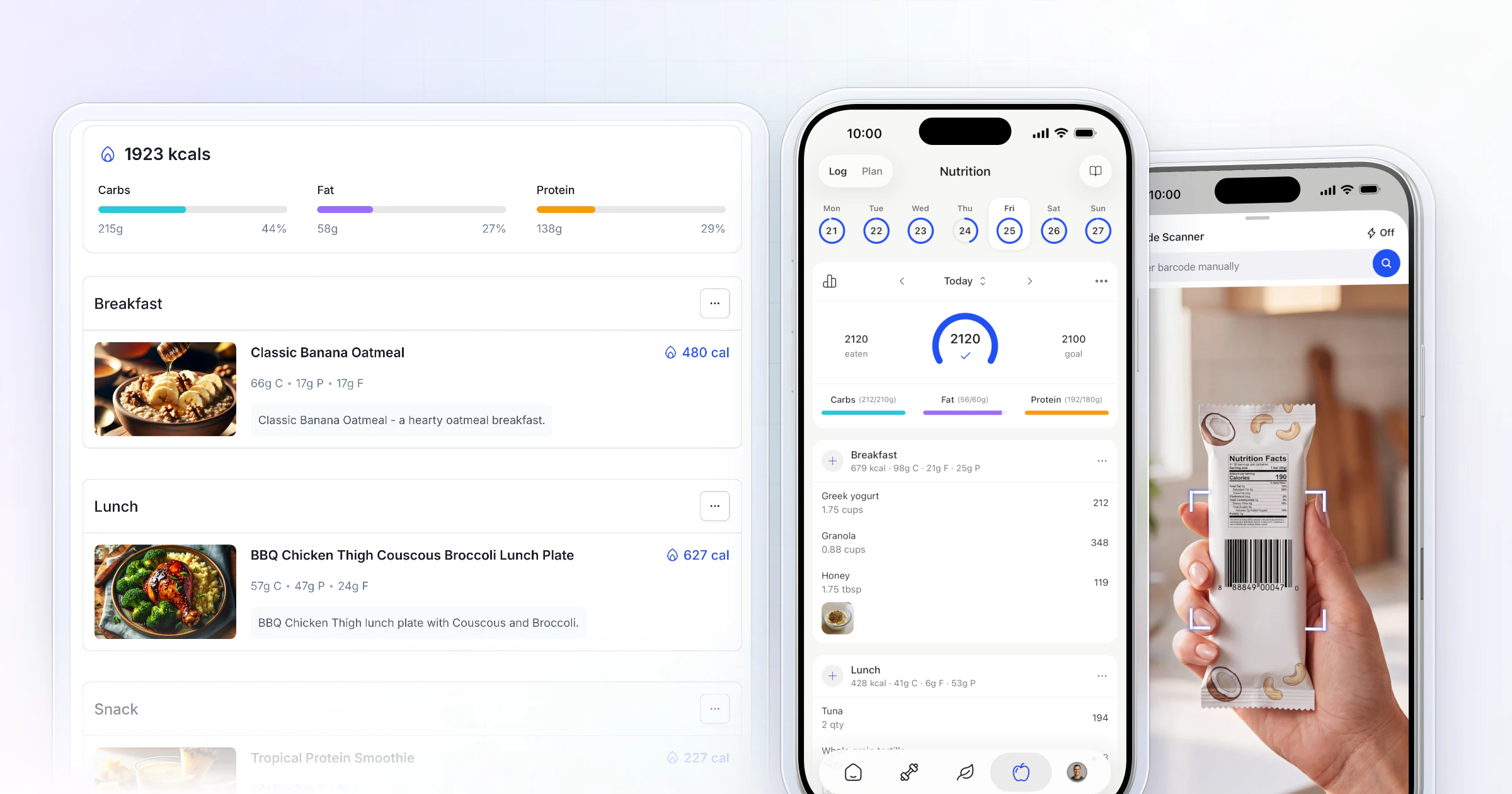
Our pick for the best nutrition coach app is HubFit, the #1 coaching app. The food tracker, barcode scanner, meal plans and 5,000+ recipes are built in with no nutrition add-on, and clients log food, follow meal plans and send check-ins in the same app you review them in. We make HubFit, and here's why it ranks first.
Key takeaways
- HubFit is the top pick: nutrition, training, check-ins, habits and messaging in one client app, with a barcode scanner, meal plans with up to 4 options per meal and recipes with diet filters.
- Look for food logging inside the coaching app itself, so clients have no second tracker to install.
- Price nutrition at your real client count: on some platforms, meal plans or recipes are an add-on or a higher plan.
What is a nutrition coach app?
A nutrition coach app is software a coach uses to set macro targets, send meal plans and recipes, see what clients eat and review their check-ins. Clients log on their phone, and you read it and reply on the coach side. Unlike a diet app, it has a coach side.
A food tracker such as MyFitnessPal or Cronometer only covers the client's half. A nutrition coach app covers both halves: the plan you write, the log they keep and the conversation in between.
What should a nutrition coach app do?
A nutrition coach app should do six jobs, from setting targets to speeding up the weekly review:
- Set targets: calories and macros, with a different target on rest days.
- Build meal plans: meals with options, so a client can swap without messaging you.
- Log food fast: a barcode scanner, a quick log and meal photos.
- Give recipes: a library clients can filter by diet.
- Show compliance: a report per client on how close they are to their macros.
- Review the week: check-ins you can compare side by side.
Test the last two hardest. If you can't see what a client ate without asking for screenshots, the app is a tracker, not a coaching tool.
How we picked
We ranked each app on four things a nutrition coach meets every week: where clients log food, how meal plans get built, what you see on the coach side, and what it costs once nutrition is switched on.
The 7 nutrition coaching platforms, ranked
Here is each platform in more depth: what it is, how clients log food and get meal plans, and what to check before you sign up.
1. HubFit
HubFit is the top pick for coaches who want food logging, meal plans, recipes, check-ins and training in one client app.
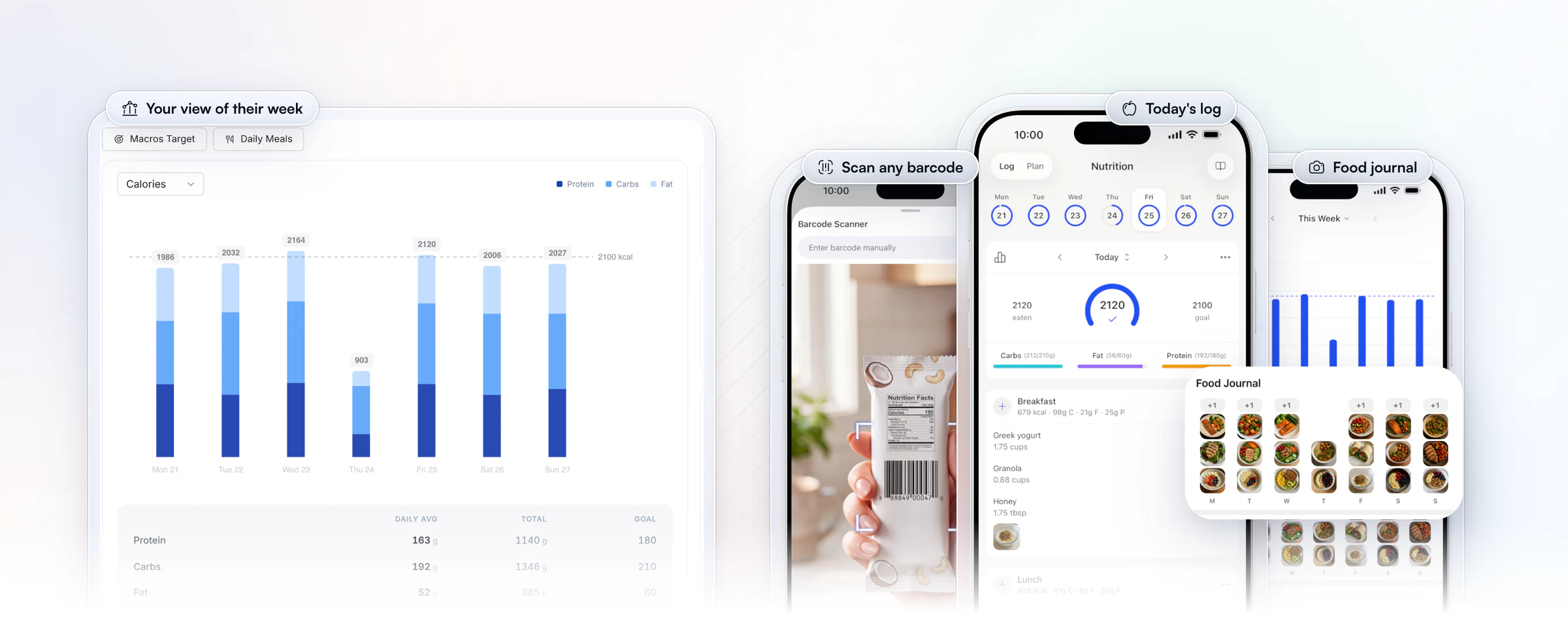
Clients log food with a barcode scanner that works with any barcode in any country, search a large food database, or use Quick Log, and they can add up to 4 photos per meal to their food journal. You set calorie, protein, carb and fat targets with a separate target for rest days, and clients can set their own targets too.
Meal plans hold up to 10 meal blocks with up to 4 options each, so a client can swap lunch without messaging you. Macro compliance reports show who is drifting, and onboarding flows assign the nutrition plan, check-ins and habits when a new client is added, so nobody waits on you.
Jesse Astill, a nutrition coach and professional fighter, builds his meal plans once and personalizes them per client, which took his onboarding from 2 hours to 30 minutes.
“I've sort of cut my workload in more than half, probably in third... now with HubFit, I can sort of just have my preloaded meal plans ready to go, go in, tweak a few of the macros just so it's personalized to them and then it's good to go.”

It's first because nutrition, check-ins with 11 question types, habits with streaks and messaging sit in the same client app as training.
2. Trainerize
Trainerize is a coaching platform for independent trainers, nutrition and lifestyle coaches, studios and gyms. Clients track meals in the app by scanning or searching foods in its meal library, which uses USDA-verified nutrition data, and they keep a photo journal. MyFitnessPal, Fitbit and Withings can sync in too. For planning, its Flexible Meal Planner and Smart Meal Planner build 7-day plans with grocery lists and custom recipes.
Those planners come with the Advanced Nutrition add-on on its lower plans, or with Studio. Plans are priced by client seats, and the add-on costs more once you pass a set seat level. FitMetrics, a separate AI add-on, works out macros from meal photos.
- What to check: whether you'll build meal plans or only set targets, and what the add-on costs at your client count. Moving over? See our Trainerize alternatives.
With us, meal plans, the food tracker and 5,000+ recipes come with the plan price, with no nutrition add-on.
3. Everfit
Everfit is a coaching platform for fitness and nutrition coaches, sports coaches, and gyms and studios. On its paid Pro plan, clients keep a food journal with macro tracking and editable meal logs, eight micronutrients are tracked, and you can send basic meal plans. Clients who already use MyFitnessPal or Cronometer can sync them.
The fuller tools sit in a Meal Plans & Recipe Books add-on: a meal plan generator that builds a full week and can regenerate it from check-ins, a recipe library, and an AI recipe builder. MacroSnap, its AI scanner for meals, barcodes and nutrition labels, is licensed per client, bought by the client or by you. Base plans are priced by client count, with a free tier for a few clients.
- What to check: which add-ons your nutrition coaching needs, and how per-client scanning licenses add up. See our Everfit alternatives.
Our food tracker and barcode scanner come with every plan, and the Smart Meal Planner and Meal AI come with Premium and up.
4. Kahunas
Kahunas is a coaching platform for online coaches and personal trainers. Its nutrition tools come with the entry plan: a verified food database with barcodes and micronutrients, custom foods, a TDEE calculator and unlimited nutrition plans. Logs are color-coded against each client's targets, so adherence shows at a glance, and you can add supplement plans and export a meal plan as a PDF.
The pricing model is three plans set by client count. Nutrition is in all of them, while automations, such as a message when a client misses a check-in, start on the middle plan.
- What to check: how you'll share recipes, since Kahunas doesn't list a built-in recipe builder.
We pair our food tracker with a 5,000+ recipe library, and sync Cronometer for clients who already log there.
5. My PT Hub
My PT Hub is a platform for personal trainers, fitness coaches and nutritionists. Clients log food against a verified nutrition database with a barcode scanner, and you set targets with its macro and calorie calculator. You can build custom meals and recipes, save nutrition templates and send automated shopping lists. Food data can also sync from MyFitnessPal, Apple Health and Google Fit.
Pricing has three plans: an entry plan that caps your clients, workouts and nutrition plans, a middle plan without those caps, and a top plan that bundles its add-ons. Check-ins come with the middle plan, where AI check-in summaries cost extra.
- What to check: the entry plan's limits, and which add-ons you'd pay for below the top plan. See our My PT Hub alternatives.
In our app, macro compliance reports for every client sit next to their check-ins, so food and feedback are reviewed in one place.
6. PT Distinction
PT Distinction is software for personal trainers, and for hybrid and online coaches. For nutrition, it has an AI meal planner, meal plan templates, recipes and a nutrition library, with a nutrition area on each client's profile. Clients log food in its in-app calorie counter, which scans barcodes and reads nutrition labels with AI, and keep a photo food diary while you follow their adherence on charts. Clients who already track in MyFitnessPal can keep a two-way sync.
Its pricing model is a base plan with a set number of clients included, then a monthly charge for each client over that limit. Its AI tools are on every plan.
- What to check: what each client over your plan's limit adds to the bill as you grow. See our PT Distinction alternatives.
Our plans are priced flat for a range of clients, so adding a client below your plan's cap doesn't change the bill.
7. TrueCoach
TrueCoach is built for personal trainers and strength coaches, with a lean toward programming. Nutrition is set up as targets: you give each client calorie, macro and fiber goals, and clients either sync macros and calories from MyFitnessPal or enter them by hand in its advanced habit and nutrition tracker. Meal plans go out as PDFs or files, or you build them inside the workout builder. TrueCoach doesn't list a built-in food database, barcode scanner or recipe library.
Pricing is three plans set by active client count, with special pricing for bigger rosters and no add-ons sold on top.
- What to check: whether your clients will be happy running two apps for training and food, and how meal plans and check-ins will reach them. See our TrueCoach alternatives.
In HubFit, clients log food and follow their meal plan in the same app they train in.
How the 7 nutrition coach apps compare
HubFit leads the matrix: food logging, meal plans with options and 5,000+ recipes come built in, with nothing extra to buy for nutrition.
| Platform | Food logging | Meal plans and recipes | What adds cost |
|---|---|---|---|
| HubFit | Tracker, barcodes, photos | Plans with options, 5,000+ recipes | Included, no add-on |
| Trainerize | In-app tracking, scan | Meal planners in add-on | Nutrition add-on |
| Everfit | Food journal, macros | Basic plans, recipes in add-on | Meal plan add-on |
| Kahunas | Food database, barcodes | Meal plans, no recipe builder | Automations: higher plan |
| My PT Hub | Food database, barcodes | Meal plans, custom recipes | Entry plan caps plans |
| PT Distinction | Calorie counter, barcodes | AI meal planner, recipes | Fee per client over limit |
| TrueCoach | Via MyFitnessPal | Plans as files | Check plan |
Two things set the first row apart. Every nutrition tool in it sits in the same client app as training, check-ins and habits, and none of it is sold separately. Where a cell says add-on or higher plan, add that cost before you compare.
HubFit's nutrition tools in depth
Our nutrition tools go well past a food log, and each one saves a nutrition coach time every week. Here is what you get: a planner that drafts whole plans, meal plans built per meal, a recipe library, your own shared foods and three ways to read what a client ate.
The Smart Meal Planner drafts a full plan in seconds. Pick a calorie goal, a macro split and the number of meals, and it builds the plan. Then swap or regenerate any meal in one tap.
- Six macro splits, as carbs/protein/fat: Balanced 40/30/30, High Protein 30/40/30, Low Carb 20/40/40, Keto 5/25/70, Low Fat 55/25/20, or your own custom split.
- 3 to 6 meals a day, for plans from 800 to 6,000 calories.
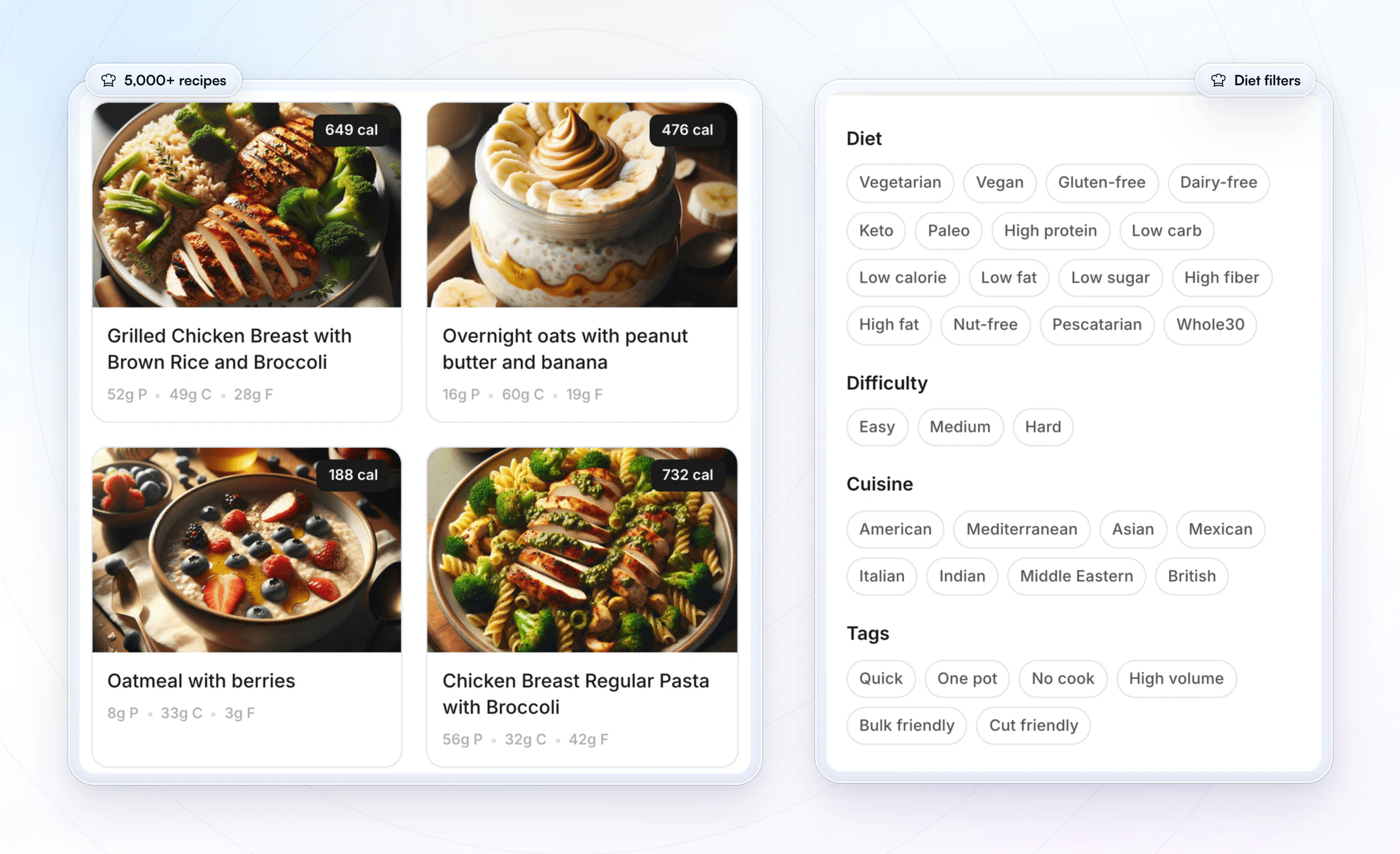
- Eight dietary filters: keto, vegetarian, vegan, pescatarian, gluten-free, dairy-free, nut-free and paleo.
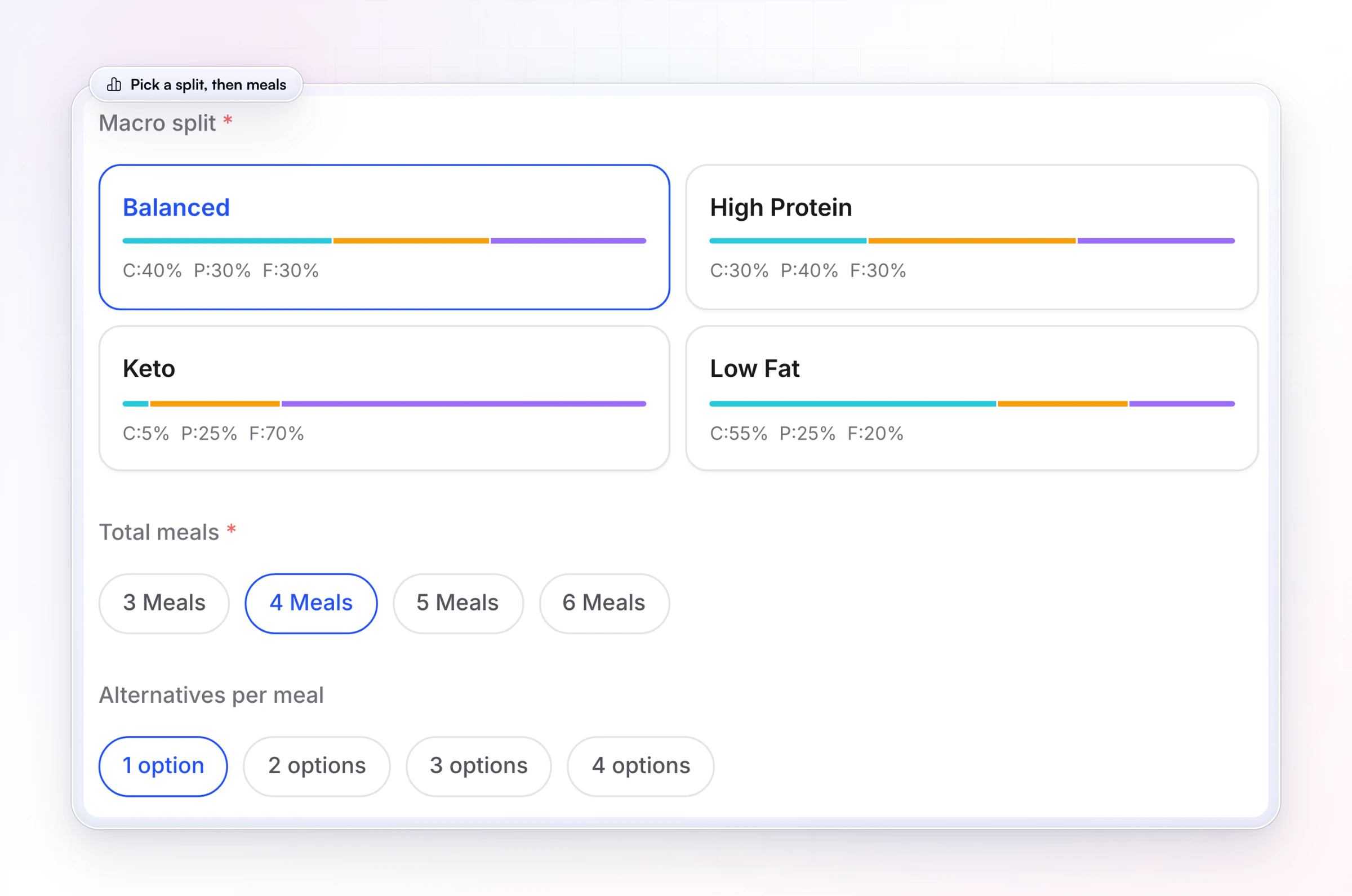
Meal plans work per meal, not just per day. Each plan holds up to 10 meal blocks with up to 4 options each. A macros plan can run as one daily target (Total Macros) or as Macros by Meal, where every meal slot has its own protein, carb and fat target and an optional note. That's how you coach a client who trains early and needs most of their carbs around it. Start from our meal plan template, then share the meal plan with your client in a few taps.
The recipe library has 5,000+ ready-to-use recipes. Filter by diet, cuisine, difficulty and tags such as high protein or quick, then add a recipe to a meal plan. With Recipe Books, you build your own branded cookbook and clients log a recipe in one tap, with its macros per serving filled in. The recipe book template shows how to lay one out.
Your own foods appear in every client's tracker. Coach Foods is your shared food library. Add the protein bar or the skyr your clients actually buy, share it with Food Access, and it shows up in their search with a coach badge.
You read a client's eating three ways. The coach's nutrition logger has a macro chart for the week, a Weekly Log that flags days where the client left a note, and the Food Journal with their meal photos. Meal AI turns a meal you describe into ingredients with macros, ready to add to a plan.
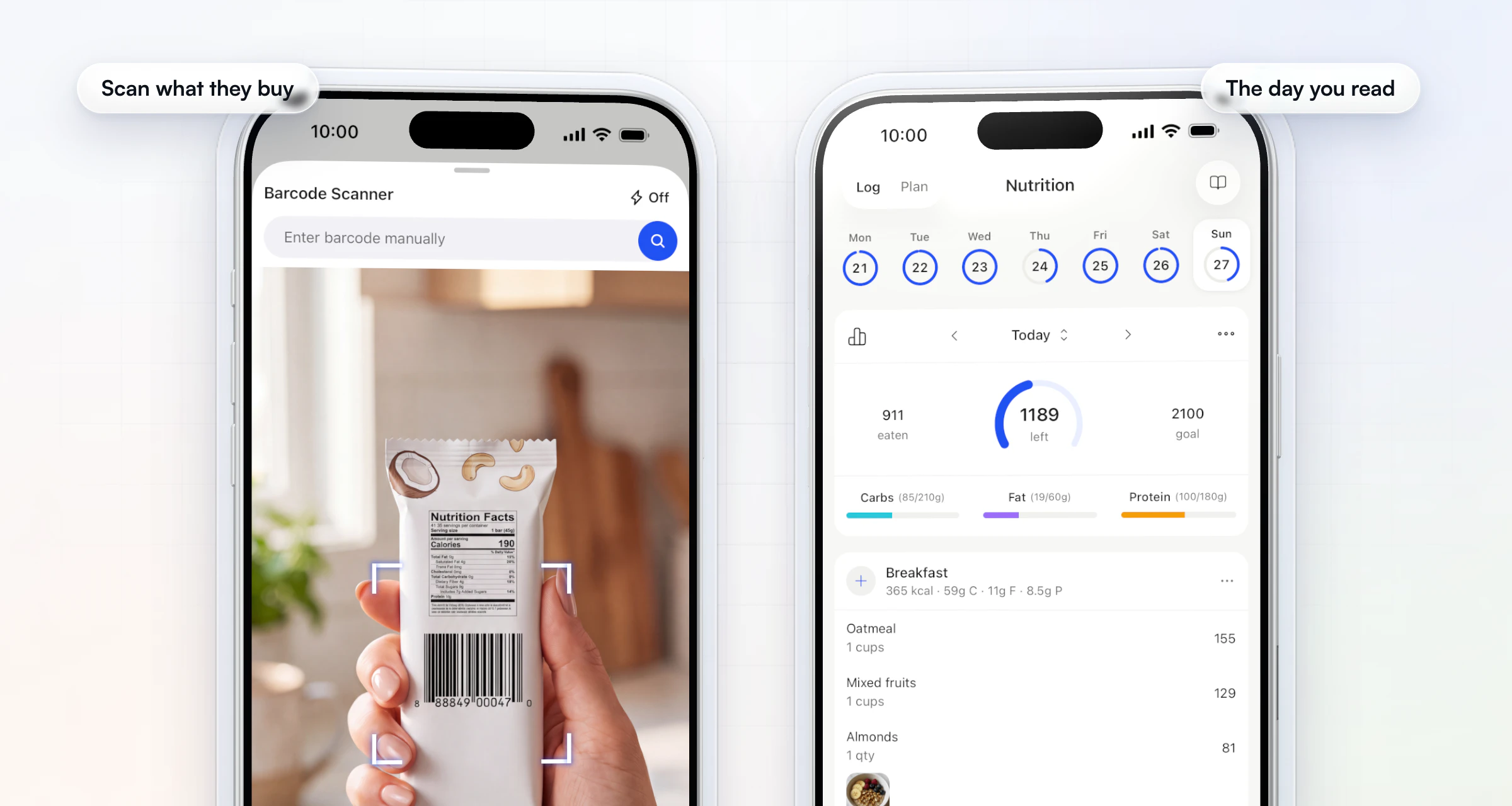
The tracker, the meal plan builder and the 5,000+ recipes come with every subscription. Recipe Books come with Premium and up.
Do your clients still need MyFitnessPal or Cronometer?
Not with HubFit, because the food tracker is built into the client app. Clients search a large food database, scan any barcode, use Quick Log or snap a photo, and every log lands next to their meal plan and targets.
Some clients already love Cronometer, and they can keep it. Once they connect their account, a Cronometer Logger tab appears on their nutrition page with their synced meals and macros, in the same weekly format. Two things to know: Cronometer data stays in that tab rather than in the built-in tracker, and it doesn't count toward nutrition challenges. Our Cronometer integration guide walks through the setup.
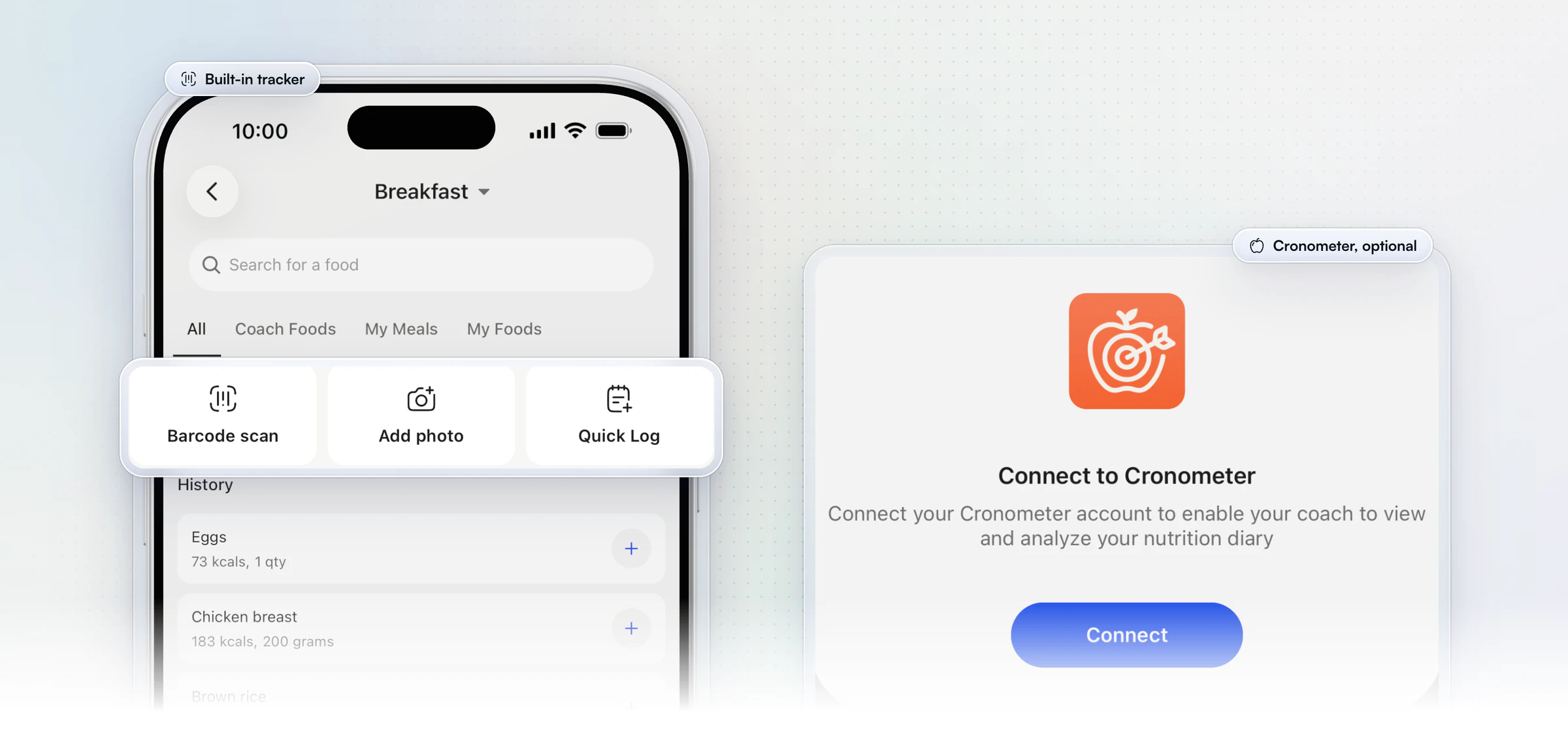
Clients coming from MyFitnessPal, a consumer food tracker, switch to HubFit's built-in tracker, with its barcode scanner and meal photos, and you on the other side. If you want to track client nutrition without a second app, this is the setup.
Which nutrition coach app fits your coaching?
HubFit fits every common way of coaching nutrition, because the tracker, the plans and the review sit in one app. Here's what each kind of coach needs and how it's done:
| You coach | What you need | How it's done |
|---|---|---|
| Macros | Targets that change by day | Rest-day targets, compliance reports |
| Meal plans | Swaps without messages | 10 meals, 4 options each |
| Training and food | One app for both | Workouts and food log together |
| Under your own brand | Your app in the stores | Branded App add-on |
| Clinical cases | Medical records | Coaching side, beside your charting |
A macro coach lives in the compliance report and the rest-day target, and needs to calculate macros before either. The free macros calculator does the arithmetic. A meal-plan coach builds with options so clients can swap.
A hybrid personal trainer gets workouts and food in the same app, so one check-in covers both. A coach with their own brand can put all of it in an app under their name. A registered dietitian doing clinical work keeps their charting software for medical records and coaches clients day to day in our app.
What does a nutrition coach app cost?
Nutrition coach apps are priced in four ways, and the model matters more than the headline price. Before you compare, work out which of these applies:
- Included: the tracker, meal plans and recipes are part of the subscription. This is HubFit: no nutrition add-on, and always free for your clients.
- Add-on: meal planners, recipes or recipe books are sold on top of the base plan (Trainerize, Everfit).
- Higher plan: a feature you need, such as check-ins or automations, sits on a higher plan (My PT Hub, Kahunas).
- Per-client fee: each client over your plan's limit adds a monthly charge (PT Distinction).
Price it at the client count you expect next year, with every nutrition feature you'd use switched on. An add-on that looks small at 10 clients can be the biggest line on the bill at 100.
What should you ask before you switch?
Ask these three questions in every trial, then run a 15-minute test as your own client on your phone:
- Where do clients log food? In the app, or in MyFitnessPal or Cronometer?
- What does it cost at next year's client count, with every nutrition add-on included?
- How do current clients move over, and does their history come too?
For the test: log a full day of meals, scan one packaged food and swap one meal. Then switch to the coach side and find that day against the targets. If any step needs a second app or a screenshot, your clients will feel it every day. You can start your free trial and run the whole test today.
FAQ
Short answers to what coaches ask most about nutrition coach apps.
What is the best app for nutrition coaches?
Our pick for nutrition coaches is HubFit, the #1 coaching app. The food tracker, barcode scanner, meal plans and 5,000+ recipes are built in with no nutrition add-on, in the same client app as training, habits, messaging and check-ins. See how nutrition coaching works in HubFit, or read our nutrition coaching guide.
What features should nutrition coaching software have?
It should have a food tracker with a barcode scanner, calorie and macro targets, meal plans with options, a recipe library, check-ins, compliance reports and messaging, all in one client app. Our app covers each one, plus a planner that drafts full meal plans and a shared library of your own foods.
What's the best meal plan software for nutrition coaches?
HubFit is our pick for meal plans. Plans hold up to 10 meals with up to 4 options each, the Smart Meal Planner drafts a full plan from six macro presets and eight dietary filters, and 5,000+ recipes drop straight into a plan. Clients see the plan in the app they log food in.
Is nutrition coaching software worth paying for?
Yes, if it saves you time every week, and the weekly review is where it shows. With the meal plan, the food log and the check-in in one place, you read a client's whole week in one view and stop chasing screenshots.
Can I share my own foods and recipes with clients?
Yes. Add your own foods to Coach Foods and share them with Food Access, and they appear in clients' food search. With Recipe Books, you publish your own recipes and clients log one in a tap with its macros per serving filled in.
What apps do nutritionists use?
Nutritionists and nutrition coaches usually use a coaching platform for meal plans, macro targets and check-ins, plus a food tracker for logging. HubFit builds the tracker in, while some platforms rely on MyFitnessPal. Registered dietitians doing clinical work often add charting software. For intake, start from our nutrition coaching questionnaire.
Is there a free nutrition coach app?
Consumer food trackers have free tiers, but coaching software is paid for by the coach. HubFit has a 14-day free trial, nutrition is included with no add-on, and it's always free for your clients. On platforms that sell meal planning as an add-on, add it to the base price before you compare.
Can I give my nutrition clients my own branded app?
Yes. Our Branded App puts meal plans, recipes, food logging and check-ins in an app under your name on the App Store and Google Play. We build, submit and maintain it as an add-on to your subscription, and it's typically live in 7 to 10 business days once your Apple and Google developer accounts are ready.
Coach nutrition in one app your clients will use
Build your first meal plan with the Smart Meal Planner this week, and your clients will log against it in the same app they train in.





