
Our pick for the best PT Distinction alternative is HubFit, the #1 coaching app. You pay one set price for your plan with no fee for each extra client, and clients train, log food with a barcode scanner and send check-ins in one app. We make HubFit, and below is how it compares with five other PT Distinction alternatives, what each costs as you grow, and how to switch.
Key takeaways
- Our top pick for a PT Distinction alternative is HubFit: one set price per plan with no fee per extra client, and training, nutrition, check-ins, habits and messaging in one client app.
- PT Distinction charges a monthly fee for every client over your plan limit, so the bill moves every time your roster does.
- On iPhone, PT Distinction's branded apps share one App Store app, and only the Android app gets its own Google Play listing.
- PT Distinction has custom forms and automated check-ins, so the real test is how long each review takes once your roster doubles.
What is a PT Distinction alternative?
A PT Distinction alternative is another coaching platform that does the same core jobs, programs, nutrition, check-ins and client messaging, with a different pricing model, client app or feature set.
A PT Distinction alternative makes sense once your roster, your brand or your clients have outgrown how the platform works for you. Coaches usually compare three things before they move: how the bill changes as clients join, what the client app does every day, and whether the app carries their own brand in the stores. This guide ranks the options on those three points.
Why do coaches look for a PT Distinction alternative?
Coaches look for a PT Distinction alternative when the bill climbs with each new client, they want their own iPhone app, clients ask for a feed, or they want faster check-in reviews. Each reason points to a different thing to test in a trial.
Your bill grows with every client
PT Distinction prices each plan for a set number of clients, then adds a monthly fee for every client above that limit. Once you pass that limit, every client you sign raises the monthly total, so the bill moves every time your roster does.
Your app shares one listing on iPhone
On iPhone, PT Distinction's branded apps share one App Store app, and only the Android app gets its own Google Play listing. On iPhone, there's no App Store listing under your own name.
Your clients want a social feed
PT Distinction offers groups and group messaging, not a social feed. Coaches who want clients cheering each other on between sessions often start looking here.
You want faster check-in reviews
PT Distinction has custom forms and automated check-ins, so the question is not whether you can run check-ins but how long each review takes as your roster grows. Our guide to online coaching check-ins covers the questions and the review routine.
What should you look for in a PT Distinction alternative?
Look for five things: a price you can forecast, nutrition in the same app, fast check-in reviews, your brand in the stores and a clean way to switch. Test each one with a real client during a trial, not on a feature page.
- A price you can forecast. Work out the bill at your client count today and at double it. If the number depends on how many clients join this month, budgeting gets harder as you grow.
- Nutrition in the same app. Count the apps a client opens each day. Food logging is the habit worth protecting: a systematic review of self-monitoring studies found a consistent link between tracking what you eat and weight loss (Burke et al.). Every extra app between the workout and the food log is a step a client can skip.
- Check-in review speed. Time one real review from inbox to reply. You want every submission in one place, the last check-in beside this one, and a quick way to reply with a comment or a video.
- Your brand in the stores. Search the App Store and Google Play for your brand name. On iPhone especially, check whether clients find an app under your name or a login inside the platform's own app.
- A way to move without downtime. Bulk client import, check-in templates and onboarding flows decide how long the switch takes. Ask how a new client gets their program, plan and check-ins on day one.
The best PT Distinction alternatives, ranked
How we compared: we looked at the week of an online coach whose roster is growing. What happens to your bill as clients join, how fast can you review check-ins, and can clients find your app under your own name? Our pick answers all three: a set price per plan with no per-client fee, a fast check-in inbox, and a Branded App with its own listing in both stores.
1. HubFit
HubFit is the top pick for coaches who want training, nutrition, check-ins and habits in one app, at a set price per plan rather than a fee per extra client. It's the #1 coaching app, rated 4.9 on the App Store and Google Play, and it's free for your clients.
Here's how it answers each reason coaches leave PT Distinction:
| What you need | PT Distinction | HubFit |
|---|---|---|
| A growing roster | Fee per client over limit | Set price per plan |
| Your own app | Shared App Store app on iPhone | Own listing in both stores |
| Client community | Groups and group messenger | Private feed with polls |
| Check-in review | Custom forms, automated check-ins | 11 question types, review inbox |
One set price per plan, with no per-client fee. Each plan covers a set number of clients, with no fee for each extra client inside it. Standard covers up to 50 clients and Premium up to 100, each at one monthly price, and Ultimate starts at 100 clients and steps up in brackets to 500, with dedicated tiers beyond that.
A coach who starts at 40 clients and signs 5 a month reaches 95 clients by month 12. On HubFit, that coach moves up one plan once, after 50 clients, and the price then holds until 100. Your clients never pay for the app. See HubFit pricing for the plans.
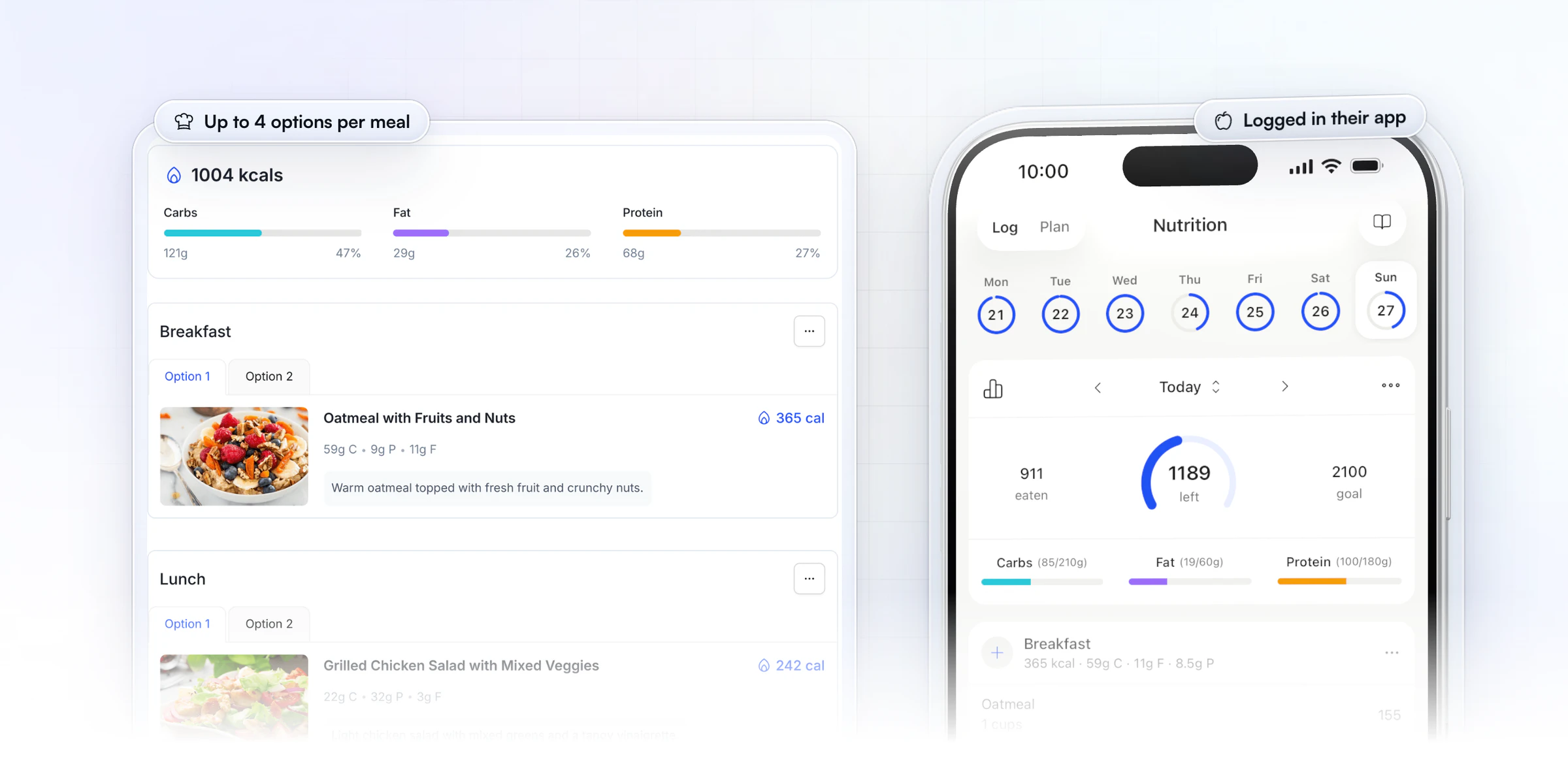
Training and nutrition in the same app. The drag-and-drop builder has 5,000+ exercise videos, fixed or calendar programs and automatic PR tracking. Clients log food with a barcode scanner against their macro targets, and you build meal plans with up to 10 meals and up to 4 options per meal, so a client can swap breakfast without breaking their macros.
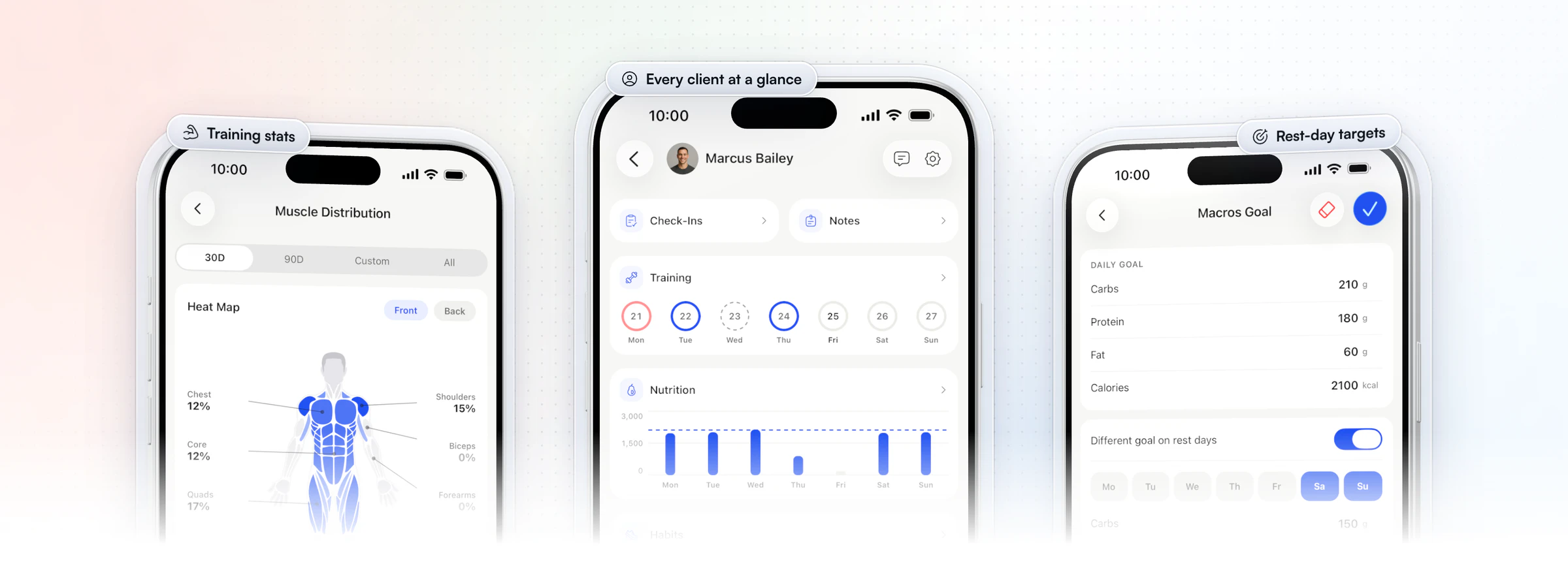
Every client on one screen. In the coach app, one screen shows each client's check-ins, notes, training week, nutrition against their goal and habits, and you get a macro compliance report for every client. Clients see their training balance as a muscle heat map, and you can set a different macro target for rest days.
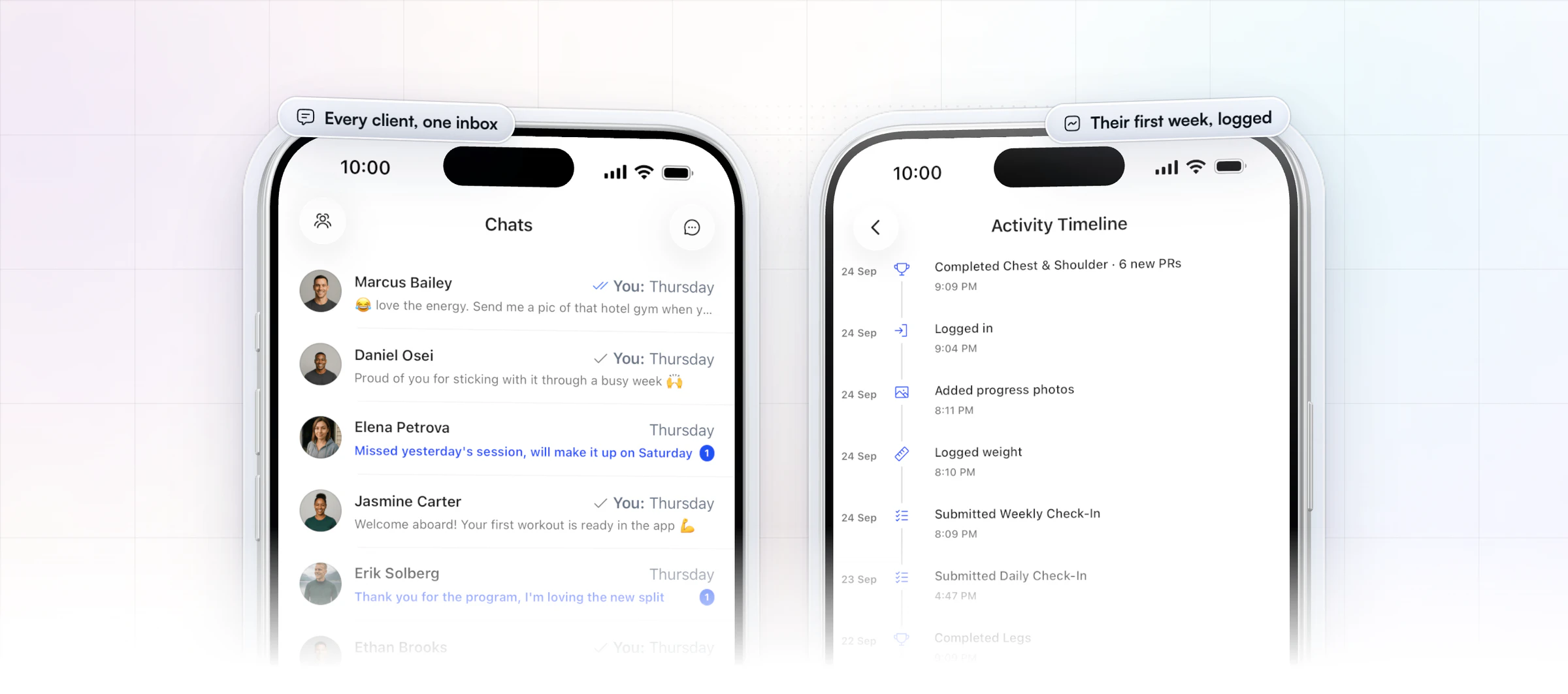
Check-ins in one review inbox. Recurring forms come with 11 question types and push reminders. Every submission lands in a review inbox, you compare it side by side with the last one, and you reply with a comment or a Loom video.
“I spend one to two minutes per client on a proper check-in now.”

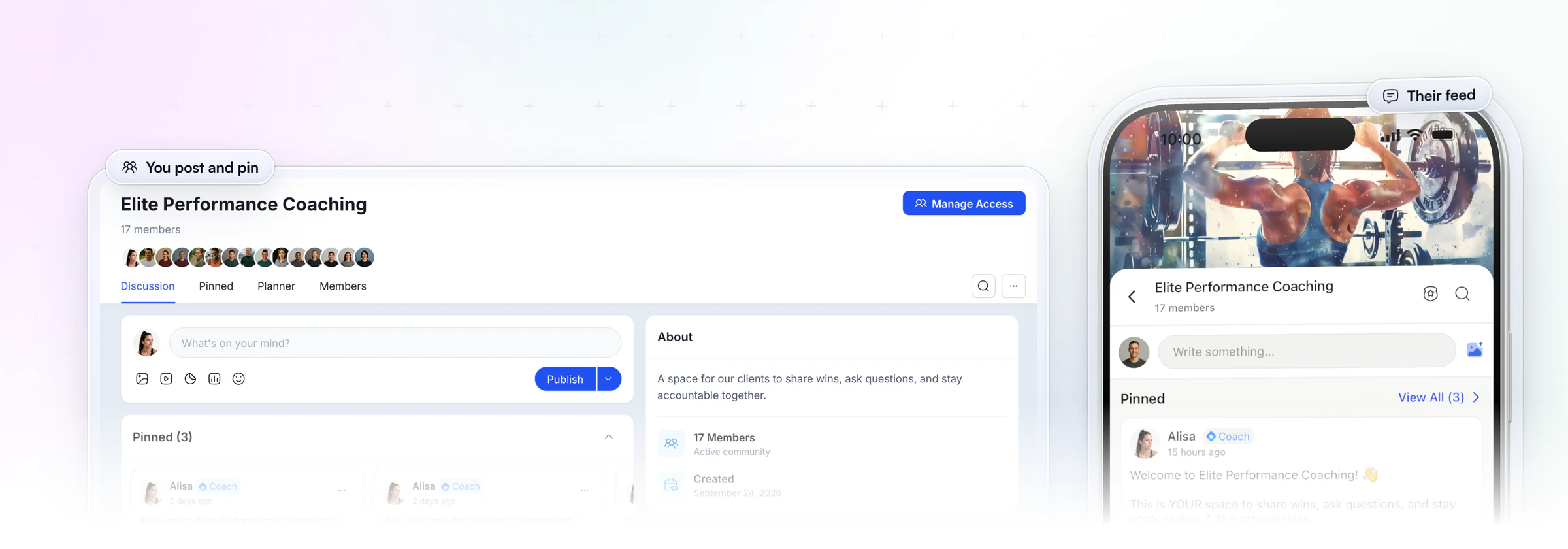
A private feed, not just groups. Our Community is a private feed where clients post updates, run polls and reply to each other, with pinned posts and scheduled posts for the coach. Clients who see each other's wins have a reason to open the app on days they don't train. Community is on the Ultimate plan.
Your own app on iPhone too. With our Branded App add-on, we build, submit and maintain an app under your name, with its own listing on the App Store and Google Play. Clients already on HubFit sign in to it with their existing HubFit details, and their programs, history and messages are already there. Apply for your branded app to see if it fits your business.
Onboarding, habits and payments that run on their own. An Onboarding Flow assigns each new client's program, nutrition plan, habits and check-ins, and 40+ ready-made habits come with streaks and completion rates calculated for you.
You can sell packages through Stripe at Stripe's own rate, with no transaction fee from us, and each purchase starts that client's onboarding. The Smart Meal Planner builds a full plan in seconds, Recipe Books give clients one-tap logging with macros per serving, and leaderboard challenges keep clients opening the app between sessions. The Smart Meal Planner, Recipe Books, payments and challenges come with Premium and up.
2. Trainerize
Trainerize, from ABC Fitness, is coaching software for personal trainers, online coaches, studios, gyms and corporate wellness programs. It covers workouts with an AI Workout Builder on paid plans, in-app meal tracking, check-in and onboarding forms, habits, Groups of up to 1,000 members with leaderboard and threshold challenges, and appointment and class booking. Paid plans connect to Garmin, Fitbit, MyFitnessPal and Zapier.
Its plans are sold by client seats, so you move up a seat level as your roster grows, and its studio plans run to hundreds of seats with their own trainer allowance. Meal planners, Stripe payments, video coaching and a business toolkit are add-ons below the studio plans.
- What to check: how your app is listed. Trainerize's Pro branded app has no App Store listing of its own and shows as "Fitness App" on iPhone home screens.
HubFit's Branded App lists your app under your own name on the App Store and Google Play.
3. Everfit
Everfit serves fitness coaches, nutrition coaches, sports coaches, gyms and studios. Its workout builder handles supersets, intervals, AMRAP and timed blocks, and its nutrition tools include a food journal, macro tracking and basic meal plans. Clients also get habit coaching, progress photos, community forums with coach polls, and session booking with group classes and waitlists.
The free plan covers up to 5 clients. Paid plans then rise in small steps by client count, and the Studio plans add group chat and on-demand content. Automations, payments, the full meal plan module, Zapier and extra video storage are add-ons, and some of them are metered by use.
- What to check: what you'd pay once the add-ons grow with you. Autoflow automations are billed on the clients in them, so that line rises with your roster too.
HubFit's Onboarding Flows come with every plan, and AutoFlow sequences come with Premium and up.
4. Kahunas
Online coaches and personal trainers are Kahunas' audience, and every plan starts with a live one-to-one onboarding session. The platform covers unlimited workout and nutrition plans, a food database with barcodes, custom check-in forms with a side-by-side compare, progress photos with an overlay view, a calendar for appointments, and payments through Stripe or PayPal with no commission from Kahunas.
It has three plans by client count: up to 25 clients, up to 50, and unlimited on the top plan. Automations start on the middle plan, while team members, at a monthly fee each, and a branded app with its own store listings are on the top plan only.
- What to check: how your clients would talk to each other. Group chat is included on the top plan and a paid add-on on the middle plan, and no built-in community feed is listed.
HubFit Community gives clients a private feed with posts and polls.
5. My PT Hub
My PT Hub is UK-based software for personal trainers, fitness coaches and nutritionists. It offers 8,000+ exercise videos with an AI workout builder, a food database of over 650,000 items, habit tracking on every plan, recurring check-ins with optional AI summaries, communities with a feed and polls, 1-to-1 bookings, group classes and live streams, and a microsite for your business.
Its starter plan is capped at 3 clients, 50 workouts and 50 nutrition plans. The middle plan has unlimited clients and sells extras one at a time, and the top plan bundles them all. A 30-day trial moves to a free plan if you don't upgrade.
- What to check: running a team. Each additional trainer is a monthly fee on the middle plan, and an app under your own name with its own store listing is a monthly add-on there too.
Team members are included on HubFit Ultimate, with Admin and Standard roles to control who sees which clients.
6. TrueCoach
TrueCoach is a strength-leaning training platform for personal trainers, strength and conditioning coaches and CrossFit coaches. Programs are built on a calendar with sets, reps, tempo and rest, and a day can hold more than one workout. Clients track metrics and progress photos, and coaches get compliance rates, voice notes in messaging and a public coach profile that takes lead applications on the middle and top tiers.
Pricing has three tiers capped at 5, 20 and 50 active clients, billed monthly or annually, with special pricing past 50. TrueCoach lists no add-ons, and coaches join a team at no extra cost.
- What to check: what branding means here. TrueCoach custom branding is your logo and color inside the TrueCoach app plus a subdomain, not your own app, and client payments are limited to coaches in the US, UK, Australia and Canada.
With HubFit's Branded App, your clients download an app under your name from the App Store and Google Play.
How the 6 PT Distinction alternatives compare
Here's how the six compare on how the price grows, food logging and what adds cost, with PT Distinction in the last row for reference.
| Platform | How the price grows | Food logging | What adds cost |
|---|---|---|---|
| HubFit | One set price per plan | In-app tracker, barcode | Nothing per client, clients free |
| Trainerize | Plans by client seats | In-app food tracking | Meal planning and payments add-ons |
| Everfit | Plans by client count | Food journal | Full meal-plan module and automations add-ons |
| Kahunas | Plans by client count | Own food database | Automations on higher plans |
| My PT Hub | Plan plus a fee per extra trainer | Own food database | White-label add-on |
| TrueCoach | Plans by active clients | Macros + MyFitnessPal | A higher tier as you grow |
| PT Distinction | Plan plus a fee per extra client | In-app calorie counter, barcode | Every client over your limit |
What does PT Distinction cost as your roster grows?
PT Distinction charges a monthly fee for every client over your plan limit, so the bill grows with each client you add. The fee per extra client is highest on its entry plan and lowest on its top plan, and even the top plan includes 50 clients before the extra fees start.
Here's what that looks like in clients rather than dollars. On PT Distinction's top plan, a coach with 100 clients pays the plan price plus 50 extra-client fees every month. At 500 clients, it is the plan price plus 450 extra-client fees.
Now picture a year of steady growth. You start at 40 clients on PT Distinction's top plan and sign 5 new clients a month. By month 4 you pass the 50 included clients, and by month 12 you're paying 45 extra-client fees on top of the plan, a number that rises again every month you grow.
Branded apps come with PT Distinction's Pro and Master plans rather than as a separate charge.
Is PT Distinction good for online coaches?
PT Distinction is personal trainer software with a program builder, nutrition tools, custom forms and groups. If you want a set price per plan with no fee for each extra client, a private social feed and your own app in both stores, HubFit is the stronger fit.
Which PT Distinction alternative fits you?
HubFit is our pick for whichever reason has you leaving PT Distinction, because it answers each of them in one app. Find your reason below, then test that one thing during your trial.
| If you're leaving for | What to test in HubFit |
|---|---|
| A growing roster | Set price per plan, no per-client fee |
| Your own app on iPhone | Branded App, own App Store listing |
| Nutrition coaching | Tracker, meal plans, 5,000+ recipes |
| Weekly check-ins | Review inbox, side-by-side view |
| A client community | Private feed with polls |
| Switching mid-season | Bulk import, Onboarding Flows |
Comparing other platforms too? See our guides to Trainerize alternatives, My PT Hub alternatives and TrueCoach alternatives.
How to switch from PT Distinction without losing clients
You can move from PT Distinction in four steps during your 14-day free trial, while clients keep training in the old app until the new one is ready. The rebuild is mostly your top programs, one check-in form and one onboarding flow.
- Save what you need first. Before you cancel anything, keep each client's contact details, current program, macro targets and recent check-in answers in one place. That's the list you rebuild from.
- Rebuild what you use most. Recreate your main programs in the workout builder and your weekly check-in from a pre-built template. With Workout AI, you paste a written workout like "Bench Press 5x8, Rows 4x10" and it comes back formatted.
- Set up one Onboarding Flow. Add macro targets and a meal plan, then build a flow that assigns every new client their program, nutrition plan, habits and check-ins on day one.
- Bring clients over in bulk. Import your clients, invite them, and run both apps for a week. Ask each client to send their first check-in in the new app, then close the old account.
Workout AI comes with Premium and up.
With a flow built, adding a new client after the switch takes minutes. Gianni Fabrizio of Gianni Coaching cut his own client setup from about 3 hours to 2 minutes.
“I can quickly fire off an onboarding email... boom, done. That client is incredibly happy, and I feel good about it.”

If you want your own app at the same time, your clients sign in to it with the same login details once it is live.
What to tell your clients
Tell clients what changes, when, and what they need to do, in one short message. A switch feels smooth when they hear it from you before the invite arrives. Copy this and edit the details:
Hi [name], from [date] your training, meal plan and check-ins move to a new app. You'll get an invite by email: download the app, sign in, and your program will be waiting. Keep using the old app until then. Send your next check-in in the new app, and message me there if anything looks off.
Send it a few days before the invites go out, then a one-line reminder on the day. Clients who know what's coming tend to log in on day one.
How long does the switch take?
Plan for about a week of overlap. Most of the work is rebuilding your three or four most-used programs, your weekly check-in and one onboarding flow; the rest of your library can follow as you need it. Move clients in one batch at a natural break, such as the start of a new training block, rather than one at a time.
FAQ
Quick answers to what coaches ask before leaving PT Distinction.
What is the best PT Distinction alternative?
We make HubFit, and it's our pick as the best PT Distinction alternative for online coaches. Training, food logging with a barcode scanner, meal plans, check-ins and habits live in one client app, at a set price per plan with no per-client fee. For the wider field, see our ranking of the best personal training software.
How much are extra clients on PT Distinction?
PT Distinction charges a monthly fee for every client over your plan limit. The fee is highest on its entry plan and lowest on its top plan, which includes 50 clients. HubFit has no per-client fee inside a plan, and clients always use the app free.
How much do PT Distinction alternatives cost?
It depends on the pricing model. We charge one set price per plan, PT Distinction adds a fee per extra client, and Trainerize, Everfit, Kahunas and TrueCoach step up by client count, with add-ons on some. See HubFit pricing for our plans.
Is there a PT Distinction alternative with nutrition built in?
Yes. HubFit includes an in-app food tracker with a barcode scanner, macro targets, meal plans and 5,000+ recipes on every plan, with no nutrition add-on. Clients log food in the app itself, so there's no MyFitnessPal to sync, and clients who already use Cronometer can connect it. Our roundup of nutrition coach apps covers food logging in more depth.
PT Distinction vs Everfit: which is better?
They price growth differently: PT Distinction adds a fee per extra client, while Everfit sells plans by client count with paid add-ons for its full meal plan module and automations. If you want nutrition and check-ins without either, HubFit is our pick. See our Everfit alternatives guide.
Does PT Distinction have check-ins?
Yes. PT Distinction has custom forms and automated check-ins. Our check-ins add 11 question types, a review inbox, side-by-side comparisons of each submission and Loom video replies. Our guide to check-in tools compares the options.
Is there a free PT Distinction alternative?
We offer a 14-day free trial, so you can move a few clients over and test it before you pay. Your clients never pay for the app. See how the pieces fit together on our coaching platform page.
Can I get an app under my own name?
Yes. Our Branded App is an add-on to your subscription: we build, submit and maintain an app under your brand, with its own listing on the App Store and Google Play. Apply for your branded app, or read more about a branded app for personal trainers.
Coach a bigger roster from one app
Move your first five clients over this week. You get one set price for your plan, no fee per extra client, and training, nutrition and check-ins in the app clients open every day.






