A monthly check-in form template is a once-a-month form where your client looks back on four weeks, logs measurements and photos, and sets next month's focus. Copy the 12-question form below, then run it in HubFit, which sends it on the day you pick with a push reminder and puts last month beside this one.
Key takeaways
- 12 questions, about 10 minutes. Three parts: look back, measure, look ahead. Copy the form as it is, or pick extra questions by goal.
- Monthly decides, weekly steers. The weekly check-in keeps the plan on track; the monthly one decides whether it's still the right plan.
- Ask only what the client knows. Sessions, steps, sleep and habit streaks come from the data, not from their memory of a whole month.
- Measure the same way every month: same morning, same tape position, same light for photos.
The monthly check-in form template (copy it)
Here are the 12 questions, the answer type for each and why it earns its place. Keep the wording and order fixed so this month lines up with the last.
| Question | Answer type | Why it matters |
|---|---|---|
| 1. Biggest win this month? | Text | A bad last week hides the rest |
| 2. What got in the way, and why? | Text | Fix the plan, not the willpower |
| 3. How satisfied are you this month? | Scale 1 to 10 | Progress can still feel miserable |
| 4. How doable did the plan feel? | Scale 1 to 10 | Low scores mean simplify |
| 5. Stress this month | Choice: Low / Okay / High | Explains most stalls |
| 6. Morning body weight | Metric | One reading against last month's |
| 7. Waist measurement | Metric | Moves when the scale won't |
| 8. Hip measurement | Metric | Tracks recomposition |
| 9. Progress photos: front, side, back | Progress Photos | Change shows over months |
| 10. Your main goal for next month | Choice: 4 goals + Other | Re-aims the next block |
| 11. Anything coming up next month? | Text | Plan travel and deadlines early |
| 12. One habit you'll commit to | Text | One habit beats five |
For question 10, offer Fat loss, Muscle, Strength and Maintain, plus Other. Make the photos and measurements optional for clients who prefer not to share them. Question 12 feeds your habit coaching: add the habit they choose in HubFit and its streak and completion rate are counted for you, so next month's form doesn't have to ask how it went.
The full form, ready to paste
This is the whole form with its instructions and answer options. Paste it into Google Forms, a doc, an email or your coaching app, and send the same version every month.
MONTHLY CHECK-IN
Name: ____________   Month: ____________
About 10 minutes. Answer for the whole month, not just the last week.

PART 1: LOOK BACK
1. What was your biggest win this month?
2. What got in the way, and why?
3. How satisfied are you with this month? (1 = not at all, 10 = completely)
4. How doable did the plan feel? (1 = impossible, 10 = easy)
5. How was your stress this month?   [ ] Low   [ ] Okay   [ ] High

PART 2: MEASURE (the same way as last month)
Weigh in first thing in the morning, after the bathroom, before food or drink.
6. Body weight: ______ lb / kg
7. Waist, midway between your lowest rib and the top of your hip bone,
   after a normal breath out: ______ in / cm
8. Hips, around the widest part, tape level: ______ in / cm
9. Photos, optional: front / side / back
   (same room, same light, same distance, same clothes)

PART 3: LOOK AHEAD
10. Main goal for next month:
    [ ] Fat loss  [ ] Muscle  [ ] Strength  [ ] Maintain  [ ] Other: ______
11. Anything coming up next month (travel, work, events)?
12. One habit I'll commit to next month:
Prefer a spreadsheet? Select the table above, copy it and paste it into Google Sheets or Excel: the rows and columns carry over, ready to turn into a form.
How to adapt it to your coaching
The look-back and look-ahead parts stay the same; swap the measurements to fit the goal.
- Strength clients: replace hips with "Which lift felt best this month?" and read their PRs from the log.
- Nutrition coaching clients: add "Which meals were hardest to stick to?" and drop the hip measurement. Our nutrition coaching questionnaire has the weekly food questions to pair with it.
- Maintenance or alumni clients: keep questions 1, 3, 10 and 12, plus the weight if they track it.
- Clients who want commitment in writing: add a Signature question under the habit.
What is a monthly check-in for coaching clients?
A monthly check-in is a longer, recurring form that steps back from day-to-day accountability to review the month's progress, reset goals and plan the next block of training. It suits online fitness clients, in-person personal training clients and nutrition coaching clients alike. Our guide to online coaching check-ins covers the whole rhythm; this page is the monthly form.
Reviewing progress pays off: people who monitor their progress reach their goals more often, more so when they report it to someone (meta-analysis of 138 studies). A monthly form makes that report a habit, with a coach reading it.
Weekly check-in vs monthly review: what's the difference?
The weekly check-in keeps the plan on track; the monthly review decides whether it's still the right plan. Most clients who are still changing habits need both, with the monthly taking the weekly's place in the week it's due.
| Aspect | Weekly check-in | Monthly review |
|---|---|---|
| Purpose | Keep this week on track | Check the plan still fits |
| Questions | 8 to 12 | 12, plus a few by goal |
| Client time | About 3 minutes | About 10 minutes |
| Measurements | Weight, or none | Weight, waist, hips, photos |
| Your review | A few minutes | About 20 minutes |
| Decision it drives | Small tweaks for next week | One main change for the month |
A different form once a month also breaks the routine. "Clients hated having the same check-in every week," Vegard Mikalsen of VM Coaching said of his old setup. A monthly form with its own questions gives both of you a fresh look. For the weekly side, copy our weekly check-in form template.
More monthly check-in questions by goal
These 18 optional questions extend the template when a client needs a deeper review. Add three or four at most, so the form stays near 10 minutes, and swap them as the client's goal changes.
Goal assessment: is the target still right?
- Is your main goal still the same? If not, what changed? Goals drift quietly, so re-aim before you plan.
- How close do you feel to that goal (1 to 10)? Compare it with last month's score, not with yours.
- What would make next month a success for you? Their definition of a good month is the one they'll chase.
- Which part of the plan helped you most this month? Keep what works before you change anything.
- Is there a date you're working toward? An event, a holiday or a shoot sets the length of the next block.
- How confident are you about next month (1 to 10)? Below 7, simplify before you add anything.
Lifestyle scan: what changed around the plan?
- How was work this month: lighter, normal or heavier? Workload explains more stalls than effort does.
- How many nights a week did you wake up rested? How sleep felt adds to the hours a tracker records.
- Did your training place or equipment change? A new gym or a home setup changes the program.
- How did weekends compare with weekdays? Most plans slip on the same two days.
- Did anything change at home? Family, routine or schedule changes are context no app can show.
- Any pain, injury or niggle this month? Catch it early, swap the exercise, and refer out when needed.
Coaching feedback: what do they need from you?
- What do you need more of from me? More check-ins, more explanation, more accountability.
- What do you need less of from me? Fewer messages can be the change that keeps a client.
- Which message or reply helped most this month? It shows you which coaching style lands.
- Is anything about the plan confusing? One unclear instruction can stall a whole month.
- How would you rate your coaching this month (1 to 10)? A falling score is an early warning to act on.
- Is there anything you haven't told me that I should know? The open door gets answers the other questions miss.
Paste-ready version of the extra questions:
Optional monthly questions (pick 3 or 4)

Goal assessment
- Is your main goal still the same? If not, what changed?
- How close do you feel to that goal (1-10)?
- What would make next month a success for you?
- Which part of the plan helped you most this month?
- Is there a date you're working toward?
- How confident are you about next month (1-10)?

Lifestyle scan
- How was work this month: lighter / normal / heavier?
- How many nights a week did you wake up rested?
- Did your training place or equipment change?
- How did weekends compare with weekdays?
- Did anything change at home?
- Any pain, injury or niggle this month?

Coaching feedback
- What do you need more of from me?
- What do you need less of from me?
- Which message or reply helped most this month?
- Is anything about the plan confusing?
- How would you rate your coaching this month (1-10)?
- Is there anything you haven't told me that I should know?
For weekly questions by goal, see our list of client check-in questions.
What should you pull from data instead of asking?
Pull anything an app already records, because a client recalling a month of steps or sessions is guessing. Asking for it also makes the form longer and the answers worse.
- Sessions completed and PRs: HubFit's workout tracker logs every set and rep and records PRs automatically.
- Steps and sleep: if they wear a tracker, these sync through Apple Health or Health Connect.
- Habit consistency: streaks and completion rates are calculated for you, so "How was your water this month?" isn't needed.
- How the weeks went: open their weekly check-ins side by side instead of asking them to sum up four weeks.
How do you take monthly measurements and photos?
Take them the same way every month, or the change you see is the method, not the client. Write these rules into the form's description:
- Weight: first thing in the morning, after the bathroom, before food or drink.
- Waist: at the end of a normal breath out, midway between the lowest rib and the top of the hip bone, the spot used in the WHO measurement protocol.
- Hips: around the widest part, tape level. With the waist, it gives the waist-to-hip ratio.
- Photos: same room, same light, same distance, same clothes, front, side and back.
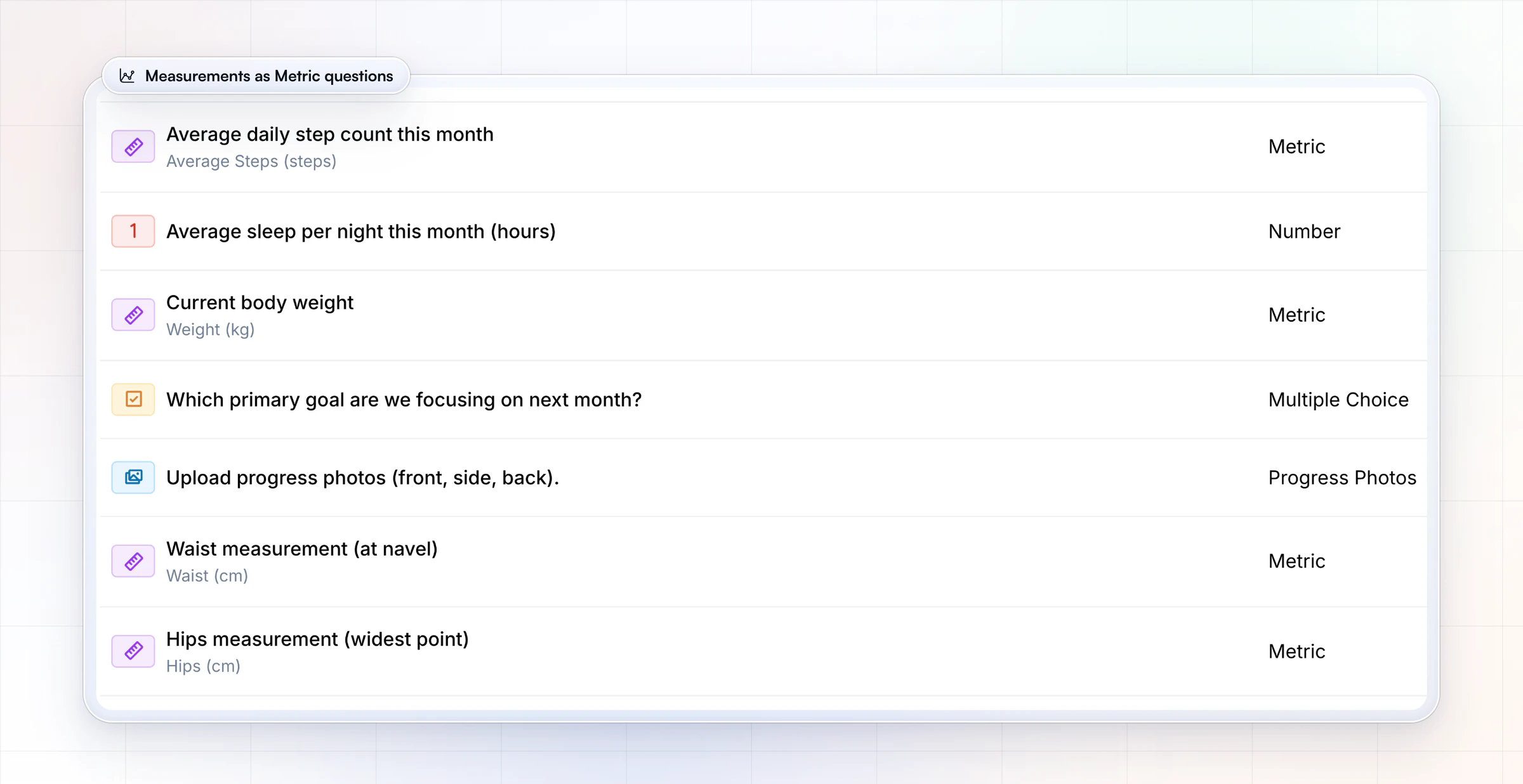
Ask for weight, waist and hips as Metric questions and each answer lands in the client's Metrics, where every measure keeps its own chart and the month's average weight sits against last month's.
A filled-in example: one client's month
Here is an example client four months into a fat-loss phase, with this month next to last month:
| Measure | Last month | This month |
|---|---|---|
| Weight | 181.2 lb | 179.4 lb |
| Waist | 36.5 in | 35.9 in |
| Sessions logged | 15 of 16 | 11 of 16 |
| Sleep (synced) | 7.1 h a night | 6.3 h a night |
| Satisfied · Doable | 8 · 8 | 6 · 5 |
| Stress | Okay | High |
The numbers kept moving, but sessions, sleep and both scores fell as stress rose. Question 11 explains why: a work deadline runs through the middle of next month. So the coach doesn't push harder. Next month becomes three 45-minute sessions a week, the same nutrition targets and one habit the client chose: lights out by 10:30. Next month's form will show whether it held.
How do you run a monthly check-in review?
Run it in about 20 minutes per client: prepare from the data, read the form, decide, and send one clear plan.
- Pull the month. Sessions, PRs, synced steps and sleep, and habit completion, before you open the form.
- Compare. Put this month's check-in next to last month's, or one from three months ago for a bigger picture.
- Read the scores first. Low satisfaction or a plan that felt hard matters more than one number.
- Decide one change. Volume, nutrition target, schedule or habit: one main change, so next month shows what worked.
- Reply with the plan. A written summary, or a short video when there's a lot to explain, so they start the month knowing exactly what's different.
Celebrate the month in your reply
Open the reply with the win before the change. A reply in three short parts works for most clients. Here is the one for the example client above:
Win: You logged 11 sessions in a deadline month and your waist still came down 0.6 in. That's the habit doing its job.
Change: Next month is three 45-minute sessions a week. Nutrition targets stay the same.
Next month: Lights out by 10:30, five nights a week. We'll see how it held in your next monthly check-in.
A client who reads their win first takes the change as a plan, not a correction.
How does HubFit run a monthly check-in?
HubFit runs the monthly check-in on its own schedule, files the measurements and keeps every earlier check-in a click away, so your 20 minutes go on the decision.
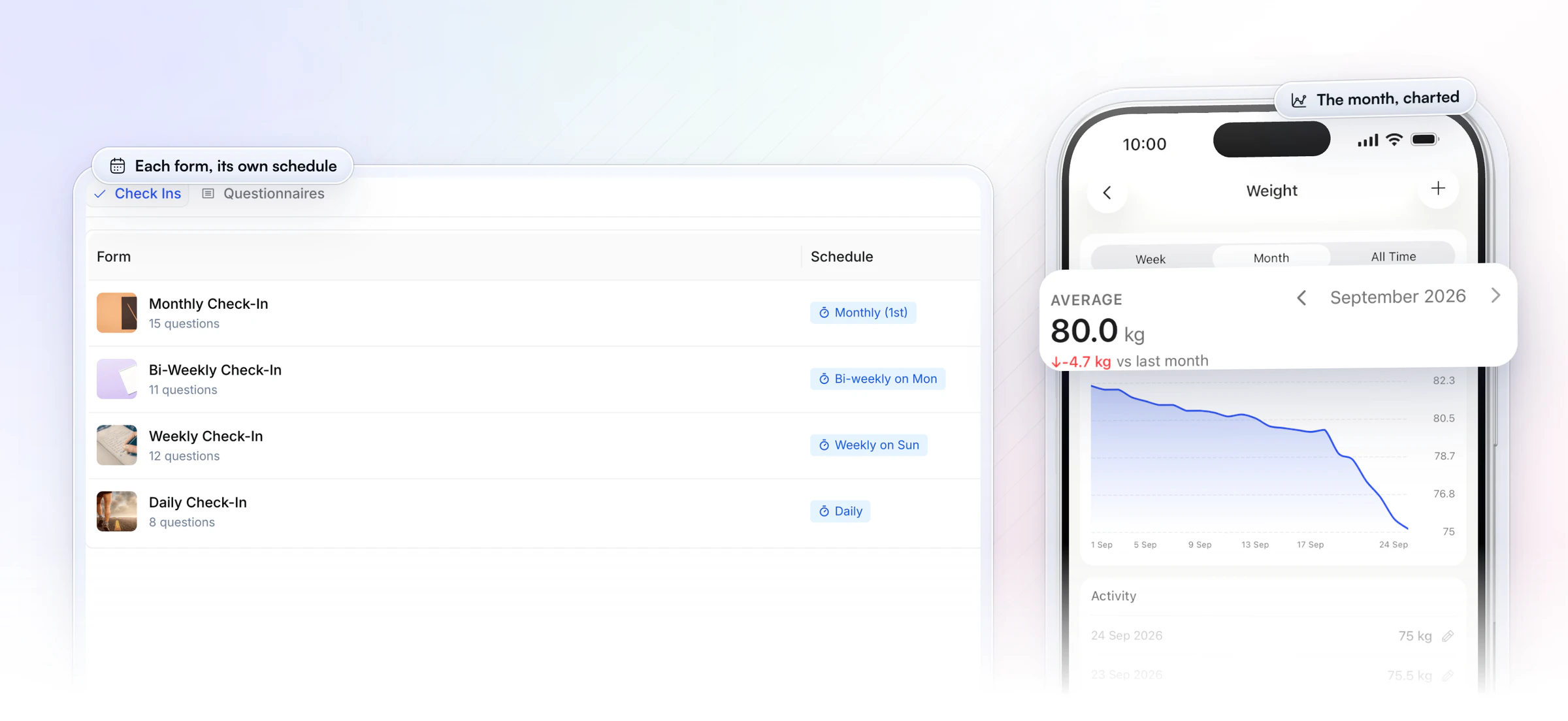
It arrives on the same day every month. Each form has its own schedule, so a client's monthly review sits beside their weekly or daily check-in. Pick the start or end of the month, or any day from the 1st to the 28th, and a push reminder goes out at the time you choose, in the client's own timezone. Clients see the next due date, answers auto-save as a draft while they fill it in, and a missed one stays on their dashboard as overdue until the next is due.
The measurements file themselves. Metric answers sync to the client's Metrics and progress photos to their gallery, so weight, waist and hips chart month over month with no spreadsheet, and the client sees the same trend in their app.
Last month is one click away. Every submission lands in one review inbox as Pending. Open this month's form, pick any earlier check-in from the list and read the two side by side. Then reply, or record a Loom video for a bigger point, and mark it Reviewed: the client gets a push and an email.
Proof from a coach. Vegard Mikalsen of VM Coaching runs his check-ins this way and now reviews each client's in a minute or two.
“I spend one to two minutes per client on a proper check-in now.”

HubFit is the #1 coaching app, rated 4.9 on the App Store and Google Play and free for your clients, and check-ins come with every plan, with 11 question types including scales, multiple choice, signatures, progress photos and metrics. See everything HubFit's check-ins can do.
How do you set up a monthly check-in in HubFit?
Setting up a monthly check-in in HubFit starts from one of its pre-built check-in templates, which you edit, schedule and assign.
- Open the templates. Go to Forms, open the Check Ins tab, click Add Check-In and open Check-In Templates. Pick one of the pre-built templates to start from.
- Match the questions. Edit them to the 12 above. Use Metric questions for weight, waist and hips, and a Progress Photos question for the photos. Mark the questions you need as required.
- Give it its own cover. A different cover image makes the monthly form stand out from the weekly in the client's app.
- Set the schedule. Choose Monthly and the day, then the reminder time.
- Assign it. Add it to each client, or to an onboarding flow so every new client gets it automatically.
- Review in one place. Compare with last month side by side, reply, and mark it Reviewed.
Want to try it with your own clients? Start your free trial and set up your monthly check-in in your first session.
FAQ
These are the questions coaches ask most about monthly check-ins.
What should a monthly check-in include?
A look back (wins, obstacles, satisfaction, stress), the month's measurements and progress photos, and a look ahead (next month's goal, what's coming up, one habit). Leave out anything an app already records. Add three or four optional questions by goal when a client needs a deeper review.
What's the difference between a weekly check-in and a monthly review?
A weekly check-in is short, about three minutes, and keeps the current plan on track with small tweaks. A monthly review takes about ten minutes, adds measurements and photos, and decides whether the plan itself should change. Run both, and let the monthly replace the weekly in the week it's due.
How long should a monthly check-in take?
About 10 minutes for the client and 20 for your review. If the form takes longer, cut questions the data already answers. Keep text answers to the look-back and look-ahead parts and use scales, choices and metrics everywhere else.
Can a monthly check-in replace weekly check-ins?
For maintenance and alumni clients, yes. For clients still changing habits, no: a month is too long to wait to spot a problem, so keep them on a weekly form, or a daily check-in form template in a short phase.
How do I get clients to actually fill in the monthly check-in?
Tell them why on day one, keep it on the same day each month and keep it near 10 minutes. Teach check-ins during onboarding, then always reply: a form nobody answers stops getting filled in. In HubFit, a push reminder arrives on the day, a different cover makes the form stand out, and answers auto-save as a draft.
Should progress photos be monthly or weekly?
Monthly suits most clients, because visible change takes weeks and fewer photo days feel less like a test. Take them in the same room, light and clothes each time, and make them optional for anyone who prefers measurements only.
What if a client misses the monthly check-in?
Send one short, friendly nudge, then ask about it in your next message. In HubFit, a missed check-in can be backdated by up to 14 days, so the month still counts. For ways to keep clients accountable between check-ins, start with the habits that keep them in the app.
Start your monthly check-ins this month
Copy the form, pick the clients who need a deeper monthly review, and set it for the 1st. HubFit sends the reminders and keeps every month side by side.