
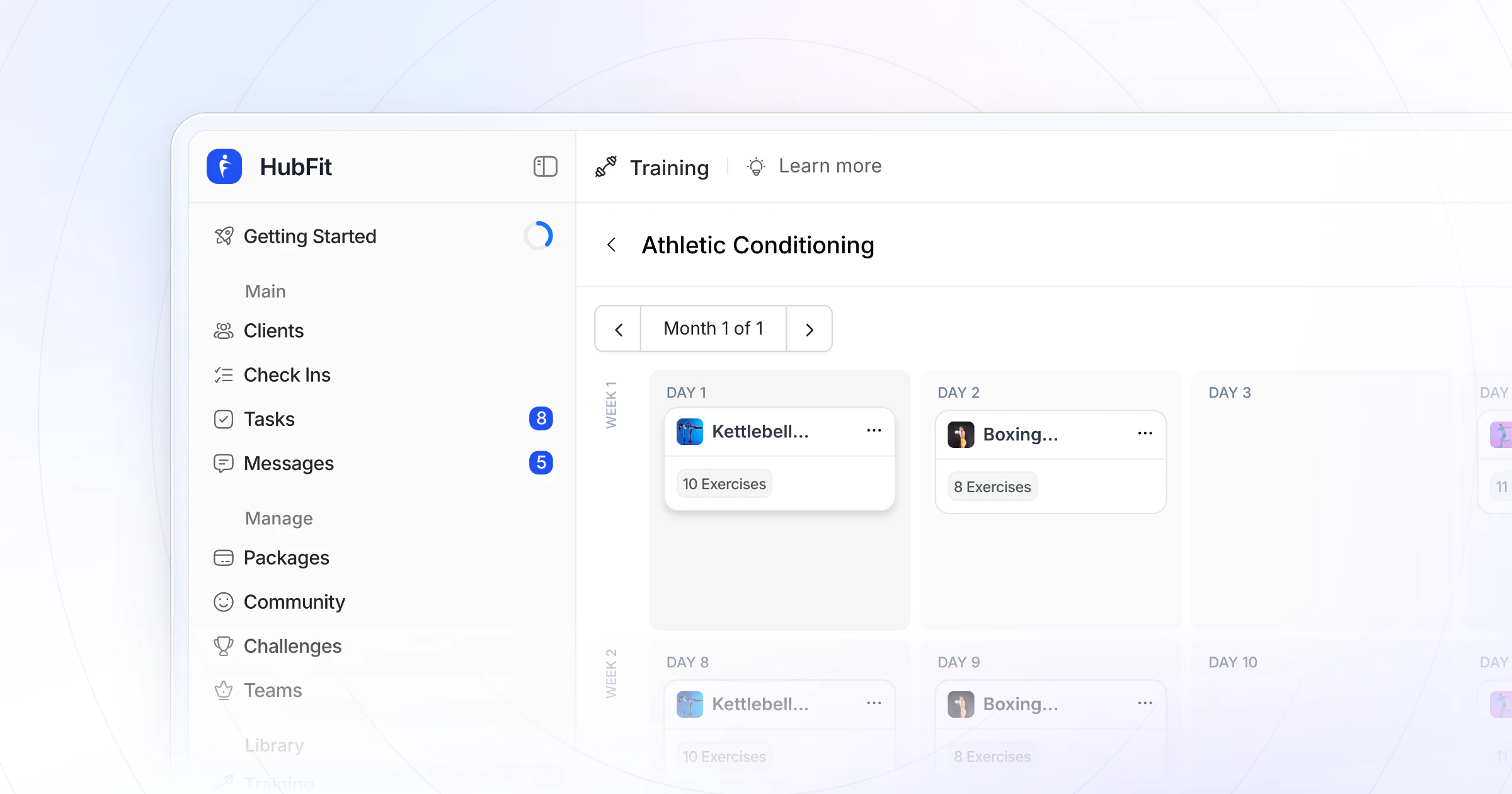
Our pick for the best workout builder software for online coaches and personal trainers is HubFit, the #1 coaching app. You build fixed or calendar programs with a drag-and-drop builder and 5,000+ exercise videos, save them as templates, and clients log every set in an app that tracks their PRs for you. We make HubFit, and here's why it ranks first.
Key takeaways
- HubFit is the top pick: a drag-and-drop builder, reusable templates, automatic PRs and AI drafts, with nutrition and check-ins in the same app.
- Supersets, circuits, AMRAP, intervals, rest, tempo and RPE should be real fields in a builder, not notes.
- Templates are what save you time at scale: write a block once, then start it for each client on their own date and adjust it.
- A program only works if clients follow it, so test how they log sets and swap exercises on their own phone.
What is workout builder software?
Workout builder software is the tool a coach uses to write training programs, attach exercise demos and deliver them to clients' phones. Clients log their sets in the app, and you see the results and adjust the next block. A spreadsheet holds the plan, while a builder also delivers it and records what happened.
The difference shows up at scale. With five clients, a shared sheet works. With fifty, you need templates you can copy, fields the client's app understands, and a record of every set so the next block writes itself.
The 7 best workout builder platforms, ranked
How we compared: we ranked each tool on what you program every week and what your client does with it in the gym. HubFit wins because the builder, the client's logging and the rest of your coaching live in one app.
1. HubFit
HubFit is the top pick for coaches who want to write programs fast and have clients actually follow them. It's the #1 coaching app, rated 4.9 on the App Store and Google Play, and free for your clients, so every program you write lands on a phone they already like using: the workout you built, logged set by set, with personal records counted the moment they happen.
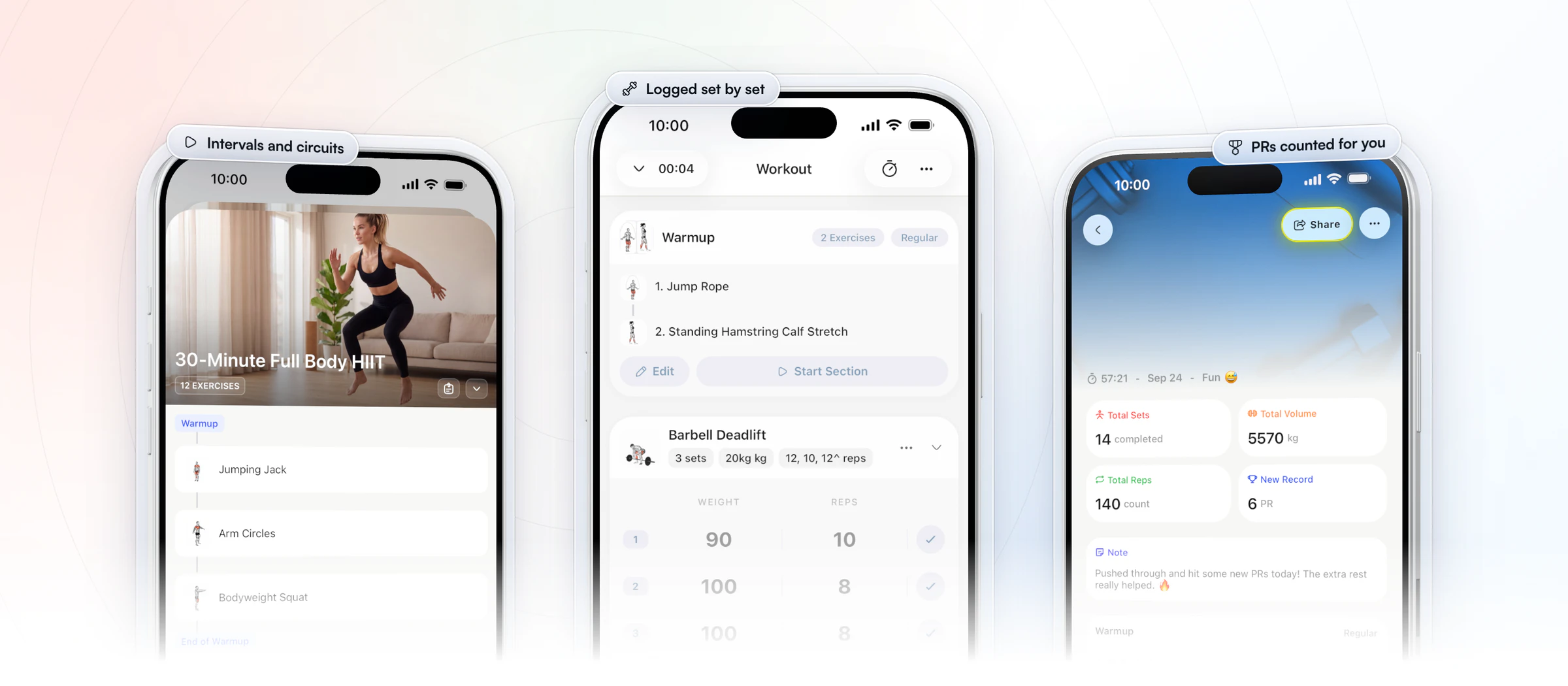
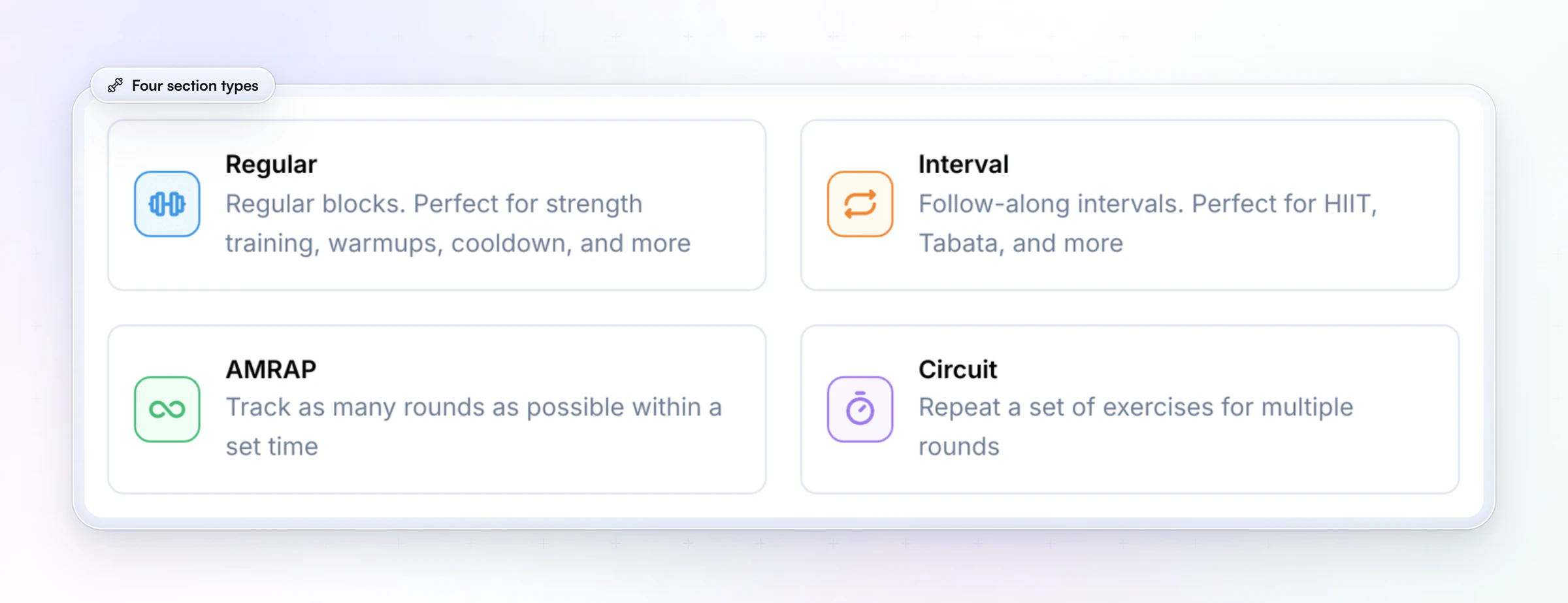
You drag exercises from a 5,000+ video library into a workout, then set sets, reps, weight and rest for each one, with tempo, RPE or RIR when the session calls for it. Group them into supersets, circuits, AMRAP or interval sections, and the client app shows a rest timer between sets. Add your own exercises with your own video, tagged by equipment and muscle group, and keep programs in folders.
Programs come two ways. With fixed programs, a client can follow more than one at a time. Calendar programs put each workout on a date. Save any program as a template, give a new client their own copy and adjust it for them. Gianni Fabrizio of Gianni Coaching programs new clients this way, so each plan stays personal without being written from zero.
“I have found that because I'm able to look at a previous client and get a new person in, I can say, 'I think that's going to suit them.' And then I can just copy, duplicate, and make a few tweaks.”

Workout AI drafts a session from a short description (exercise count, sets, reps, muscle focus, difficulty, rest) and turns pasted text such as "Bench Press 5x8" into a workout. Onboarding flows assign a client's program the moment they join, whether you add them yourself or they buy a package. Packages come with Premium and up.
Nutrition with a barcode scanner, check-ins with 11 question types, habits and messaging sit in the same client app, so clients open one app for everything you coach.
2. Trainerize
Trainerize is a coaching platform for personal trainers, online coaches, studios and gyms.
Its builder draws on a pro-built exercise library and ready-made programs, and you can import exercise videos from YouTube. Programs run on a calendar, from Master Programs you copy to clients to phased custom programs. The AI Workout Builder is included on paid plans and can start from an uploaded PDF, CSV or Excel file. Leaderboard and threshold challenges are on Pro and up, so training can feed a group goal.
Pricing follows client seats, from a free single-client plan through Grow and Pro to Studio. The builder needs no add-on, but meal planning and Stripe payments do below Studio.
- What to check: which plan and add-ons you need for meal planning and payments at your client count.
Our builder lets you compare and edit exercises across several workouts side by side in a spreadsheet view, so a whole training block is planned in one place.
3. Everfit
Everfit is made for fitness coaches, nutrition and sports coaches, and gyms and studios.
Its drag-and-drop builder handles supersets, intervals, AMRAP and timed sections, with %1RM auto progression, RPE, cadence and heart-rate fields, and alternate exercises. You can upload your own videos or link YouTube and Vimeo, save multi-week templates, and draft workouts with the AI Workout Builder from text or a PDF. On Studio, on-demand programs let clients start, stop and pause on their own.
The free tier includes the workout builder for up to five clients. Pro and Studio are priced by client count, and the Advanced Program Builder starts on Pro. On-demand collections are an add-on below Studio, and uploaded video workouts past the free storage need a storage add-on.
- What to check: which paid add-ons you need, since its automations are a metered add-on.
On HubFit, the workout builder, the in-app workout tracker and 5,000+ exercise videos come with every plan.
4. Kahunas
Kahunas is an online coaching platform for coaches and personal trainers.
Every plan lets you write unlimited workout plans from its exercise video library, upload your own exercises and have clients log their sessions in the app. A content library holds audio, video, documents and PDFs to send alongside a program, and progress graphs and photo check-ins show how the training is landing. It doesn't list an AI program builder.
Its three plans are set by client count, and every one includes unlimited workout and nutrition plans. Automations, which can message a client when you add or update their plan, start on the middle plan, Growth.
- What to check: which plan includes automations, if you want clients told when you change their program.
HubFit's Workout AI drafts a session from a short description or turns pasted text into a workout.
5. TrueCoach
TrueCoach is built for personal trainers with a strength focus, including strength and conditioning, bodybuilding, weightlifting and CrossFit coaches.
Its calendar-based builder covers sets, reps, tempo and rest, and you can place several workouts on one day. Bring your own exercise videos or pull them in from YouTube or Instagram. Programs saved for later can go to one client or many, starting at any point, and clients can move workouts in their calendar. Compliance rates over 7, 30 and 90 days show which clients need attention.
Its three plans step up by active client count, with special pricing above 50, and it doesn't sell add-ons.
- What to check: how check-ins and nutrition work, since it doesn't list a native form builder and its nutrition is macro targets plus MyFitnessPal.
We track PRs automatically as clients log (max weight, max volume and estimated 1RM), and shows each client's training on a muscle heat map.
6. My PT Hub
My PT Hub is personal training software for PTs, fitness coaches and nutritionists.
You build custom workouts from video exercises and string them into multi-week programs, with compliance tracking on Premium. Workouts AI builds a workout from text, a photo, a spreadsheet or a PDF and can add progression; it runs on the web. A template marketplace offers ready-made fitness plans, and team members can share workouts, nutrition plans and custom exercises, though not programs.
Starter allows three clients and 50 workouts, Premium lifts those limits, and Ultimate bundles every add-on.
- What to check: the cost as your team grows, since each extra trainer adds a monthly fee below its top plan.
We save any program as a template you copy to a new client and adjust, with programs kept in folders with tags.
7. PT Distinction
PT Distinction is coaching software for personal trainers and for hybrid and online coaches.
Its program builder takes your own exercise uploads or embedded YouTube and Vimeo videos, adds a progression calculator, and marks each program with a Program Health traffic light. The AI Program Generator drafts a program for you to edit, and clients can log workouts that weren't scheduled. Movement screens and exercise technique reviews, where a client uploads a video of a lift, sit beside the builder.
Each plan includes a set number of clients, every client over that adds a monthly charge, and its AI tools are on every tier. Trainers are added free.
- What to check: the cost at next year's client count, since every client over your plan's limit adds a monthly charge.
On HubFit, a plan's price covers its whole client range, with no fee per client inside it.
Leaving one of these? Our guides to Trainerize alternatives, My PT Hub alternatives and PT Distinction alternatives cover what to plan for.
How the 7 workout builder platforms compare
HubFit leads the table: a drag-and-drop builder with automatic PRs, 5,000+ exercise videos to build from, and flat plans where clients are free.
| Platform | Workout builder | Exercise library | How it's priced |
|---|---|---|---|
| HubFit | Drag-and-drop, AI, auto PRs | 5,000+ videos | Flat plans, clients free |
| Trainerize | Programs, AI builder | Library + programs | Plan + paid add-ons |
| Everfit | Drag-and-drop, AI builder | 1,000+ videos | Plan + metered add-ons |
| Kahunas | Workout plans | 1,000+ videos | Tiers by client count |
| TrueCoach | Calendar builder | Library + uploads | Tiers by active clients |
| My PT Hub | Multi-week programs, AI | Video library | Plan + paid add-ons |
| PT Distinction | Program builder | Library + uploads | Tiers by client count |
Workout AI comes with Premium and up.
How is workout builder software priced?
Workout builder software is priced in one of three ways: flat plans by client count, a base plan plus paid add-ons, or a charge for every client or coach past a limit. Compare the total at next year's client count, not the first month; the comparison table above shows each platform's model.
On our plans, nutrition is included, the client app is always free for your clients, and Workout AI comes with the plans that include it, at no extra cost. See the plans on our pricing page.
Which workout builder fits your business?
HubFit fits every kind of coaching business below, because the builder, the client app and the business tools are one product. Pick the row that sounds like you, and the last column is what does the job.
| Your business | What you need most | In our app |
|---|---|---|
| Online coach | Programs clients follow alone | Video demos, rest timer |
| In-person PT going hybrid | Log sessions as you coach | Log in the coach app |
| Coach selling programs | Programs that deliver on purchase | Packages, Workout Studio |
| Team or studio | Shared library, own clients | Roles, assigned clients |
| Coach who also does nutrition | Food beside the training | Nutrition in the same app |
Workout Studio and team members are part of Ultimate.
If you sell programs, selling workout programs online walks through packages and pricing.
What should a workout builder let you program?
A good workout builder makes everything you prescribe a real field the client's app can act on, not a note they have to read. Use this checklist in any trial:
| What to test | Why it matters | In HubFit |
|---|---|---|
| Supersets and circuits | Paired work without notes | Supersets, circuits |
| AMRAP and intervals | Timed work, real fields | AMRAP, interval sections |
| HIIT and Tabata | Follow-along conditioning | Interval sections |
| Tempo | Time under tension, clearly | Tempo column |
| RPE and RIR | Effort, not just load | RPE and RIR columns |
| Rest between sets | Keeps the session's pace | Timer, ±15 s |
| Per-set logging | Loads to beat next week | Every set, history |
| Personal records | Wins without your math | Automatic PRs |
| Exercise swaps | No equipment, no gap | Swap mid-workout |
| Templates | One base, many clients | Copy and adjust |
| AI drafts | A first draft in seconds | Workout AI |
Per-set logging is what makes progressive overload work: you can only add load when last session's numbers are in front of the client.
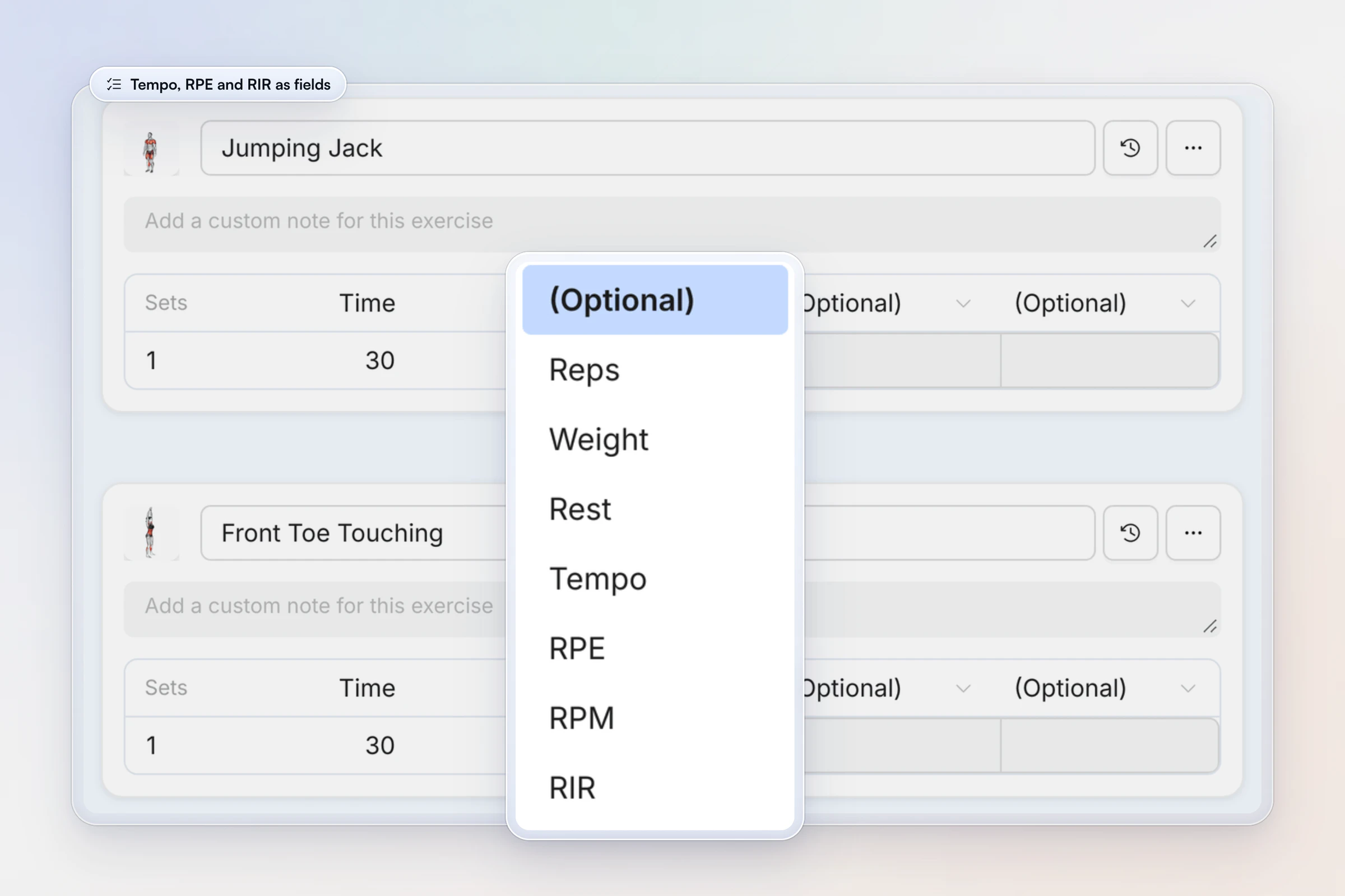
Each exercise takes up to four columns after sets, so a strength lift can carry reps, weight, rest and RPE, while a bike sprint carries time and RPM.
What is the best software for programming training blocks and periodization?
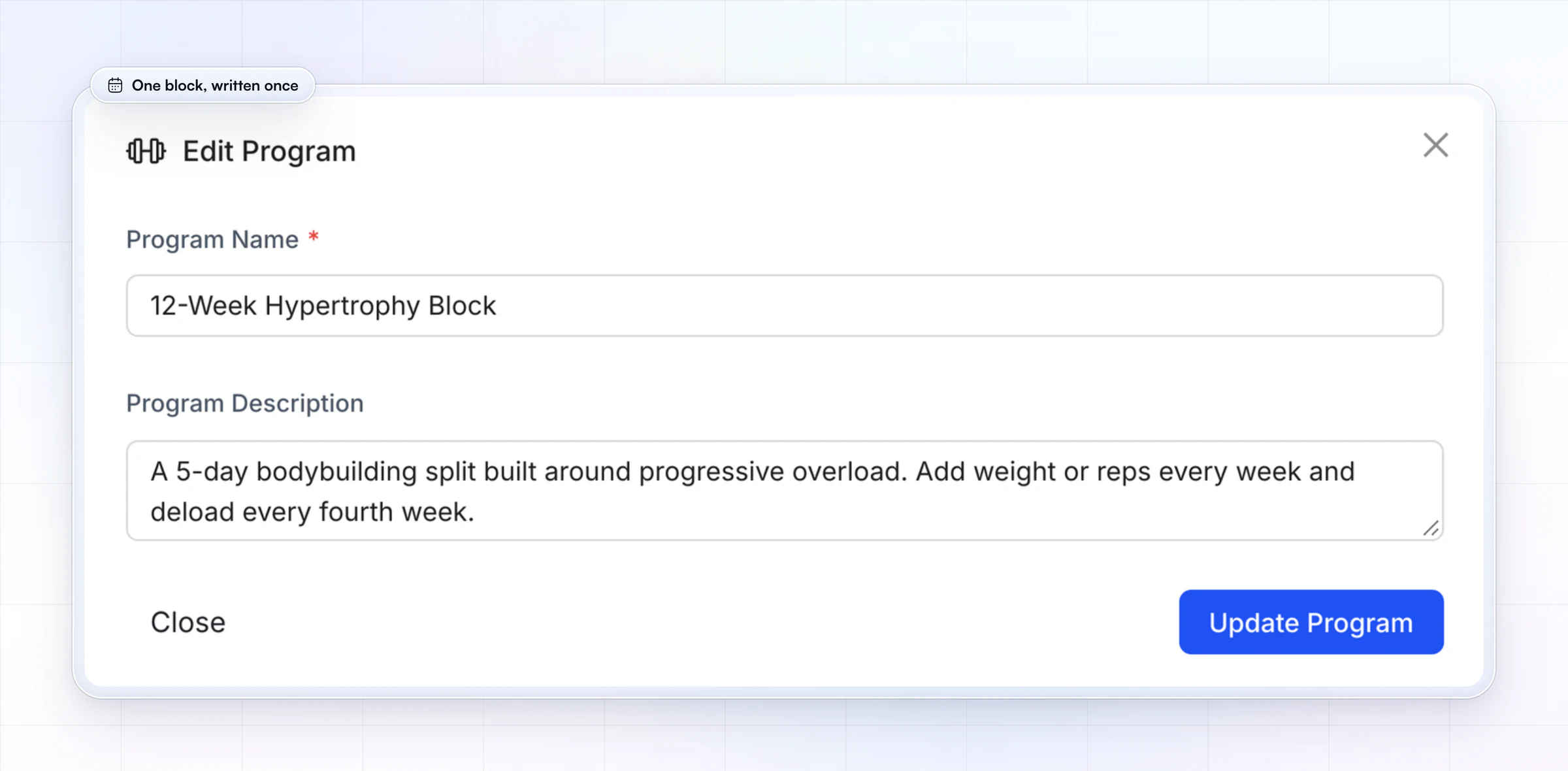
HubFit is our top pick for programming training blocks: you write a block as a fixed or calendar program, save it as a template, and edit exercises across several workouts side by side in a spreadsheet view when you write the next one. Here's how a block runs:
- Phase templates: save each phase (hypertrophy, strength, deload) as its own program, with its intent written into the description.
- Copy, then adjust: import the block to a client on their start date, then change the exercises or loads that need it.
- Per-set history: open the client's history for any exercise before you write the next block, so loads come from what they actually lifted.
A block's description is where you write the plan in plain words, so the client can see where the block is going.
Periodization itself is a method, not a feature. For linear, undulating and block models with week-by-week examples, read our guide to periodization.
How big should a workout builder's exercise library be?
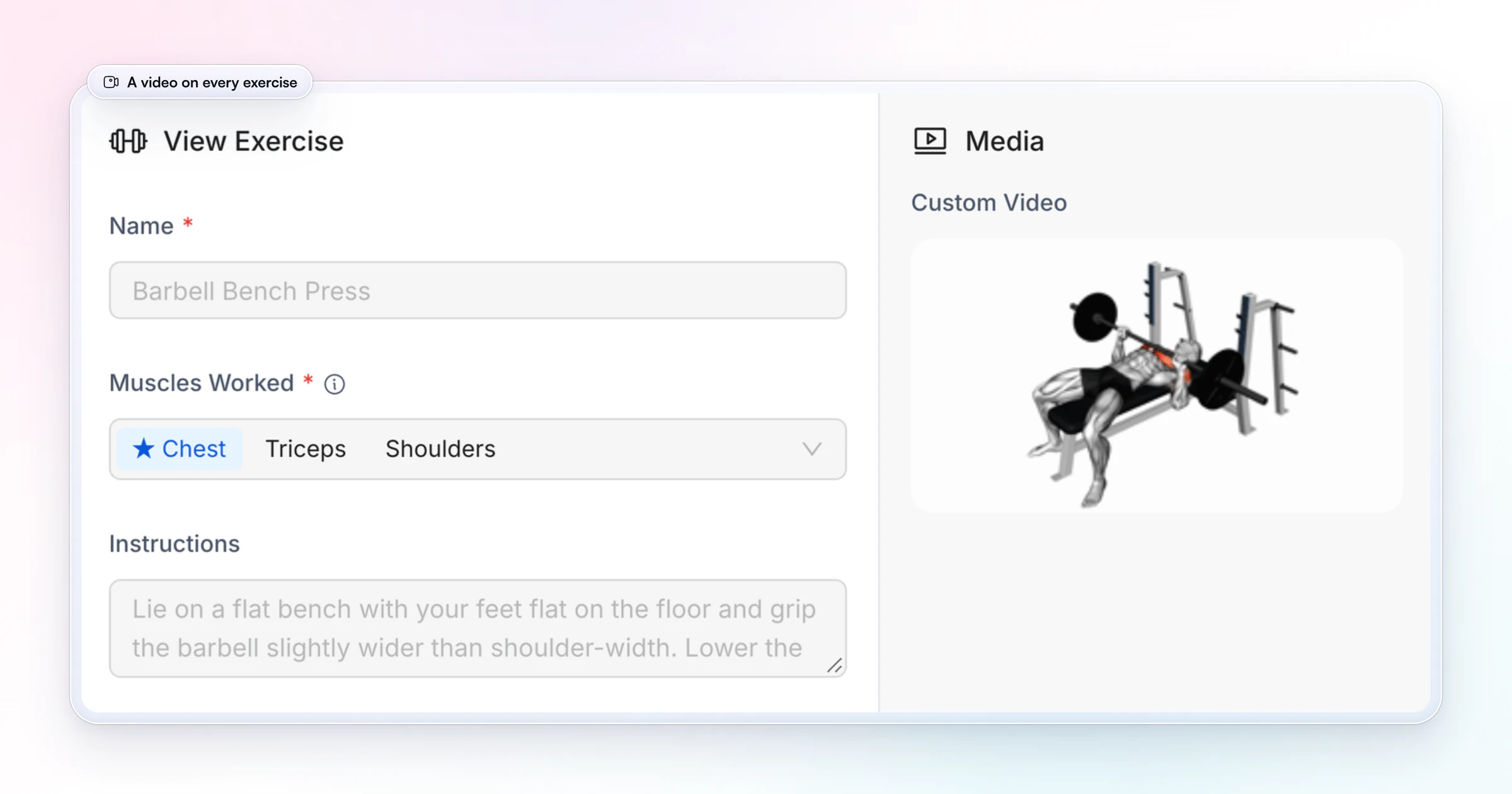
A workout builder's exercise library should be big enough to cover every variation you program, with your own videos for the rest. You get 5,000+ exercise videos with demos, and you can add your own exercises with your own video, so the client sees your cue, not a stranger's.
The headline count matters less than three things:
- Coverage of what you program. Search the library for your five most-used variations. A trap-bar deadlift or a tempo goblet squat should already be there.
- Your own video in one step. Paste a YouTube link or upload a file. Tag it with up to 3 pieces of equipment and 4 muscle groups so swaps and search find it.
- Demos the client sees in the session. The video belongs inside the workout on their phone, not in a link they have to open.
How do you reuse workout templates without losing personalization?
You reuse workout templates by saving a program once, importing a copy to each client and then changing only what that client needs. The template stays your standard, and each copy becomes theirs.
- Save the base program as a template. Keep it in a folder with tags (goal, level, equipment) so you find it in seconds.
- Import it to the client on their start date. The calendar fills from that day.
- Adjust their copy. Swap the exercises their equipment or injuries rule out, and set their starting loads.
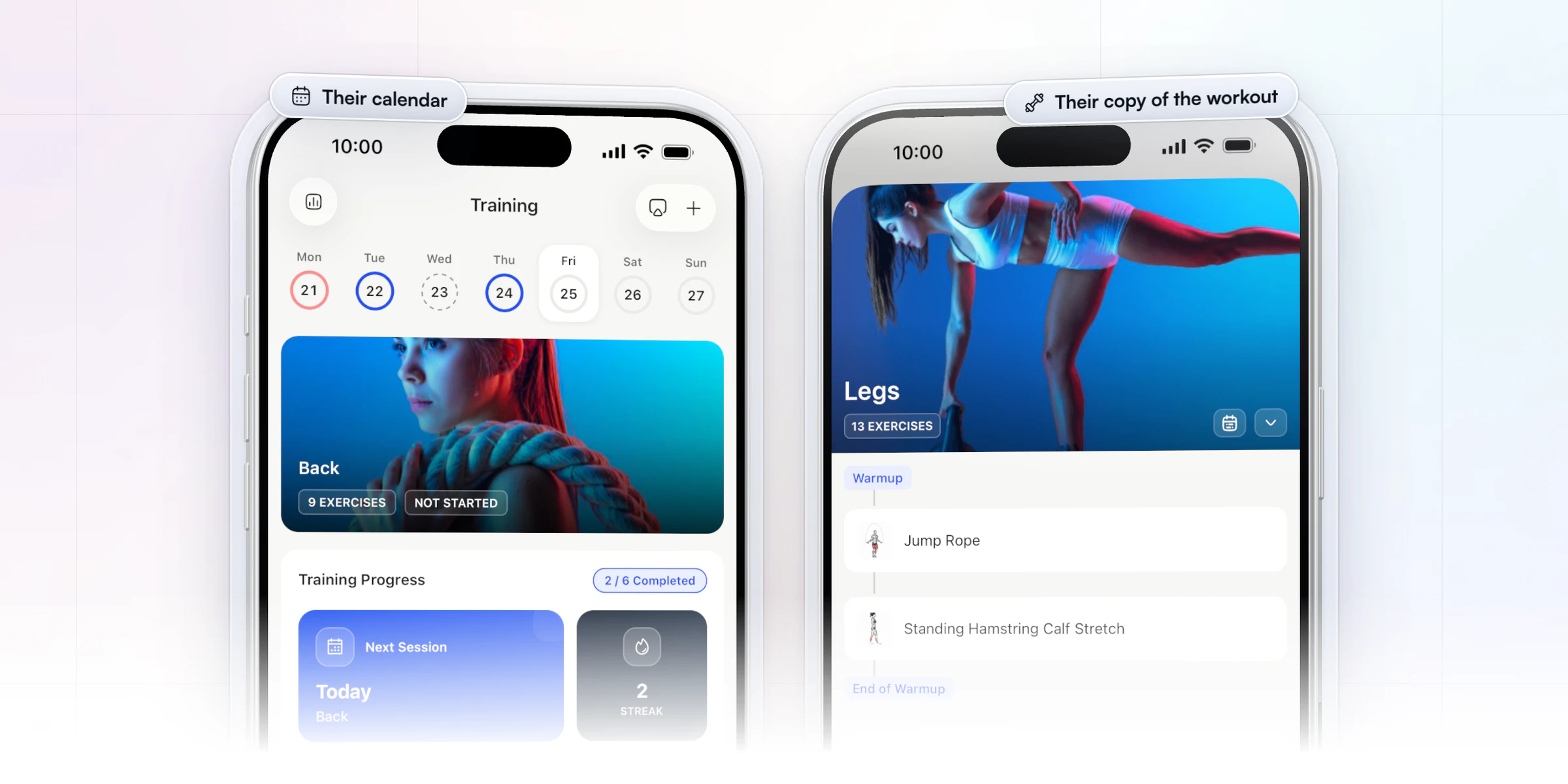
Two shortcuts save the most time. An onboarding flow assigns the right template the moment a client joins, so nobody waits on you. And Workout AI turns programs you already have as text into workouts: paste them in, then check each one.
How HubFit gets clients to follow the program you wrote
A program only works if the client runs it, and our client app does three things a spreadsheet can't:
- It coaches the session. Today's workout runs with a rest timer that counts down your prescribed rest, plus or minus 15 seconds, and on iPhone the workout shows on the Lock Screen as a Live Activity.
- It handles the gym. No free rack? The client searches by muscle or equipment and swaps the exercise mid-workout, and each exercise's past sets are one tap away.
- It reports back. Max weight, max volume and estimated one-rep max are tracked automatically, and new PRs are marked on the finished workout. After the session the client rates it and leaves you a comment.
On your side, every completed workout arrives with its sets, loads, rating and the client's comment, and the history stays accurate for your next block.
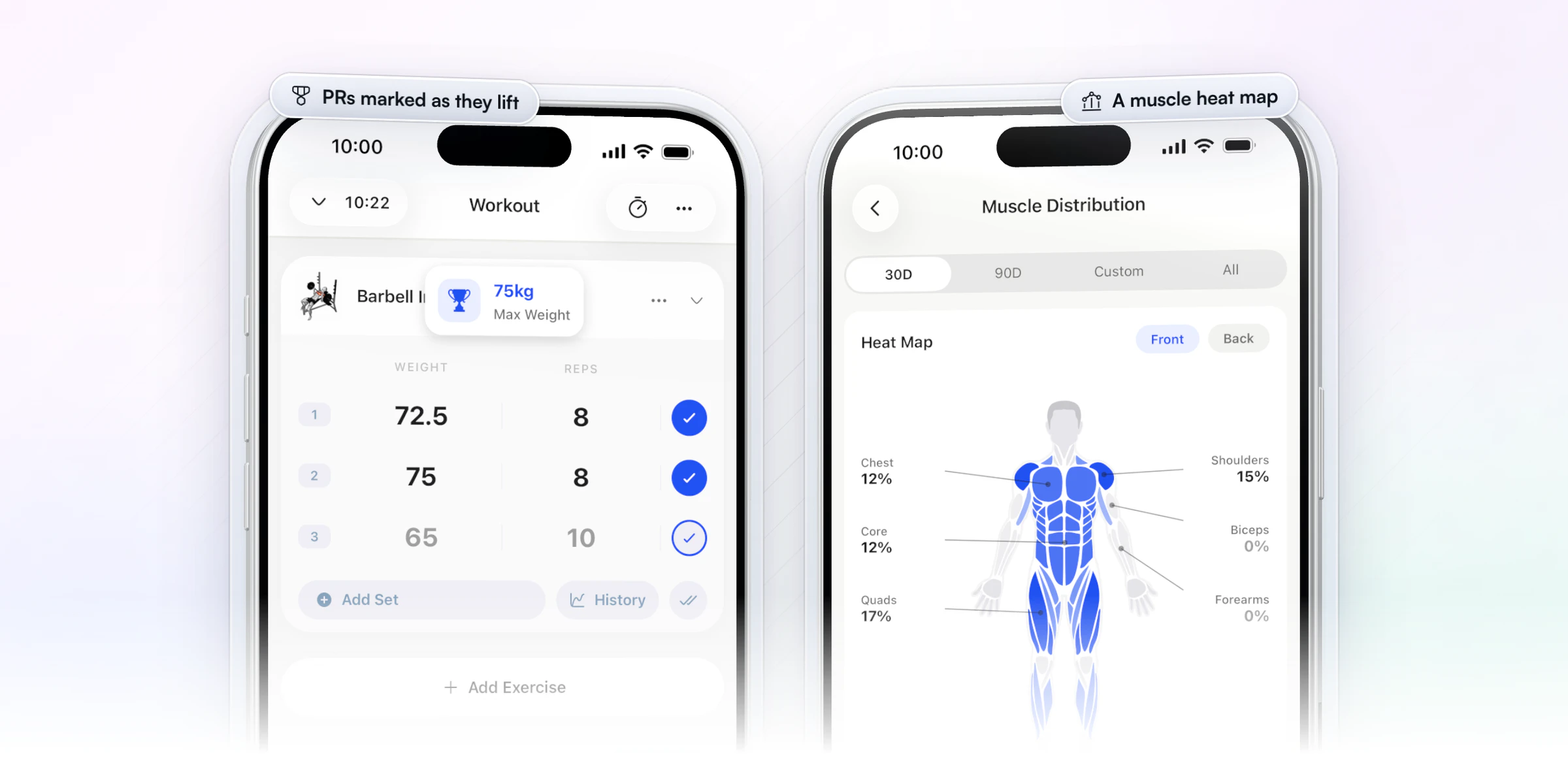
Training clients in person? Log the session on your client's behalf in the coach app, and reps, sets, weights, rest and PRs are captured in real time. Training statistics then add a muscle heat map and a breakdown by month and muscle.
Want to see it with your own program? Start your free trial and build one workout tonight.
How do you test a workout builder in 15 minutes?
Run the same 15-minute test in every trial, as your own client, on your phone:
- Build one real week for a client you coach now: a superset, a timed section, a tempo prescription and your usual rest times. Note every field you had to fake with a note.
- Log it as the client: finish a few sets, swap one exercise and check that last session's numbers show up.
- Review it as the coach: open the completed workout, read the comment, and copy the week into next week's block.
If any step needed a workaround, picture it with 50 clients.
FAQ
Short answers to what coaches ask most about workout builder software.
What is the best workout builder software for online coaches?
HubFit is the top pick. It pairs a drag-and-drop builder, fixed and calendar programs, reusable templates and 5,000+ exercise videos with a client app that logs every set and tracks PRs automatically. Nutrition, check-ins and habits are in the same app. See the workout builder and coaching tools in detail.
What should personal trainers look for in workout builder software?
Look for five things: native fields for what you prescribe (sections, tempo, RPE, rest) rather than notes, per-set logging with history, exercise swaps, templates you can copy and adjust, and a client app people actually open. The checklist above is a trial-ready version. Trainers comparing whole platforms can read our guide to personal trainer software.
Can clients log their training inside the app?
Yes. Clients log every set as they train, see last session's numbers, swap exercises mid-workout, edit while training and edit a completed workout. PRs are tracked automatically from their second session of an exercise. You see each completed workout with its rating and comment.
Can I bring my own exercise videos?
Yes. Add a custom exercise, then paste a YouTube link or upload your own video file. Tag it with up to 3 pieces of equipment and 4 muscle groups, and it sits in your library next to the 5,000+ built-in demos, ready to drop into any workout.
Is Google Sheets enough to program clients?
Google Sheets works for a handful of clients, but it only holds the plan. It doesn't run rest timers or flag PRs on its own, and clients log sets by typing into cells, so you end up chasing screenshots and messages. Here are other ways to share workout programs.
Can I use AI to build workouts?
Yes, as a first draft. Workout AI builds a session from a short description of the exercises, sets, reps, focus and rest you want. Review and edit every draft before a client sees it. Our guide to the AI workout generator shows prompts that work.
Can clients follow on-demand workouts in the app?
Yes. Workout Studio lets you upload follow-along workout videos that clients stream inside the app, with no redirects out to YouTube or Drive. Learn more about Workout Studio and how coaches sell workout programs online.
How hard is it to switch workout builder software?
Most of the work is moving programs. Start new clients on the new platform, rebuild your top templates first and move current clients at a block change. If you're leaving Everfit or TrueCoach, our Everfit alternatives and TrueCoach alternatives guides cover what to plan for.
Write programs your clients follow
Build your best block once in HubFit, import it to every client on their start date, and let the app run the session while you review the results. Start with one real week and a 14-day free trial.






