
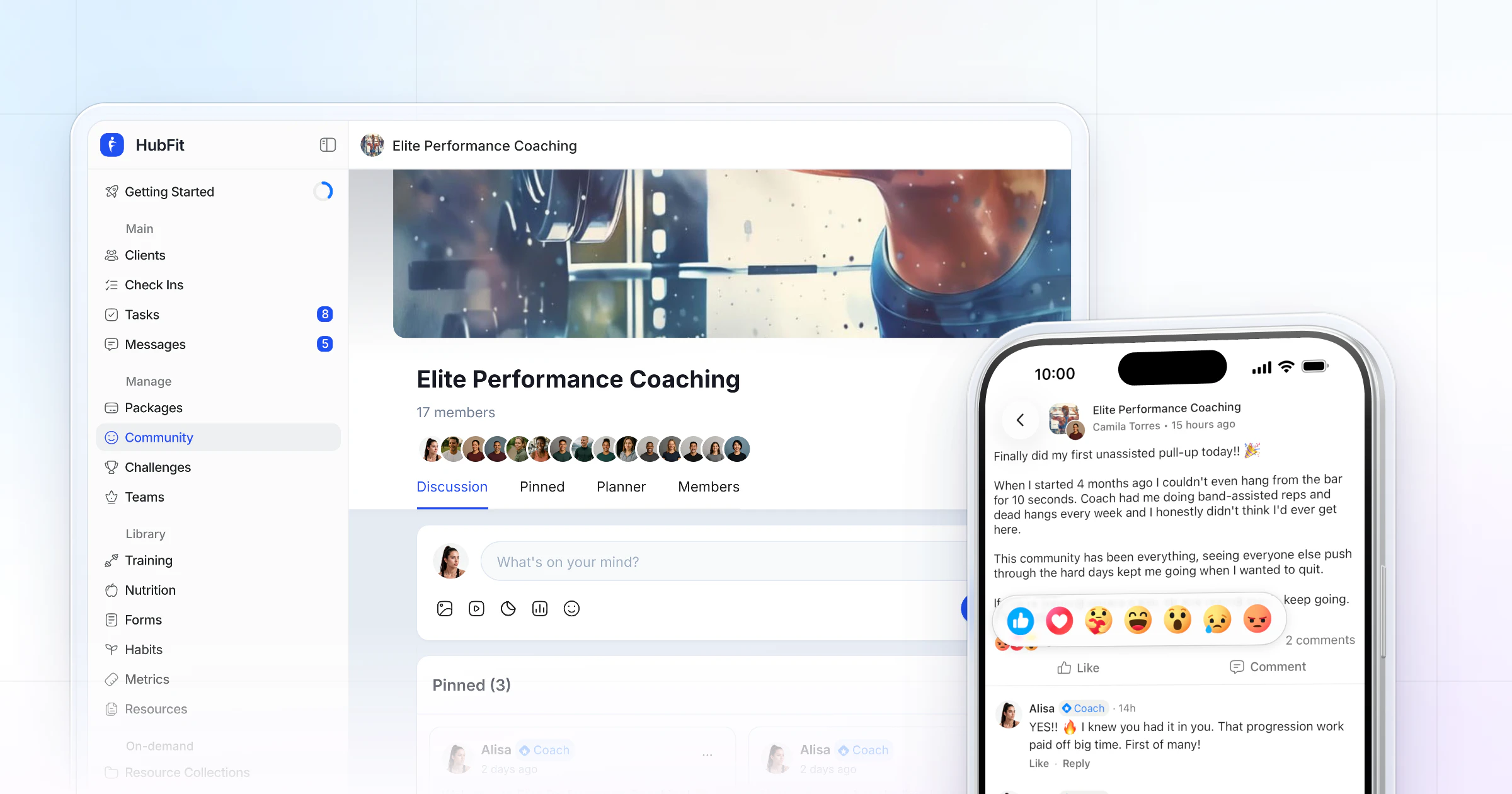
Our pick for the best online fitness community platform for coaches is HubFit, the #1 coaching app: a private feed, group chats and 1:1 messages inside the app clients already train, log food and check in with, plus challenges with leaderboards. It beats a Facebook group or a separate community app because every post sits next to the client's plan. The community and group chats are part of Ultimate.
Key takeaways
- Put the community where clients already are: next to their workouts, meals and check-ins, in one app.
- HubFit is our top pick: run as many communities as you want, one for each program, cohort or challenge.
- Trainerize, Everfit and Kahunas each offer some of this; check which plan or add-on unlocks it.
- Keep it active with a pinned welcome, a post a day and a reply to every win.
What is an online fitness community platform?
An online fitness community platform is software that gives a coach's clients a private place to post progress, ask questions and cheer each other on. The best one for coaches sits inside the coaching app itself, so a client's post about a new PR lives in the same app as the workout that produced it.
That's the difference from a general community tool or a social media group. The community is part of the coaching, not parked in another app your clients have to remember to open.
Why does a community help online coaching clients?
A community helps because clients who feel part of a group are more likely to stick with the plan. One classic trial found that people who joined a weight-loss program with friends, and were given social support, were more likely to complete it (Wing and Jeffery, 1999).
For an online coach, that support has to happen between sessions, on the phone your client already holds. A community gives quiet clients a reason to open the app on a day with no workout, and gives you a place to celebrate wins in front of everyone. It works best alongside the habits that keep clients accountable one to one.
The best online fitness community platforms for coaches, compared
The best online fitness community platforms for coaches are HubFit, Trainerize, Everfit and Kahunas. We make HubFit, so here is how we compared them: what clients can post, what it takes to unlock the community, and whether it sits next to the client's training, food and check-ins.
1. HubFit
HubFit is the #1 coaching app, rated 4.9 on the App Store and Google Play, and its community lives in the same app your clients already use for training, nutrition and check-ins. A client who just finished a workout can share the win with the group in a few taps, and you see it beside their plan, not in a separate app.
Here is what you get for running a coaching community:
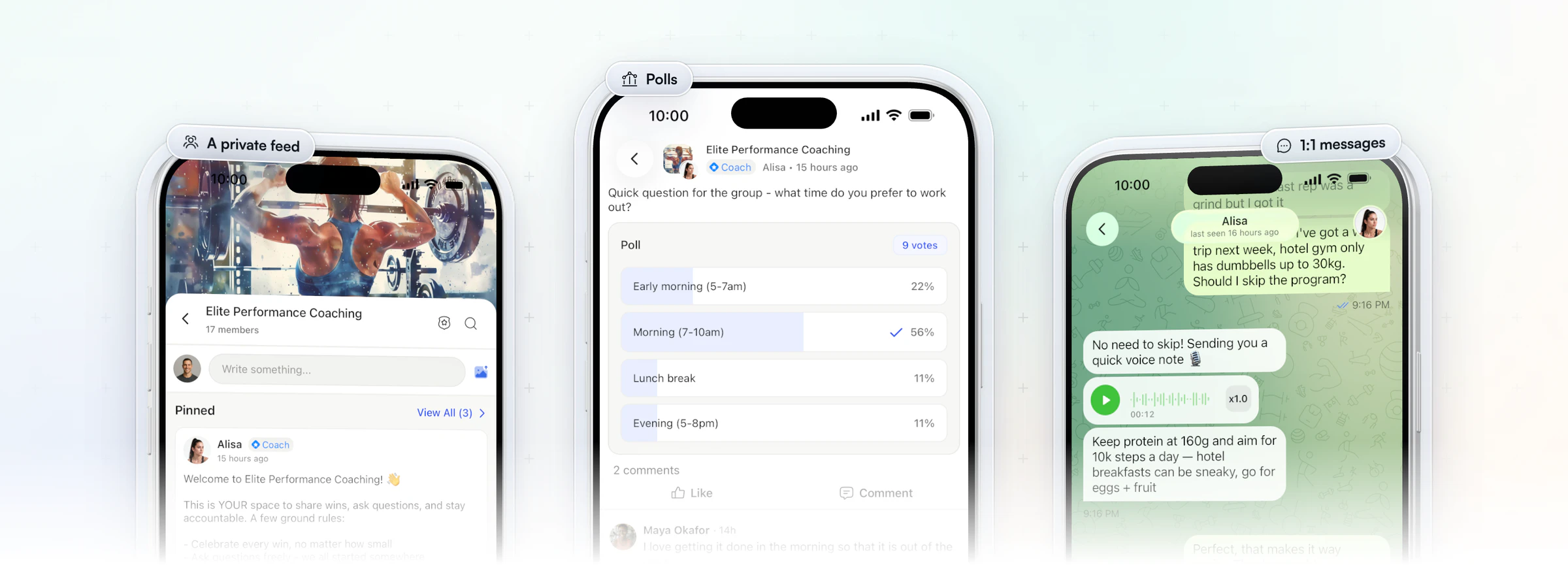
- A private feed for every group. Run as many communities as you want: one per program, cohort or challenge. Clients post photos and videos, reply in threads, @mention each other and react with seven reactions.
- Polls built into the feed. Ask the group a question and watch the results come in, so quiet clients have a say without writing a word.
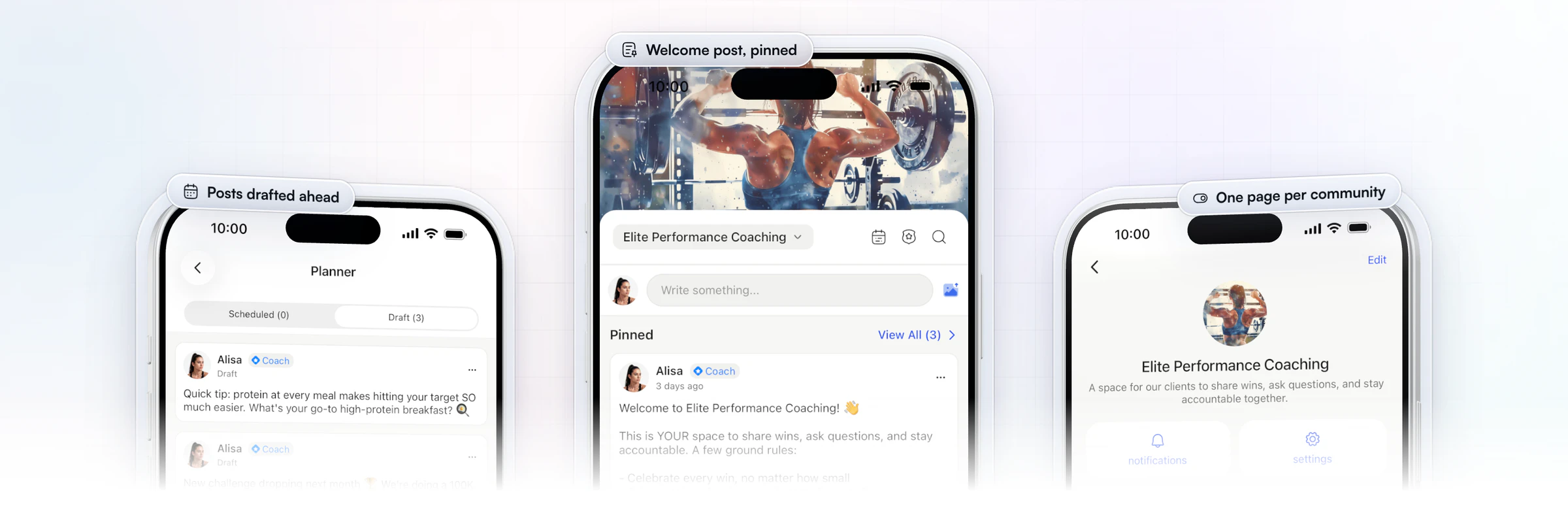
- A feed that runs on busy days. Schedule posts ahead, pin the ones that matter and moderate what goes up. Push notifications bring clients back when something new is posted.
- Group chats and 1:1 messages beside it. Group chats for quick talk, 1:1 messages with voice notes and GIFs for coaching one client, and broadcasts that land as personal messages. You never hand out your personal number.
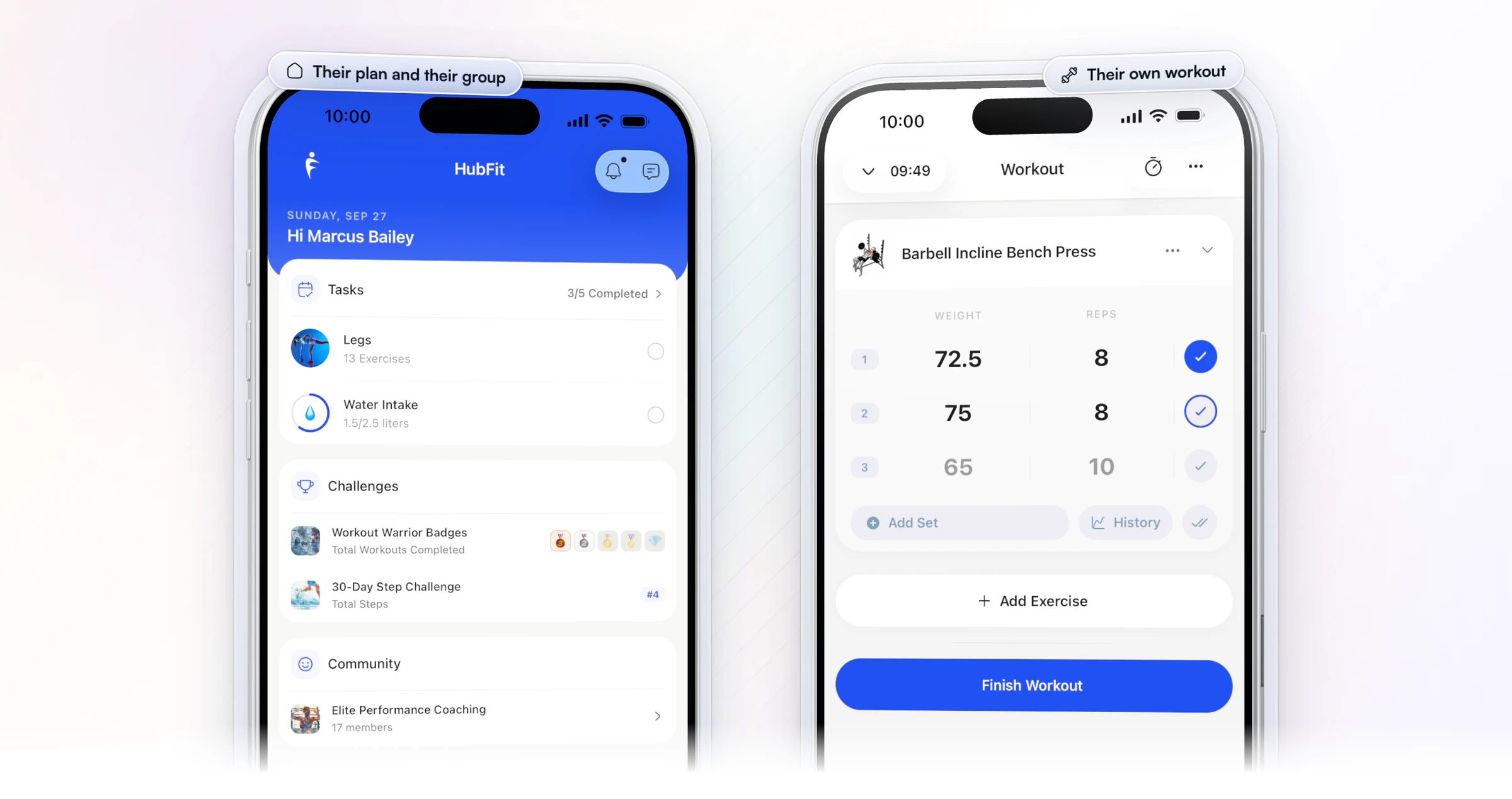
- Challenges that give clients something to post. Leaderboard and milestone challenges with badges run in the same app.
- Free for your clients. They download the app and join your community at no cost.
2. Trainerize
Trainerize is built for independent personal trainers, nutrition and lifestyle coaches, studios and gyms. Its community lives in Groups, a private social hub of up to 1,000 members where clients share photos, @mention each other and react. Activity can post to the group automatically, you can share a workout of the day, and you can limit posting to trainers. Native polls aren't listed; it suggests using reactions for quick votes. One-to-one and group messages, with voice messages, sit alongside.
Pricing works by client seats: a free plan for one client, a small entry plan, then Pro and Studio plans that step up by client count, with nutrition planning, payments, video calls and business tools as add-ons below Studio. Check your plan: Groups come with its Pro plans and up. In HubFit, the community is a private feed with built-in polls and scheduled, pinned posts.
3. Everfit
Everfit is built for fitness coaches, gyms and studios, nutrition coaches and sport coaches. Its Community Forums come with its paid plans: clients post photos and video, like, comment and react, and coaches run polls with up to 25 options, multi-select and options members can add. Clients vote but can't create polls. Group chat and broadcast messages sit on its Studio plans, and a Team tab lets coaches message each other.
Pricing starts with a free plan for a few clients, then Pro and Studio plans priced by client count, with automation, payments, meal plans and on-demand content as add-ons. Check the add-ons: scheduled forum posts and leaderboards live inside its paid Autoflow add-on, which is metered by the clients you put in it. In HubFit, scheduled posts, pinned posts and polls are part of the community feed.
4. Kahunas
Kahunas is built for online coaches and personal trainers, with an emphasis on one-to-one onboarding. Its community tools are group chat and group coaching packages, and no social feed is listed. Its chat carries voice notes of up to 15 minutes, video, threads, reactions, GIFs and search, and custom habit tracking and wearable data from Apple Health or Google Health Connect sit in the same app.
Pricing has three plans by client count, from a starter plan with a client cap to unlimited clients on the top plan. Group chat is included on the top plan and a monthly add-on on the middle plan, and team members are paid per seat on the top plan only. Check which plan or add-on unlocks group chat, and whether chat alone is enough for your group. In HubFit, group chats and a private feed with polls sit side by side.
If you're comparing whole coaching apps rather than just the community, our guide to personal trainer software covers the rest.
How the 4 community platforms compare
Here's how the four compare on what clients can post and what it takes to unlock the community.
| Platform | Community | What to check |
|---|---|---|
| HubFit | Private feed, polls, group chats | Sits next to workouts, food, check-ins |
| Trainerize | Groups, a private social hub | Groups on Pro plans and up |
| Everfit | Community Forums | Leaderboards need the Autoflow add-on |
| Kahunas | Group chat, no social feed listed | Check which plan or add-on unlocks group chat |
What should an online fitness community platform include?
A good fitness community platform gives clients a feed worth posting in, gives you control over it, and keeps it next to the coaching. Check these eight things before you choose.
| Feature | Why it matters | In HubFit |
|---|---|---|
| Feed with reactions, @mentions, polls | Clients join in with two taps | Yes |
| Scheduled and pinned posts | The feed runs on busy days | Yes |
| Moderation | The space stays on topic | Yes |
| Group chat and broadcasts | Quick talk, one note to many | Yes |
| Challenges with leaderboards | Gives clients wins to post | Yes, plus badges |
| On-demand video | Follow-alongs in the same app | Workout Studio |
| Next to workouts, food, check-ins | Posts sit beside the plan | Yes, one app |
| Paid access | Charge for the group | Sell it in a package |
Broadcasts and Workout Studio are part of Ultimate too. A platform that misses the last two rows leaves you running the community in one place and the business in another.
How HubFit keeps a coaching community active
HubFit gives you the tools to run the feed in minutes a day, not hours. Four of them do most of the work.
- Polls that take two taps. Post a poll in the feed and see who voted for what, so quiet clients have a say without writing a word.
- Ground rules you control. Each community has its own settings: let clients post or not, allow comments or not, and show or hide the member list.
- The right people in each group. Manage who is in each community from one list, so a cohort only sees its own feed.
- Posts that go out on time. Schedule a week of posts ahead and pin the ones that matter.
Want to see it with your own clients? Start your free trial and set up your first community today.
How do you run group coaching in one app?
Run group coaching with one community per cohort, one program and challenge for the group, and an onboarding flow that sets up each new client. That's the core of personal training software for groups: the group shares a feed, and each client still gets their own plan.
- Give each cohort its own community. Name it after the program and add only that cohort's clients, so the feed stays relevant.
- Assign the same program and a challenge. An onboarding flow assigns the cohort's program, nutrition plan, habits and check-ins, and can enroll each client in the group's challenge.
- Add a group chat for quick talk. Keep the feed for wins and prompts, and the chat for "who's in for Saturday?"
When a cohort ends, keep the community open for alumni or start a fresh one for the next intake.
Can you charge for access to a fitness community?
Yes. Sell the community as part of a paid package, so clients pay for the coaching and the group together. In HubFit, a client buys the package through a Stripe checkout, the onboarding flow assigns their plan, and you add them to that package's community from its member list. Packages and payments come with Premium and up.
A paid group works best with a clear promise: a 12-week cohort, a challenge with a start date, or an alumni group for past clients. For setting the price, see how to price online coaching packages.
Facebook group, WhatsApp or an in-app community?
An in-app community is the better home for paying clients because it lives where the coaching happens. A Facebook group, a WhatsApp group or a separate community app can work, but each one costs you something:
- A Facebook group sits on a social network full of distractions, and a client's post never sits next to their plan.
- A WhatsApp group turns into a stream of messages, and it can show your personal phone number to every member.
- A separate community app is one more app for clients to open, and one more place for you to check.
With a community inside your coaching app, clients post, train and check in in one place, and you never hand out your personal number.
Gianni Fabrizio of Gianni Coaching made that move. He used to run clients across WhatsApp, Loom, Drive and Facebook Groups, sending video feedback as a link in a chat. Since moving to HubFit, nothing goes out through an outside link.
“Everything is inside the check-in system. The links, everything goes in there.”
The same goes for the community: when the feed sits in the app clients already open for their plan, there is no outside group to keep alive and no second app to open.
Community, group chat or 1:1 messages: which should you use?
Use the community feed for what the whole group should see, group chat for quick back-and-forth, and 1:1 messages for anything personal. HubFit has all of them in one app, so you choose the tool for each message, not a different platform.
| Tool | Use it for | Example |
|---|---|---|
| Community feed | Wins, prompts, polls | "Share one win from this week" |
| Group chat | Quick talk in a small group | Cohort plans for race day |
| 1:1 messages | Coaching one client | A voice note on their squat |
| Broadcast | One note to many clients | Holiday hours, sent as 1:1s |
1:1 messaging is in every subscription and works on iOS, Android and the web, with voice notes, GIFs, read receipts and pinned messages. A broadcast lands in each client's inbox as a personal 1:1 message, so a reminder never reads like a mass email.
How to set up a coaching community in 3 steps
Setting up a coaching community takes three steps: create the community, pin a welcome post, and schedule your first week of posts.
- Create one community per group of clients. A program, a challenge or a cohort. Give each a clear name, a cover and a one-line description of who it's for.
- Pin a welcome post with the ground rules. Say what the space is for, how often you'll post, and ask one question to answer in the comments, such as "What's your goal for the next 12 weeks?"
- Schedule a week of posts. Write them on Sunday and schedule them, so the feed stays active on days you're busy coaching.
A weekly posting plan you can copy
Post once a day and give each day a job. Each row uses one feature, so the plan runs itself once it's scheduled.
| Day | Post | Feature to use |
|---|---|---|
| Monday | "What's your one goal this week?" | Scheduled, pinned post |
| Tuesday | A 60-second form tip | Video in the feed |
| Wednesday | A poll on something you teach | In-feed poll |
| Thursday | A client spotlight, with their OK | @mention |
| Friday | "Share one win, any size" | Reactions |
| Saturday | The challenge leaderboard so far | Challenges |
| Sunday | "Plan your week": one habit to keep | Habits |
Need more prompts for Saturday? Pull them from our list of fitness challenge ideas. For Sunday, see habit coaching.
How do you keep an online fitness community active?
A community stays active when the coach shows up first and every post gets a reply. Clients copy what they see: when wins get celebrated the same day, more wins get posted.
- Reply to every win. A reaction takes a second; a comment that names what they did makes it count. Use @mentions to pull a quiet client into a thread.
- Keep personal issues out of the feed. Injuries, money and bad weeks belong in 1:1 messages.
- Give quiet clients a way in. Some clients will never post. A poll lets them have a say anyway.
- Moderate early. One off-topic sales pitch left up tells everyone the space isn't looked after.
Give the feed something to post about
A challenge gives every client progress worth posting. Run leaderboard or milestone challenges from 25+ templates, tracked on 7 metrics such as sessions, volume, steps and days logged, with 8 badge theme sets. Clients climb the leaderboard or earn badges as they train, log meals or sync steps, and share branded cards to social media. Challenges come with Premium and up.
Pick a format with milestone vs leaderboard challenges, start with a step challenge, and see what to look for in fitness challenge software. For the bigger picture, read our guide to client retention.
FAQ
These are the questions coaches ask most about running an online fitness community.
Which apps give personalized coaching inside a community group?
HubFit does. The community feed, group chats and 1:1 messages sit in the same app as each client's own workouts, nutrition and check-ins, so you coach the group and the individual in one place. See how they fit together on the engagement page.
How many communities can I run in HubFit?
As many as you need. A simple start is one community for all your clients, then one for each program, challenge or cohort as they grow.
Can clients post anonymously?
No. Clients post under their own name, which keeps the feed accountable. For sensitive topics, run an anonymous poll in chat or move the conversation to 1:1 messages.
How do I moderate a coaching community?
Pin your ground rules on day one, decide whether clients can post and comment in each community's settings, and delete off-topic posts the same day. Reply to the first few posts yourself so new members see how the space works.
How big should a coaching community be?
Start with one community for every client. Once it passes a few dozen active members, or your programs differ a lot, split it by program or cohort so every post feels relevant. Gyms and studios can run one per class type; see our guide to gym member retention.
Can I charge for my community?
Yes. Include it in a paid package, then add each client who buys to that package's community. Clients pay once for the coaching and the group, by card, Apple Pay or Google Pay.
Do clients need another app?
No. The community, messages, workouts, food logging and check-ins are all in one app on iOS and Android, with messaging on the web too. 1:1 messaging is in every subscription, and you never give out your personal number.
Is a Facebook group good enough for an online coaching community?
It can work for a free audience. For paying clients, a community inside your coaching app keeps their posts next to their workouts and check-ins, and keeps them in the app you coach them in. To share guides and files without cluttering the feed, see how to share resources with clients.
Give your clients a community this week
Your clients already open HubFit to train, eat and check in. Create their first community today, pin your welcome post and schedule Monday's goal prompt. Every plan starts with a 14-day free trial.






