
To avoid burnout as an online coach, fix the system, not your stamina: cap your client load, set reply hours, review check-ins in fixed blocks and hand the repeat admin to software. HubFit, the #1 coaching app, does that last part. Onboarding, check-in reminders and client chat run from one app, so your energy goes to coaching.
Key takeaways
- Burnout comes from the setup, not from caring too much. An always-on inbox, five apps and too many clients for the price wear coaches down.
- It is common in this job. In a 2022 study, about 3 in 10 fitness professionals reported work-related burnout.
- Boundaries only work in writing. Put your reply hours and check-in day in onboarding, and keep client chat off your personal number.
- Admin is the easiest load to drop. Onboarding, reminders and chat can run from one app instead of five, and rest goes on the calendar like a client session.
What is burnout, and why do online coaches get it?
Burnout is exhaustion that builds when work stress goes unmanaged for months. The World Health Organization defines it as "a syndrome conceptualized as resulting from chronic workplace stress that has not been successfully managed" (WHO, ICD-11). It names three dimensions: exhaustion, growing mental distance or cynicism about your job, and reduced professional efficacy (a drop in how well you do it).
The WHO is clear that burnout "is not classified as a medical condition." It is an occupational phenomenon: it comes from work, so the fixes start with how the work is set up.
Online coaching sets that trap in a few ways:
- No closing time. Clients message from every time zone, and a phone in your pocket feels like a promise to answer.
- Too many tools. Programs in one app, check-ins in a form, chat on WhatsApp, notes in a spreadsheet. Switching between tasks costs time (Rubinstein et al., 2001).
- Low prices. If each client pays little, the only way to earn more is more clients, and every one adds messages and reviews.
- The emotional load. You care about every plateau and every quiet client, and you carry it home.
This guide is about the business side. If you feel exhausted most weeks, can't switch off or dread work, talk to a doctor or a mental health professional too.
How common is burnout in coaches and personal trainers?
Burnout is common in fitness work: about a third of fitness professionals in one study reported personal burnout. In a 2022 study in the Journal of Strength and Conditioning Research, 256 strength coaches and personal trainers completed the Copenhagen Burnout Inventory. 32.8% reported personal burnout (feeling worn out in general), 28.5% reported work-related burnout and 18.0% reported client-related burnout (Snarr and Beasley, 2022).
Burnout scores were higher among personal trainers than strength coaches, and higher in those who were women, unmarried or living alone. The authors point to social support, continuing education and personal-care time as buffers. Notice what is lowest on that list: burnout from clients themselves. Personal and work-related burnout were both more common.
What are the signs of burnout in a coach?
The early signs show up in your business before you feel them: replies slip, check-ins pile up and you start resenting clients you used to enjoy.
| Warning sign | First fix |
|---|---|
| Replying to clients late at night | Set reply hours in onboarding |
| A check-in backlog every Monday | Review in two fixed blocks |
| Writing the same welcome message again | Automate onboarding |
| Dreading opening your chats | Move chat into one app |
| A full roster but not enough income | Raise prices, not headcount |
| No day off in weeks | Block days off and tell clients |
Pick the sign that costs you the most hours and start there.
Which coaches burn out first?
The coaches who burn out first are the ones whose setup has no edges: always reachable, building everything from scratch, charging too little or running two businesses at once. Most coaches see themselves in at least one of these four.
The always-available coach
You answer within minutes, at 10 pm, on Sunday, because a fast reply feels like good service. Clients learn to expect it, and the inbox becomes your boss. The fix: a reply window stated in onboarding (fix 2), so fast means "within a working day", not "within the hour".
The over-deliverer
Every client gets a custom program, a custom meal plan and a long written reply each week. It feels like care, but it doesn't scale past 20 clients. The fix: templates and onboarding flows that do most of the setup, so your custom time goes to the few changes that move results.
The underpriced coach
You took clients at a low price to fill the roster, and now you need twice as many to earn a living. Every one of them adds messages and reviews. The fix: raise prices for new clients first (fix 5) and let the roster shrink to what you can serve well.
The hybrid coach
You train clients in person by day and coach online by night, with a different system for each. The online work always lands in your evenings. The fix: one app for both groups, so programming happens in the gaps between sessions and everyone's check-in sits in the same review block.
Why HubFit helps you coach without burning out
HubFit takes the repeat admin off your week and keeps every client in one app, so there is less to remember and less to switch between.
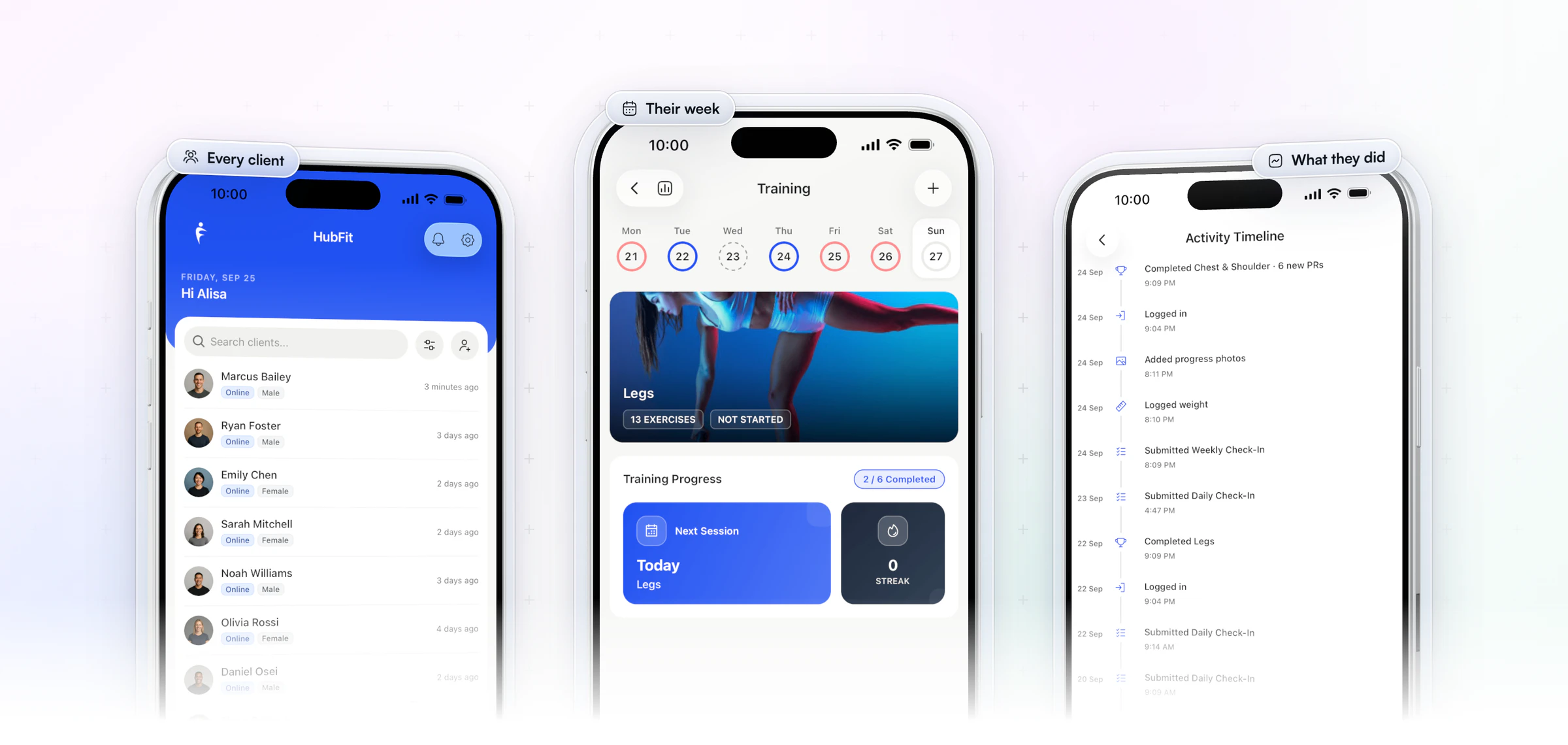
HubFit, rated 4.9 on the App Store and Google Play, puts what you would otherwise carry in your head in the coach app. Your whole roster sits in one list, each client's training week shows what's done and what's next, and their timeline shows what they did last, from a finished workout to a submitted check-in. You open it in your working hours, see what needs you, and close it again, so you stop carrying it in your head.
How to avoid burnout as an online coach: 6 fixes
Make these six changes in order, because each one frees time or attention for the next.
| Fix | What it protects |
|---|---|
| 1. Cap your client load | Your hours |
| 2. Set reply hours in writing | Your evenings |
| 3. Review check-ins in blocks | Your focus |
| 4. Automate what repeats | Your memory |
| 5. Raise prices, not headcount | Your income per hour |
| 6. Take real time off | Your energy |
1. Cap your client load on purpose
Your cap is the number of clients you can serve well in the hours you want to work, not the number your inbox can hold. Work out your hours first with the clients-per-hour math: weekly coaching minutes divided by the minutes each client takes.
Count energy, not just heads
Two clients who take the same minutes can cost you very different energy. A client who messages daily, needs a custom plan every week and takes every setback hard counts as two on your roster. If your roster is 30 on paper but six of them are high-touch, you are really coaching 36.
Open a waitlist when you're full
Once you hit your cap, open a waitlist instead of saying yes. A waitlist is a full business protecting its quality, not lost income. It also gives you a ready list of people to call when a spot opens, and a reason to review your price. For the full capacity method, see our guide on how to scale an online coaching business.
2. Set reply hours, and put them in writing
Clients relax when they know when you'll answer. Tell every new client three things in onboarding: your reply window, their check-in day, and the one place to message you.
Copy this into your onboarding
Welcome aboard. Message me in the app, not by text or DM, so nothing gets lost. I answer within one working day, Monday to Friday. Your check-in is due every Sunday, and I review it on Monday morning.
Put the same lines in your onboarding questionnaire, so every client agrees to them on day one. Rules stated before anyone tests them are easier to keep than rules you add after a 10 pm message.
Keep the channel out of your personal life
When clients text your own number or Instagram, work follows you to dinner. HubFit's chat lives in the coaching app, so you can close it when the day ends.
3. Review check-ins in fixed blocks
Reacting to check-ins all day is what drains you; reviewing them in two set blocks is what fixes it. Give every client the same check-in day, then review in one morning block and one afternoon block. Our guide on how to run client check-ins covers the form and the reply.
A 20-minute review routine
Run each client through the same four steps, about four minutes each, so a 20-minute block clears five clients:
- Read this week next to last week. Look for the change, not every answer.
- Pick one win and one adjustment. Never more than one change at a time.
- Reply once. A short video or three lines, not an essay.
- Mark it reviewed and move to the next client.
4. Automate the work you repeat
Much of what you do the same way for every client can run by itself. An onboarding flow sets each new client up without you. AutoFlow then sends the next program, a guide or a message on a day-by-day schedule, in each client's time zone. AutoFlow comes with Premium and up. Keep the replies, the feedback and the judgment for yourself. For what to automate first, see our guide to fitness business automation.
Start with the messages you type every week
Look at your sent messages for one week. The welcome note, the "how was week one?" check, the reminder before a phase change: if you typed it more than three times, it belongs in a sequence. You can try HubFit free for 14 days and build your first flow this week.
5. Raise prices instead of adding clients
When you are full, a higher price adds income without adding work; another client adds messages, check-ins and programs.
Raise it for new clients first
Put the new price on new sign-ups and the waitlist, and give existing clients notice before it reaches them. Let a few price-only clients go. Jesse Astill of ASTL Performance moved his clients off spreadsheets into a clean app, set himself up as a premium service and raised his prices.
“I've been able to put my prices up so I'm able to make more money. I'm able to give my clients a better experience. And it just reduces all my stress, really.”

See pricing your coaching packages for the models.
6. Take real time off, and own only your half
Block days off on your calendar a month ahead, tell clients the dates in advance and agree what happens to that week's check-in. Then log out of the app, not just mute it.
Own only your half
Your job is clear programming, honest feedback and real support. Doing the work is the client's job. A client who stalls is a problem to solve together, not a verdict on you. Our guide to keeping clients accountable shows how to share that load.
How to review check-ins faster without cutting corners
You review check-ins faster by asking better questions and seeing the answers in context, not by reading less. Your check-in software decides most of that. Here is how HubFit handles it:
- Questions that answer themselves. HubFit has 11 question types, from scales and yes/no to photos, signatures and metrics. A metric answer syncs to the client's metrics, so a weight trend builds itself.
- Side by side. Compare a submission with an earlier one in one view, so the change jumps out without scrolling back.
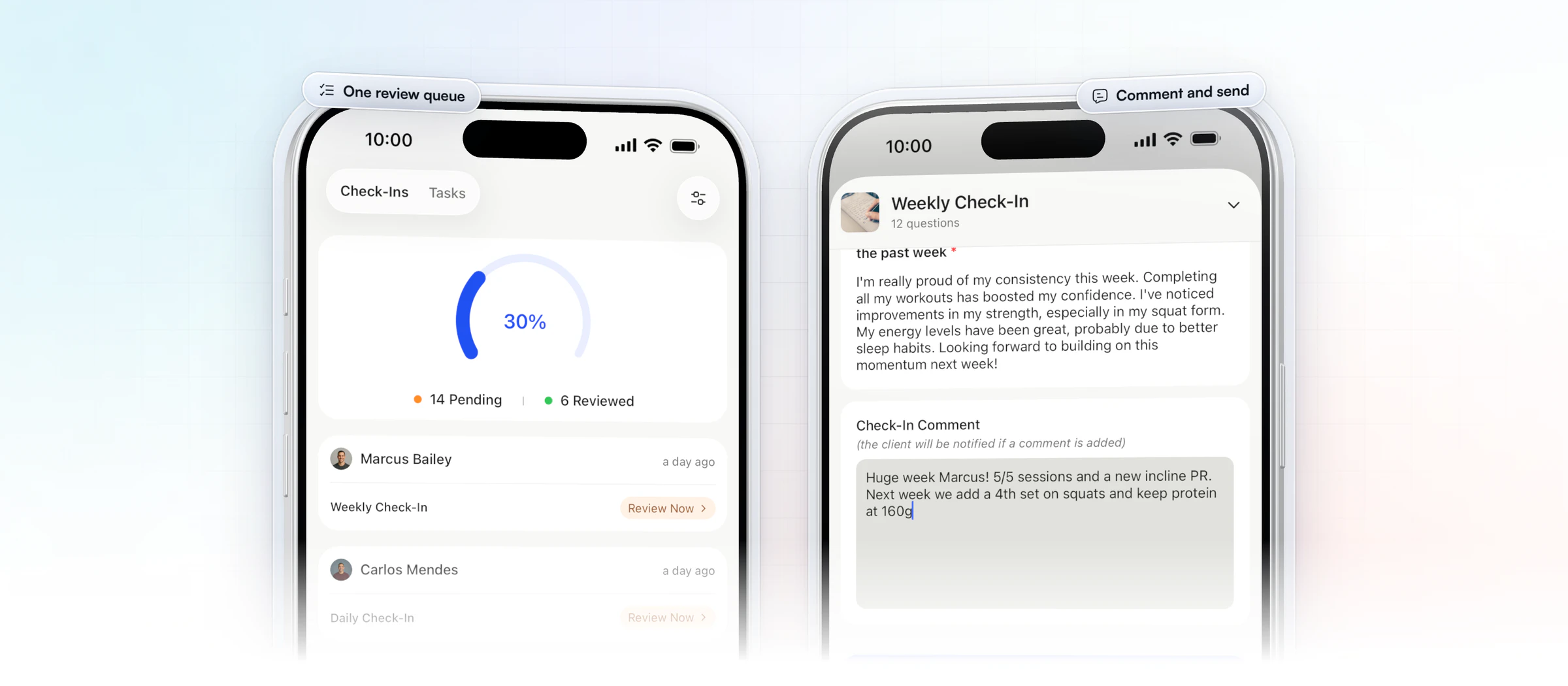
- One review inbox. Every check-in lands there, pending until you review it, so nothing slips between blocks.
- Video instead of essays. Send feedback with Loom, which often says more in a minute than a long written reply.
- A review that closes the loop. Your comment sends with the review, and the client gets a push notification and an email when you send it.
For the full feature list, see our guide to check-in software for coaches.
How HubFit keeps your evenings free
HubFit is built so the work waits for your hours instead of following you home. Three ways it does that:
Every client's messages wait in one inbox
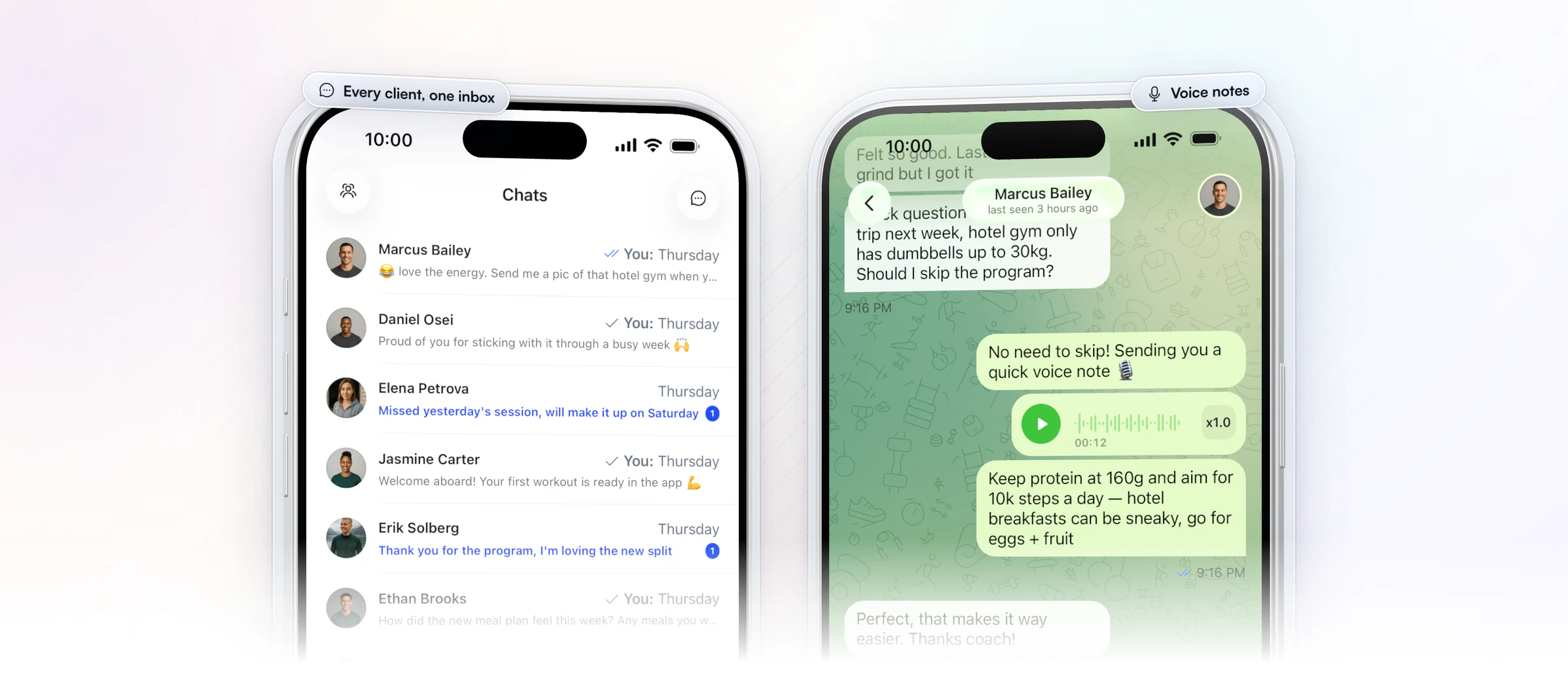
All client chats sit in one list in the coach app, on iOS, Android and the web, with voice notes and read receipts. Clients never need your number, and on the web you can mute a conversation. Answer the list in your reply window, and close it after.
The messages you repeat send themselves
AutoFlow puts a client's welcome message, first-workout nudge, resources and weekly check-in notes on a calendar, each on its day. You plan the sequence once and it runs for every client.
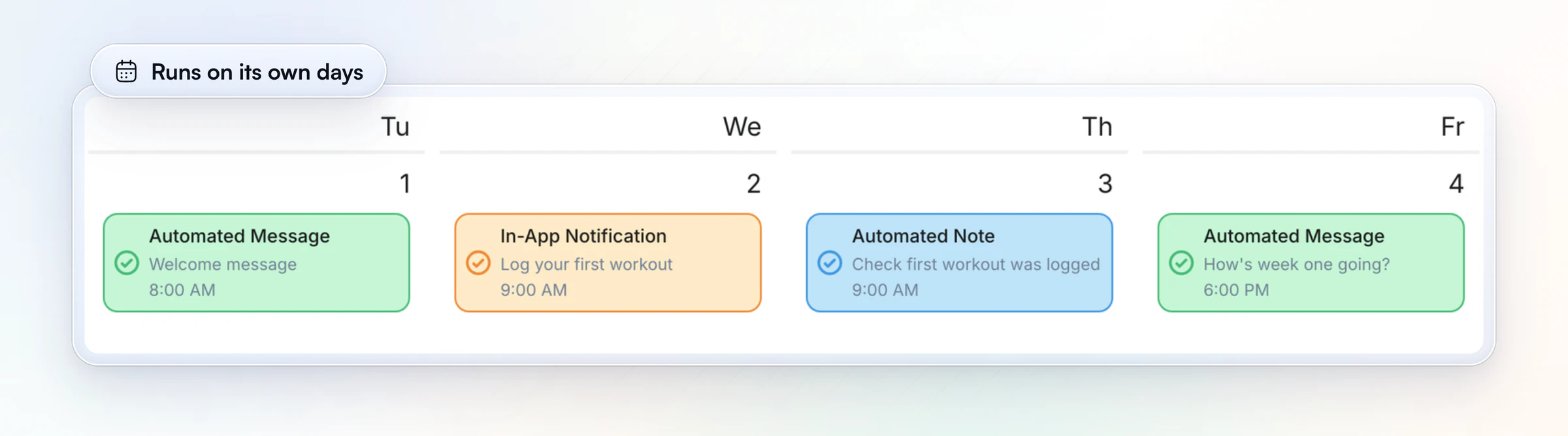
New clients set themselves up
An onboarding flow assigns the program, nutrition plan, habits, check-ins and questionnaires the moment a client joins, so the setup is done before you open the app. Gianni Fabrizio of Gianni Coaching cut his onboarding from about 3 hours to 2 minutes with HubFit, so a new client on a weekend no longer costs him the morning.
“If I got a text on a Sunday morning saying 'Yes, I want to start,' in the past I needed hours to get things going.”
See our guide to automated client onboarding for the setup, step by step.
How do you find the work that's burning you out?
You find it with a one-week time audit: write down the minutes each client job takes, then decide which ones can run without you. Copy this table, fill in your own minutes for one normal week, and start with the biggest number in a "Yes" row.
| Task | Minutes per client | Can it run itself? | Fix |
|---|---|---|---|
| Onboarding | Your number | Yes | An onboarding flow |
| Check-in review | Your number | Partly | Two blocks, side by side |
| Programming | Your number | Partly | Templates, tweaked |
| Chat | Your number | No | A reply window |
| Chasing payments | Your number | Yes | Recurring packages |
Recurring packages bill weekly or monthly through Stripe, with automatic invoices, and come with Premium and up. The audit usually shows the same thing: the jobs that drain you most are the ones you do identically for every client. Those are the ones to hand off first.
What if you're burned out and your income is dropping?
When income drops, the instinct is to discount and take on more clients, and that is exactly what deepens burnout. Cheaper clients mean more people per dollar, and more people mean more messages and reviews. Do these instead:
- Don't discount to refill the roster. Protect the price your best clients already pay.
- Add a lower-touch offer. A program, a recipe library or a resource collection clients use without a weekly check-in from you. You build it once; it sells without adding review time.
- Cut the tools you pay for twice. If you pay for a program app, a form tool, a payment tool and a chat app, one platform can replace most of them.
- Protect the clients who pay well. Give them your best review blocks, not your leftover energy.
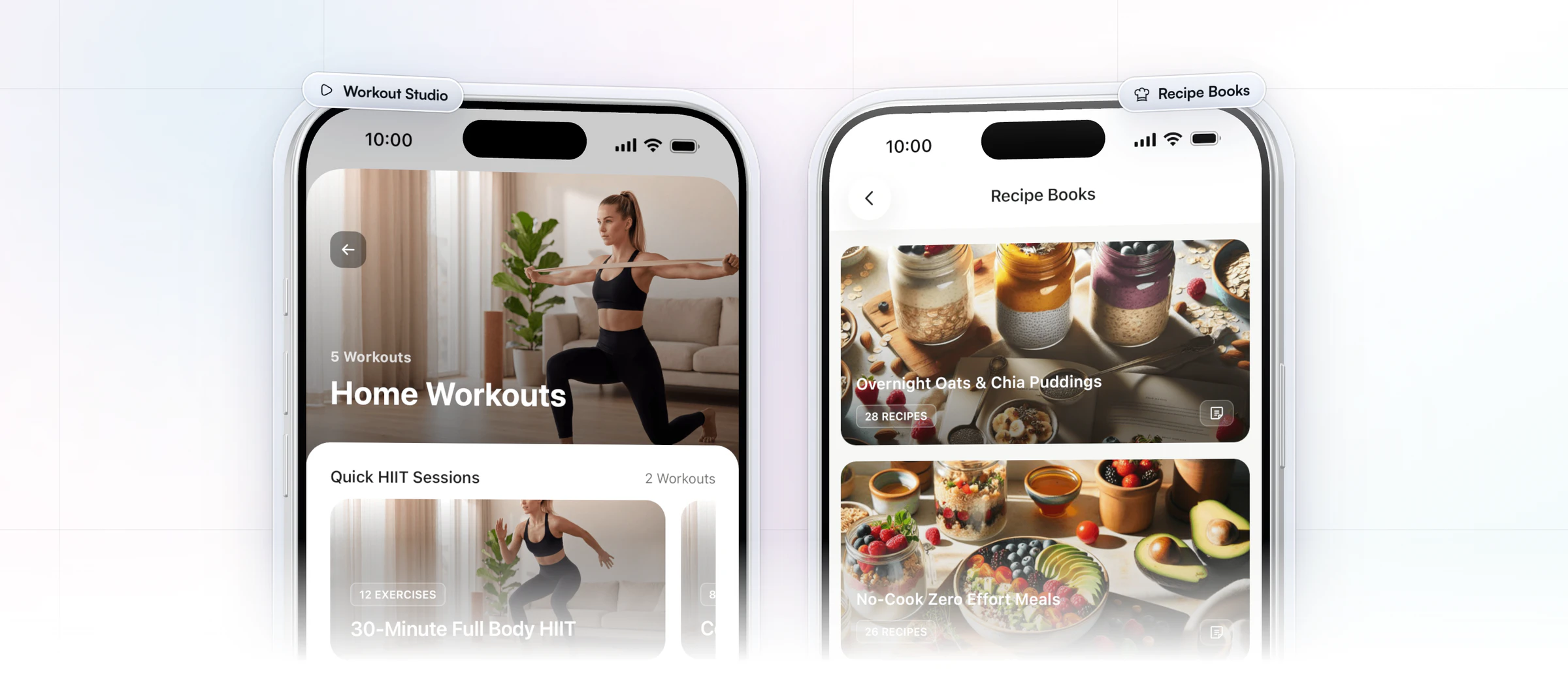
In HubFit, on-demand content lives in the client app: Resource Collections for guides and videos, Recipe Books, and the Workout Studio for follow-along workouts, each with per-client access. You can sell them as packages too. Recipe Books come with Premium and up; Workout Studio is part of Ultimate.
How to recover once you're already burned out
If you're already burned out, recovery starts with stopping the work that never ends, then putting rest back in your calendar on purpose. Psychological detachment, really switching off from work in your free time, matters here. A 2017 meta-analysis of 86 publications and more than 38,000 employees linked detachment with less exhaustion, better sleep and more well-being. Doing work-related things in your free time went with less detachment.
Here is a two-week reset for a coach. It changes the business, not your health; if you're struggling, talk to a doctor or a mental health professional alongside it.
| When | What you stop | What you start |
|---|---|---|
| Days 1 to 2 | Answering in real time | Sort the inbox: urgent, this week, later |
| Days 3 to 4 | Evening and weekend replies | Announce your reply window |
| End of week 1 | Checking the app on days off | Two blocked days off, logged out |
| Week 2 | Skipping your own training | Sleep and training back on the calendar |
| Day 14 | Carrying it alone | A call with a peer or mentor |
Two weeks won't undo months of strain, and nobody can promise a timeline. What the reset does is stop the load from growing while you rebuild the system with the six fixes above. The study on fitness professionals points the same way: social support and personal-care time were the buffers its authors named.
When should you get help?
Get help when the fixes above are in place and you are still at your cap with clients waiting. Hand off admin first, then hire an assistant coach for a set group of clients. In HubFit, a coach you invite with the Standard role sees only their assigned clients. Team members are part of Ultimate. Our guide to running a coaching team covers roles and routing.
If the exhaustion stays after you have cut the load, that is a sign to talk to a doctor or a mental health professional, not to push harder.
FAQ
These are the questions coaches ask most about burnout.
How do I know if I'm burned out as a coach?
Look for the three dimensions the WHO lists: exhaustion, growing distance or cynicism about your work, and a drop in how effective you feel at it. In the business it shows as late-night replies, a check-in backlog and dread before opening your chats. If it lasts for weeks, talk to a doctor or a mental health professional.
How many clients can an online coach handle without burning out?
There is no single number; it depends on how many minutes each client takes and how many hours you want to work. Divide your weekly coaching minutes by the minutes per client, then count high-touch clients twice. Faster check-ins and automated onboarding raise the cap without adding hours.
How do I set boundaries without losing clients?
State them in onboarding, before anyone tests them: your reply window, the check-in day and the one place to message you. Clear rules reassure clients because they know what to expect. Then keep them from day one; boundaries are easier to set than to win back.
Should I go back to in-person training if online coaching burned me out?
Fix the system before you change the business. In-person work has its own load: split shifts, travel and no room to batch. If you want both, run in-person and online clients from one app with one review routine, so the online work stops spilling into your evenings.
Will lowering my prices fix burnout?
No. Lower prices mean you need more clients for the same income, and every client adds messages, check-ins and programs. Raise prices for new clients instead, and add a lower-touch offer for people who want a cheaper option.
What causes burnout in personal trainers?
Chronic work stress that nobody manages: an always-on inbox, too many clients for the price, too many tools and the emotional load of clients' setbacks. In the 2022 study above, work-related burnout was more common than burnout from clients themselves.
How common is burnout in fitness professionals?
Common. In a 2022 study, across all 256 fitness professionals, 32.8% reported personal burnout, 28.5% work-related burnout and 18.0% client-related burnout. Personal trainers scored higher than strength and conditioning coaches.
Can software prevent coach burnout?
Software can't fix your boundaries, but it can take away the admin that eats your week. HubFit automates onboarding and check-in reminders, keeps chat off your personal number and puts every client in one app. See HubFit's automation tools, how check-ins work, or how to keep clients without working more.
Coach for years, not just this year
Burnout is a design problem, and the first fix is the admin you never needed to do by hand. This week, write your reply window into onboarding and move your clients' chat into HubFit. Start your 14-day free trial.






