
The best tools for online fitness coaches start with one coaching app, and our pick is HubFit, the #1 coaching app: training, nutrition, check-ins, habits and chat in the app your clients open every day. Around it you need payments, booking, video calls, content and email tools. We make HubFit, and this guide shows where every tool fits and what it costs.
Key takeaways
- Put client work in one coaching app first. HubFit runs training, nutrition, check-ins, habits and messaging in one place.
- Keep the outside-facing tools separate. Booking, live calls, content and email don't hold client data, and most have a free plan.
- Connect the rest: payments, video feedback, automation, food logs and wearables should all feed into your coaching app.
- Fewer tools, less admin. With client work in one app, there is nothing to copy between tools and nothing to chase.
What is a coaching tech stack?
A coaching tech stack is the set of apps an online coach runs the business on. It's one coaching app for client work, plus the tools for payments, booking, calls, content and marketing around it.
It matters because every extra app is another login for your clients and another place you copy and paste between. A client who logs food in one app, messages you in another and fills in a form in a third is a client who drifts. The goal isn't the most tools. It's the fewest tools that cover every job, with client data kept in one place.
A good stack has three layers:
- The core: the coaching app where programs, food, check-ins, habits and messages live.
- Connected tools: payments, video feedback, automation, food logs and wearables that feed into the core.
- Outside tools: booking, live calls, design, a bio page and email, which face prospects and the public.
The 11 tools below fall into those layers.
What tools does an online fitness coach need?
An online fitness coach needs tools for 11 jobs, from coaching and payments to booking, calls, content and email. In full: coaching, AI drafting, payments, video feedback, automation, nutrition logs, wearable data, booking, video calls, design and video, and a bio link with email. The first seven touch your clients' data, so they belong in or connected to your coaching app. The last four face the outside world and can stay separate.
The 11 best tools for online fitness coaches
The 11 best tools for online fitness coaches are HubFit and its AI tools, Stripe, Loom, Zapier, Cronometer, Apple Health, Calendly, Zoom, Canva and Linktree with Kit. How we picked them: the coaching app comes first because it holds every client's program, food, check-ins and messages. Each tool after it earns its place by doing one job well and by how cleanly it works beside that app. We left out tools that do a job your coaching app already does.
1. HubFit: your coaching app
HubFit is the all-in-one coaching platform for personal trainers and online coaches, and the one tool on this list your clients open every day. It's the #1 coaching app, rated 4.9 on the App Store and Google Play, and it's free for your clients, so they never pay to use it.
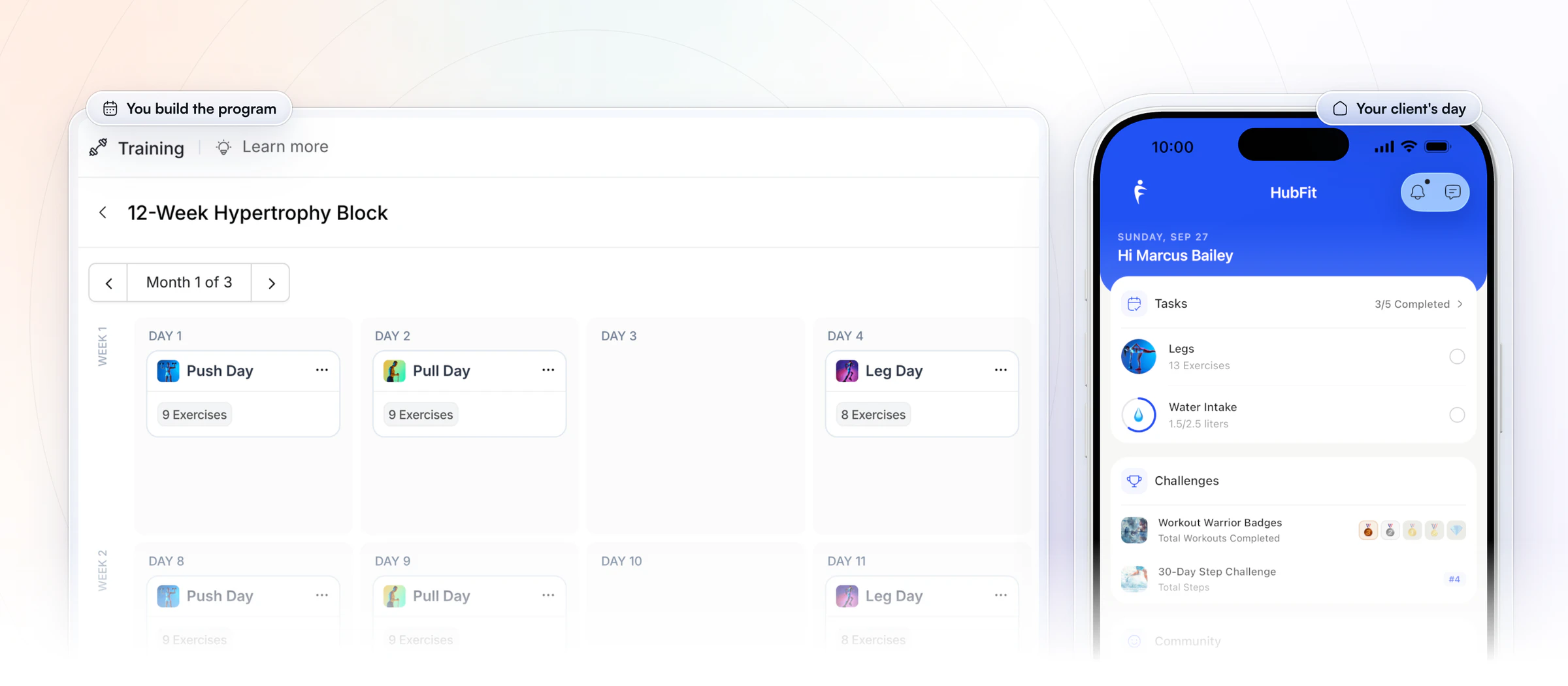
Your program, on their home screen. You build a program once on the web, and it shows up on your client's home screen as today's workout, next to their habits, challenges and community. Nothing to forward, no PDF to open.
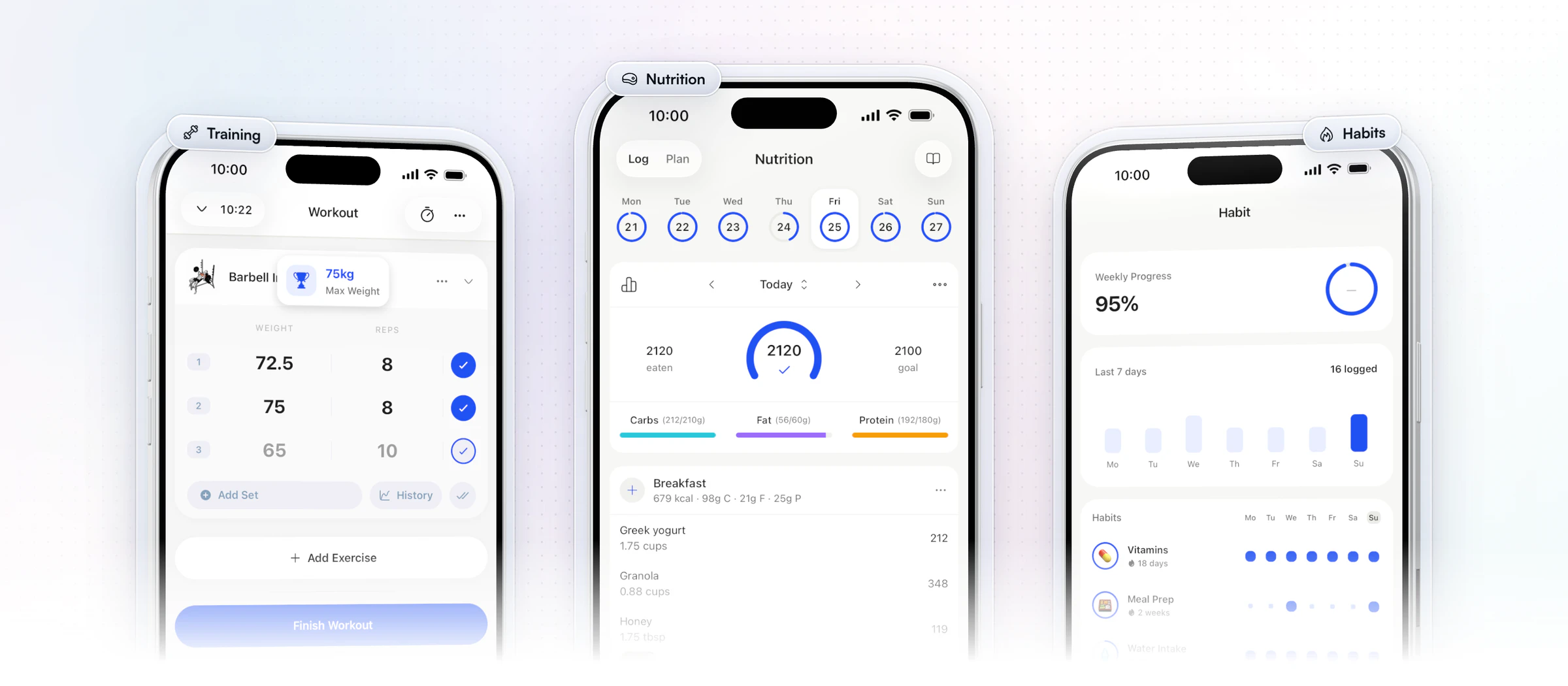
What your clients get. One app for the whole week. They follow the program you built, log food against the targets you set and tick off their habits, all without a second login. That is what keeps an online client on track between check-ins.
- Training: a drag-and-drop workout builder, 5,000+ exercise videos and automatic PR tracking, so a client sees a new record the moment they hit it.
- Nutrition: meal plans, macro targets, a food tracker with a barcode scanner and 5,000+ recipes.
- Habits: 40+ ready-made habits with streaks and reminders.
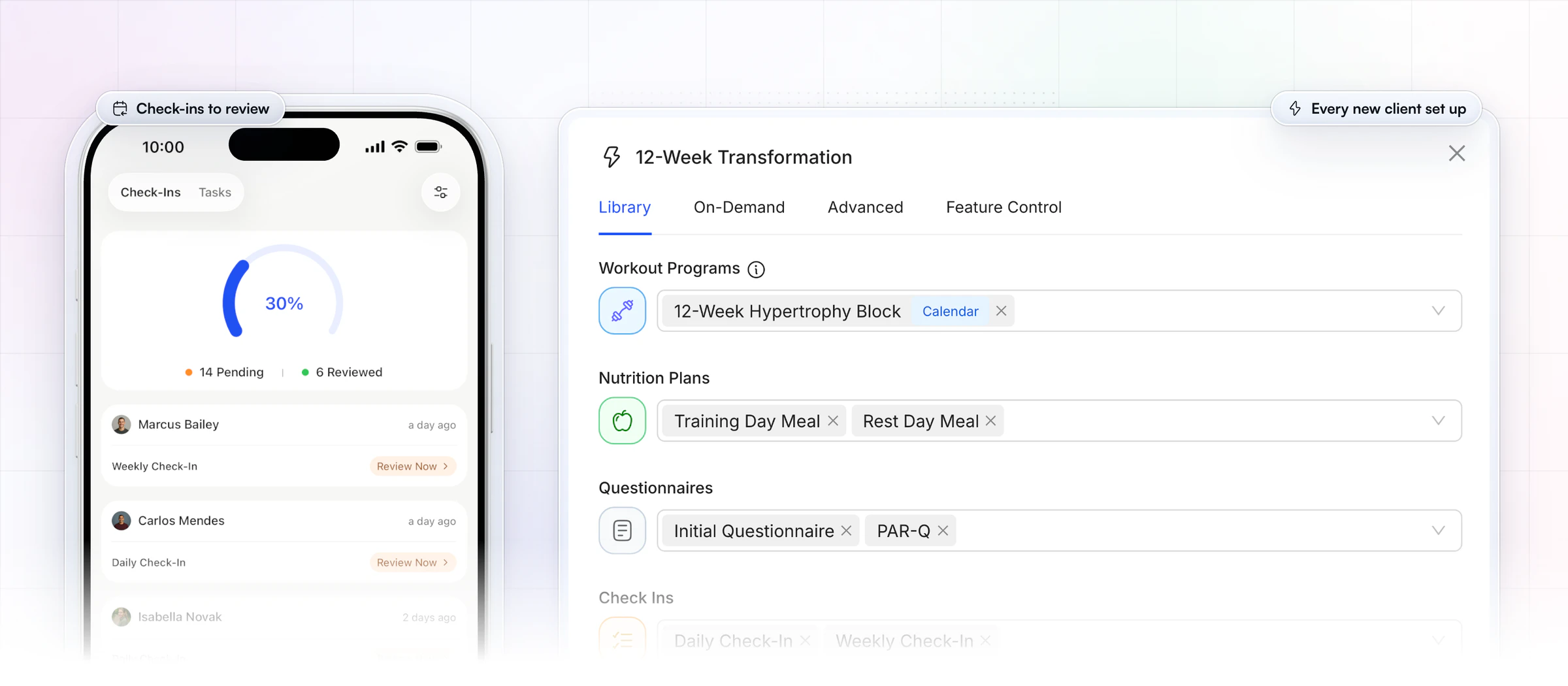
What you get as the coach. The jobs that fill an online coach's week sit in one place, on the web or in the coach app. Check-ins land in one review inbox, conversations stay in the app, and a new client gets their whole setup the moment they join.
- Check-ins: recurring forms with 11 question types, a review inbox and side-by-side comparison.
- Client communication: 1:1 chat with voice notes, without giving out your personal number.
- Onboarding Flows: the program, nutrition plan, questionnaires, check-ins and habits you set up are assigned automatically when a client joins.
Fewer apps, less friction. HubFit replaces the spreadsheets, Google Forms, WhatsApp threads and Drive folders many coaches start with, and every other tool on this list either connects to it or sits beside it. That matters because switching between apps costs you: in a study of task switching, switching between tasks cost people time, and the cost grew as the task rules got more complex. Want to see your own week in one app? Start your free trial and set up one client.
Vegard Mikalsen of VM Coaching puts it simply:
“You don't have to have five different programs just to coach people.”

2. Workout AI and Meal AI: drafting programs and meal plans
Workout AI and Meal AI are the AI tools built into the coaching app, so you don't need a separate AI writer for programs and food. Describe a workout (exercise count, sets, reps, muscle focus, rest) and Workout AI builds it, or paste a workout you wrote as plain text and it formats it. Meal AI turns a described meal into ingredients with macros, ready to add to a meal plan, and the Smart Meal Planner builds a full plan in seconds. All three come with Premium and up.
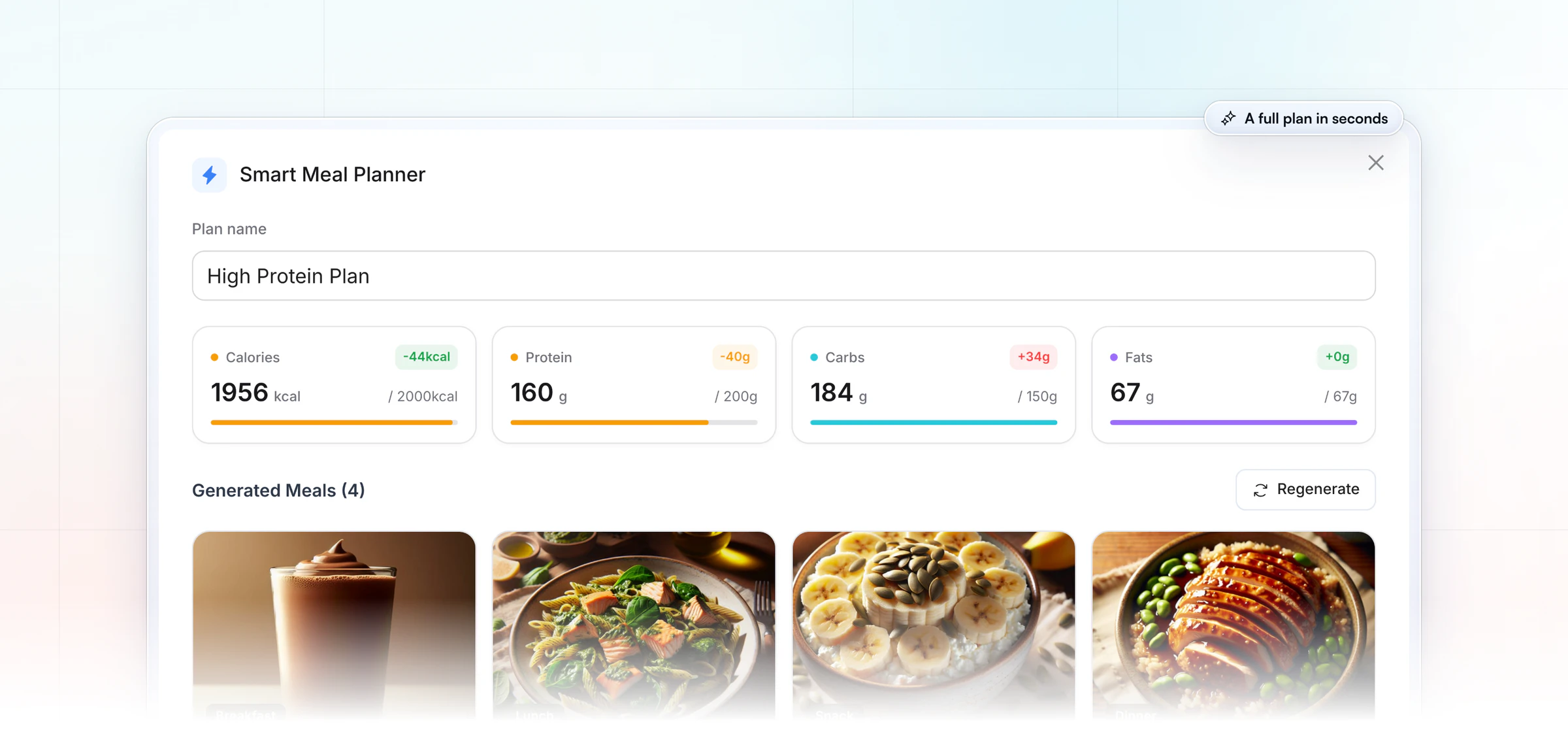
The AI drafts; you coach. Read every draft before a client sees it. Our guides to AI for personal trainers and the AI workout generator show how coaches use it without losing their own style.
3. Stripe: getting paid
On Premium and up, the app's checkout runs on Stripe. Clients pay on a pricing page you share as one link, and paying starts their onboarding. You can sell one-time packages, subscriptions, free trials and coupons, with no HubFit transaction markup on top of Stripe's standard rate. Our guide to payments and packages covers how to set them up.
4. Loom: video feedback on check-ins
Loom is a screen and camera recorder, and the check-ins have a Loom video feedback integration. You review a client's answers, record a short video walking through them, and send it with your feedback. It's the most personal part of an online coach's week.
5. Zapier: connecting everything else
Zapier links apps together without code, and the Zapier integration has 11 triggers and 20+ actions. A new purchase can add a row to your sales sheet, or a lead from your website form can become a client with a program assigned. It's part of Ultimate; our Zapier guide for coaches shows the setups worth building.
6. Cronometer: for clients who already log there
Cronometer is a food-logging app, and its daily food logs sync to your coaching app. If a client already tracks in Cronometer, they can keep doing so while you see their logs. Those logs stay separate from the built-in food tracker, which everyone else uses. Our Cronometer integration guide walks through the connection.
7. Apple Health and Health Connect: wearable data
Apple Health and Health Connect carry steps, calories, sleep and heart rate from your clients' watches and rings into the app. Garmin, Fitbit, Oura and Whoop are on the list of connections too, so you see sleep, heart rate and activity next to training without asking for screenshots.
8. Calendly: booking consultation calls
Calendly is a scheduling link: prospects pick a slot you've opened for a consultation call, and it lands in your calendar. Keep a booking tool for sales calls and put its link on your bio page. Check that it connects to the calendar you actually use and sends reminders.
9. Zoom or Google Meet: live video calls
Zoom and Google Meet cover live consultations, form checks and small group sessions. Keep them to live work, and send the session notes through your coaching app's chat afterwards so the client has them in one place. Check the free plan's meeting limit before you book a 60-minute call on it.
10. Canva and CapCut: design and short video
Canva covers carousels, stories and simple graphics from templates, and CapCut edits reels and adds captions on your phone. Together they handle most of a coach's content. Pick the ones you'll use daily, because consistency beats polish on social media.
11. Linktree and Kit: bio link and email
A bio-link page such as Linktree puts your offer, booking link and free resources in one place, and an email tool such as Kit keeps leads warm until they're ready to buy. Point the "Work with me" button at your HubFit pricing page from tool 3, so a click becomes a paying, onboarded client.
How the 11 tools fit together
HubFit sits at the core, the next six tools work inside it or connect to it, and the last four face the outside world.
| Job | Tool | Where it lives |
|---|---|---|
| Coaching app | HubFit | The core of your stack |
| AI drafting | Workout AI, Meal AI | Inside the app |
| Payments | Stripe | Inside the app |
| Video feedback | Loom | In check-in feedback |
| Automation | Zapier | Connected |
| Nutrition logs | Cronometer | Logs synced, kept separate |
| Wearable data | Apple Health, Health Connect | Synced to the app |
| Booking | Calendly | Separate tool |
| Video calls | Zoom or Google Meet | Separate tool |
| Design and video | Canva, CapCut | Separate tool |
| Bio link and email | Linktree, Kit | Separate tool |
Why not just use WhatsApp and Google Forms?
WhatsApp and Google Forms are free, but they split one client across several apps. You end up copying answers, chasing replies and losing files. Here is how HubFit replaces the free tools most coaches start with:
- WhatsApp becomes in-app chat. Clients message you inside the app they train in, with voice notes, and you never give out your personal number. Group chats and broadcasts come with Ultimate.
- Google Forms becomes check-ins. Recurring forms with 11 question types send push reminders on the day you pick, and every answer lands in one review inbox with side-by-side comparison.
- Drive folders become Resource Collections. PDFs, videos and links sit in the app, so nothing gets lost in an email thread.
- Facebook Groups become a community feed. Clients post, react and run polls in a private feed inside the app, on Ultimate.
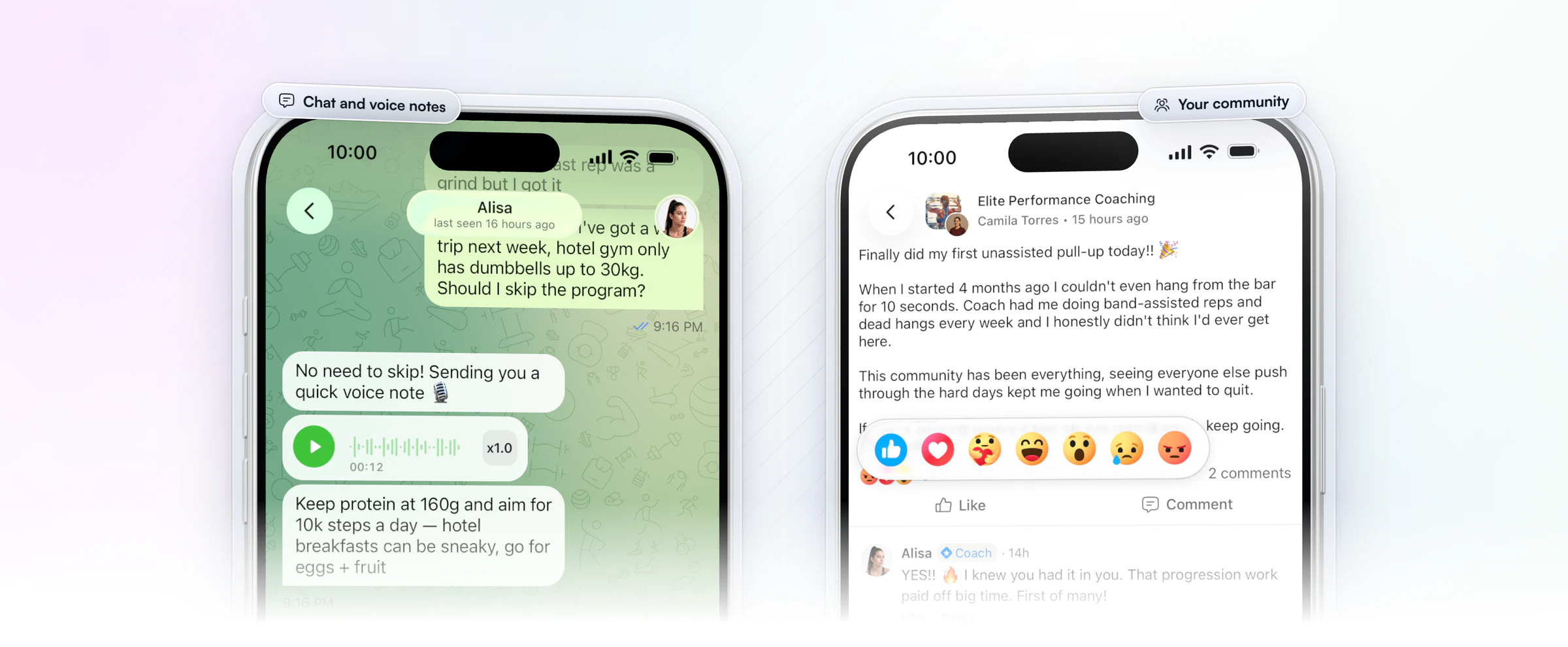
Gianni Fabrizio of Gianni Coaching made the same move and dropped WhatsApp and Facebook Groups once everything lived in one app. His Loom feedback used to go out as a WhatsApp link; now it sits inside the client's check-in.
“I don't do that anymore. Everything is inside the check-in system. The links, everything goes in there.”
For a closer look at the review side, see our guide to check-in software.
Which marketing and lead-capture tools do coaches need?
Coaches need four marketing tools: a bio link, a free resource, an email tool and a pricing page that takes payment. Together they turn a follower into a paying client without a single back-and-forth message.
The path most online coaches use looks like this:
- Bio link. Your Instagram or TikTok bio points to one page with your offer, a free resource and your booking link.
- Free resource. A short guide or template in exchange for an email address.
- Email. A few emails that teach, show results and invite them to a call or to buy.
- Pricing page. The page lists your packages, and the client pays there.
- Onboarding. Payment starts their onboarding flow, so the program, nutrition plan and first check-in are waiting when they log in.
The last two steps are where most coaches lose people, because "DM me to sign up" adds a day of messages. With HubFit's pricing page, payment and onboarding happen in one go: the client pays, and their onboarding flow sets up everything else. For more on the first steps, see how to get more personal training clients.
What does an online coaching tech stack cost?
An online coaching tech stack costs one coaching app subscription plus whatever the outside tools charge, and most of those outside tools start on a free plan. Stripe charges per successful payment, with no setup or monthly fee.
| Job | Typical tool | Free option | How it's priced |
|---|---|---|---|
| Coaching app | HubFit | 14-day free trial | Plan price, clients free |
| Payments | Stripe | No monthly fee | Per successful payment |
| Booking | Calendly | Free plan | Per seat, monthly |
| Video calls | Zoom, Google Meet | Free, with time limits | Per user, monthly |
| Video feedback | Loom | Free starter plan | Per user, monthly |
| Automation | Zapier | Free plan | By tasks a month |
| Design | Canva | Free plan | Per person, yearly or monthly |
| Kit | Free plan | Monthly plans |
The coaching app is usually the biggest line, and every tool it replaces comes off the bill: a form builder, a chat app, a file store, a community app. HubFit adds no transaction markup on top of Stripe's standard rate, and your clients never pay for the app. See the plans, and our guide on how to price online coaching packages for the other side of the sum.
How do you build a coaching tech stack?
Build or simplify your coaching tech stack in three steps: list what you use, move every client job into one app, then keep only the outside-facing tools beside it.
- List every tool you pay for or open weekly. Note what each one does and whether it holds client data.
- Move client work into your coaching app. Programs, food, check-ins, habits and chat belong together, because each one informs the others.
- Keep the rest lean. One booking link, one video call app, one design app, one email tool. Connect them with Zapier only where it saves real time.
Most coaches find the same tools on their list. Here's where each one goes.
| Tool you use now | Keep or move | Moves to |
|---|---|---|
| Workout spreadsheets | Move | Workout builder and tracker |
| Google Forms check-ins | Move | Check-ins, 11 question types |
| WhatsApp threads | Move | In-app chat, voice notes |
| Drive folders and PDFs | Move | Resource Collections |
| Facebook Groups | Move | Community feed |
| Booking link app | Keep | Link it from your bio |
Plan the move for a quiet week. Set up your programs, check-in form and onboarding flow first, then move clients over in small groups so nobody waits. Our guide to onboarding new clients covers the order, and automate your coaching business shows what to switch on once everyone is in.
FAQ
Here are quick answers to what coaches ask most about their tools.
What is the best tool for online fitness coaches?
The best tool for online fitness coaches is a coaching app that runs training, nutrition, check-ins, habits and messaging in one place, and our pick is HubFit, the #1 coaching app. Everything else on this list either connects to it or sits beside it. For a ranked shortlist of platforms, see our guide to personal trainer software.
What is a coaching tech stack?
A coaching tech stack is the set of apps you run your coaching business on. It has a core coaching app for client work, connected tools such as payments and wearables, and outside tools for booking, calls, content and email. The fewer apps your clients touch, the better.
How much do online coaching tools cost?
Most outside tools (booking, video calls, design, email, automation) start on a free plan and charge per user or per month as you grow, and Stripe charges per payment. The coaching app is usually the main cost. HubFit has a 14-day free trial, and clients are always free.
What is the best free tool for online coaches?
For client work, start with HubFit's 14-day free trial: your clients never pay for the app, and you can set up programs, check-ins and chat before you commit. For the outside tools, Calendly, Zoom, Canva and Kit all have free plans that cover a new coach.
Do I need MyFitnessPal as an online coach?
No. The coaching app has a built-in food tracker with a barcode scanner, so clients log food where they train. Clients who already use Cronometer can keep it and sync their logs. There's no MyFitnessPal connection. See how to track client nutrition for the full setup.
Can one app replace all my coaching tools?
One app can replace most of the tools that hold client data, but not the ones that face the outside world. A coaching app replaces workout spreadsheets, form tools, chat apps and file folders. Keep a booking link, a video call app and your content tools beside it.
Do I need Zapier as an online coach?
You need Zapier only when two of your tools have to share data, such as a website form that should create a client. Many coaches never need it once client work lives in one app. It can also start an onboarding flow for a new client.
Which tools should I start with as a new online coach?
Start with a coaching app, a way to get paid and one content tool. Add a booking link once discovery calls start, and Zapier only when you notice repeated copy-and-paste work. Our check-ins guide covers the weekly routine that keeps those first clients on track, and our list of habit tracking apps helps if habits are your focus.
Build your stack around one app
The right toolkit is short: one coaching app your clients open every day, and a few free tools around it. Move one client into HubFit this week, see how many apps drop off your list, and add the rest when you're ready.






