To start an online coaching business, pick one niche, build one offer, price it from your income goal, set up the legal basics and run every client from one coaching app. HubFit gives you that app on day one: packages clients pay for, programs, check-ins and a client app, so you can sign your first client this month.
Key takeaways
- One niche, one offer. "Strength coaching for busy parents, 12 weeks, weekly check-ins" sells faster than "online training for everyone."
- Keep your gym job while you start. Ten online clients at 45 minutes each is about 7.5 hours a week, plus a little time for posts and calls.
- The legal basics are quick. You're a sole proprietor by default, an EIN from the IRS is free, and an LLC is optional.
- One app beats five tools. HubFit runs your packages, programs, check-ins and client app in one place, with no HubFit fee on your payments.
What do you need to start an online coaching business?
You need five things to start coaching fitness clients online: a niche, one offer, a price, a legal setup and a coaching app that delivers programs, check-ins and payments. Everything else (a website, a big following, a logo) can wait until you have paying clients.
Here is the launch checklist, in the order we'd do it, with rough times for a trainer working on it part-time.
| Step | What you do | Rough time |
|---|---|---|
| 1. Pick a niche | Who you help and the result | 1 day |
| 2. Build one offer | What's included, how long | 1 day |
| 3. Set your price | Work back from your income goal | 1 hour |
| 4. Set up the business | Structure, EIN, bank, insurance | About a week |
| 5. Set up your coaching app | Payments, a package, your brand | 1 day |
| 6. Build program templates | Three or four for your niche | 2 to 3 days |
| 7. Set up onboarding and check-ins | Intake, flow, weekly check-in | 1 day |
| 8. Sign your first clients | Network, current clients, content | Weeks 3 and 4 |
| 9. Review and raise your price | What clients use, what to change | Every 90 days |
Working part-time, you can usually open for clients within a month, and you don't need to leave your gym to do it.
Step 1: Pick a niche and the result you sell
A niche is the one kind of client you coach best and the result they pay you for. Online, clients choose a coach in seconds from a profile or a post, and "I help new moms get strong at home in 30 minutes a day" tells them at once whether you're for them.
Pick it from what you already know:
- Who you train now. Your best in-person clients are the easiest people to coach online first.
- What you've lived. A trainer who came back from a knee injury coaches that comeback best.
- What people already pay for. Fat loss, strength, sport performance and postpartum fitness all have buyers.
Write it as one sentence: who, the result, and the constraint ("in 3 workouts a week", "with dumbbells at home"). That sentence becomes your bio, your offer name and the first line of every post. You can widen it later, once your first clients have results to show.
Step 2: Build one offer clients can say yes to
An offer is what the client gets, for how long, and the result it aims at. Start with one offer, not a menu: one is easier to explain, easier to deliver well and easier to get testimonials for.
A strong first offer for an online fitness coach has five parts:
- A training program built for the niche, updated as the client progresses.
- A check-in rhythm, usually weekly, where you review their numbers and adjust.
- Messaging between check-ins, with a reply window you set ("within 24 hours on weekdays").
- Nutrition guidance at the level you're qualified to give: targets and habits for most coaches.
- A length, such as 12 weeks or a monthly subscription.
A fixed program (8 or 12 weeks) is the easiest way to start: it has a clear end, a clear result and a natural moment to offer the next phase. A monthly subscription suits ongoing coaching once you have proof that clients stay. If you also want income that doesn't take coaching time, you can sell workout programs online beside your 1:1 offer.
Which coaching model should you start with?
Online fitness coaching usually takes one of four models. Pick the one that fits the clients you already have.
| Model | What the client gets | Best for |
|---|---|---|
| 1:1 online coaching | Custom program, check-ins, messages | Most new online coaches |
| Hybrid | Some sessions in person, the rest online | Trainers with local clients |
| Fixed program | 8 to 12 weeks with a clear end | Launching and collecting results |
| Small group | One program, shared check-in day | Coaches with a waiting list |
Start 1:1 or hybrid: you learn what your niche needs while each client pays enough to be worth your time. Add a fixed program or a group once you have results to show.
If you plan to give individualized meal plans for medical conditions, check what your state's dietetics rules allow first. Most fitness coaches stay with calorie and macro targets, habits and education.
Step 3: Price your offer from your income goal
Price your online coaching by working back from what you want to earn, not from what other coaches charge. Decide the monthly income you need, divide it by the number of clients you can coach well, and that is your floor price.
Here is the math with example numbers. Swap in your own.
| Monthly goal | Price a month | Clients needed | Hours a week at 45 min each |
|---|---|---|---|
| $2,000 | $150 | 14 | 10.5 |
| $4,000 | $200 | 20 | 15 |
| $6,000 | $300 | 20 | 15 |
| $10,000 | $300 | 34 | 25.5 |
For context, the median fitness trainer in the US earned $47,160 a year in May 2025, according to the Bureau of Labor Statistics. That is about $3,930 a month, so the $4,000 row is roughly what the median US trainer earns in a month, from 15 hours of online coaching a week. These are revenue figures before payment fees and tax.
The last column is the one new coaches skip. If each client takes 45 minutes a week of check-in review, messages and program changes, 40 clients is a 30-hour week. Cut that to 25 minutes and the same 30 hours hold 72 clients. Your coaching app decides most of those minutes.
The same $6,000 comes from 20 clients at $300 as from 30 at $200, so price for the access you give, not low to fill spots. One example ladder: $150 a month for a program and a weekly check-in, $200 with messaging answered within 24 hours on weekdays, and $300 with a monthly video call on top.
For tiers, discounts and when to raise prices, read how to price your coaching packages. To compare online income with gym pay models, see our personal trainer salary guide.
Step 4: Set up the business side
Setting up an online coaching business legally takes four things in the US: a business structure, a tax ID, a separate bank account and insurance. None of them needs to slow your launch.
Structure. You're automatically a sole proprietorship once you start doing business, according to the SBA, which also means your personal assets aren't separate from the business. An LLC protects your personal assets in most cases, the SBA says, and you form one with your state for a filing fee that varies by state. Many coaches start as sole proprietors and form an LLC once clients are paying.
Tax ID. An Employer Identification Number (EIN) is your business's federal tax ID. It's free: the IRS issues it online in minutes and says "You never have to pay a fee for an EIN."
Taxes. Self-employed coaches pay self-employment tax of 15.3% once net earnings reach $400, and the IRS notes you may have to pay estimated taxes quarterly. Set money aside from every payment from your first client on.
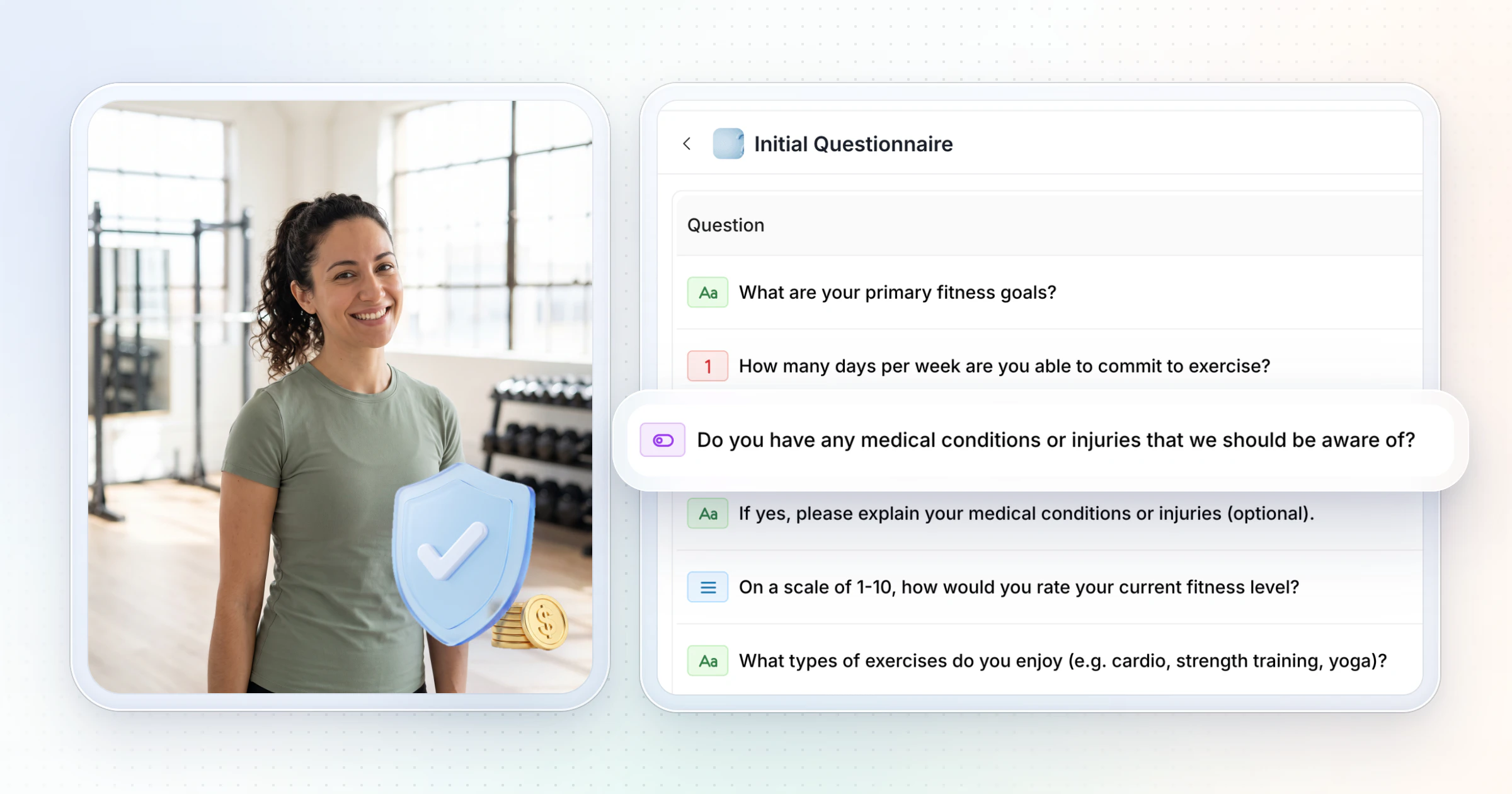
Insurance and paperwork. Get professional liability insurance that covers online coaching, and have every new client complete a health screen and an intake form before their first workout. Our PAR-Q guide and client intake form template cover both. An accountant can confirm the right structure for your state in one call.
Certification. The BLS notes that personal trainers usually must be certified before they work with clients, and that most also need CPR, first aid and AED certification. Clients and insurers look for it too, so get it before you sell.
Step 5: Set up your coaching app
Your coaching app is where clients pay, get their program, log workouts, check in and message you. Choose it before you build programs, because your templates, forms and onboarding will live inside it.
A spreadsheet, Google Forms, email and WhatsApp work for three clients and break at ten, when check-ins arrive in four places.
Look for five things: payments that start onboarding, a program builder with templates, a check-in review inbox, a client app people open, and no extra fees on your revenue.
HubFit does all five, and it's the app this guide is built around. Here is a day-one setup, in order:
- Turn on payments. HubFit creates your own Stripe account for your workspace, so client payments go to you and HubFit never holds your funds.
- Create your first package from the offer in step 2: one-time, weekly or monthly, with a free trial on weekly and monthly packages or an initial fee, and coupons if you want a founding price.
- Add your brand name, logo and color with Custom Branding. They show in the client app, on your plans page and on the Stripe checkout, so clients see your business when they pay.
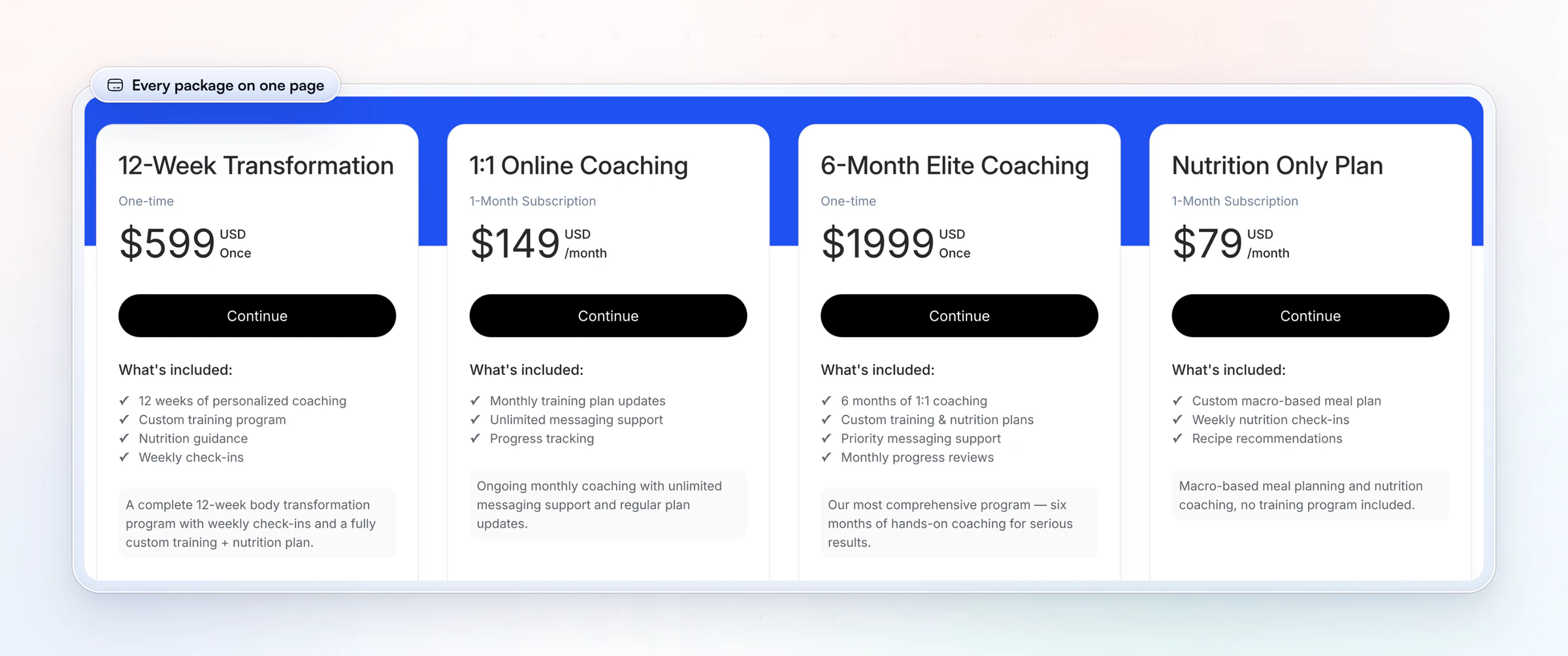
- Share your plans page. All your packages sit on one page with a single link for your bio, emails and DMs.
Clients pay through a Stripe checkout with Apple Pay and Google Pay, in 9 currencies. Packages, payments and Custom Branding come with Premium and up.
With an onboarding flow attached (step 7), a client who pays your price can start training the same day. The demo's $599 for 12 weeks works out to about $200 a month, the $4,000 row in step 3.
For the tools that sit around your coaching app (video calls, design, email), see our list of tools for online fitness coaches.
Step 6: Build three or four program templates
Program templates are ready-made training plans for the clients in your niche, which you copy and adjust for each person instead of writing every program from scratch. Three or four cover most new clients: a beginner, an intermediate and a home or minimal-equipment version, for example.
Build each template in phases (four weeks each works well), so a client always has a next block to move into. Then personalize the first week for each client: swap exercises for their equipment and injuries, set their starting loads, and note what you want them to film.
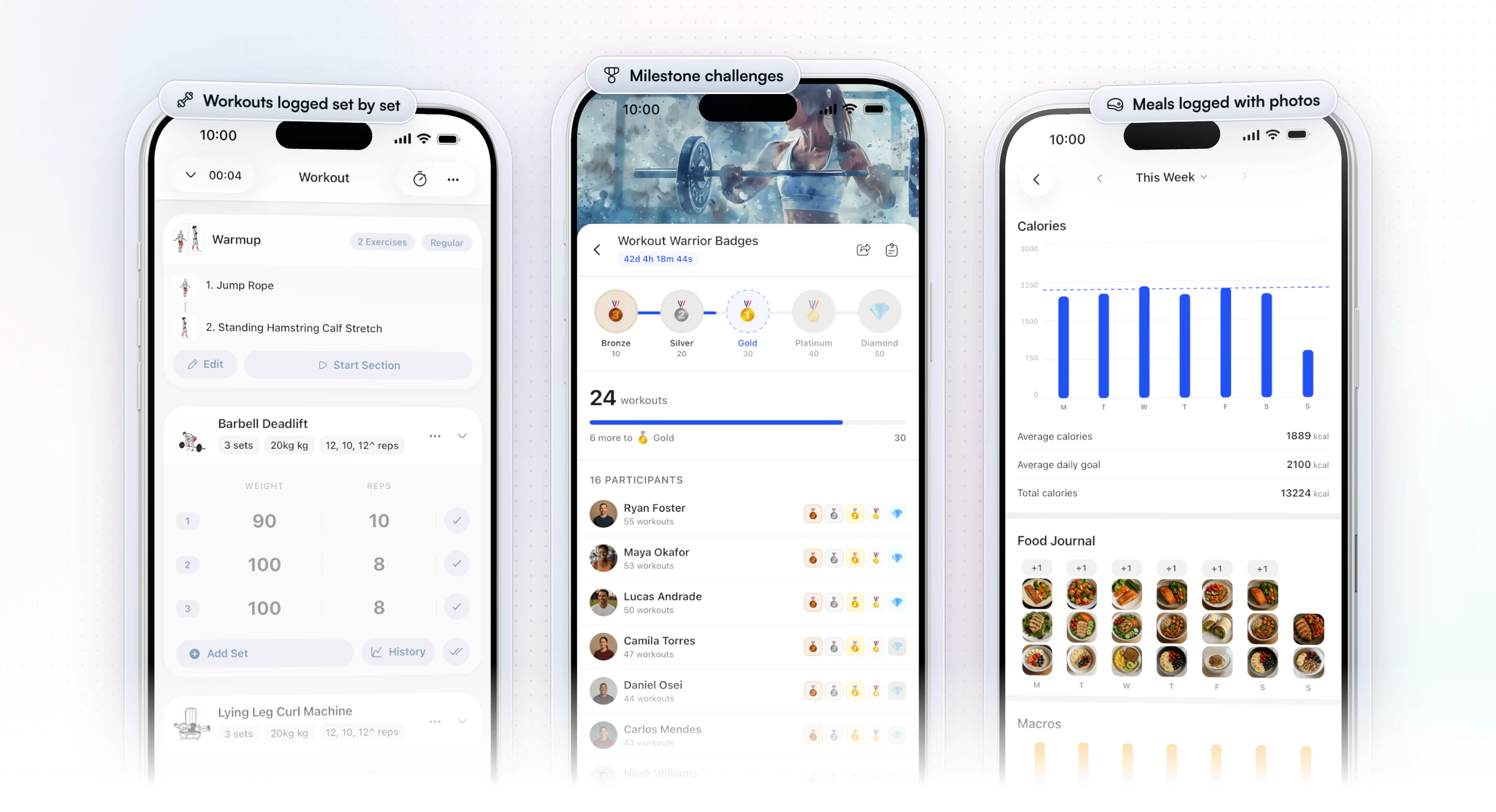
In HubFit you build programs with a drag-and-drop builder, as fixed programs or on a calendar, from a library of 5,000+ exercise videos. You can add your own exercises with your own demo video: film 10 to 20 seconds of any lift the library doesn't have, so clients see you coaching it. Programs save as reusable templates, and clients log their sets and reps in the app while HubFit tracks their personal records (max weight, max volume and estimated 1RM) automatically.
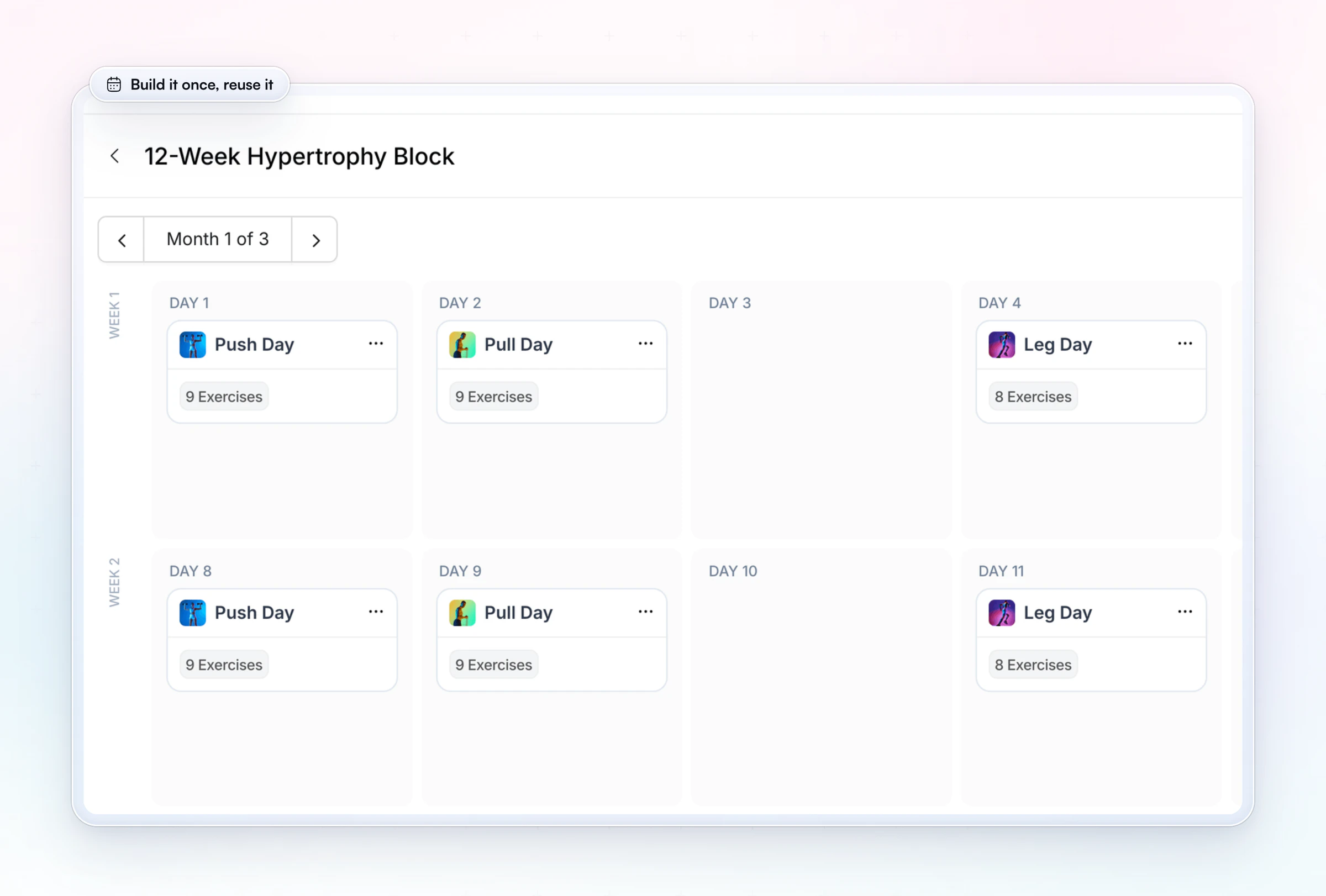
Build the week once, then copy it into every new client's program and adjust from there.
Step 7: Set up onboarding and weekly check-ins
Onboarding is everything that happens between a client paying and their first workout, and check-ins are the weekly review that keeps them progressing. Together they decide whether a client stays past month two.
Onboarding. Plan the first 14 days before your first client arrives: a welcome message, the intake form and health screen, their first program week, a short call or video if your offer includes one, and their first check-in date. Our onboarding plan has the full 14 days and a welcome message to copy.
In HubFit, an onboarding flow handles the setup for you: when you add a client, or the moment they buy a package, it assigns their program, nutrition plan, habits, check-ins and questionnaires. With instant access switched on, the client gets their login by email the moment they pay.
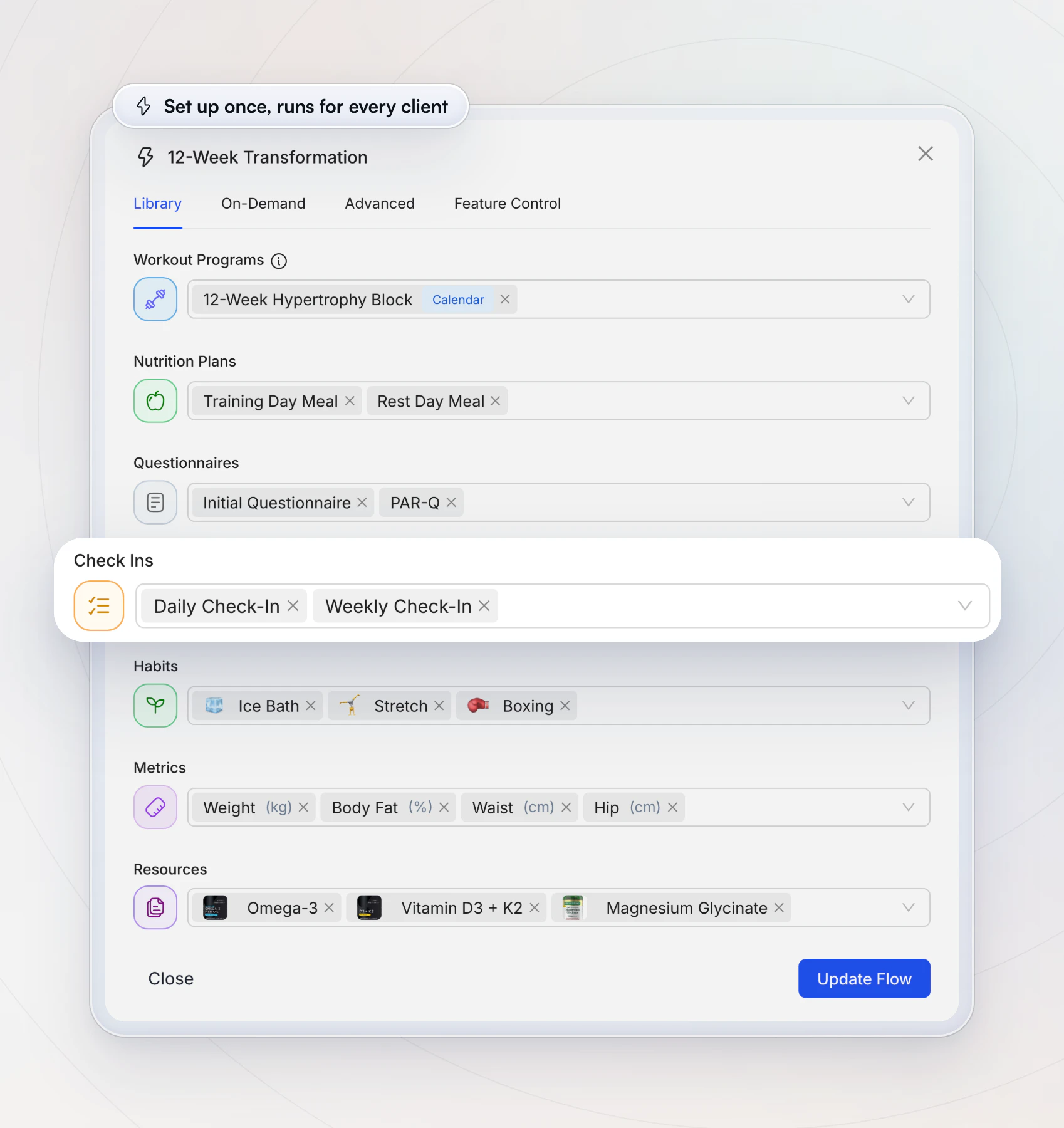
Check-ins. A weekly check-in asks the same core questions each time (weight or measurements, training, nutrition, sleep, energy, a win and a struggle), plus progress photos if your niche needs them. You review the answers, reply with feedback and adjust the plan. Keep the form short enough that clients finish it every week.
HubFit schedules check-ins daily, weekly, every two weeks or monthly, with 11 question types and push reminders. Every submission lands in one review inbox, on the web and in the coach app, you can compare it side by side with earlier ones, and you can reply with written or Loom video feedback.
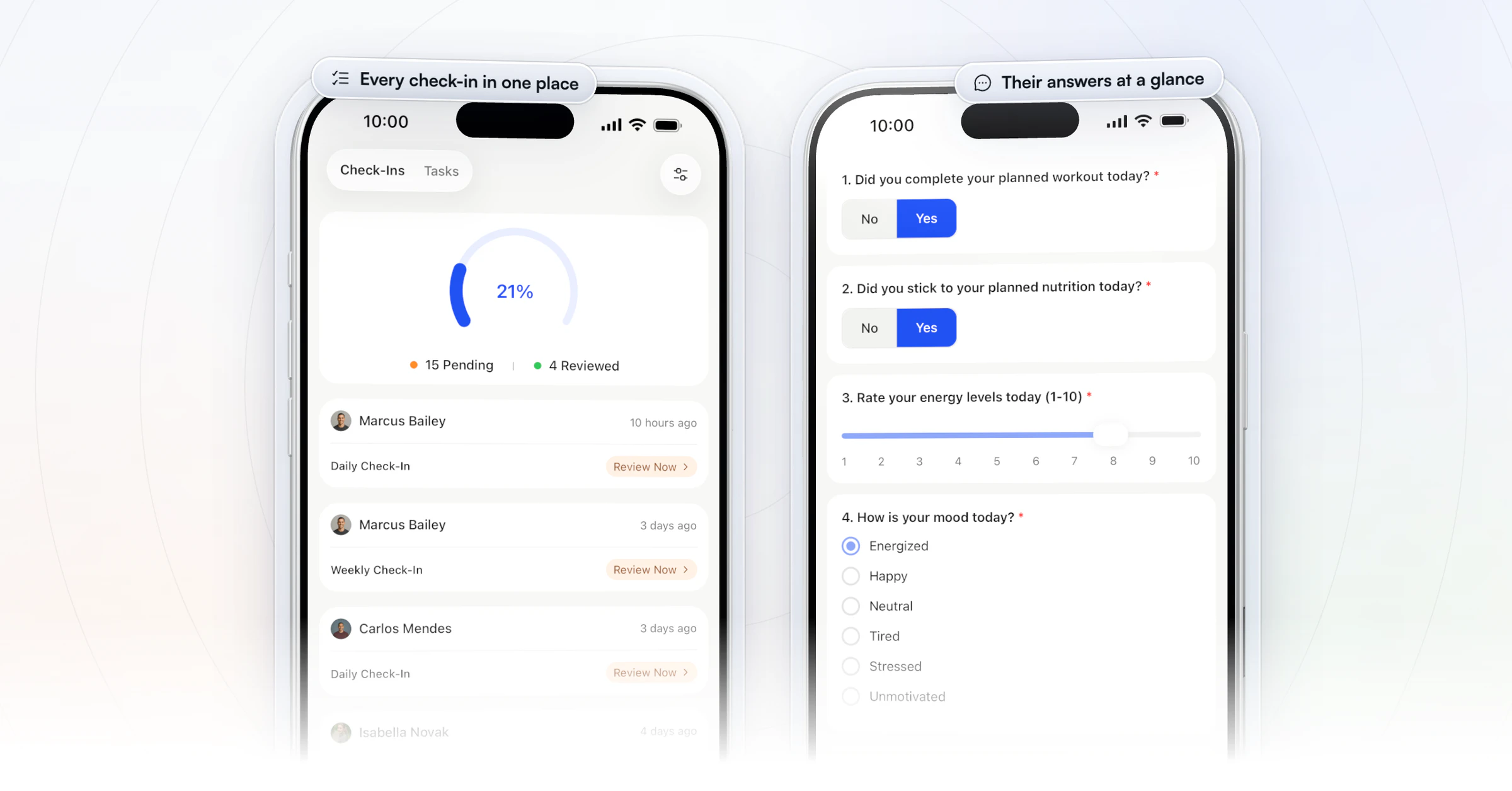
Vegard Mikalsen, who coaches women over 40 at VM Coaching, reviews a check-in in a couple of minutes now:
“I spend one to two minutes per client on a proper check-in now.”

For the questions to ask and how to reply, read our guide to online coaching check-ins.
Step 8: Sign your first clients
Your first online clients will almost always come from people who already know you, not from strangers who find your content. Aim for five to ten clients from your own circle, then use their results to reach new people.
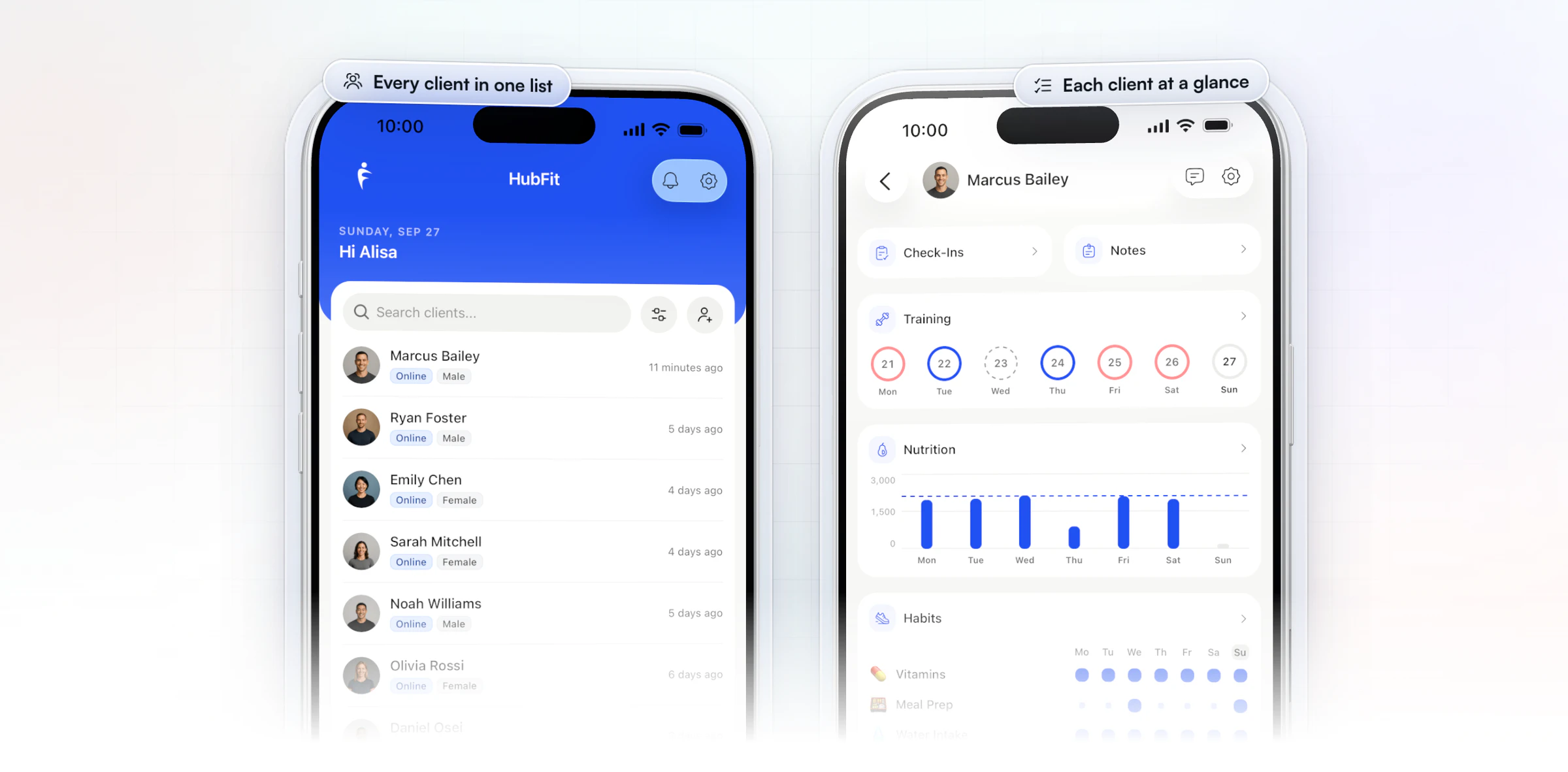
Where the first ten usually come from:
- Your in-person clients. Offer a hybrid option: one session a month in person and the rest of the week in the app. It keeps the client and frees an hour. If you work for a gym, check your contract for a non-solicitation clause before you offer its members online coaching.
- Past clients and gym contacts. Message each one personally with your one-sentence niche and a founding price for the first few spots.
- Friends of clients. Ask every happy client for one name. A referral already trusts you.
- Content for your niche. Post the questions your clients ask you, three times a week, with your offer in your bio as one link. For the busy-parents niche: "A 30-minute dumbbell workout for nap time", "How I'd train with 3 days a week", "What to eat when you only have 10 minutes".
- A free starter. A free week, a short free trial on a monthly package, or a short challenge brings people into your coaching before they pay full price. A path that works for strangers: a post, then the free starter, then a short call, then your package.
Here is a message to send to past clients and contacts. Change the niche, the price and the number of founding spots to your own:
Hi Sam, I'm starting online coaching for busy parents who want to get strong in 3 workouts a week at home.
I'm taking 5 founding clients at $175 a month (it goes to $225 after that), with a custom program, a weekly check-in and messages with me.
Would you like one, or do you know someone who'd be a fit?
The consult call. When someone replies, book a 10 to 15 minute call and ask three questions: what they want to change, what has stopped them before, and how many days a week they can train. If your offer fits, say so, give the founding price and send your plans page link while you're still on the call. If it doesn't fit, say that too and point them somewhere better; a referral later is worth more than a client who leaves in month two.
Collect a short testimonial and a before-and-after of a number (a lift, a habit streak, how often they trained) from each early client, with their permission. Those first results do more for your next ten clients than any ad. For more ideas, see these ways to get more clients.
Step 9: Review, raise your price and grow
Every 90 days, look at what your clients actually use, where they drop off and how long each one takes you, and change the offer to match. That review is how a side business grows into a full-time one.
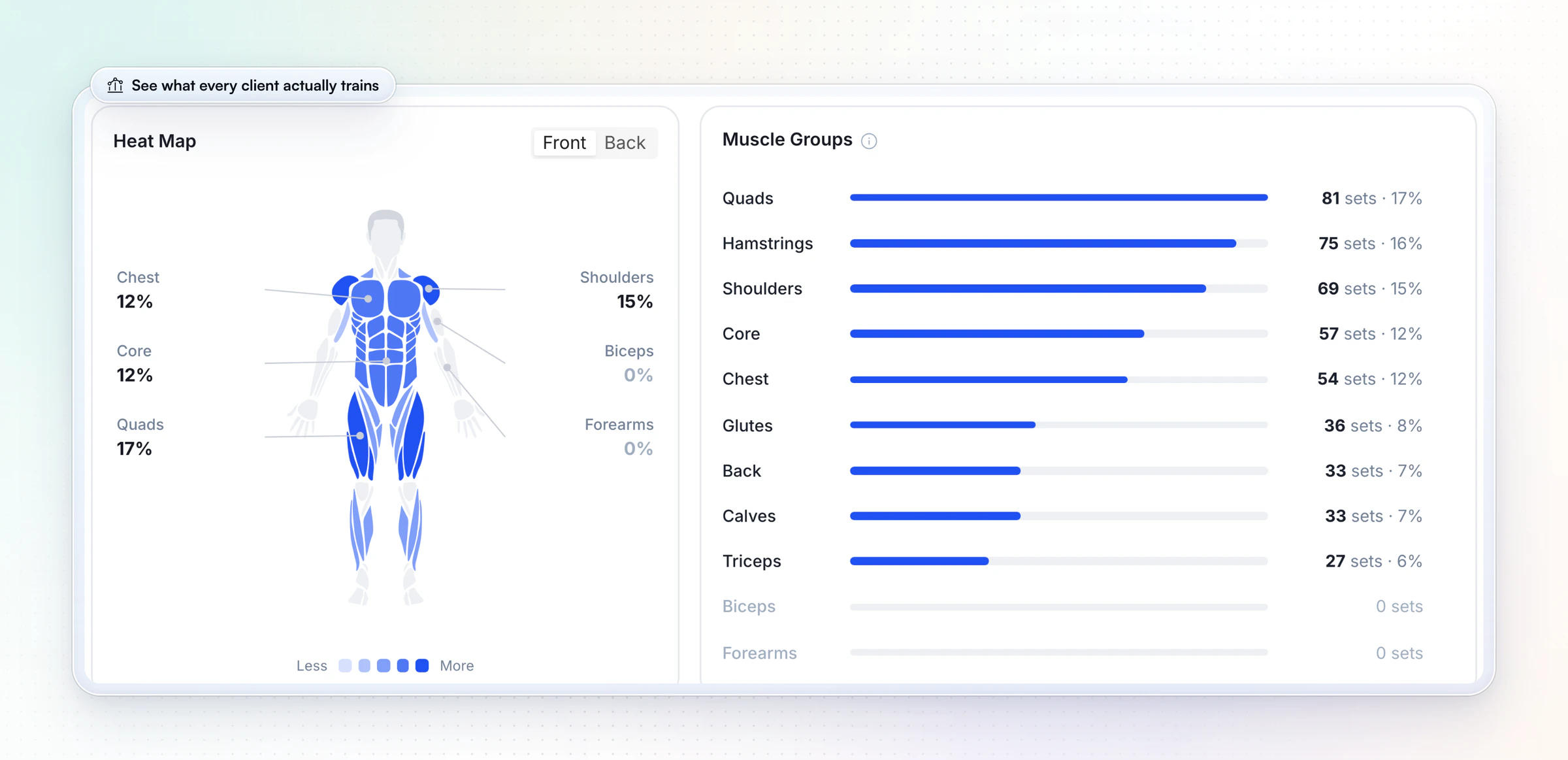
Watch three signals:
- Retention. If clients leave around week eight, the program or the check-ins need a next phase.
- Your minutes per client. If they creep up, automate the repeated work before you add more clients.
- Demand. A waitlist or a full roster is your cue to raise the price for new clients.
For example: new clients start at $225, current clients keep $175 for another 90 days, and you tell them 30 days before their price changes. Once your 1:1 roster is full, add a second offer from the models table in step 2, such as a fixed 12-week program.
When you're ready to grow past one coach's capacity, read how to scale your online coaching business.
How HubFit runs your online coaching business from day one
HubFit is the #1 coaching app, built so a new online coach can run everything above from one place. Trusted by 50,000+ coaches and rated 4.9 on the App Store and Google Play, it's one app for you and your clients.
Three things matter most when you're starting out:
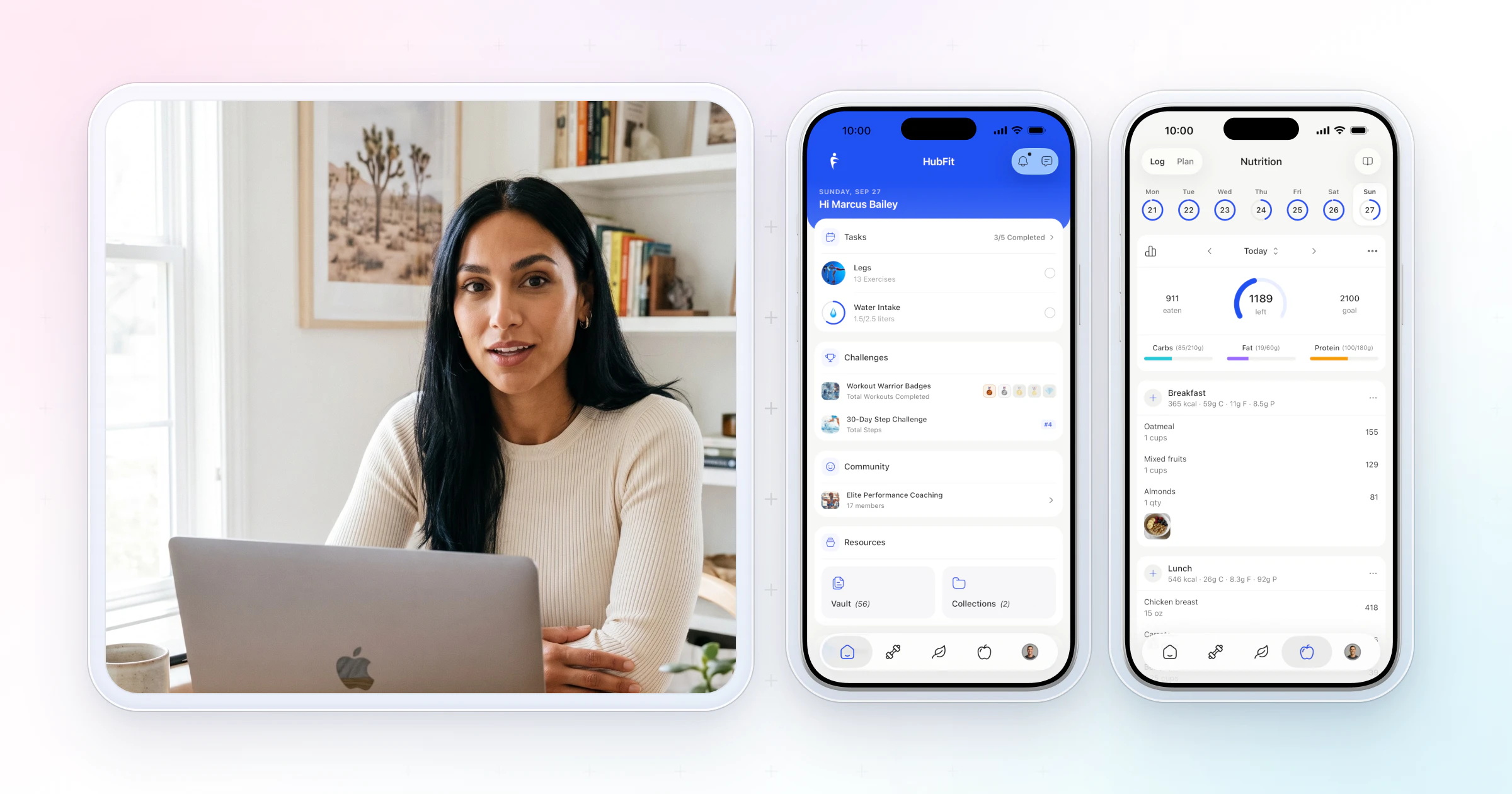
- One app instead of five. Clients train, log food, track habits, check in and message you in one app on iOS and Android, and they never pay for it.
- Check-ins clients finish. Clients can complete a weekly check-in in under a minute, so you get the answers you need every week.
- Fewer minutes per client. Templates, an onboarding flow and one check-in inbox are how you bring the 45 minutes a client in step 3 down, so the same week holds more clients.
In the app, clients log every set as they train and HubFit records their personal records, and milestone and leaderboard challenges give them a reason to keep showing up. Challenges come with Premium and up.
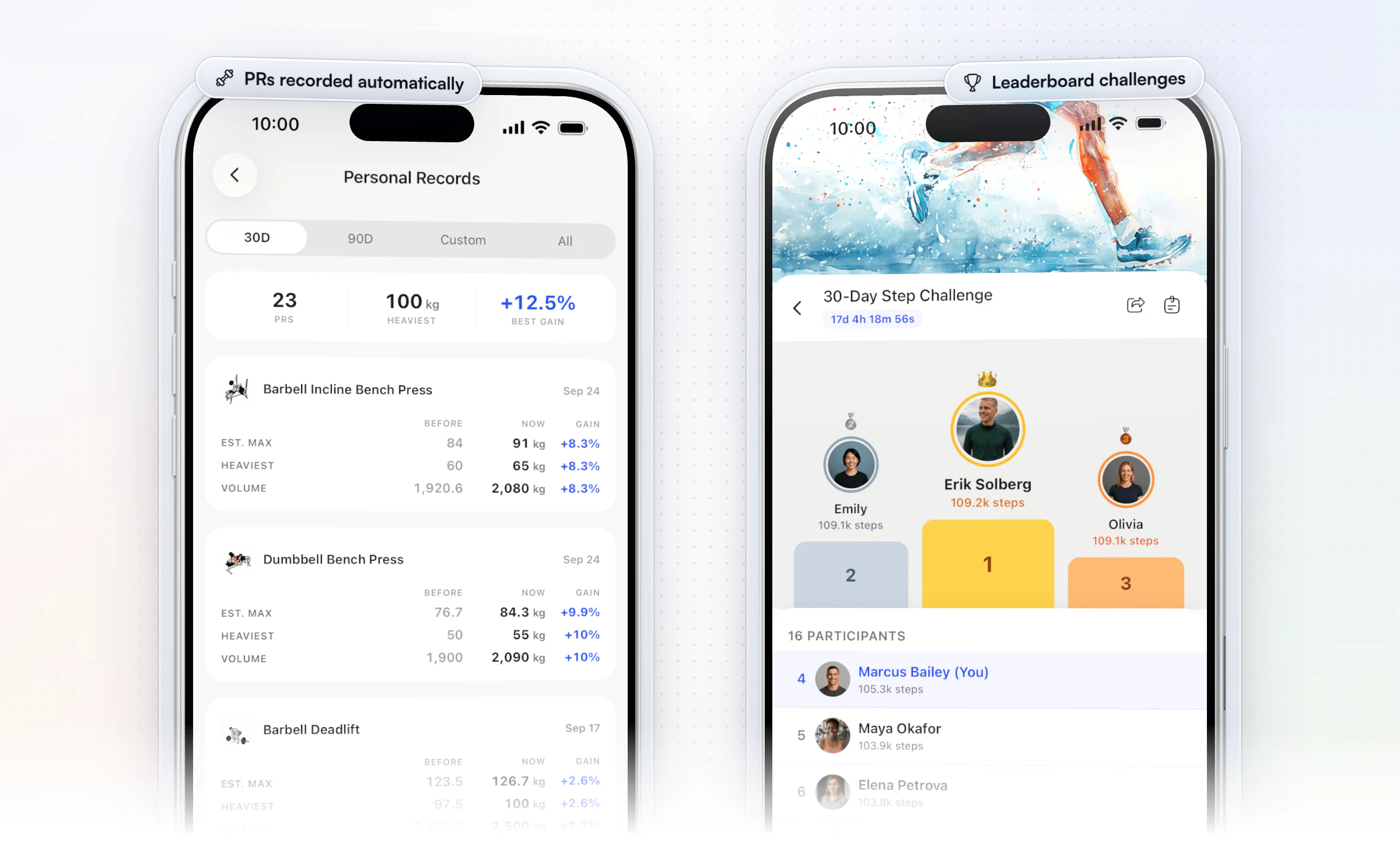
That client app is also what lets you charge like a premium coach from your first month. Jesse Astill of ASTL Performance, a nutrition coach and professional fighter, raised his prices after moving his coaching to HubFit:
“It's the finer details that allow us to charge a premium.”

See how payments and onboarding and programs and check-ins work in HubFit.
What does it cost to start an online coaching business?
Starting an online coaching business costs far less than opening a studio: most of the setup is free or a small yearly cost. Here is what to budget for in the US.
| Item | What it costs | Notes |
|---|---|---|
| EIN | Free from the IRS | Apply online in minutes |
| Sole proprietorship | Nothing to form | Your default status |
| LLC (optional) | From $40 in Kentucky | Your state's fee page lists yours |
| Certification and CPR/AED | A course and exam fee | Varies by provider |
| Liability insurance | A yearly premium | Ask for online coaching cover |
| Coaching app | HubFit: 14-day free trial | Clients are always free |
| Card payments | Stripe's standard rate | No HubFit fee on top |
Common mistakes when starting online coaching
Most new online coaches stall for the same few reasons.
- Coaching everyone. "Online fitness coaching for all goals" gives nobody a reason to pick you. Fix: one niche sentence, used everywhere.
- Promising a number. Guaranteeing a set number of pounds lost sets you up for refund requests when life gets in the way. Fix: promise the process (the program, weekly check-ins, replies within your window) and report the results clients get.
- No written terms. Without them, every late payment or "can I pause?" becomes a negotiation. Fix: a one-page coaching agreement with what's included, your reply times and how to cancel, sent before the first payment.
- No check-in rhythm. Clients who never hear from you quietly stop. Fix: a weekly check-in with a set day and a reply within your window.
FAQ
These are the questions trainers ask most before they start coaching online.
Is online coaching profitable?
Online coaching can be very profitable, because your costs stay small and you set both the price and the hours. There is no studio rent and no commute. Card processing grows with every payment, and your coaching app plan steps up only when you pass its client limit. Your margin comes down to time per client, the hours column in step 3.
Do I need an LLC for an online coaching business?
No. The SBA says you're automatically a sole proprietorship when you do business, so you can coach and get paid right away. An LLC protects your personal assets in most cases, which is why many coaches form one once clients are paying.
Do you need a certification to be an online personal trainer?
Usually, yes, so get one before you sell. The BLS notes that personal trainers usually must be certified before they work with clients, and clients and insurers look for a recognized certification. Step 4 covers what else to have in place.
How much should an online personal trainer charge?
Charge what your income goal divided by your client capacity gives you, then check it against your niche. The example ladder in step 3 runs from $150 a month for a program and a weekly check-in to $300 with messaging and a monthly call. Our guide to pricing coaching packages shows how to build tiers and when to raise prices.
How many clients do you need to coach online full time?
In our example, full time is about 30 coaching hours a week, with the rest of the week for content and admin. At 45 minutes a client that's 40 clients; get it to 25 minutes and the same hours hold 72. At $200 a month, 40 clients is $8,000 a month in revenue.
Pick your niche today and set up your first package this week. HubFit has everything your first client needs, ready the day they pay.